



WP Simple Pay Integration
Integrating WP Simple Pay (Stripe) with AffiliatePress takes no longer than 5 minutes. After enabling it, AffiliatePress automatically tracks affiliate commissions for successful Stripe payments.
Whether you’re accepting one time payments, recurring subscriptions, donations, service fees, or custom payment requests, this integration allows AffiliatePress to assign completed payments with the referring affiliate and calculate commissions based on your existing commission rules.

Here we’ll show you how to integrate WP Simple Pay with AffiliatePress.
Before You Begin
Before configuring the integration, make sure you have the following installed and activated:
- WordPress with administrator access
- WP Simple Pay (Free or Pro)
- Stripe connected to WP Simple Pay
- AffiliatePress
Set Up WP Simple Pay Integration
Follow these steps to connect WP Simple Pay with AffiliatePress:
- Head over to AffiliatePress → Settings → Integrations.
- Scroll down until you find the WP Simple Pay integration.
- Turn on the integration.
- Save your changes.
After saving the settings, AffiliatePress is ready to work with your WP Simple Pay forms.
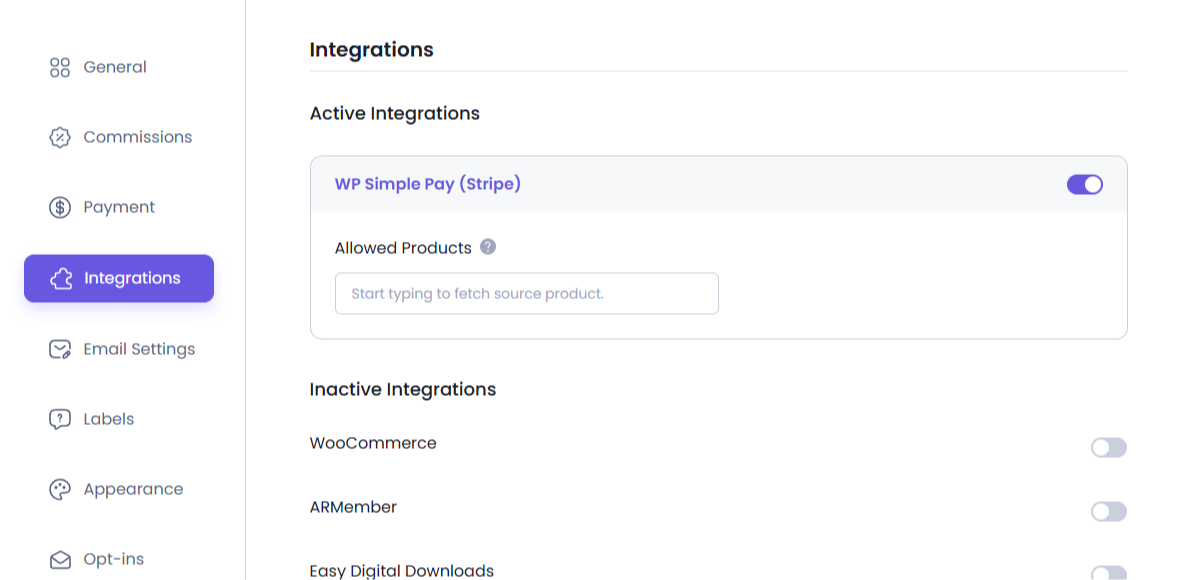
Configure Commission Tracking for a Payment Form
The integration must be configured individually for every payment form that should generate affiliate commissions.
To configure a payment form:
- Head over to WP Simple Pay → Payment Forms.
- Open the payment form you want to use for affiliate commission tracking.
- Click Settings.
- Open the AffiliatePress tab.
- Turn on the Enable Commission option.
- Save your changes.
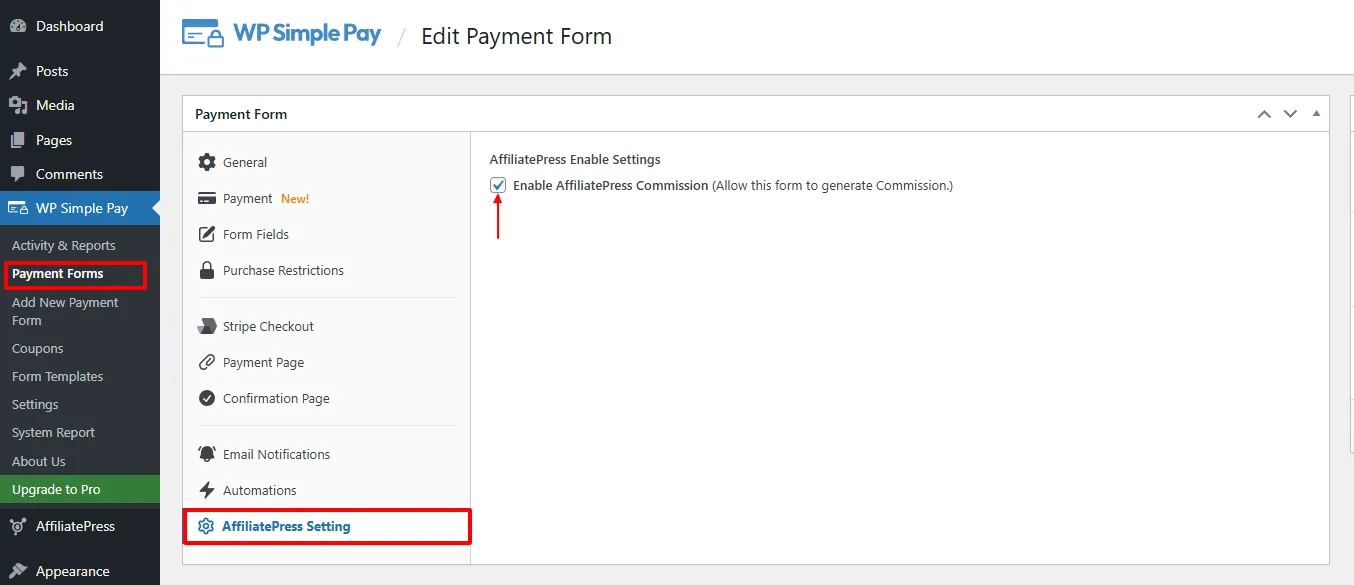
After the form is configured, AffiliatePress will begin tracking successful payments submitted through that form.
Payment Processing
AffiliatePress generates commissions only after a payment has been successfully processed through Stripe.
Before making your payment form live, make sure:
- Stripe is connected to WP Simple Pay.
- The payment form is configured correctly.
- Customers can complete the payment successfully.
If a payment is not completed successfully, no affiliate commission will be created.
Note: AffiliatePress works with both the Free and Pro versions of WP Simple Pay.
Product-wise Commission Add-on Support
AffiliatePress allows you to set different commission rates for individual WP Simple Pay payment forms.
To use this feature, you must install and activate the AffiliatePress Product-wise Commission Rate Addon. Once activated, you can assign custom commission rates to specific payment forms while keeping your default commission settings for other forms.
For example:
| Payment Form | Commission |
| Membership Payment | 20% |
| Service Payment | 15% |
| Donation Form | Default Rate |
Form specific commission rates always take priority over:
- Default commission
- Group commission
- Affiliate specific commission
Payment forms without a custom commission rate continue using your default AffiliatePress commission settings.
For detailed setup instructions and more information, click here.
Product Selection Add-on
AffiliatePress allows you to control which WP Simple Pay payment forms are eligible for affiliate commissions.
To use this feature, you must install and activate the AffiliatePress Product Selection Addon. Once activated, you can select specific payment forms that should generate affiliate commissions. Payment forms that are not selected will not generate commissions.
After installing the add-on:
- Go to the WP Simple Pay integration settings.
- Choose the payment forms under Allowed Products.
- Save your settings.
Only the selected payment forms will generate affiliate commissions. All other payment forms will be ignored.
For detailed setup instructions and more information, click here.
How WP Simple Pay Commission Tracking Works
After the integration has been configured:
- A visitor clicks an affiliate link.
- The visitor opens a WP Simple Pay payment form.
- The payment is successfully completed through Stripe.
- AffiliatePress verifies the transaction.
- A commission is generated according to your configured commission settings.
- The commission becomes available in the AffiliatePress dashboard for review and payout.