



Masteriyo LMS Integration
AffiliatePress integrates with Masteriyo LMS to automatically track affiliate commissions whenever a customer purchases your online courses.
Whether you sell individual courses, learning paths, certifications, or complete training programs, AffiliatePress attributes eligible purchases to the affiliate who referred the customer.
Here we’ll show you how to integrate Masteriyo LMS with AffiliatePress in just a few simple steps.
Before You Begin
Before setting up the integration, make sure you have the following installed and activated:
- WordPress with administrator access
- Masteriyo LMS
- AffiliatePress
Set Up Masteriyo LMS Integration
To connect Masteriyo LMS with AffiliatePress:
- Head over to AffiliatePress → Settings → Integrations.
- Scroll down until you find the Masteriyo LMS integration.
- Toggle on the integration and save your changes.
After turning on the integration, the following commission setting becomes available.
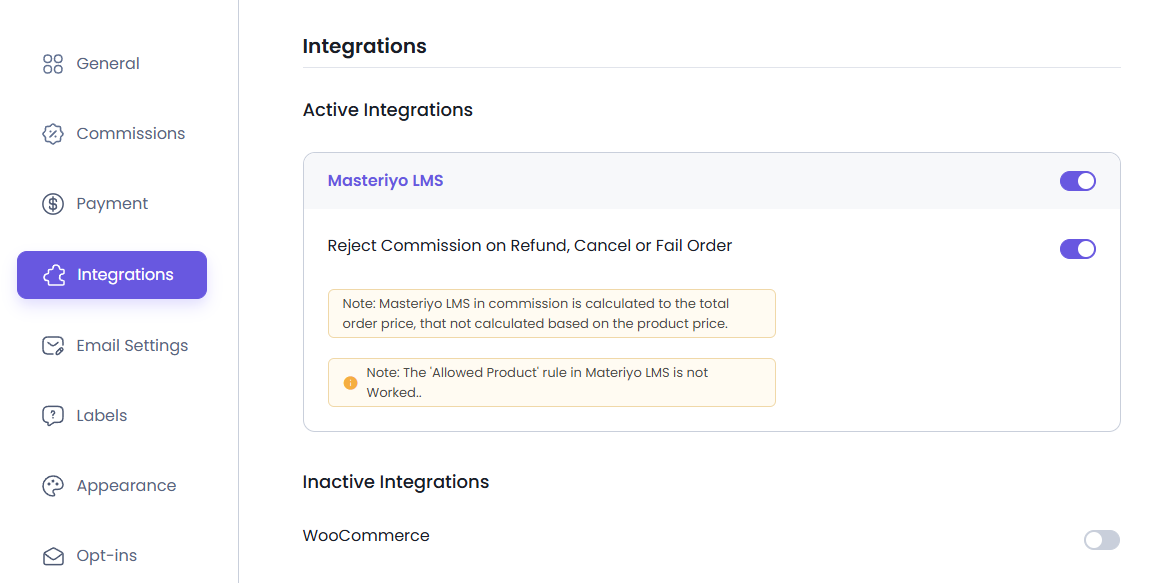
Reject Commission on Refunded, Cancelled, or Failed Orders
If a customer requests a refund, cancels an order, or the payment fails before the commission is paid, AffiliatePress automatically rejects the unpaid commission associated with that purchase.
This ensures affiliates receive commissions only for completed course purchases.
Note: This option only affects commissions that have not yet been paid.
Important Notes: Masteriyo LMS calculates affiliate commissions using the total order amount, not individual course prices.
At the moment, Masteriyo LMS does not provide AffiliatePress settings for individual courses. Once the integration is turned on, AffiliatePress automatically tracks eligible course purchases and generates commissions based on your configured commission rules.
Make sure your Masteriyo LMS checkout and payment gateway are properly configured so AffiliatePress can track completed purchases accurately.
How Masteriyo LMS Commission Tracking Works
After turning on the Masteriyo LMS integration:
- A visitor clicks an affiliate link.
- The visitor purchases one or more Masteriyo LMS courses.
- Masteriyo LMS processes the order.
- AffiliatePress attributes the purchase to the referring affiliate.
- A commission is created based on your commission settings.
- If the order is refunded, cancelled, or fails, the commission may be automatically rejected depending on your settings.