



WPForms Integration
AffiliatePress integrates with WPForms to track affiliate commissions for payment forms submitted through your website.
This integration works with WPForms payment forms, making it a good choice if you’re selling products, collecting payments, accepting donations, or offering paid registrations through WPForms.
Once everything is set up, AffiliatePress automatically attributes eligible purchases to the referring affiliate and records the commission.

Here we’ll show you how to integrate WPForms with AffiliatePress.
Before You Begin
Before setting up the integration, make sure you have the following installed and activated:
- WordPress with administrator access
- WPForms Pro
- AffiliatePress
Set Up WPForms Integration
To turn on the WPForms integration:
- Head over to AffiliatePress → Settings → Integrations.
- Scroll down until you find the WPForms integration.
- Toggle on the integration and save your changes.
Turn On Commission Tracking for a Form
After turning on the integration, you can choose which payment forms should generate affiliate commissions.
To do this:
1. Head over to WPForms → All Forms.
2. Open the form you want to configure.
3. Inside the form builder, click Settings → AffiliatePress.
4. Turn on the Enable Commission option.
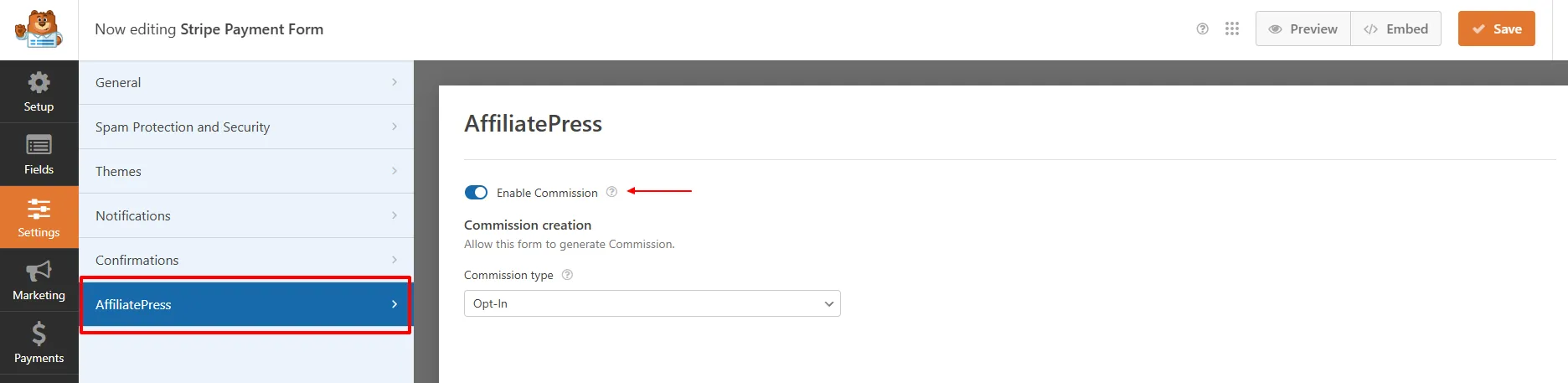
5. Select a Commission Type:
- Sale: Go with it when the form submission represents a completed sale or payment.
- Opt-In: Use this type when the form is used to collect an opt-in or subscriber registration.
- Lead: When the form submission represents a lead or potential customer, select this option.
6. Save your changes.
From this point on, AffiliatePress tracks eligible commissions whenever a customer successfully submits the configured payment form.
Note: AffiliatePress settings are available only with WPForms Pro.
Note: Commission tracking works only for payment forms. Make sure your form includes a supported payment field and that a payment gateway is configured correctly. Commissions are recorded after a successful payment.
Product-wise Commission Add-on Support
AffiliatePress allows you to set different commission rates for individual WPForms payment forms.
To use this feature, you must install and activate the AffiliatePress Product-wise Commission Rate Add-on. Once activated, you can assign custom commission rates to specific forms while keeping your default commission settings for all other forms.
For example:
| Form | Commission |
| Product Order Form | 20% |
| Event Registration Form | 15% |
| Donation Form | Default Rate |
Form-specific commission rates always override:
- Default commission
- Group commission
- Affiliate-specific commission
Forms without a custom commission rate use the default commission settings. For detailed setup instructions and more information, click here.
Product Selection Add-on
AffiliatePress allows you to control which online forms are eligible for affiliate commissions.
To use this feature, you must install and activate the AffiliatePress Product Selection Addon. Once activated, you can select specific payment forms that should generate affiliate commissions. Forms that are not selected will not generate commissions.
After installing the add-on:
- Go to the WPForms integration settings.
- Choose the forms under Allowed Products.
- Save your settings.
Only the selected payment forms will generate affiliate commissions. All other forms will be ignored.
Note: Products selected through this add-on override the Disable Commissions product setting and will still generate commissions.
For detailed setup instructions and more information, click here.
How WPForms Commission Tracking Works
After turning on the WPForms integration:
- A visitor clicks an affiliate link.
- AffiliatePress tracks commission.
- The visitor submits a configured payment form.
- The payment is processed successfully.
- AffiliatePress validates the transaction.
- A commission is generated for the affiliate based on your commission settings.