



MemberPress Integration
AffiliatePress integrates with MemberPress to automatically track commissions whenever customers purchase a membership through your website.
No matter whether you offer one-time memberships, recurring subscriptions, or premium content, AffiliatePress records eligible commissions based on your configured commission rules

Here we’ll show how to integrate MemberPress with AffiliatePress.
Before You Begin
Before setting up the integration, make sure you have the following installed and activated:
- WordPress with administrator access
- MemberPress (Pro)
- AffiliatePress
Set Up MemberPress Integration
To turn on the MemberPress integration:
- Head over to AffiliatePress → Settings → Integrations.
- Scroll down until you find the MemberPress integration.
- Toggle on the integration and save your changes.
After turning on the integration, you can configure the following commission settings.
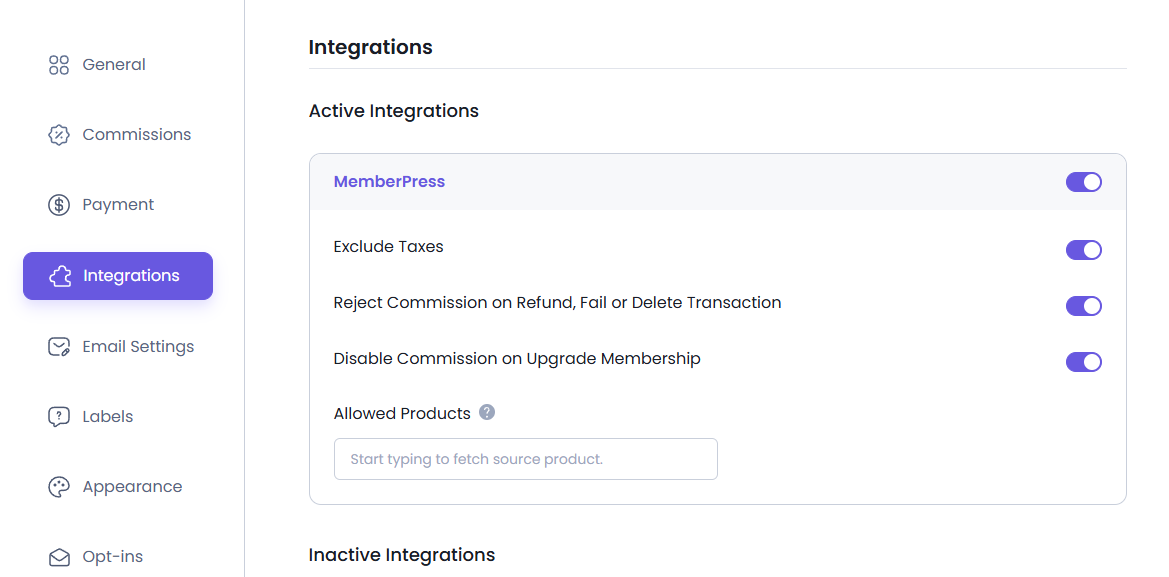
Exclude Taxes
Membership taxes are excluded from the order total when affiliate commissions are calculated.
For example, if a membership purchase contains:
- Membership Price: $100
- Tax: $12
The commission is calculated using $100 instead of $112.
Reject Commission on Refunded, Failed, or Deleted Transactions
When a MemberPress transaction is refunded, fails, or is deleted, AffiliatePress automatically rejects any unpaid commission associated with that transaction.
This ensures commissions are generated only for completed membership purchases.
Note: This option only affects commissions that have not yet been paid.
Disable Commission on Membership Upgrades
AffiliatePress does not generate commissions when a customer upgrades an existing membership.
This is useful if you don’t want affiliates to earn commissions on membership upgrades.
Disable Commissions for Individual Memberships
By default, AffiliatePress generates commissions for all MemberPress memberships.
If you don’t want a particular membership to generate affiliate commissions, you can disable commissions for that membership individually.
To do this:
- Head over to MemberPress → Memberships.
- Open the membership you want to configure.
- Scroll down to the AffiliatePress Commission Settings section.
- Turn on the Disable Commission For This Membership option.
- Save your changes.
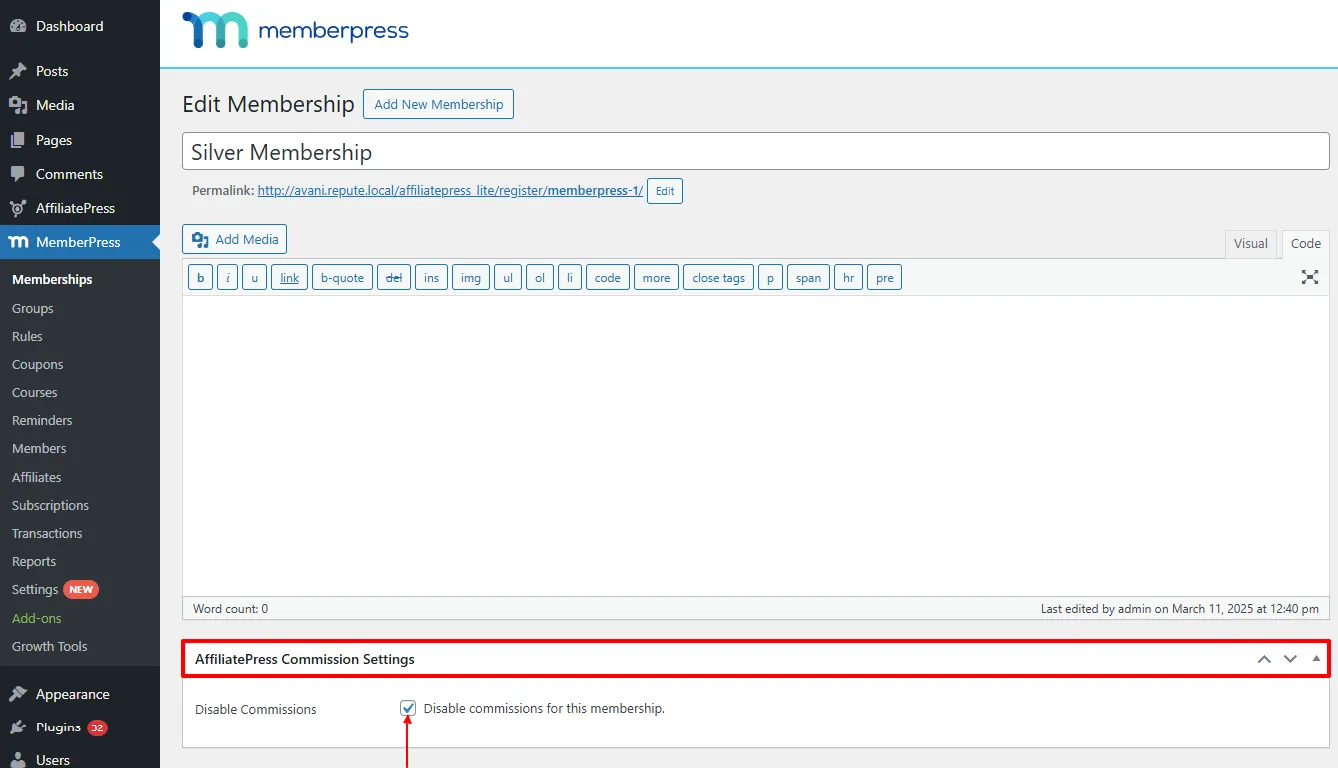
Note: This option does not work when Commission Basis is set to Commission Per Order.
Note: AffiliatePress settings are available only with MemberPress Pro.
Coupon Code Add-on Support
AffiliatePress allows you to track affiliate commissions when customers purchase MemberPress memberships using affiliate coupon codes.
To use this feature, you must install and activate the AffiliatePress Coupon Code Add-on. Once activated, you can assign MemberPress coupon codes to specific affiliates. When customers use an assigned affiliate coupon code during checkout:
- The coupon discount is applied to the membership purchase.
- The purchase is attributed to the assigned affiliate.
- AffiliatePress automatically generates the commission for that affiliate.
This makes it easier for affiliates to promote your memberships using discount codes while still receiving referral credit.
For detailed setup instructions and more information, click here.
Product-wise Commission Add-on Support
AffiliatePress allows you to set different commission rates for individual MemberPress memberships.
To use this feature, you must install and activate the AffiliatePress Product-wise Commission Rate Add-on. Once activated, you can assign custom commission rates to specific memberships while keeping your default commission settings for all other memberships.
For example:
| Membership | Commission |
| Basic Membership | 10% |
| Premium Membership | 20% |
| Enterprise Membership | Default Rate |
Membership-specific commission rates always override:
- Default commission
- Group commission
- Affiliate-specific commission
Memberships without a custom commission rate use the default commission settings. Plus, for detailed setup instructions and more information, click here.
Product Selection Add-on
AffiliatePress allows you to control which MemberPress memberships are eligible for affiliate commissions.
To use this feature, you must install and activate the AffiliatePress Product Selection Add-on. Once activated, you can select specific memberships that should generate affiliate commissions. Memberships that are not selected will not generate commissions.
After installing the add-on:
- Go to the MemberPress integration settings.
- Choose the memberships under Allowed Products.
- Save your settings.
Only the selected memberships will generate affiliate commissions. All other memberships will be ignored.
Note: Memberships selected through this add-on override the Disable Commission For This Membership setting and will still generate commissions.
For detailed setup instructions and more information, click here.
How MemberPress Commission Tracking Works
After turning on the MemberPress integration:
- A visitor clicks an affiliate link.
- AffiliatePress records the referral.
- The customer purchases a membership.
- AffiliatePress validates the transaction.
- A commission is generated for the affiliate.
- If the transaction is refunded, fails, or is deleted, the commission may be automatically rejected based on your settings.