



QR Code Addon
Want to make it easier for affiliates to promote your business? The AffiliatePress QR Code Addon gives every affiliate a unique QR code linked to their referral URL. This way your affiliates can download and share their QR codes across printed materials, events and digital campaigns to promote your business.
In this guide, you’ll see how to install and enable QR Codes addon in AffiliatePress.

Install and Activate the QR Code Addon
Before using the QR Code Addon, make sure AffiliatePress is installed and your license is activated.
Next, you must install and activate the QR Code Addon for AffiliatePress. Once activated, it automatically creates a unique QR code for every affiliate’s referral link which makes it easy to share referral links online and offline.
Enable Affiliate QR Codes
After activating the QR Code Addon, click Configure. Or to enable this feature,
1. Go to AffiliatePress → Settings → General
2. Scroll down till you see the Affiliate QR Codes section.
3. Simply toggle on the Enable Affiliate QR Code option.
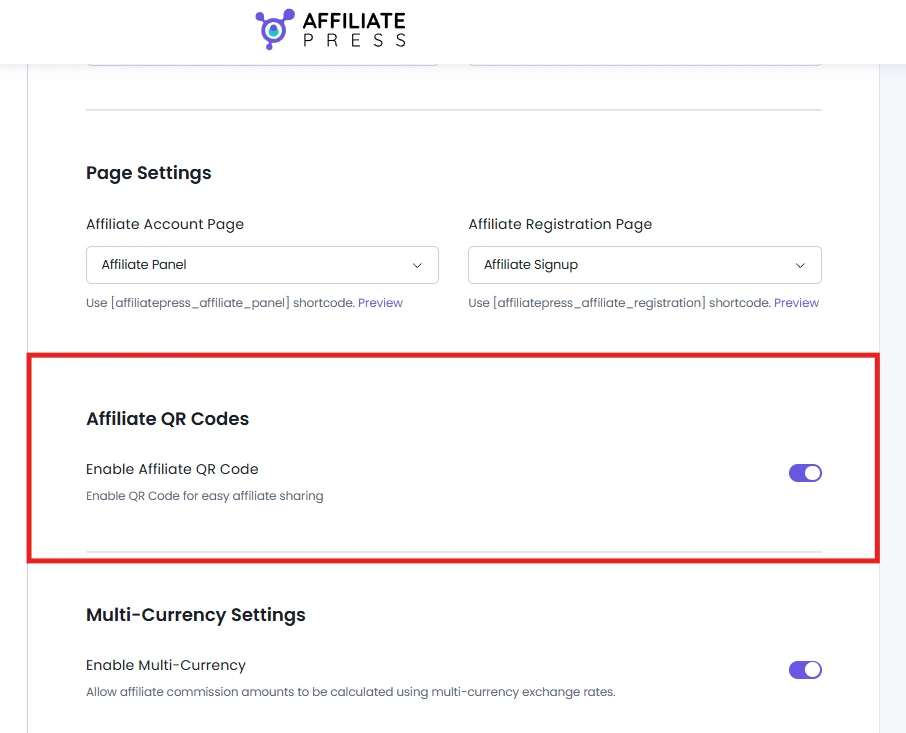
4. Lastly, scroll down to click Save for applying your changes.
After that, AffiliatePress automatically generates a unique QR code for each and every affiliate based on their referral URL. Thus affiliates can immediately access their QR codes from the Affiliate Panel without any extra configuration.
Note: If you disable the Affiliate QR Codes option, affiliates will no longer be able to view or download their QR codes from the Affiliate Panel.
How Affiliate QR Codes Work
AffiliatePress automatically creates a unique QR code for each and every affiliate using their referral URL. Each QR code is linked exclusively to that affiliate which allows referrals generated via the QR code to be tracked just like referrals from a standard affiliate link.
Thus whenever someone scans an affiliate’s QR code, they are redirected to the affiliate’s referral URL. If the visitor completes a qualifying sale or action, AffiliatePress attributes the referral to the corresponding affiliate based on your commission settings.
Using this Add-on, there is no need to manually generate or assign QR codes since every affiliate gets their own QR code automatically.
View QR Codes in the Affiliate Panel
Affiliates can access their QR codes by logging into the Affiliate Panel.
Simply go to the Affiliate Panel → Affiliate Links tab. From here, affiliates can easily view their unique referral URL, and just beneath it, its automatically generated QR code.
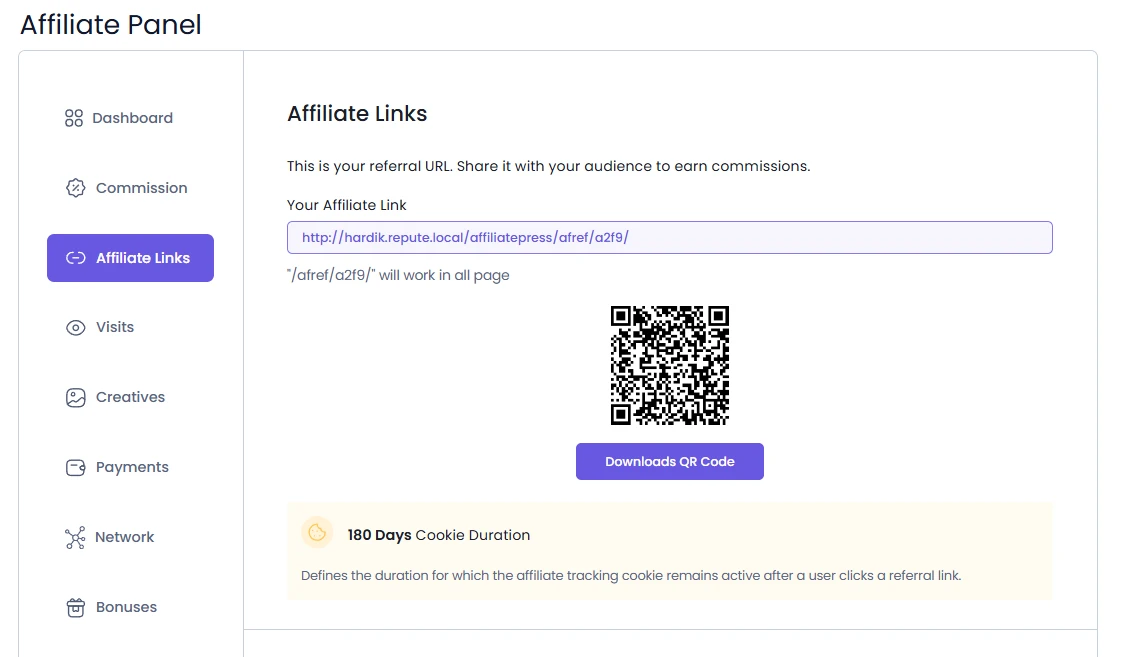
The QR code is always associated with the affiliate’s referral URL which makes it easy to promote products and services via both digital and printed marketing materials.
Download QR Codes
For downloading a QR code, affiliates simply click the Download QR Code button available right under the affiliate link and QR Code image.
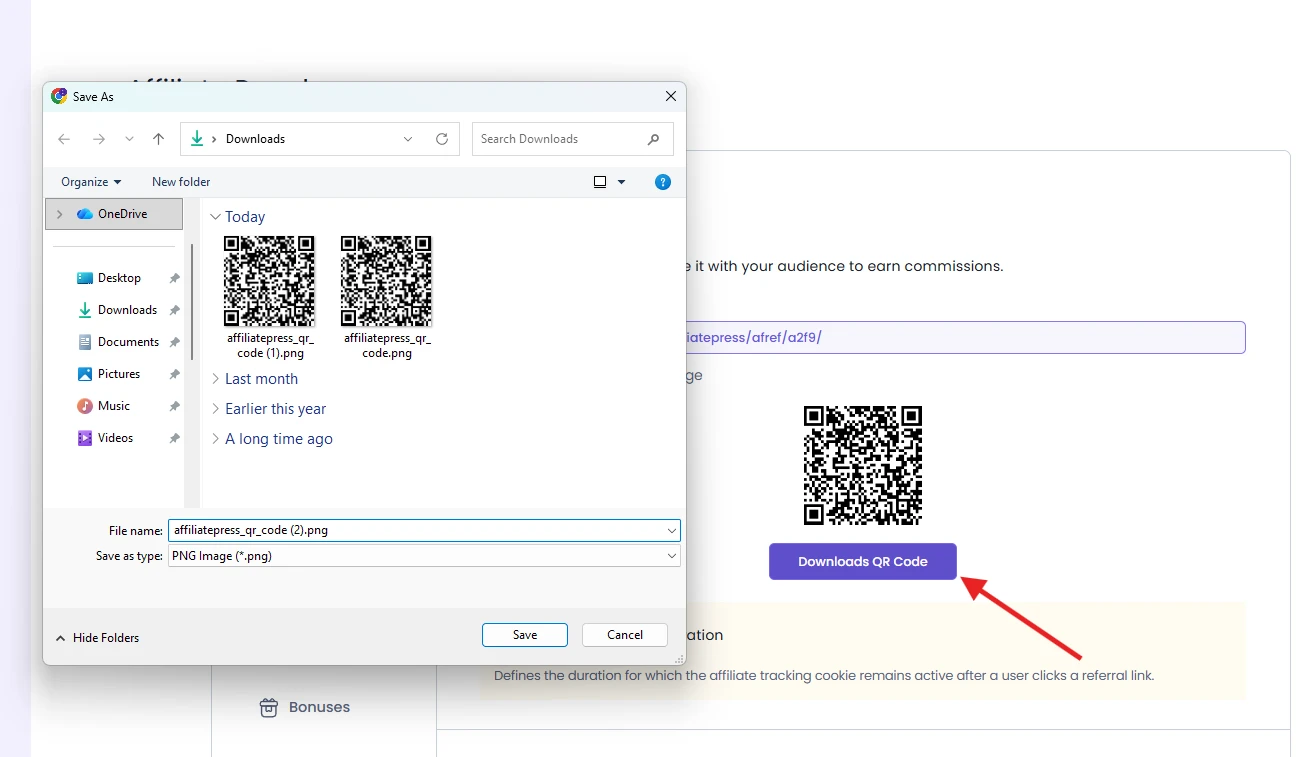
The QR code is downloaded as a PNG image, thus it can be used easily for digital sharing and high quality printing. Plus, affiliates can use the downloaded QR code without needing any extra plugins or third party QR code generators.
Just download the QR code .png image, and start sharing.
Where Can Affiliates Use QR Codes?
Affiliates can use their QR codes anywhere they promote your business. These includes:
- Business cards
- Flyers and brochures
- Posters and banners
- Event booths and trade shows
- Product packaging
- Printed newsletters
- Social media posts
- Email campaigns
- And a lot more.
Using QR codes in affiliate marketing makes it easy for potential customers to access affiliate referral links with a simple scan, while helping affiliates share more.