



Coupon Code Addon
Want your affiliates to earn commissions without sharing referral links? The AffiliatePress Coupon Code Addon lets you assign coupon codes to affiliates so every sale made using their coupon is automatically tracked and rewarded with the accurate commission.
In this guide, we’ll show you how to install the Coupon Code Addon, manage affiliate coupon codes, and configure coupon tracking across supported AffiliatePress integrations.
Install and Activate the Coupon Code Addon
Before using the Coupon Code Addon, make sure AffiliatePress is installed and your license is activated.
Next, you must install and activate the Coupon Code Addon so that AffiliatePress can automatically track affiliate referrals using coupon codes.
Supported Integrations
The Coupon Code Addon supports coupon-based affiliate tracking in real time for the following integrations:
- WooCommerce
- Easy Digital Downloads
- ARMember
- MemberPress
- LifterLMS
- Paid Memberships Pro
- Restrict Content Pro
- Paid Member Subscriptions
- WP EasyCart
- Accept Stripe Payments
- GetPaid
After you’ve assigned a coupon code to an affiliate in any supported integration, AffiliatePress automatically tracks sales made using that coupon and attributes the commission to the assigned affiliate.
Remember the exact steps for assigning an affiliate to a coupon vary slightly between integrations. You’ll find the setup instructions for each supported integration later in this guide.
Manage Coupon Codes
After activating Coupon Code Add-on, click on the Configure, which will redirect you straight to AffiliatePress → Coupons. You can also see a newly added menu item inside your WordPress admin sidebar under AffiliatePress.
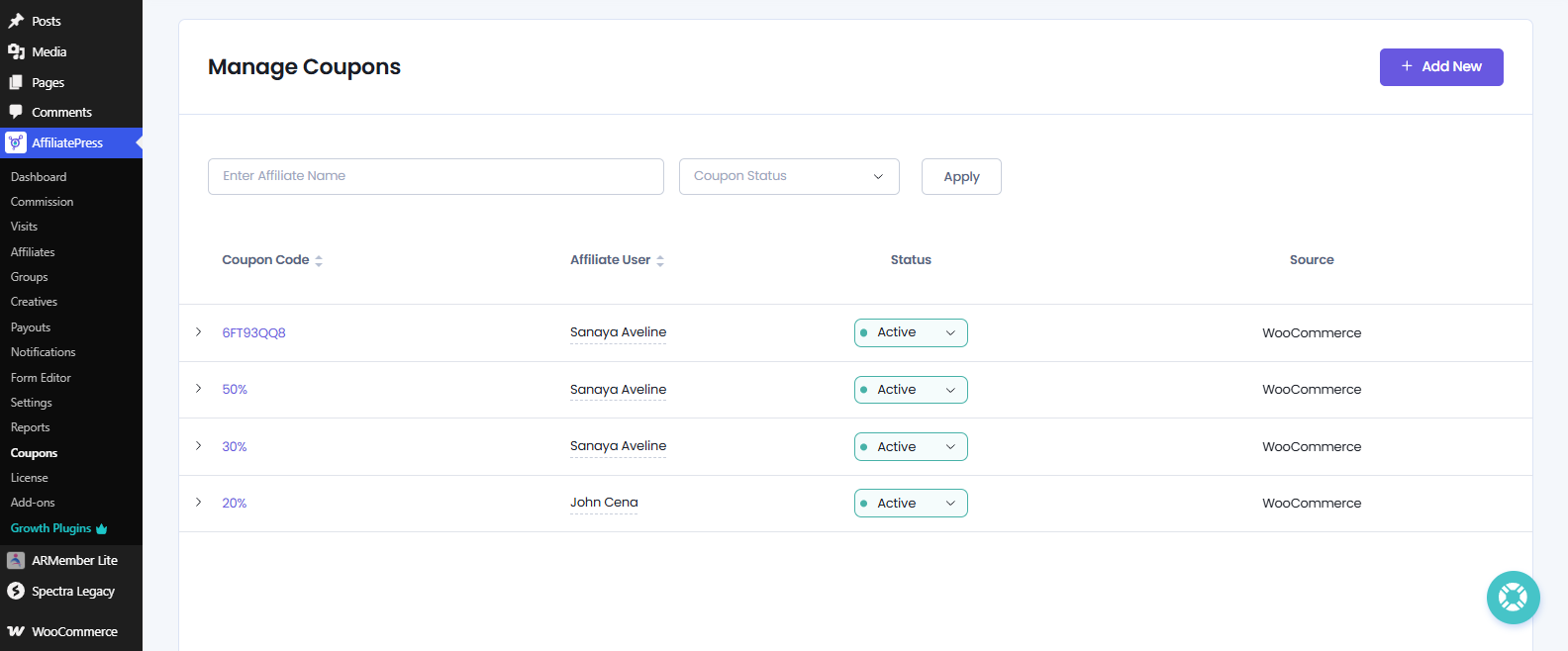
AffiliatePress Coupons page is where you can create, assign and manage all affiliate coupon codes from one place.
From here, you can:
- Create and assign coupon codes to affiliates.
- Search and filter existing coupon assignments.
- View coupon and affiliate details.
- Manage coupon status and supported integration sources.
- Edit and delete a coupon
Create and Assign Coupon Codes
To create a new coupon assignment, click Add New from the AffiliatePress → Coupons page.
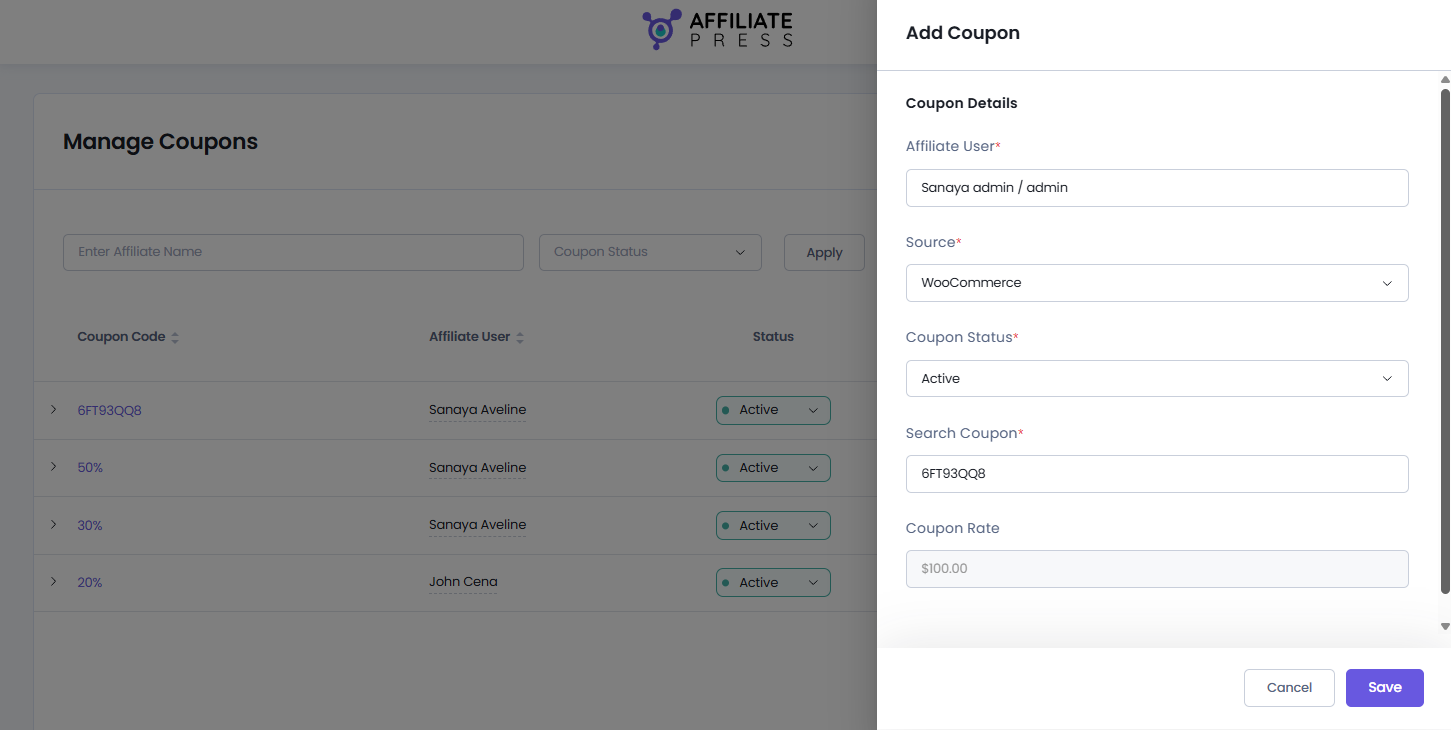
This will slide open a new Add Coupon panel, where you can add details such as:
- Affiliate User: Select the affiliate who should get commissions for this coupon.
- Source: Choose the integration where the coupon was created (such as WooCommerce or Easy Digital Downloads).
- Coupon Status: Set the coupon as Active or Inactive. If active, coupon code can be used. If inactive, the coupon code will not be eligible for commission.
- Search Coupon: Search and select an existing coupon from the selected integration (Will discuss in detail later)
- Coupon Rate: You don’t have to set this. AffiliatePress will automatically fetch the coupon amount from the coupon you’ve selected in the Search Coupon.
After selecting the required details, click Save.
From here on, whenever a customer uses the assigned coupon during checkout, AffiliatePress automatically attributes the referral and commission to the selected affiliate.
Note: The coupon must already exist in the selected integration before you can assign it to an affiliate from AffiliatePress.
Search and Filter Coupon Codes
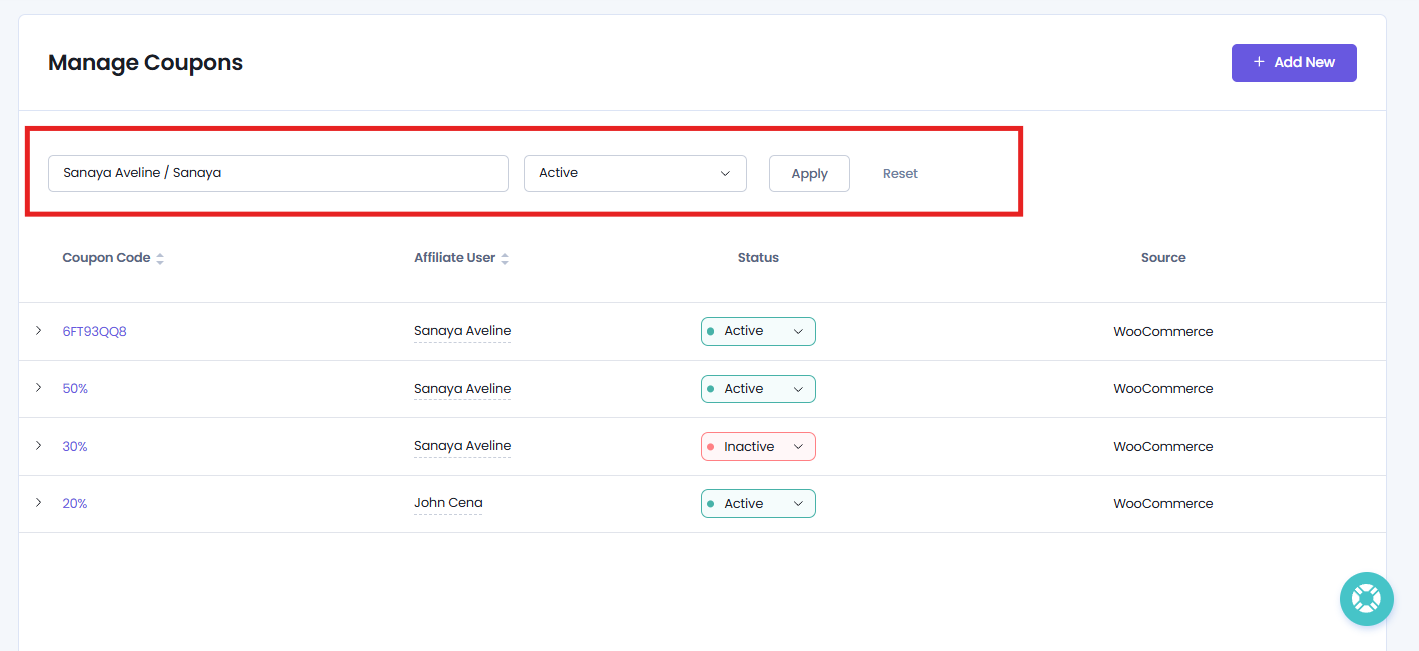
As your affiliate program grows, AffiliatePress makes it easy to find specific coupon assignments. From the Coupons page, you can search and filter coupons by:
- Affiliate name or username.
- Coupon status.
After selecting the affiliate name or status, simply click on Apply to filter. After searching, hit the Reset to see the whole coupons list again.
This way you can quickly find the coupon assignments you are looking for without manually browsing the complete list.
View Coupon Details
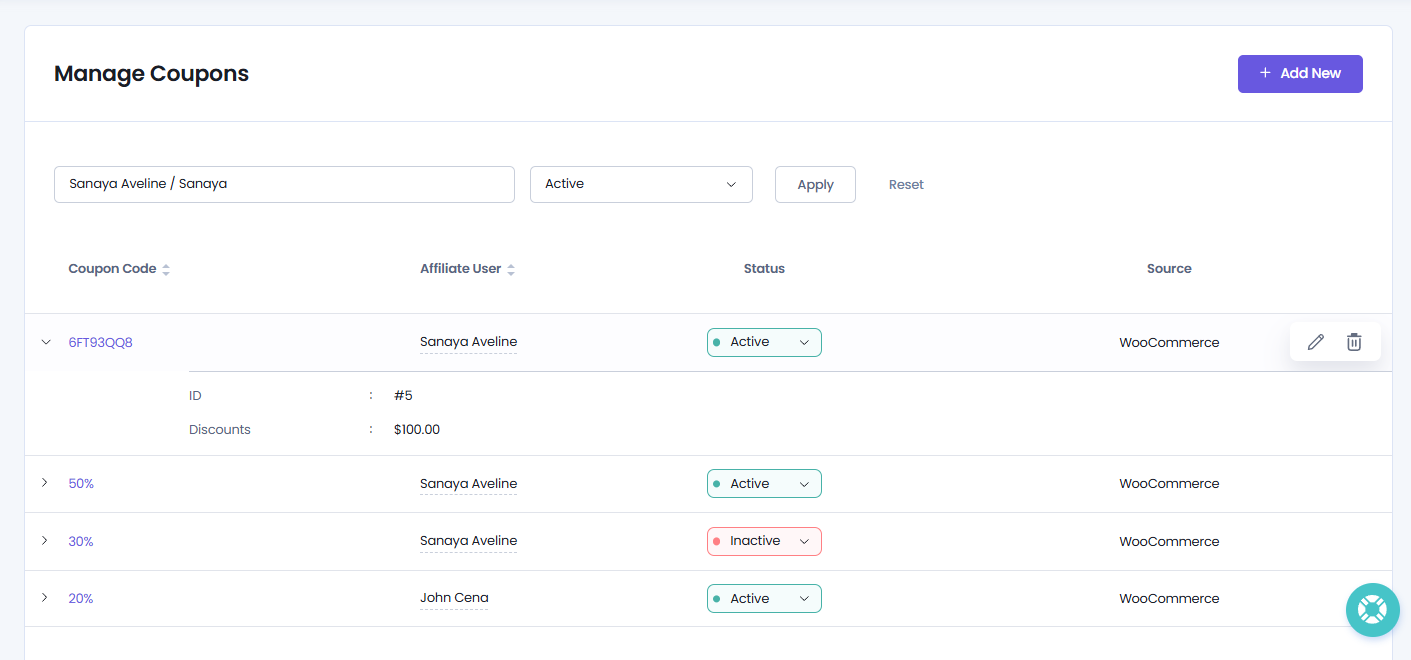
The Coupons page shows all assigned coupon codes in a single table. This includes important information such as:
- Coupon code
- Assigned affiliate user
- Coupon status
- Integration source
For more info about coupons, simply click on the Coupon record. This will show you coupon’s ID and discount amount.
Further, to view more information about an affiliate, simply click the affiliate’s name. AffiliatePress opens a quick details popup showing basic information such as the affiliate’s username, email address, full name and group.
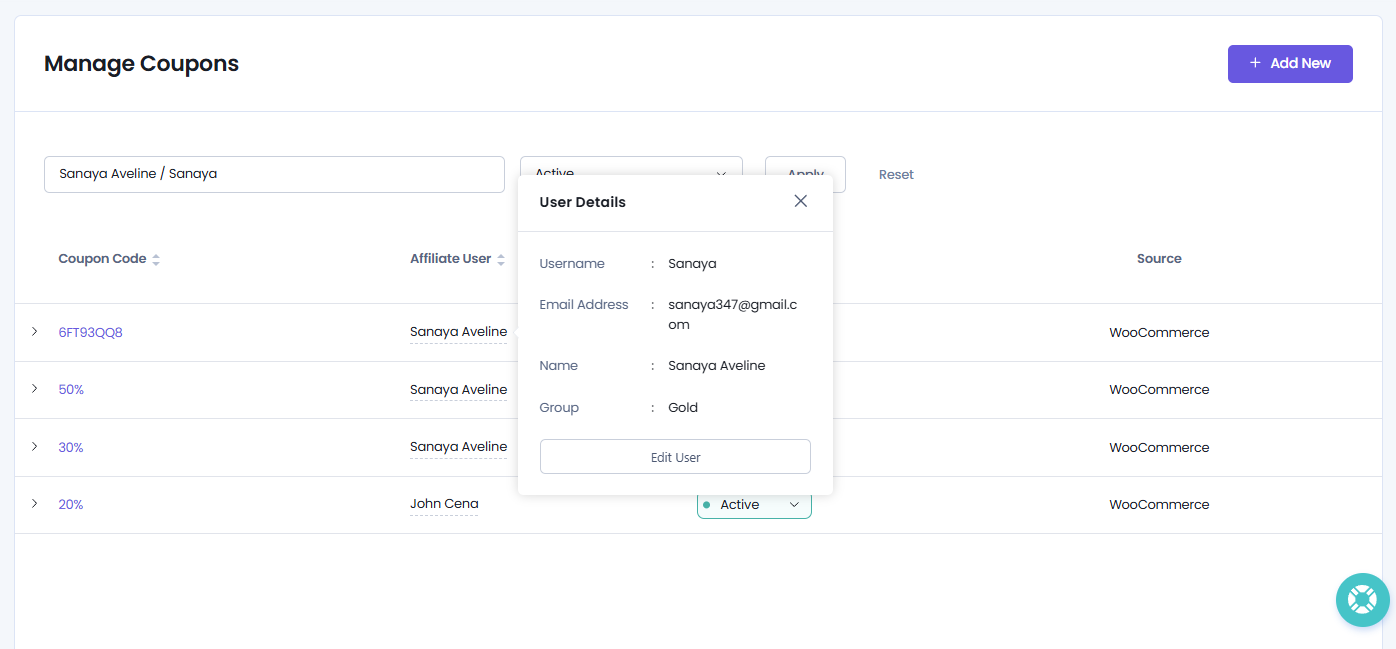
You can also open and edit the affiliate profile directly from this popup to make changes if needed.
Edit Coupon Assignments
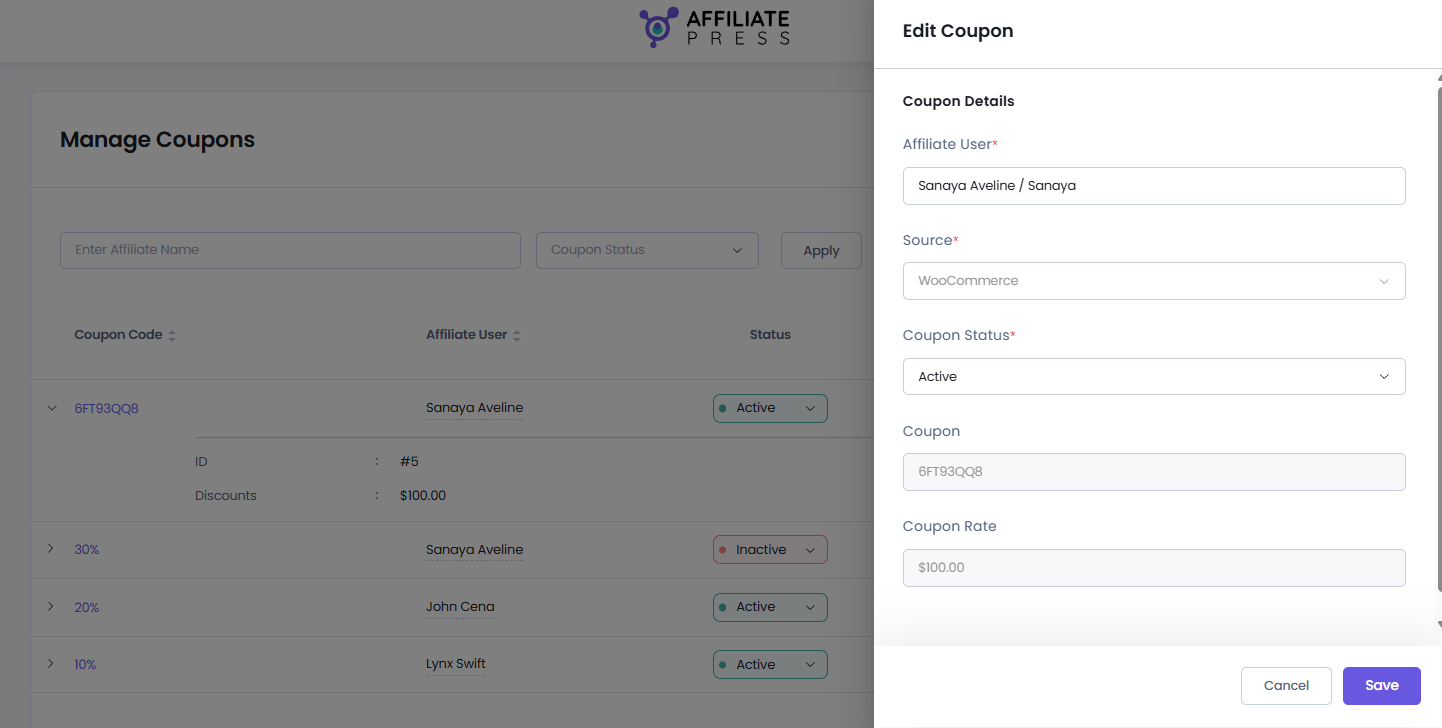
AffiliatePress allows you to quickly edit an existing coupon assignment whenever you need to change the assigned affiliate user or coupon status.
For editing a coupon assignment, simply hover over the coupon record you want to modify. This will show you action icons; click on the Edit icon.
After clicking on the edit icon, the Edit Coupon panel will slide open. You can update the affiliate user or coupon status, and click Save to apply your changes. That’s all!
Delete Coupon Assignments
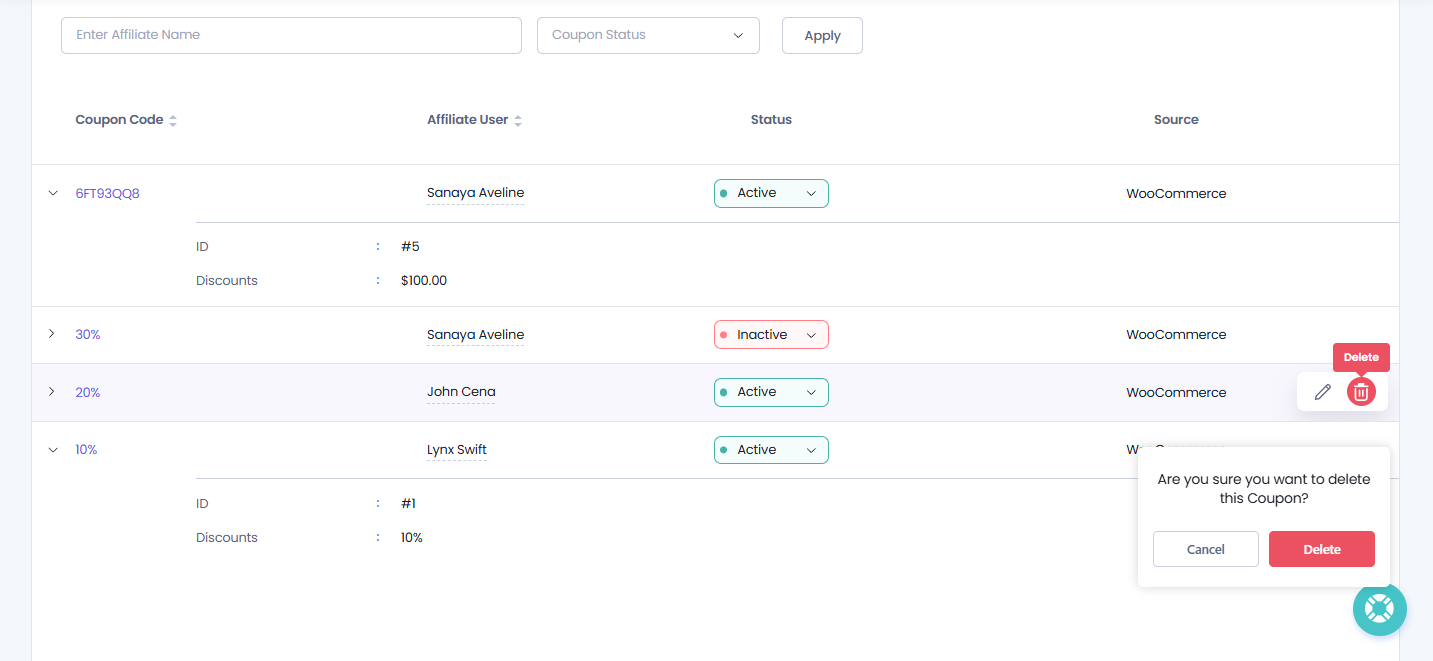
If a coupon assignment is no longer needed, you can Inactive it. But if it’s not needed anytime in the near future, you can delete it directly from the Coupons page.
To delete a coupon assignment, just hover over the coupon record you want to remove and click the Delete icon. This will show you a confirmation popup asking if you are sure you want to delete this coupon assignment.
Lastly, click on the Delete.
After the coupon assignment is deleted, AffiliatePress shows a quick success confirmation message saying that the coupon has been deleted successfully.
Note: Delete Coupon assignment here removes the association between the coupon and the affiliate in AffiliatePress. It does not affect the original coupons created from your supported integrated plugin (such as WooCommerce or Easy Digital Downloads).
View Coupon Codes in the Affiliate Panel
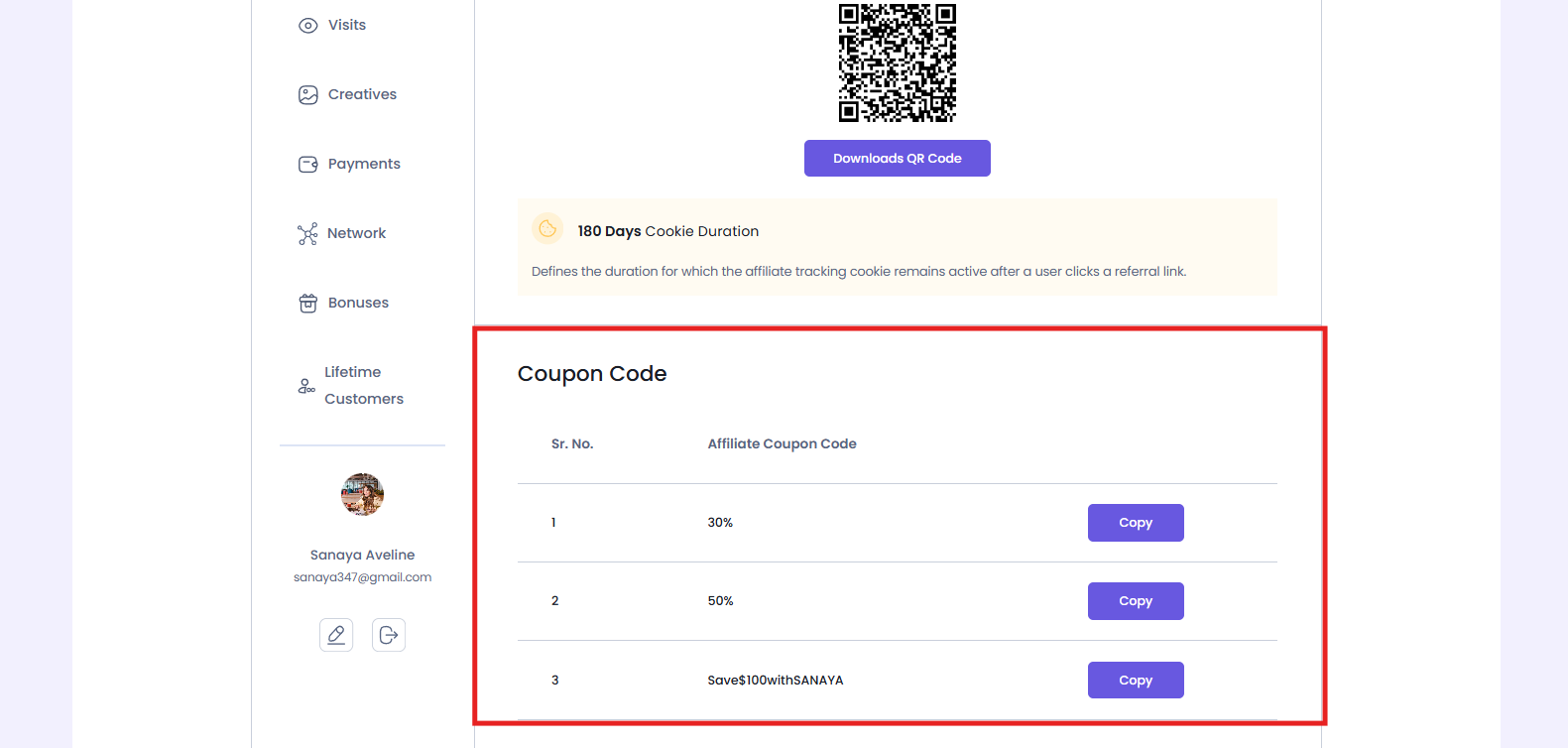
Affiliates can easily view all coupon codes assigned to them right from the Affiliate Panel.
To access them, affiliates first must log in to their Affiliate Panel. Now, head over straight to the Affiliate Links tab, and scroll down to the Affiliate Coupon Codes section.
Here, affiliates can see every coupon code assigned to their account in a simple list. Each coupon includes a Copy button so affiliates can easily copy the coupon code and share it with their audience.
This makes it easy for affiliates to promote their coupon codes across websites, emails, social media, advertisements and other marketing channels without having to manually type or remember the coupon code.
How Coupon Tracking Works
After a coupon code is assigned to an affiliate, AffiliatePress automatically tracks every sale made using that coupon.
Compared to the standard affiliate tracking, customers here don’t need to visit your website through an affiliate referral link. As long as they apply the assigned coupon during checkout, AffiliatePress recognizes the affiliate and automatically generates the commission.
Here’s what happens:
- A customer enters an affiliate’s coupon code during checkout.
- The integrated plugin validates and applies the coupon discount.
- AffiliatePress detects the coupon usage.
- The sale is attributed to the affiliate assigned to that coupon.
- A commission record and corresponding visit are automatically created inside AffiliatePress.
The generated commission behaves like any other commission in AffiliatePress. You can review, approve, reject or pay it using your normal commission workflow.
Configure Coupon Tracking for Each Integration
The Coupon Code Addon supports multiple AffiliatePress integrations. Although the overall tracking process is still the same, the location where you assign an affiliate to a coupon differs slightly for each integration.
Thus below are the setup steps for every supported integration.
WooCommerce

AffiliatePress integrates directly with WooCommerce coupons, allowing you to assign an affiliate to any WooCommerce coupon.
Thus for configuring coupon tracking in WooCommerce:
1. Go to WooCommerce → Marketing → Coupons.
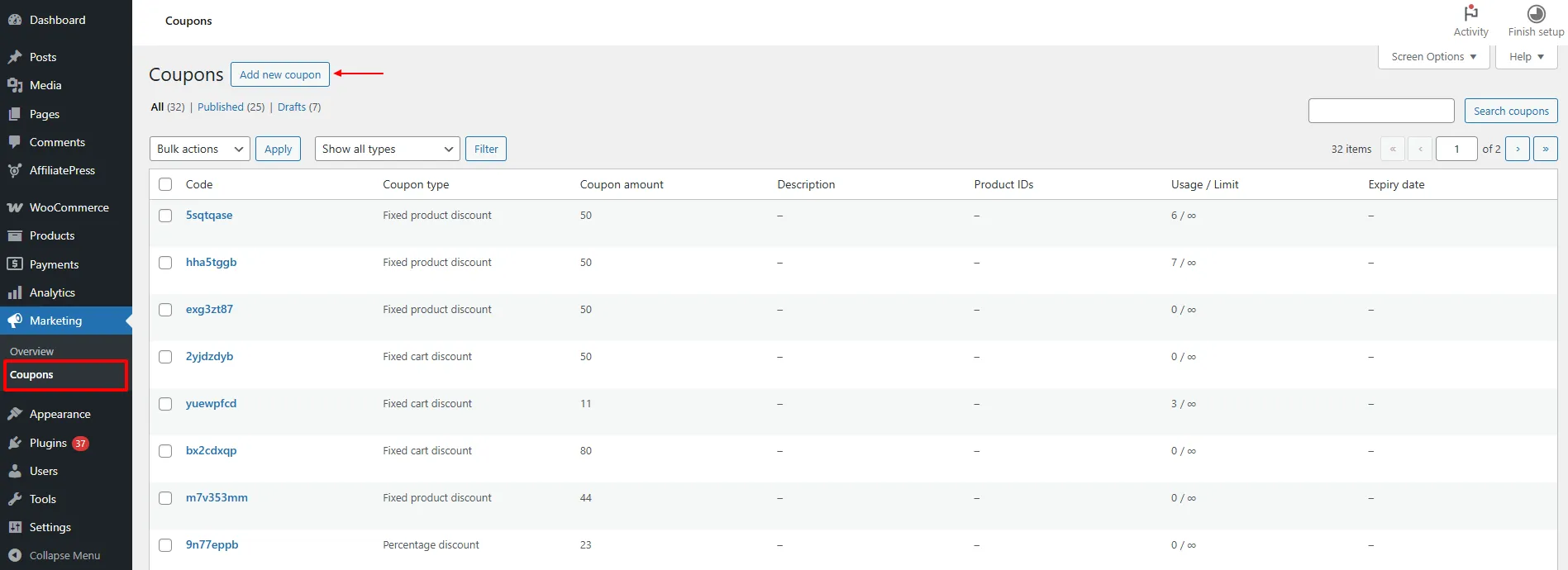
2. Create a new coupon or edit an existing one.
3. Scroll down to the AffiliatePress Affiliate User field.
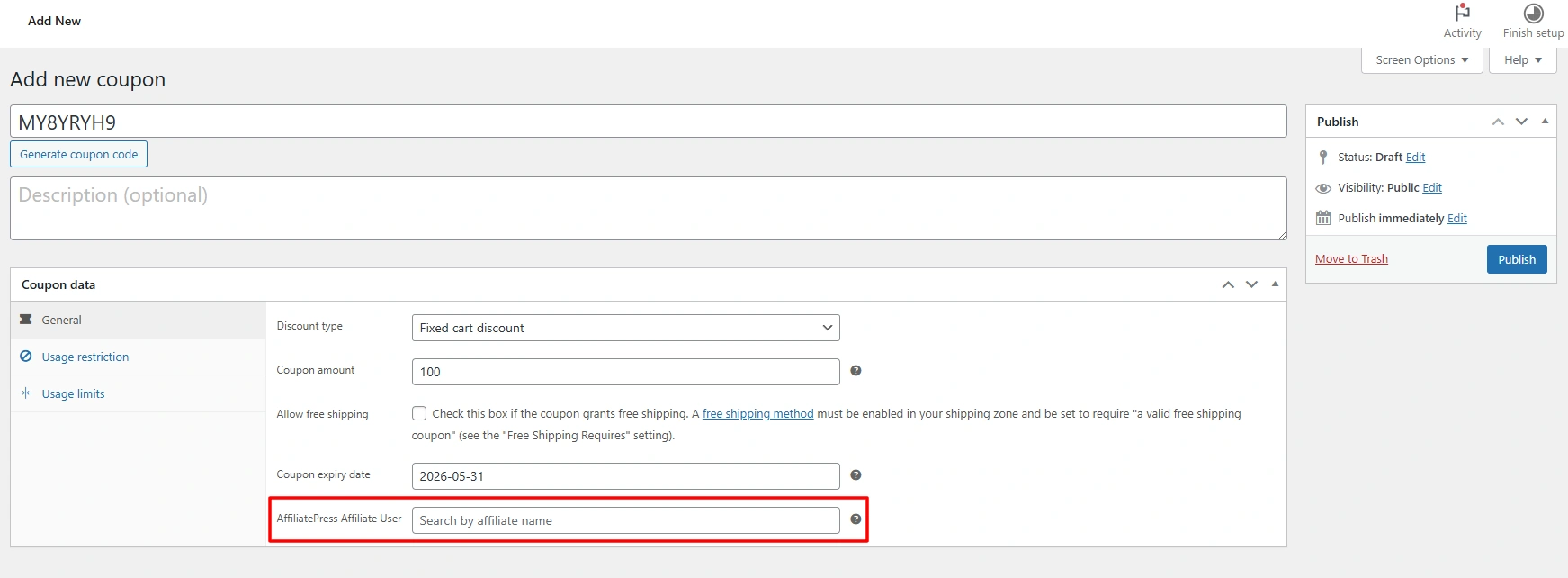
4. Search for and select the affiliate you want to assign the coupon to.
Update or publish the coupon.
That’s it. The selected coupon is now linked to the chosen affiliate.
Whenever a customer completes a sale using this WooCommerce coupon, AffiliatePress automatically tracks the referral, creates a commission and attributes it to the assigned affiliate.
Note: Once the coupon is assigned, it also becomes available in AffiliatePress → Coupons, and automatically appears in the affiliate’s Affiliate Panel → Affiliate Links → Affiliate Coupon Codes section.
Easy Digital Downloads

AffiliatePress integrates with Easy Digital Downloads coupons, allowing you to link discount codes with affiliate users for automatic commission tracking.
For configuring coupon tracking in Easy Digital Downloads:
1. Go to Downloads → Discounts.
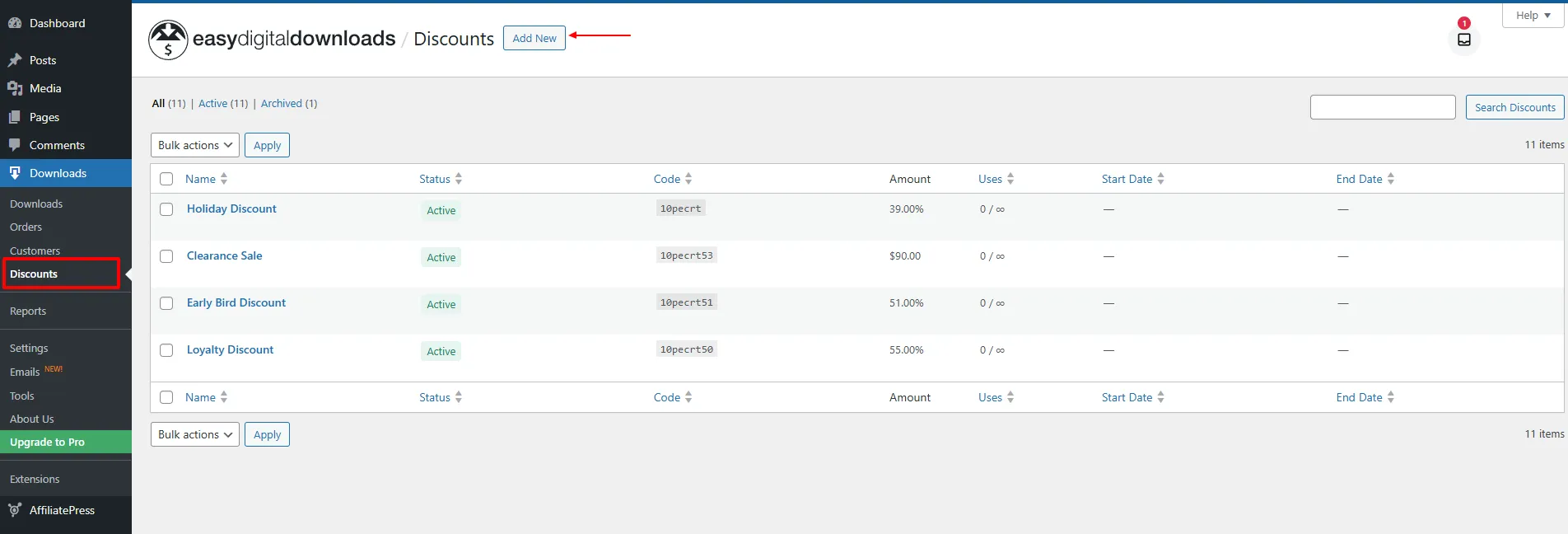
2. Create a new discount code or edit an existing one.
3. Locate the AffiliatePress Affiliate User field.
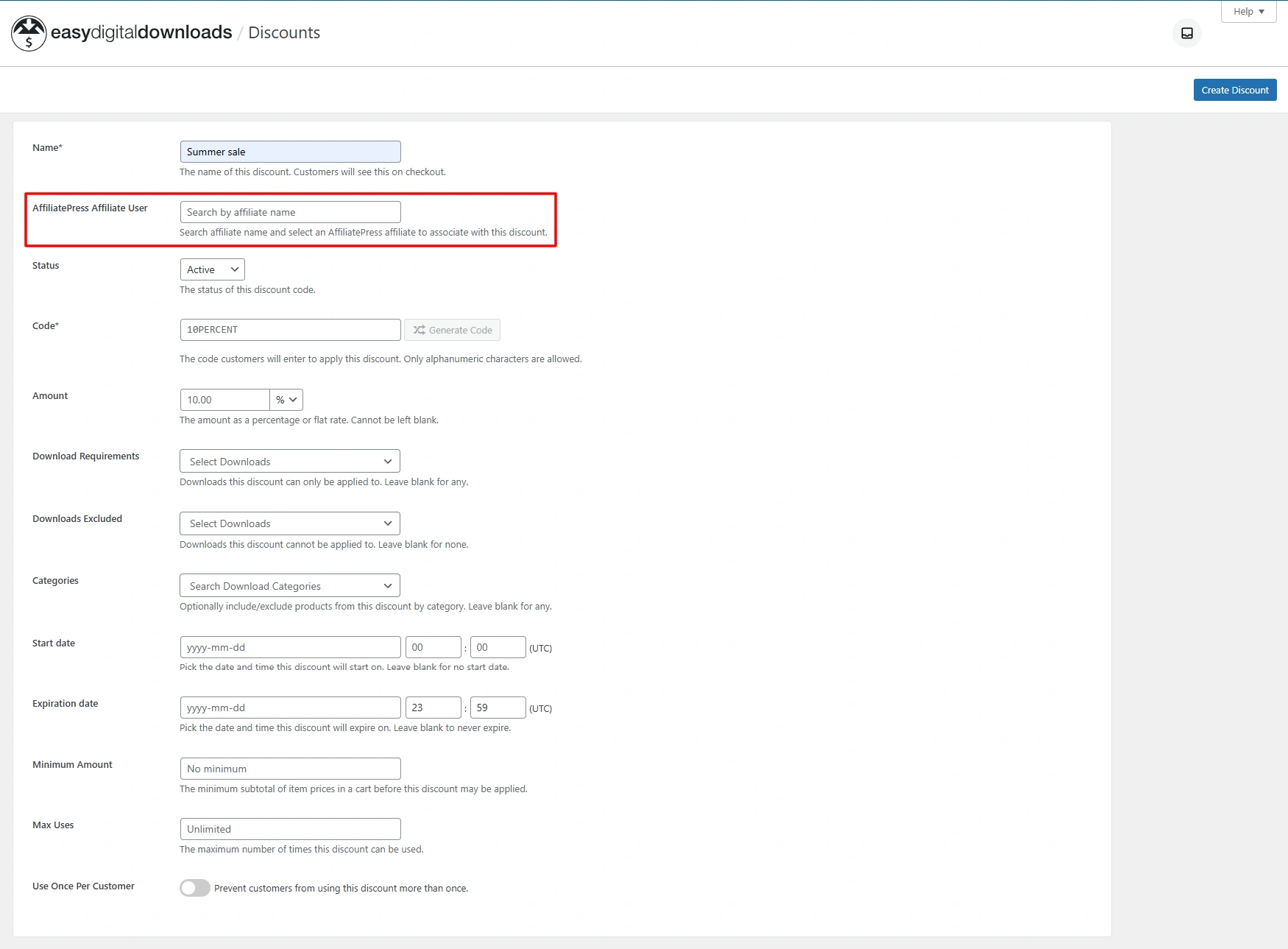
4. Search and select the affiliate you want to assign the coupon to.
5. Save the discount code.
After it is assigned, the discount code is linked to the selected affiliate. Thus whenever a customer uses this discount code during checkout, AffiliatePress automatically tracks the purchase and generates the commission for the assigned affiliate.
Note: AffiliatePress calculates commissions based on the discounted purchase amount when Easy Digital Downloads discount functionality is used.
Note: AffiliatePress considers the commission on the discounted price when EDD’s Discounts or Discounts Pro is used.
ARMember

AffiliatePress integrates with the ARMember Coupon Management addon, allowing you to assign ARMember coupons to affiliate users for commission tracking.
Before using this integration, make sure both the AffiliatePress Coupon Code Addon and ARMember Coupon Management addon are activated.
To configure coupon tracking in ARMember:
1. Go to ARMember → Coupon Management.
2. Create a new coupon or edit an existing coupon.
3. Find the AffiliatePress Affiliate User field.
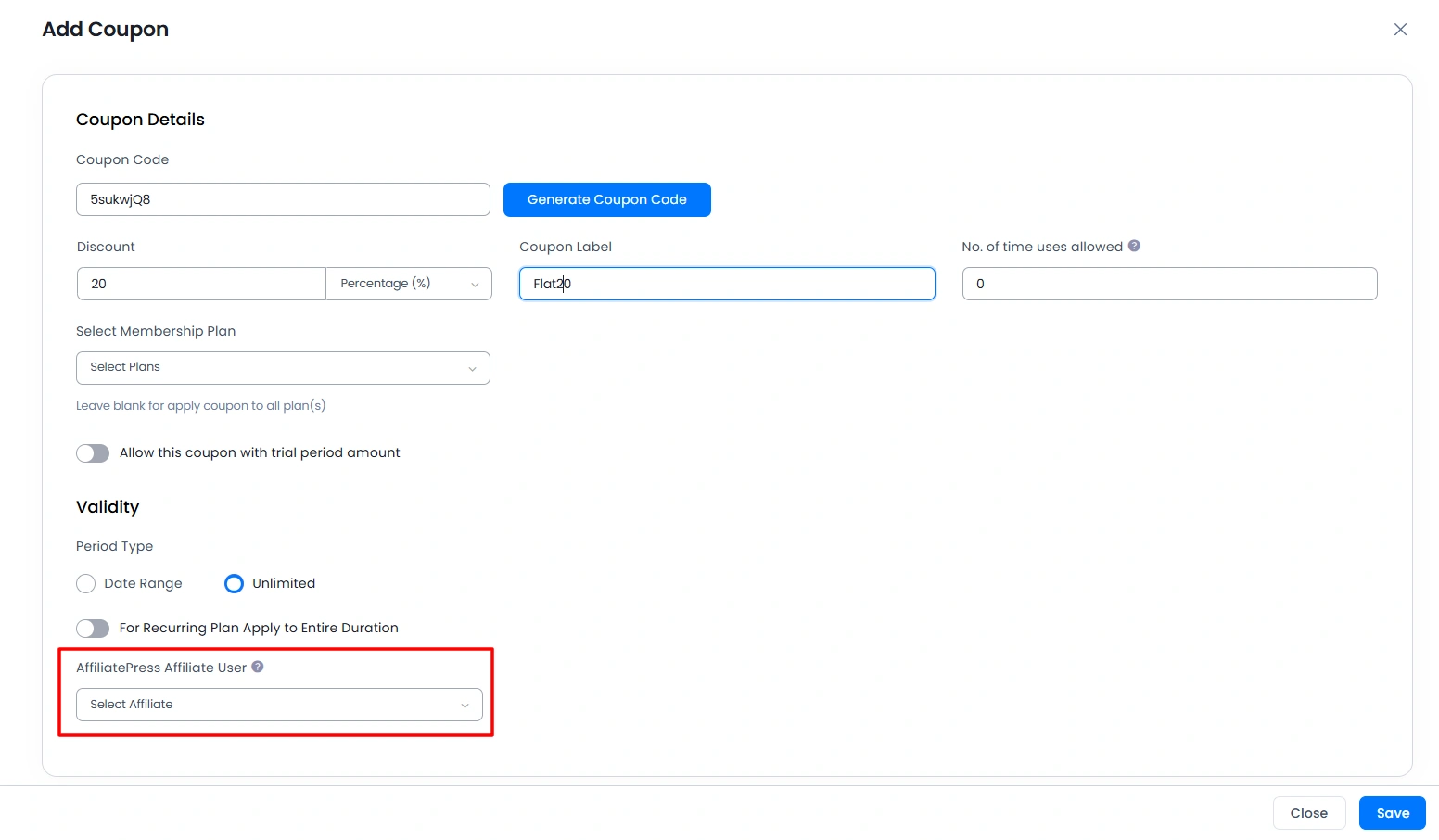
4. Select the affiliate you want to associate with the coupon.
Save the coupon.
After saving, the coupon is linked to the selected affiliate. Any purchase made using this coupon will be tracked and attributed to that affiliate.
The assigned coupon will also show in the AffiliatePress Coupons page and in the affiliate’s Affiliate Panel → Affiliate Links → Affiliate Coupon Codes section.
MemberPress

AffiliatePress integrates with MemberPress coupons, allowing administrators to assign coupons directly to affiliates without requiring referral links.
To configure coupon tracking in MemberPress:
1. Go to MemberPress → Coupons.
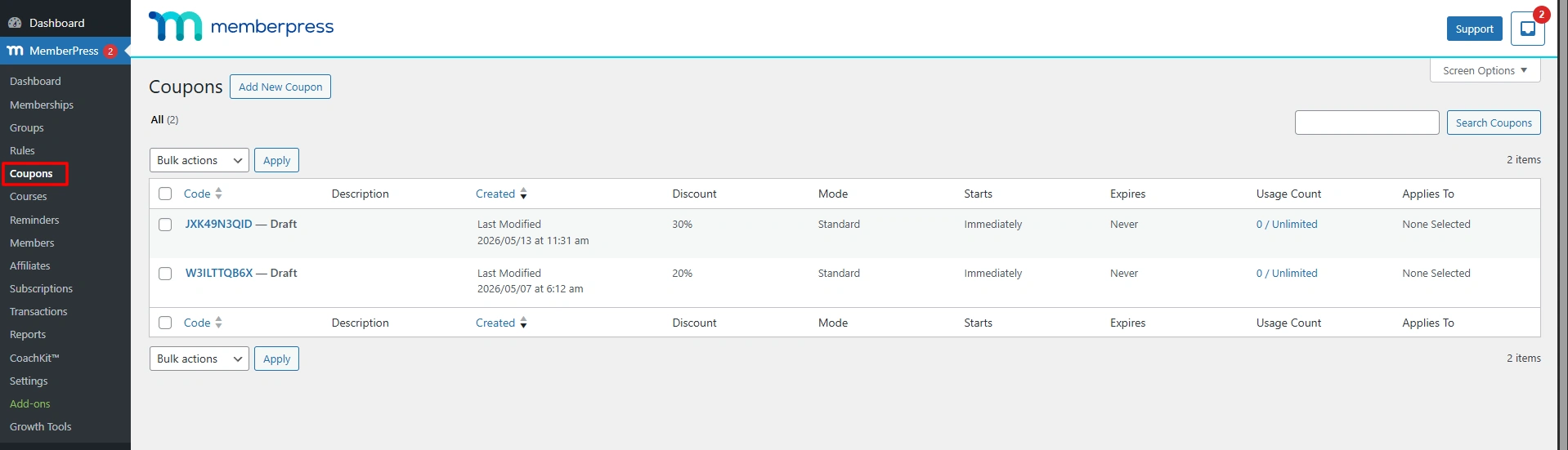
2. Create a new coupon or edit an existing coupon.
3. Locate the AffiliatePress Coupon Settings section.
4. Search and select the AffiliatePress affiliate user.
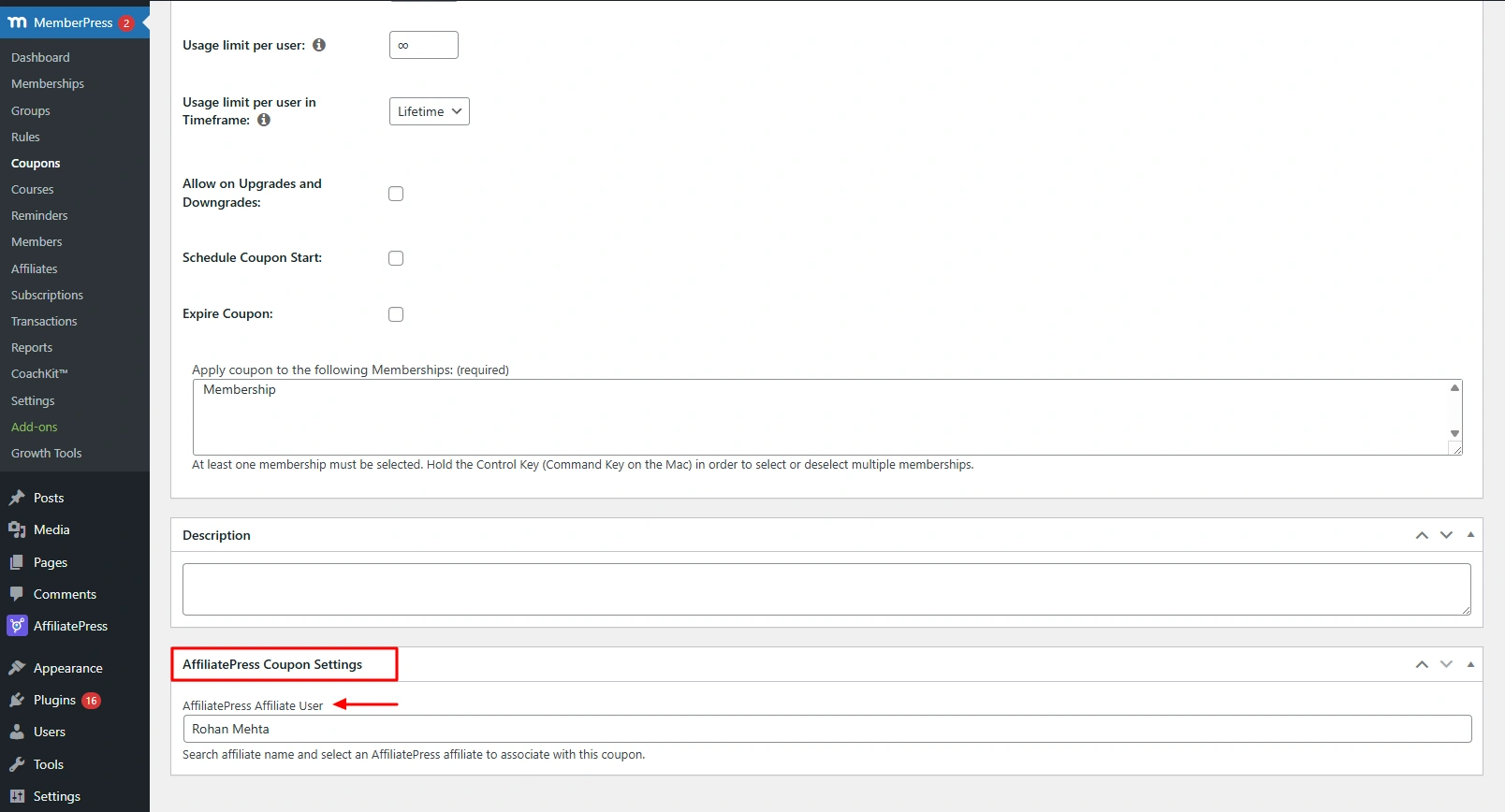
Save the coupon.
After assigning an affiliate, the MemberPress coupon becomes an affiliate tracking method.
Thus whenever a customer uses this coupon during checkout, AffiliatePress automatically identifies the assigned affiliate and generates the corresponding commission.
LifterLMS

AffiliatePress integrates with LifterLMS coupons, allowing you to assign discount codes to affiliates and track commissions through coupon usage.
To configure coupon tracking in LifterLMS:
1. Go to LifterLMS → Orders → Coupons.
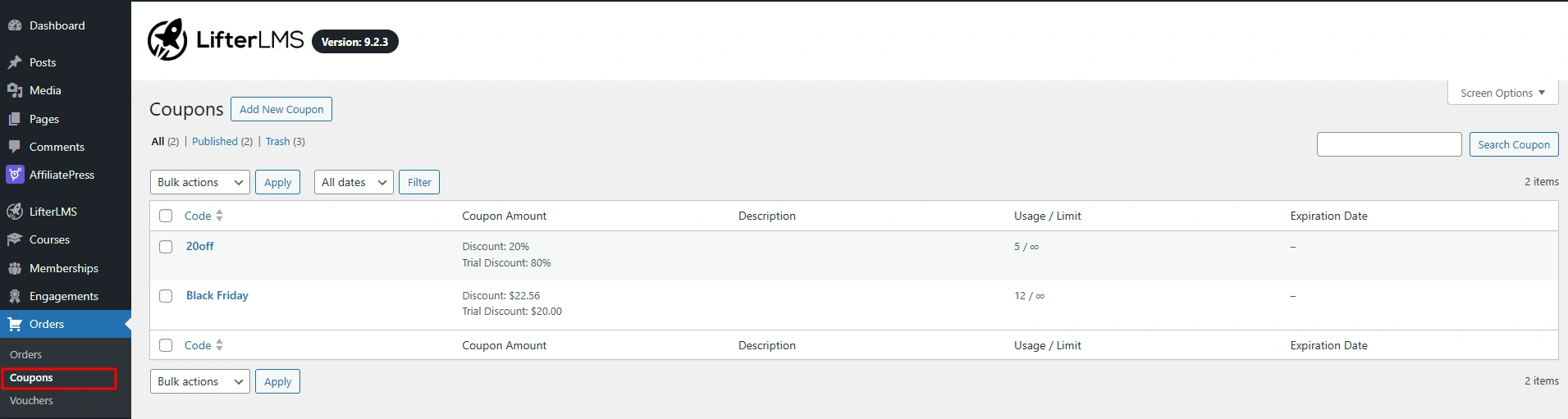
2. Create a new coupon or edit an existing coupon.
3. Open the AffiliatePress tab.
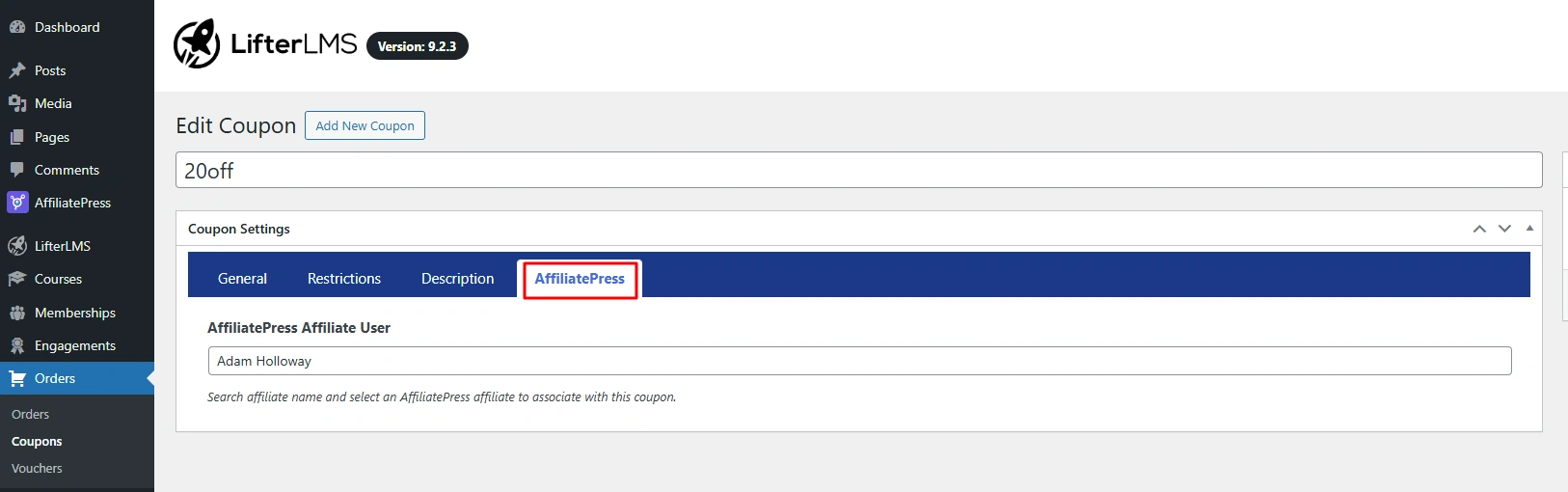
4. Select an affiliate from the AffiliatePress Affiliate User field.
5. Save the coupon.
After this, the coupon works as an affiliate tracking method. Customers using this coupon will generate commissions for the assigned affiliate automatically.
Paid Memberships Pro

AffiliatePress integrates with Paid Memberships Pro discount codes, allowing you to connect discount codes with affiliates for commission attribution.
To configure coupon tracking in Paid Memberships Pro:
1. Go to Memberships → Settings → Discount Codes.
2. Create a new discount code or edit an existing one.
3. Find the AffiliatePress Affiliate User field.
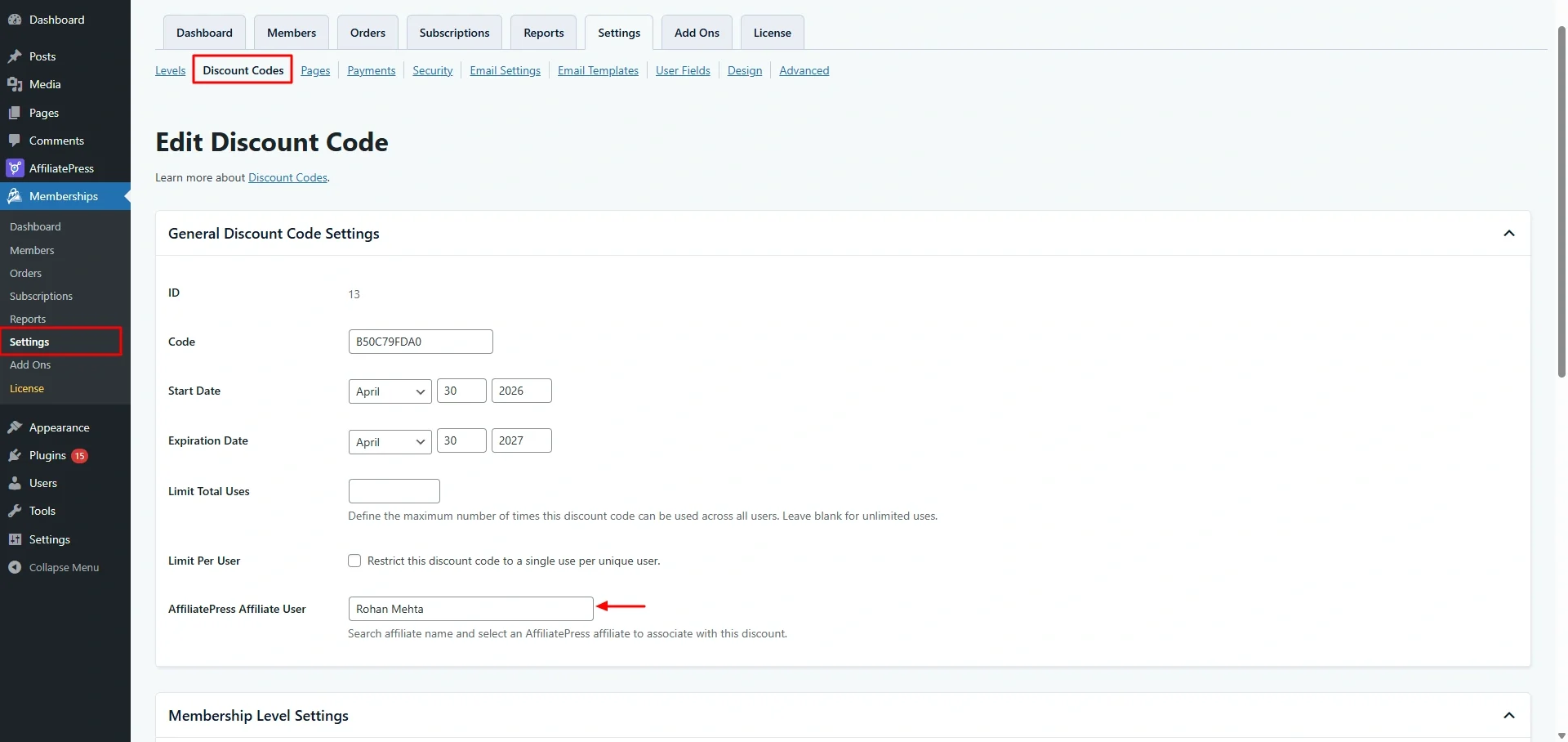
4. Select the affiliate user you want to assign.
5. Save the discount code.
After saving, the discount code is linked to the affiliate. AffiliatePress will automatically track purchases made using that discount code and generate commissions for the assigned affiliate.
Restrict Content Pro

AffiliatePress integrates with Restrict Content Pro discount codes, allowing coupon-based affiliate tracking.
Note: Restrict Content Pro coupon support requires their Pro version.
To configure coupon tracking in Restrict Content Pro:
1. Go to Restrict → Discount Codes.
2. Create a new discount code or edit an existing one.
3. Find the AffiliatePress Affiliate User field.
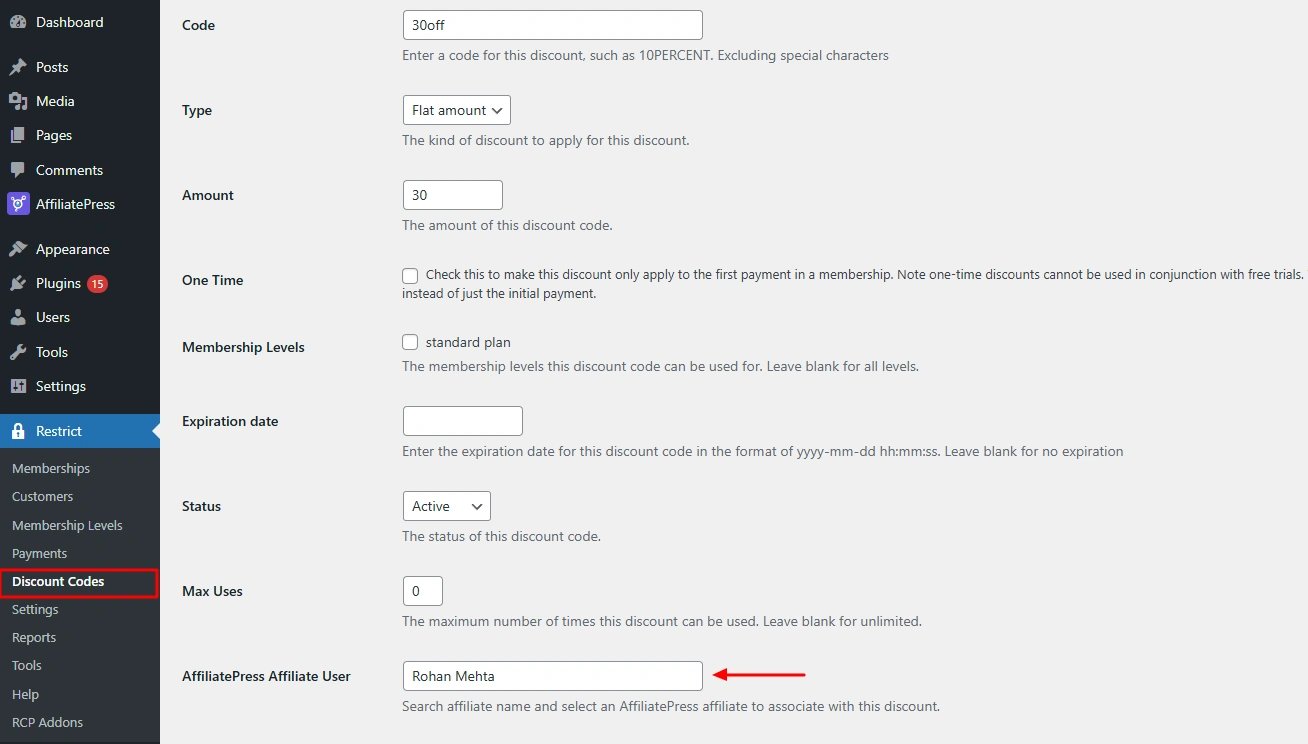
4. Select the affiliate you want to assign.
5. Save the discount code.
Thus AffiliatePress tracks purchases made through the discount code and attributes commissions to the selected affiliate.
Paid Member Subscriptions

AffiliatePress integrates with Paid Member Subscriptions discount codes, allowing affiliates to earn commissions through subscription purchases made with assigned discount codes.
So for configuring coupon tracking:
1. Go to Paid Member Subscriptions → Discount Codes.
2. Create or edit a discount code.
3. Locate the AffiliatePress Affiliate User field.
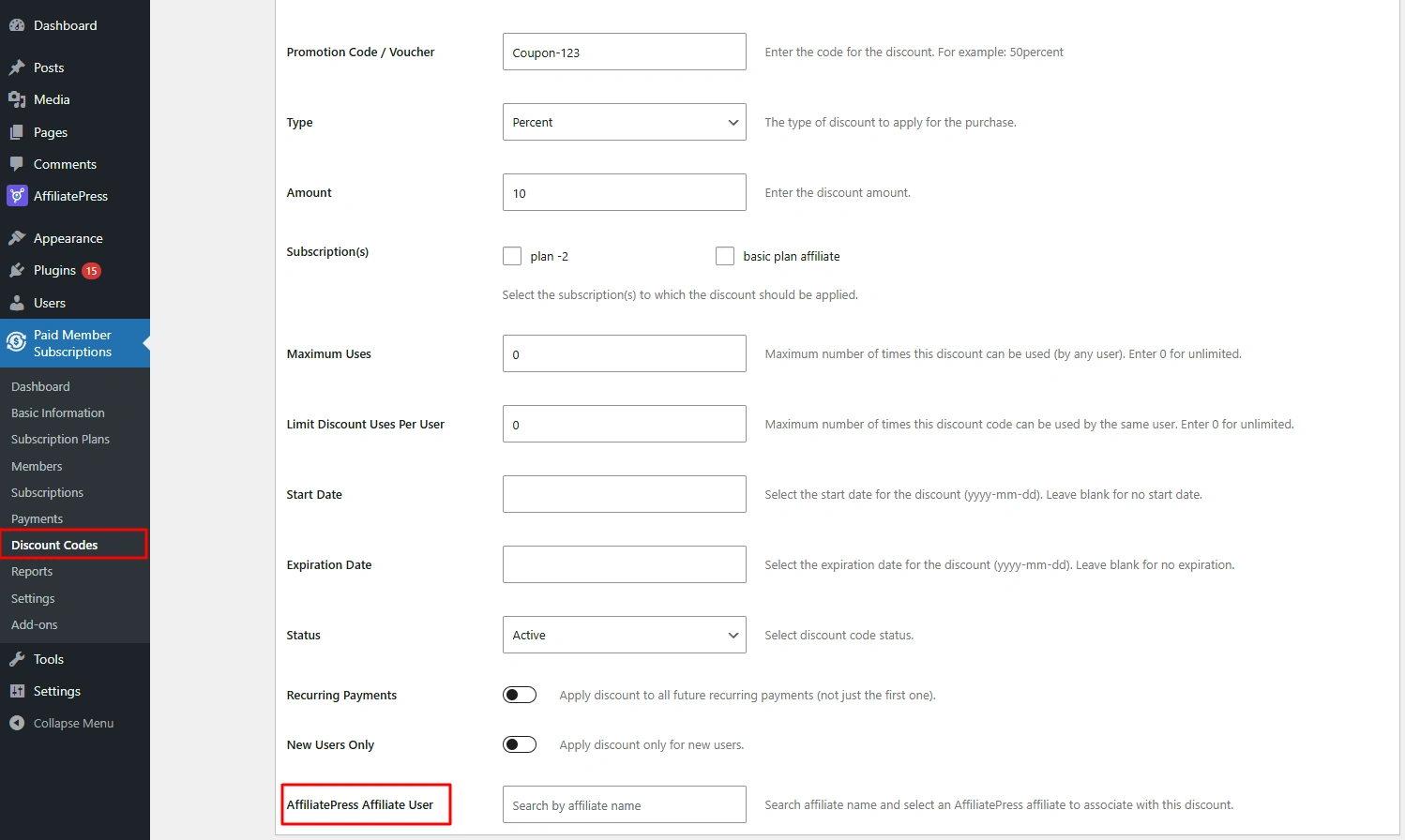
4. Select the affiliate user.
5. Save the discount code.
The discount code is now linked to the affiliate. Any eligible subscription purchase using this code will be tracked and credited to the assigned affiliate.
WP EasyCart

AffiliatePress integrates with WP EasyCart discount codes, allowing coupon-based affiliate tracking.
To configure coupon tracking:
1. Go to WP EasyCart → Marketing → Coupons.
2. Create a new coupon or edit an existing coupon.
3. Locate the AffiliatePress Affiliate User field.
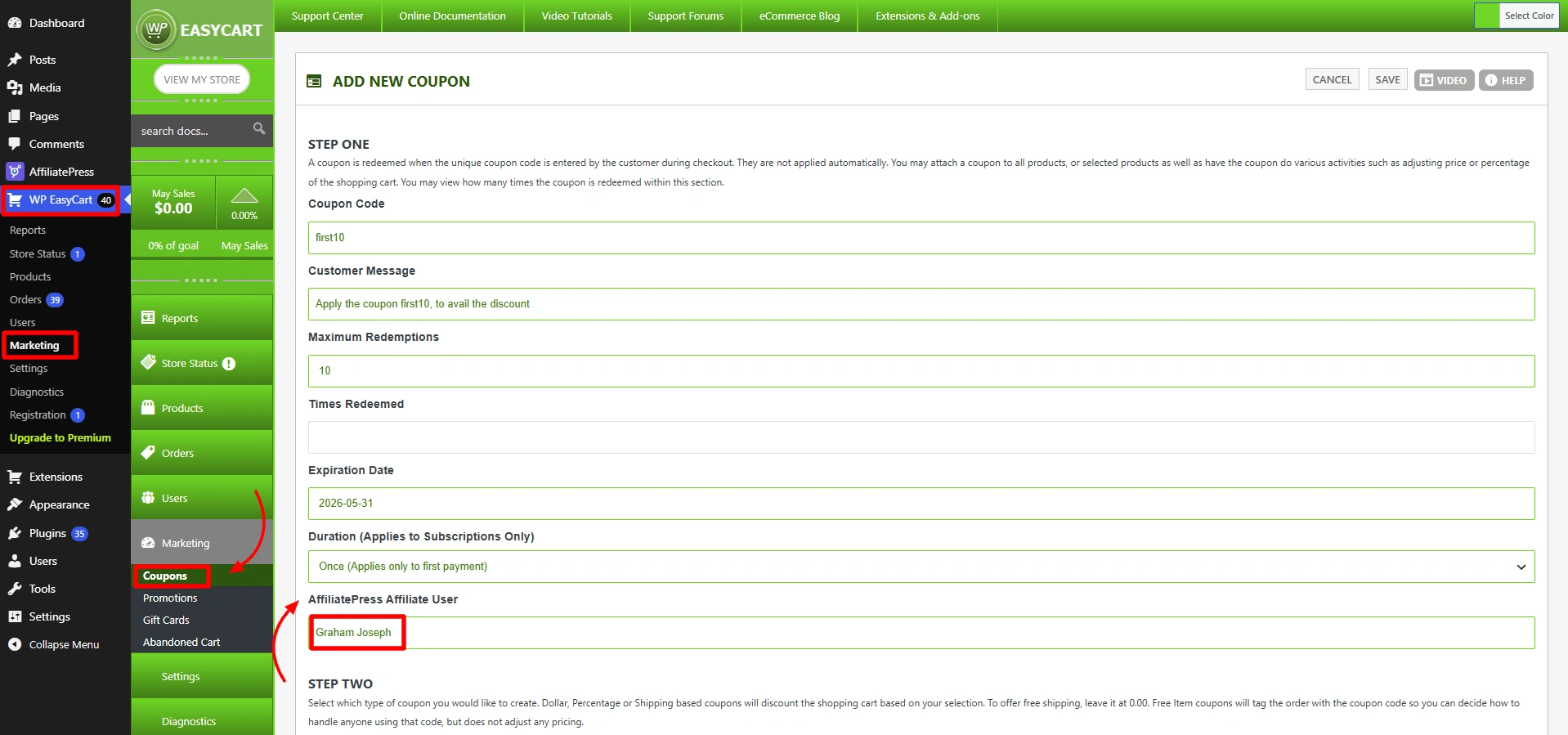
4. Select the affiliate user.
5. Save the coupon.
After it’s connected, AffiliatePress automatically tracks purchases made through the coupon and assigns commissions to the selected affiliate.
Note: WP EasyCart coupon needs the Pro version only.
Accept Stripe Payments

AffiliatePress integrates with Accept Stripe Payments coupons, allowing you to assign discount codes to affiliates.
To configure coupon tracking:
1. Go to Stripe Payments → Coupons.
2. Create a new coupon or edit an existing coupon.
3. Find the AffiliatePress Affiliate User field.
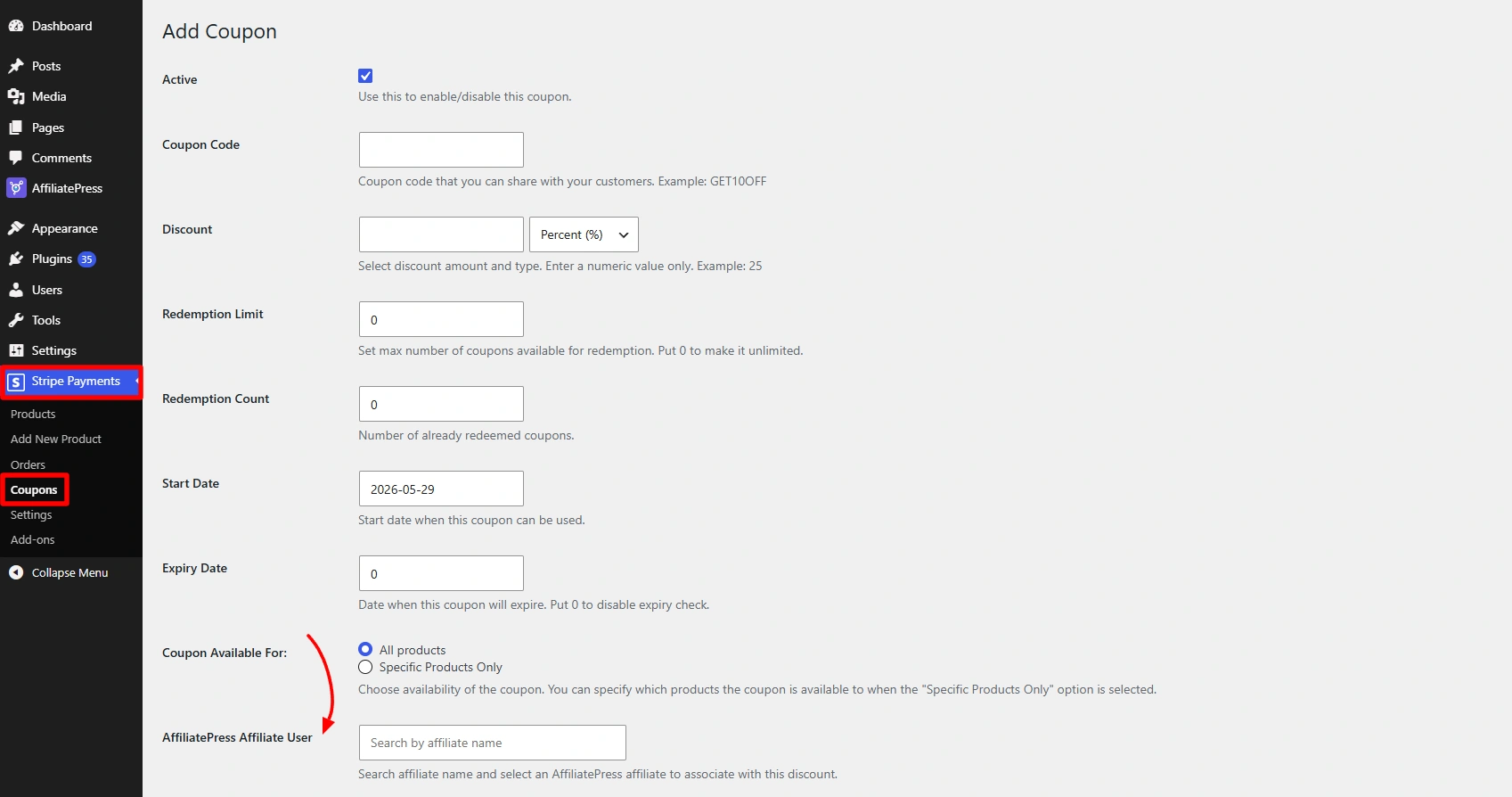
4. Select the affiliate user.
5. Save the coupon.
Thus after saving, any sale done by using this coupon will be tracked by AffiliatePress and credited to the assigned affiliate.
GetPaid

AffiliatePress integrates with GetPaid discount codes, allowing you to track affiliate commissions through coupon usage.
To configure coupon tracking:
1. Go to your GetPaid discount codes section.
2. Create a new discount code or edit an existing one.
3. Open the AffiliatePress Coupon Settings section.
4. Select an affiliate from the AffiliatePress Affiliate User field.
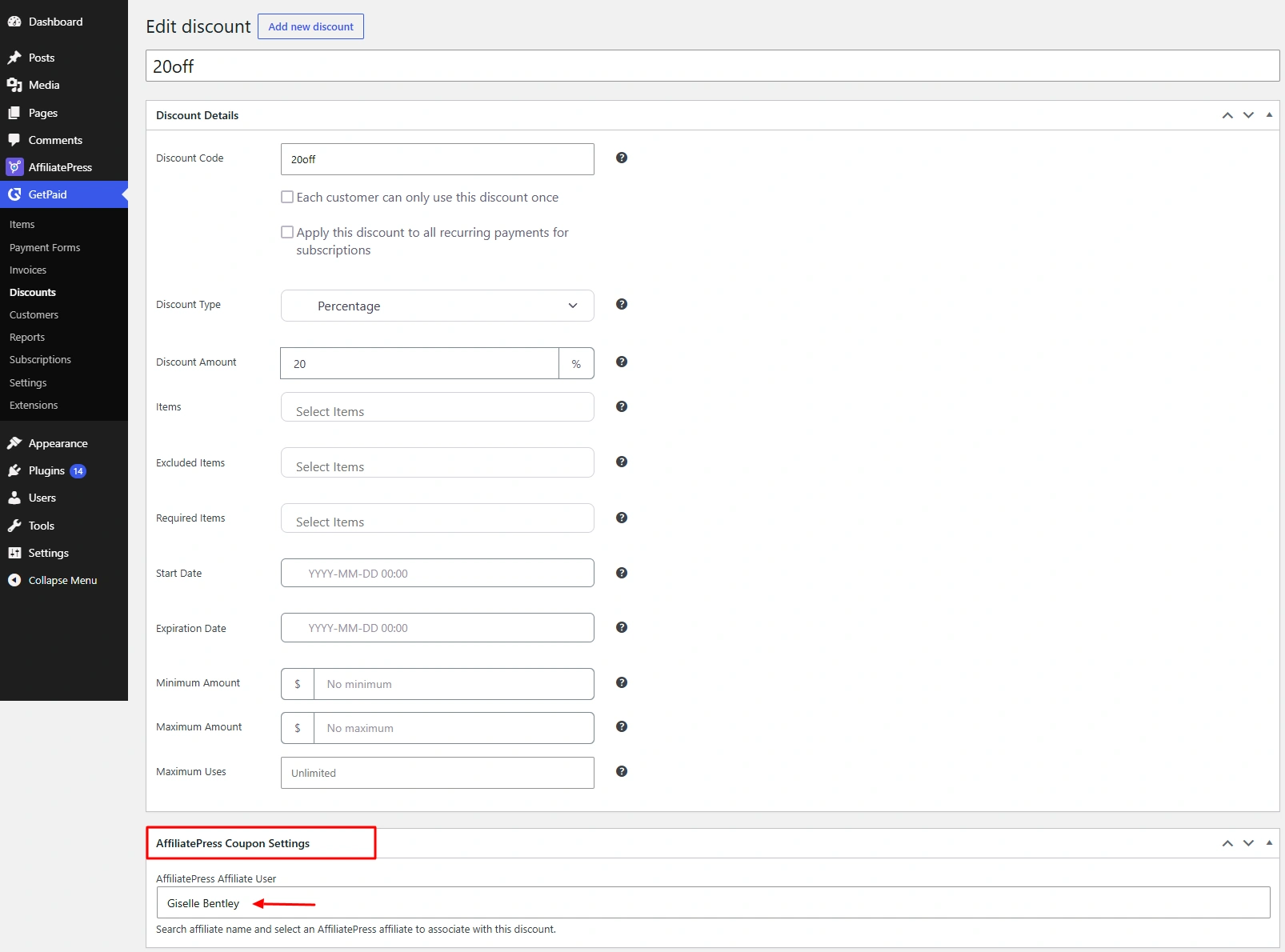
5. Save the discount code.
After the affiliate is assigned, the discount code becomes connected with the affiliate. Thus any sale made using this discount code will automatically generate commissions for the chosen affiliate.