



Integration Settings
Integration Settings allow you to connect AffiliatePress with supported WordPress plugins to automatically track affiliate referrals and generate commissions.
Simply enable the integrations for the plugins you use, and AffiliatePress will begin tracking eligible actions such as purchases, memberships, bookings and more.
You can easily manage AffiliatePress integrations from AffiliatePress → Settings → Integrations.
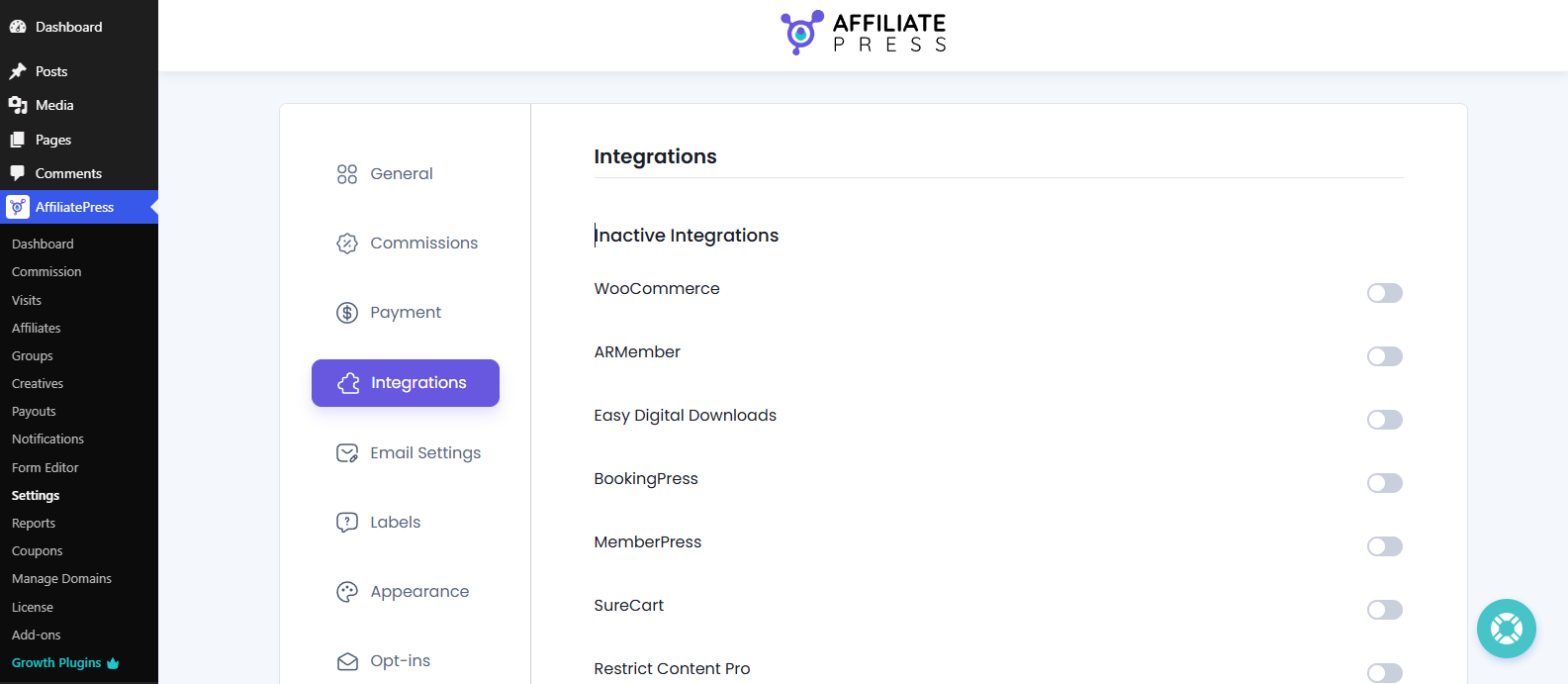
How To Manage AffiliatePress Integrations
AffiliatePress allows you to enable integrations for the WordPress plugins installed on your website. Once an integration is activated, AffiliatePress automatically tracks supported referral actions and generates affiliate commissions based on your configured commission settings.
Note: Before enabling an integration, make sure that its WordPress plugin is already installed and activated. AffiliatePress only tracks referrals for active integrations.
You only need to enable the integrations for the plugins you actively use, and have installed in your WordPress dashboard. There’s no need to activate integrations for plugins that aren’t installed on your website.
Supported Integrations
Integrates with a total of 27 WordPress plugins, AffiliatePress offers you a wide range of eCommerce, membership, LMS, form builder, booking, donation, and payment plugins.
Simply toggle on the integrations that match the plugins installed on your website to start tracking affiliate referrals automatically.
Here are all the available AffiliatePress integrations:
| Integration Plugin | Action That Triggers Commission |
| WooCommerce | After a product purchase |
| ARMember | After a membership plan is purchased |
| Easy Digital Downloads | After a digital product is purchased/downloaded |
| MemberPress | After a membership is purchased |
| SureCart | After a successful SureCart checkout |
| Restrict Content Pro | After subscribing to premium content |
| WP EasyCart | After placing an order |
| LifterLMS | After enrolling in a course or membership |
| GiveWP | After a donation is made |
| Simple Membership | After a membership registration |
| Paid Memberships Pro | After purchasing a membership plan |
| Paid Member Subscriptions | After completing a subscription |
| Ultimate Membership Pro | After signing up for a premium membership |
| Ninja Forms | After form submission leads to a conversion |
| WPForms | After a successful form submission |
| Gravity Forms | After a transaction-related form entry |
| WP Simple Pay (Stripe) | After a Stripe payment is completed |
| Masteriyo LMS | After course or quiz enrollment |
| GetPaid | After invoice/payment completion |
| LearnPress | After purchasing an online course |
| Accept Stripe Payments | After a Stripe payment is received |
| ARForms | After a form submission results in a sale or registration |
| Download Manager | After downloading a paid file |
| BookingPress | After a booking is confirmed |
| LearnDash | After course enrollment |
| MasterStudy LMS | After enrolling in a course |
| Tutor LMS | After enrolling in a course |
Active and Inactive Integrations
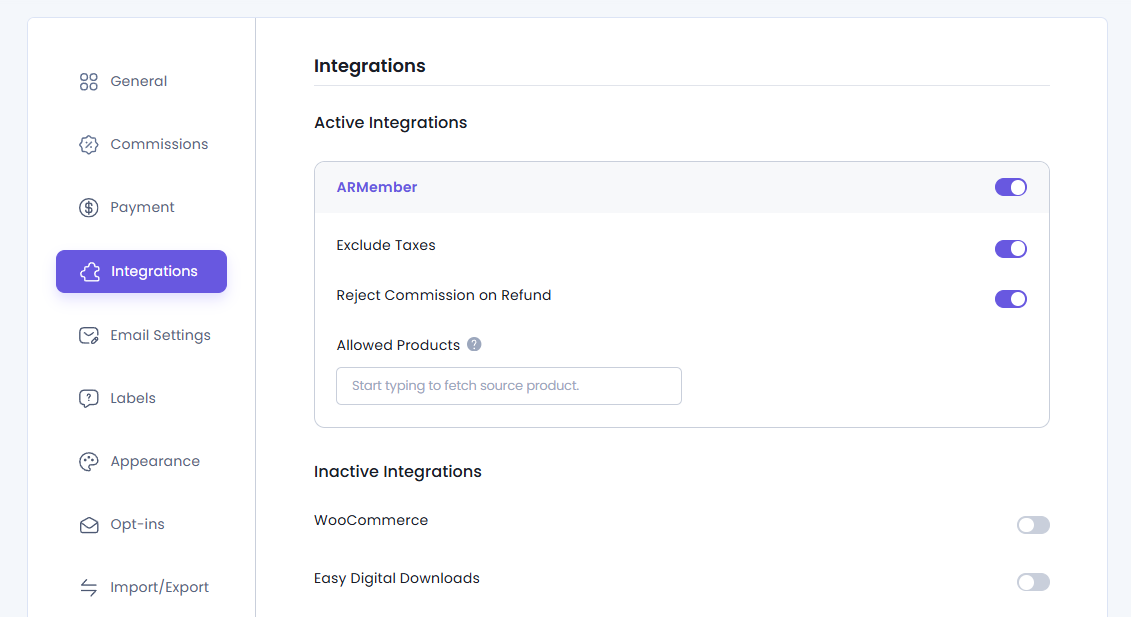
After activating an integrations, the Integrations page groups plugins into Active Integrations and Inactive Integrations which makes it easy to manage your connected plugins.
Active Integrations are currently enabled and allow AffiliatePress to track supported referral actions and generate commissions automatically.
Inactive Integrations are available but disabled. Enable an integration whenever you want AffiliatePress to start tracking referrals for that plugin.
After enabling or disabling an integration, remember to Save your changes.
Configuring AffiliatePress Integrations Settings
After you enable an integration, you may see extra configuration options. These extra options become available based on the selected plugin.
These settings allow you to control how AffiliatePress tracks referrals and calculates affiliate commissions. Remember the options vary by integration, still may include:
- Exclude Shipping
- Exclude Taxes
- Reject Commission on Refund, Cancelled, Failed, or Deleted Orders
- Disable Commission on Subscription or Membership Upgrades
- Allowed Products (This option works only when the commission type is set to Per-Product Value. It doesn’t apply to the Per-Order commission type).
To know which configuration options are available for each AffiliatePress integrations you’ll be setting, below is a quick table:
| Integration | Exclude Shipping | Exclude Taxes | Reject Commission | Disable Upgrade Commission | Allowed Products |
| WooCommerce | ✅ | ✅ | ✅ | ✅ | ✅ |
| ARMember | — | ✅ | ✅ | — | ✅ |
| Easy Digital Downloads | ✅ | ✅ | ✅ | ✅ | ✅ |
| BookingPress | — | — | ✅ | — | ✅ |
| MemberPress | — | ✅ | ✅ | ✅ | ✅ |
| SureCart | ✅ | ✅ | — | — | ⚠️ |
| Restrict Content Pro | — | — | ✅ | ✅ | ✅ |
| WP EasyCart | ✅ | ✅ | ✅ | — | ✅ |
| LifterLMS | — | — | ✅ | — | ✅ |
| ARForms | — | — | — | — | ✅ |
| GiveWP | — | — | — | — | ✅ |
| Simple Membership | — | — | — | — | ✅ |
| Paid Memberships Pro | — | — | ✅ | — | ✅ |
| Paid Member Subscriptions | — | ✅ | ✅ | — | ✅ |
| Ultimate Membership Pro | — | ✅ | ✅ | — | ✅ |
| Ninja Forms | — | — | — | — | ✅ |
| WPForms | — | — | — | — | ✅ |
| Gravity Forms | — | — | ✅ | — | ✅ |
| WP Simple Pay (Stripe) | — | — | — | — | ✅ |
| Masteriyo LMS | — | — | ✅ | — | ⚠️ |
| GetPaid | — | — | ✅ | — | ✅ |
| LearnPress | — | — | ✅ | — | ✅ |
| Accept Stripe Payments | ✅ | ✅ | ✅ | — | ✅ |
| Download Manager | — | — | ✅ | — | ✅ |
| LearnDash | — | — | — | — | — |
| MasterStudy LMS | — | — | ✅ | — | ✅ |
| Tutor LMS | — | ✅ | ✅ | — | ✅ |
- ✅ = Supported
- — = Not available
- ⚠️ = Supported with limitations (see notes we’ve below)
Note: In SureCart, commissions are calculated using the total order value rather than individual product prices. The Allowed Products option is currently not supported.
Note: In Masteriyo LMS, commissions are calculated using the total order value. The Allowed Products option is also currently not supported here.
Additional Integration Features
Some AffiliatePress integrations and features we discussed here needs a dedicated add-on or have their own setup guide.
Product Selection Addon
AffiliatePress allows you to restrict affiliate commissions to specific products, courses, memberships, booking services or forms. You can only see the “Allowed products” field when you activate the AffiliatePress Product-wise Commission Rate Addon.
Once activated, supported integrations show an Allowed Products option from which you can select exactly which products or services are eligible for affiliate commissions while all other products continue using your default commission settings.
For detailed setup instructions and more information, click here.
Tutor LMS Integration
AffiliatePress allows you to automatically track affiliate referrals and generate commissions for Tutor LMS course enrollments.
For using this integration, you must install and activate both Tutor LMS Integration. Once all set, AffiliatePress tracks eligible course purchases and automatically generates affiliate commissions based on your configured commission settings.
For detailed setup instructions and more information, click here.
MasterStudy LMS Integration
AffiliatePress allows you to automatically track affiliate referrals and generate commissions for MasterStudy LMS course enrollments.
For using this integration, you must install and activate both MasterStudy LMS integration. Once enabled, AffiliatePress tracks eligible course purchases and automatically generates affiliate commissions according to your configured commission settings.
For detailed setup instructions and more information, click here.