



Product Selection Add-on
Want more control over which products generate affiliate commissions? The Product Selection Add-on lets you choose specific products that are eligible for affiliate commissions.
Just select the products you want to include, and AffiliatePress will only track commissions for those products.
In this guide, we’ll show you how to install and set up the Product Selection Add-on in AffiliatePress.

Install and Activate the Product Selection Add-on
Before using any addon, make sure AffiliatePress is installed and your license is activated.
After that, you must install and activate the Product Selection Add-on so you can choose the product you want to make eligible for commission, and the AffiliatePress system will track only those specific products.
Supported Integrations
The AffiliatePress Product Selection Add-on works with the following AffiliatePress integrations:
| Supported Integrations | Supported Integrations |
| WooCommerce | ARMember |
| BookingPress | MemberPress |
| Restrict Content Pro | WP EasyCart |
| LifterLMS | ARForms |
| GiveWP | Simple Membership |
| Paid Memberships Pro | Paid Member Subscriptions |
| Ultimate Membership Pro | WPForms |
| Tutor LMS | LearnPress |
| Accept Stripe Payments | MasterStudy LMS |
| GetPaid | Ninja Forms |
| Download Manager | Gravity Forms |
| WP Simple Pay (Stripe) |
Note: Product Selection is currently not supported for SureCart, Masteriyo LMS or LearnDash.
Configure Product Selection
After activating the Product Selection Add-on, go to AffiliatePress → Settings → Integrations.
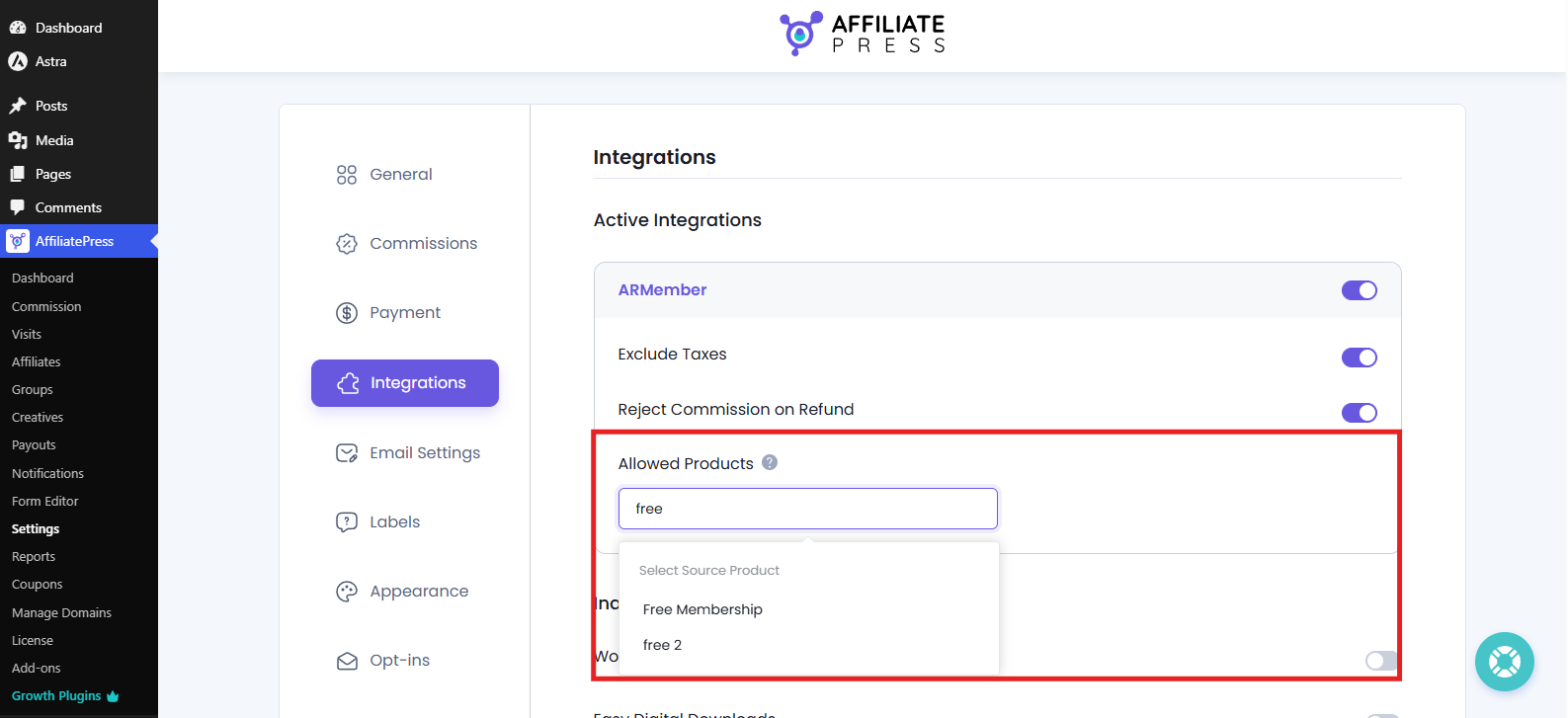
After you activate a supported integration, you’ll see the “Allowed Products” field in its settings. This is where you choose the products that can generate affiliate commissions.
Inside the Allowed Products, simply start typing the name of your product which you want to include for commission. Then select the product from the results, and repeat the process for any other products you want to make eligible for affiliate commissions.
After you have selected your products, save your settings.
AffiliatePress will now use your product selection when calculating affiliate commissions. If a customer buys a product that you’ve selected, the affiliate referral can generate a commission. If the purchased product isn’t included in your selection, AffiliatePress won’t generate a commission for that product.
Important: This setting works only when the commission type is set to ‘Per-Product Value’. It does not apply to the ‘Per-Order’ commission type.
How Product Selection Works
After you select products in the “Allowed Products” field, AffiliatePress checks the products included in an order before generating affiliate commissions.
If the order has a product you selected, AffiliatePress can generate a commission for that product when the purchase is attributed to an affiliate.
If the order contains a product that you did not select, AffiliatePress will not generate a commission for that product.
Let’s understand it better with an example.
For instance your store sells types of Honey, but you only want affiliates to earn commissions when they sell Wildflower Honey.
So here’s what you can do. In the Allowed Products field, select “Wildflower Honey” and save your settings.
This way now when a customer buys Wildflower Honey using an affiliate’s referral, AffiliatePress can track a commission for that sale. However if the customer buys another Honey product through the same affiliate’s referral, AffiliatePress won’t generate a commission because that product wasn’t selected in the Allowed Products field.
The Product Selection Add-on therefore lets you control which products can participate in your affiliate program.
Product Selection and Disable Commission
Product Selection takes priority over the product-level Disable Commission setting.
This means a product selected in the Allowed Products field can still generate an affiliate commission even if Disable Commission is enabled for that product.
| Product Selection | Disable Commission | Will Commission Be Applied? |
| Product is selected | Disabled | Yes |
| Product is not selected | Disabled | No |
| Product is selected | Enabled | Yes |
This behavior allows the products selected via Product Selection to be still eligible for affiliate commissions, even when the product-level Disable Commission setting is enabled.