



AffiliatePress Languages and Translation Options
AffiliatePress, a robust WordPress affiliate management plugin, supports multiple languages to ensure accessibility for users worldwide.
With AffiliatePress’s built-in languages, you can easily switch to your preferred language and enjoy a smooth, localized experience.
In this guide, we’ll walk through the available languages and how to change them on your WordPress site.
AffiliatePress Supported Language
AffiliatePress comes with a wide range of pre-installed languages, allowing you to work comfortably in their native language.
Below is the list of available inbuilt languages:
- Arabic – ar
- German ( Deutsch)- de_DE
- English – en_US
- Spanish (Español) – es_ES
- French – fr_FR
- Italian – it_IT
- Dutch – nl_NL
- Polish- pl_PL
- Romanian – ro_RO
- Russian –ru_RU
- Turkish –tr_TR
- Ukraine-uk
How to Change the AffiliatePress Language
Switching to your preferred language in AffiliatePress is quick and simple. Follow these steps:
- Log in to your WordPress dashboard.
- Go to the Settings ⇾ General Settings.
- Locate the Site Language dropdown menu and choose your desired language from the list.
- Once selected, AffiliatePress will automatically apply the chosen language across the plugin interface.
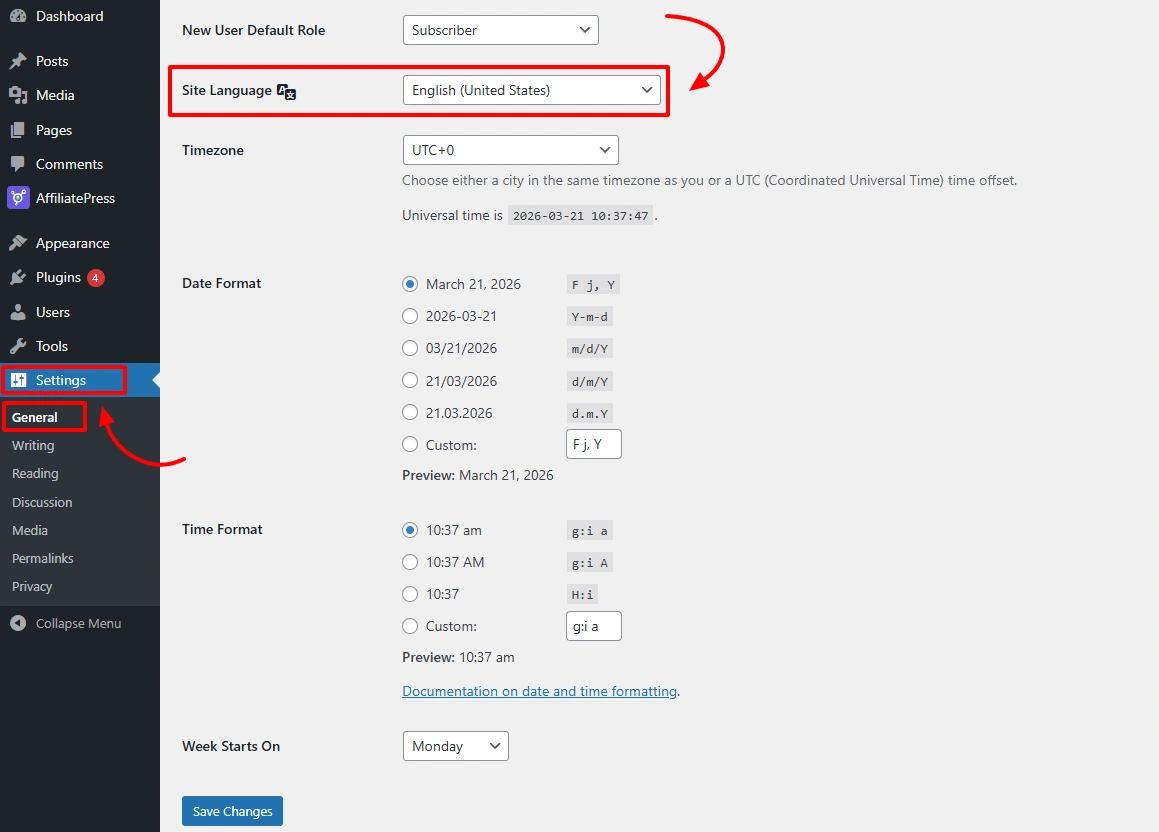
This ensures a consistent and user-friendly experience throughout your site.
Custom Translation Options for AffiliatePress
If your preferred language is not included in the built-in list, you can still localize AffiliatePress using third-party translation tools. The plugin is fully compatible with popular translation solutions such as the following:
- Loco Translate
- Poedit
Using these tools, you can create and manage custom translations, ensuring AffiliatePress meets your specific language requirements.