



SureCart Integration
AffiliatePress integrates with SureCart to automatically track affiliate commissions whenever customers place orders through your SureCart store.
You can also decide whether shipping charges and taxes should be included in commission calculations based on how you want your affiliate program to operate.

Here we’ll show you how to integrate SureCart with AffiliatePress.
Before You Begin
Before setting up the integration, make sure you have the following installed and activated:
- WordPress with administrator access
- SureCart
- AffiliatePress
Set Up SureCart Integration
To connect SureCart with AffiliatePress:
- Head over to AffiliatePress → Settings → Integrations.
- Scroll down until you find the SureCart integration.
- Toggle on the integration and save your changes.
After turning on the integration, the following commission settings become available.
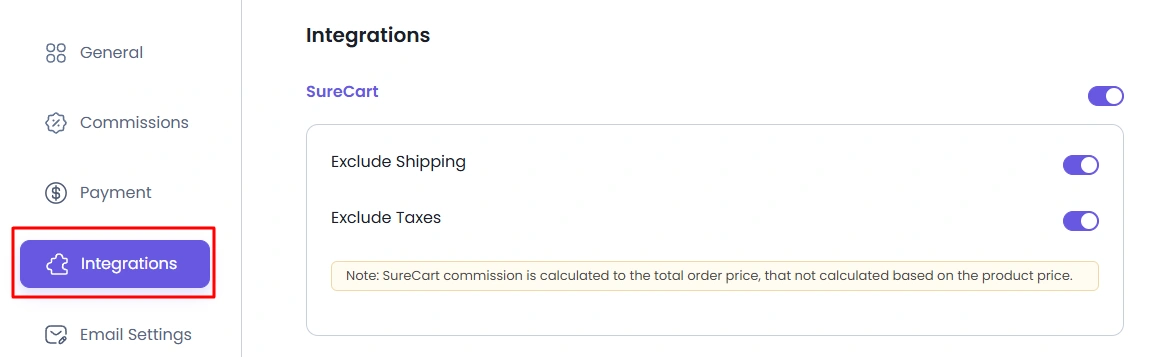
Exclude Shipping
Shipping charges are excluded from the order total before affiliate commissions are calculated.
For example, if an order contains:
- Product Total: $100
- Shipping: $15
The commission is calculated using $100 instead of $115.
Exclude Taxes
Taxes are excluded from the order total when affiliate commissions are calculated.
For example, if an order contains:
- Product Total: $100
- Tax: $18
The commission is calculated using $100 instead of $118.
Note: SureCart calculates affiliate commissions using the total order amount, not individual product prices. If a customer purchases multiple products in a single order, the commission is calculated from the final order total after applying your commission settings.
Important Notes: SureCart does not provide product level AffiliatePress settings inside the plugin. After the integration is activated, AffiliatePress automatically tracks SureCart orders and generates commissions based on your configured commission rules.
Because commission tracking is handled at the order level, there are no additional AffiliatePress settings to configure within individual SureCart products.
How SureCart Commission Tracking Works
After turning on the SureCart integration:
- A visitor clicks an affiliate link.
- The visitor places an order through your SureCart store.
- SureCart processes the order.
- AffiliatePress attributes the order to the referring affiliate.
- A commission is created according to your commission settings.
- The commission amount is calculated from the final order total, taking your shipping and tax settings into account.