



Lifetime Commission Addon
The Lifetime Commission Addon allows you to link a referred customer to an affiliate so they can earn commission on every future purchase. This gives you greater control over affiliate relationships by overriding the default/global commission rules.
In this guide, we’ll show you how to install and set up the Lifetime Commission Addon in AffiliatePress.
Install and Activate the Lifetime Commission Addon
Before using the Lifetime Commission Addon, make sure AffiliatePress is installed and your license is activated.
Once you’re ready, install and activate the Lifetime Commission Addon to reward affiliates with lifetime commissions from customers they refer.
Accessing Lifetime Commissions Settings
- Go to the AffiliatePress → Settings → Commissions Tab
- Scroll down to till you find the Lifetime Commission Settings
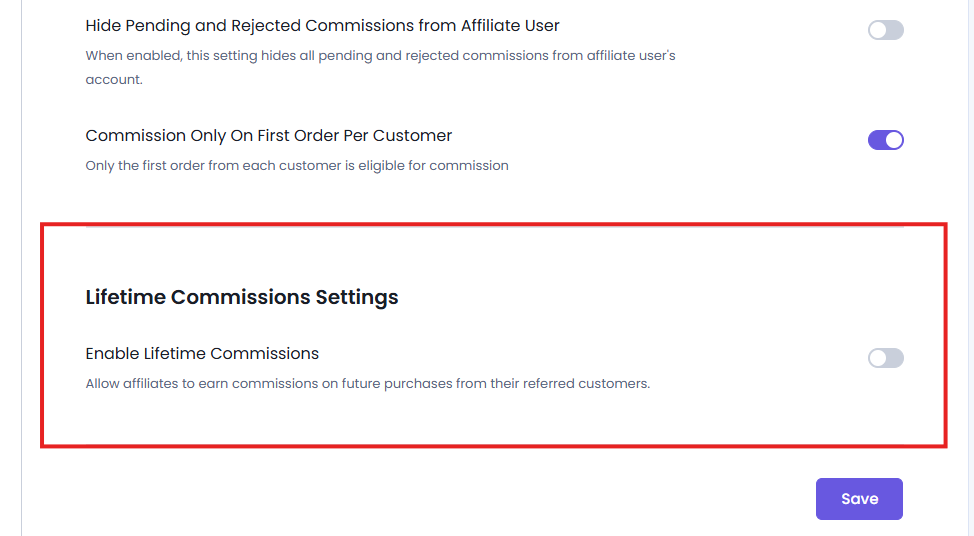
- Toggle on the “Enable Lifetime Commissions” to access all of its settings
Configure the Lifetime Commissions
After enabling Lifetime Commissions settings from AffiliatePress→ Settings →Commissions, you can control how lifetime commissions are applied across your affiliate program.
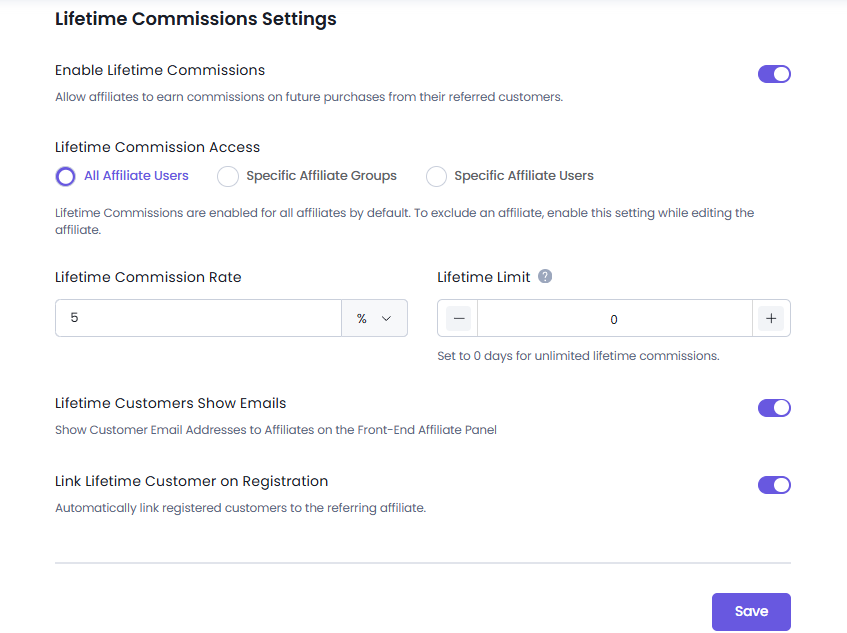
Lifetime Commission Access
By default, Lifetime Commissions are enabled for all affiliates. This means every eligible affiliate can continue earning commissions from customers they have referred for the configured lifetime period.
However, if you want to, you can also set it for specific affiliate groups and specific affiliate users. To apply it, simply enable this setting while editing the affiliate user/affiliate group.
Lifetime Commission Rate
Set the commission rate that affiliates will earn from future purchases made by their linked customers. This rate applies to lifetime commissions and can be set as you like to match your affiliate strategy.
For example if you set the Lifetime Commission Rate to 5%, affiliates will earn a 5% commission on eligible purchases made by customers linked with their account during the active lifetime period.
Lifetime Limit
The Lifetime Limit decides how long an affiliate is eligible to receive commissions from their referred customers.
Enter the number of days you want the lifetime relationship to remain active. During this period, every eligible purchase made by the linked customer generates a commission for the referring affiliate.
If you set the value to 0, the lifetime commission never expires which allows affiliates to earn commissions from that customer indefinitely.
Examples:
- 30 → Affiliate earns commissions for 30 days after the customer is linked.
- 365 → Affiliate earns commissions for one year.
- 0 → Unlimited lifetime commissions.
Lifetime Customers Show Emails
This setting allows you to control whether affiliates can see the email addresses of their linked customers in the Affiliate Panel.
Simply enable it if you want to show the email addresses of linked customers in the affiliate’s front end panel. And when it’s disabled, the email addresses are hidden from affiliates.
The Lifetime Customers section is still available, but the Email Address column is not shown.
This setting only affects what affiliates can see in the Affiliate Panel, and does not affect the customer information or settings available to administrators in the AffiliatePress dashboard.
Link Lifetime Customer on Registration
Enable this setting to automatically associate newly registered customers with the referring affiliate.
When a visitor registers after clicking an affiliate referral link, AffiliatePress automatically creates the lifetime customer relationship.
Thus any future eligible purchases made by that customer during the configured lifetime period will be credited to the same affiliate. This automation option makes sure the attribution is always accurate while lowering your manual management of customer affiliate relationships.
Managing Affiliate Lifetime Customers
After the Lifetime Commissions are configured and customers are linked to affiliates, you and your affiliates can easily view and manage these customer relationships.
Managing Lifetime Customers From Admin Panel
- Go to AffiliatePress → Affiliates page.
- Hover over the affiliate whose lifetime customers you want to view
- Click the “Lifetime Customers” icon.
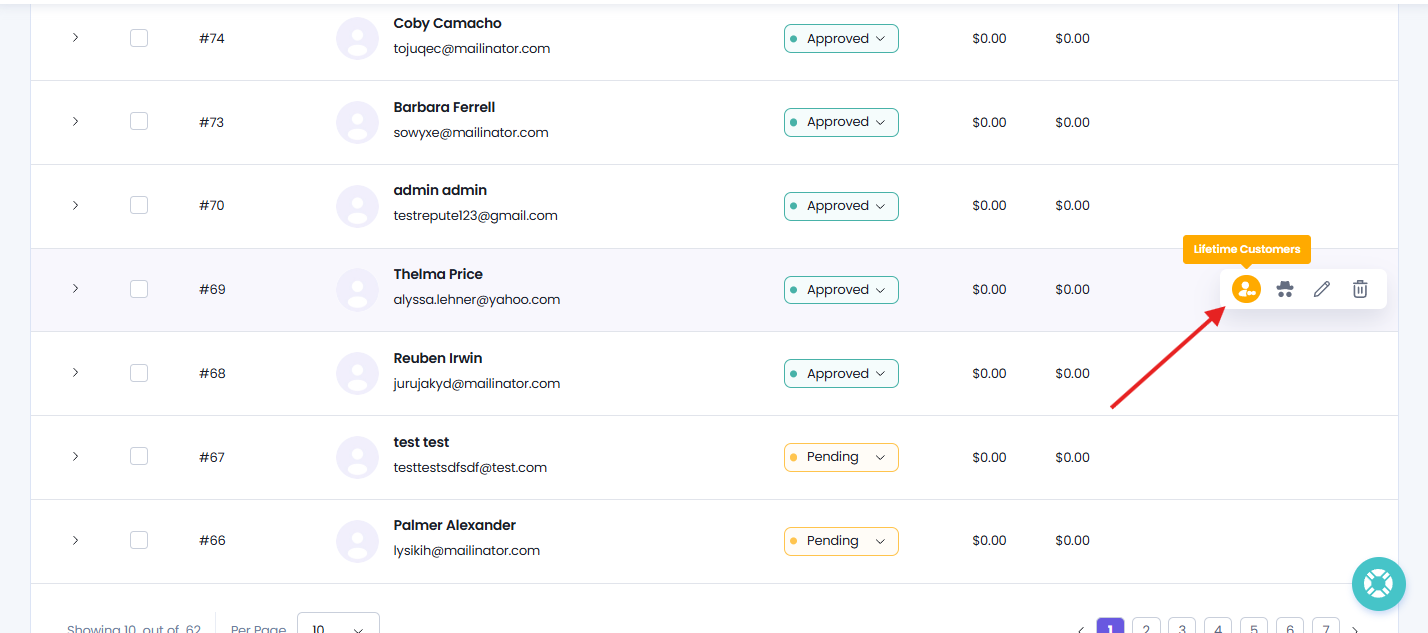
A side panel opens from the right, showing all customers linked to that affiliate. This Lifetime Customers panel shows all the information for each customer, including:
- Email Address
- Status (Linked, Unlinked, Expired)
- Linked Date
You can also see each’s username and full name by simply clicking on that email.
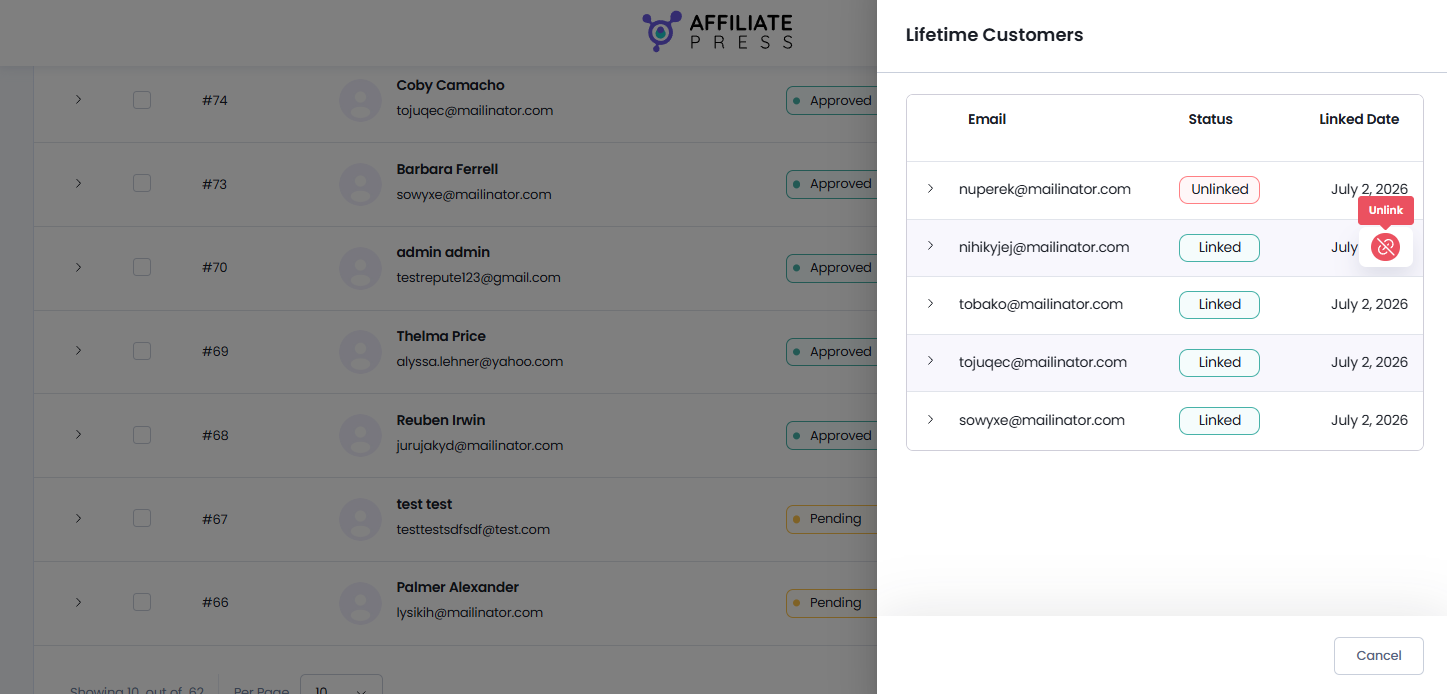
If needed, click the “Unlink” button next to each customer to remove the lifetime relationship. After a customer is unlinked, future eligible purchases from that customer will no longer generate lifetime commissions for the affiliate.
View Lifetime Customers in the Affiliate Panel
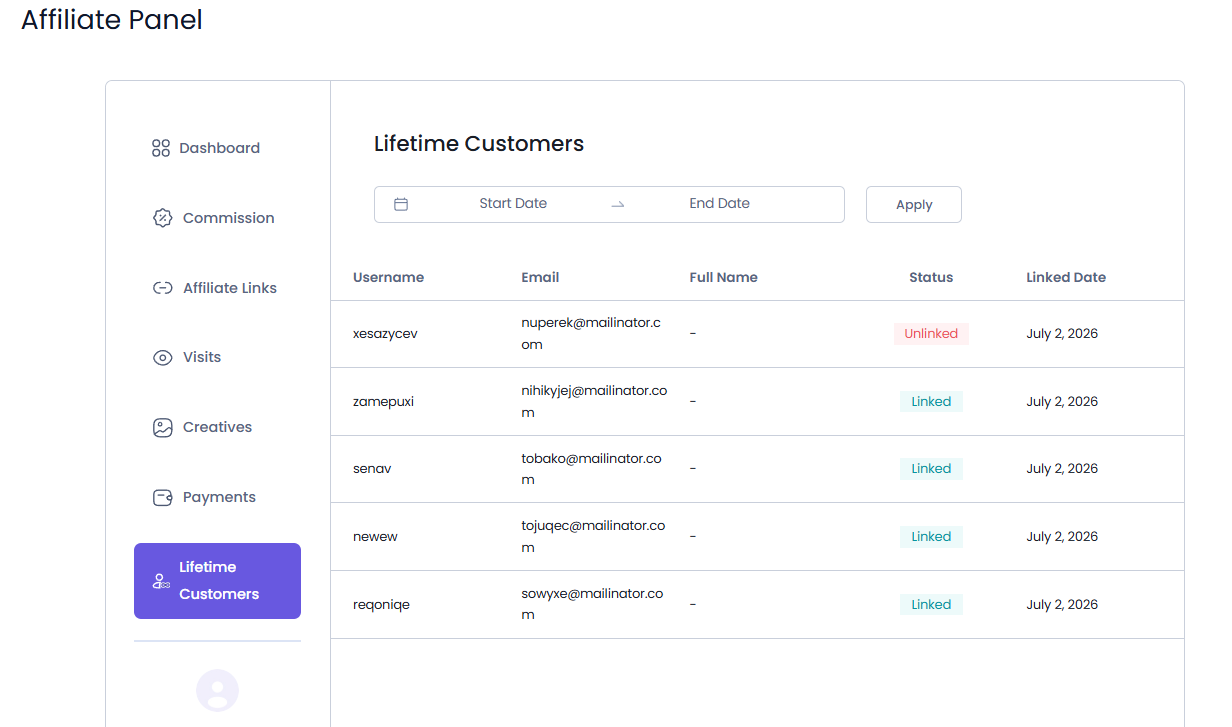
Affiliates can see the details of the customers linked to their account. Details such as:
- Username
- Email Address (If Lifetime Customers Show Emails option is enabled)
- Full Name
- Status (Linked, Unlinked, Expired)
- Linked Date
When Lifetime Customers Show Emails is disabled, the Email Address column is hidden from the Affiliate Panel. This setting only affects the information shown to affiliates and does not affect any other customer info or settings in the AffiliatePress admin dashboard.
The Lifetime Customers tab gives affiliates better visibility into their long term referrals and helps them understand which customers are linked to their account and may contribute to their lifetime commissions.
Note: Lifetime Commission has the highest priority and overrides all other commission rules, including Default, Group, Tiered, Affiliate-specific, and Product-specific commission rates.
Modify Affiliate Panel Labels
You can customize the labels related to Lifetime Customers from AffiliatePress → Settings → Label → Lifetime Labels.
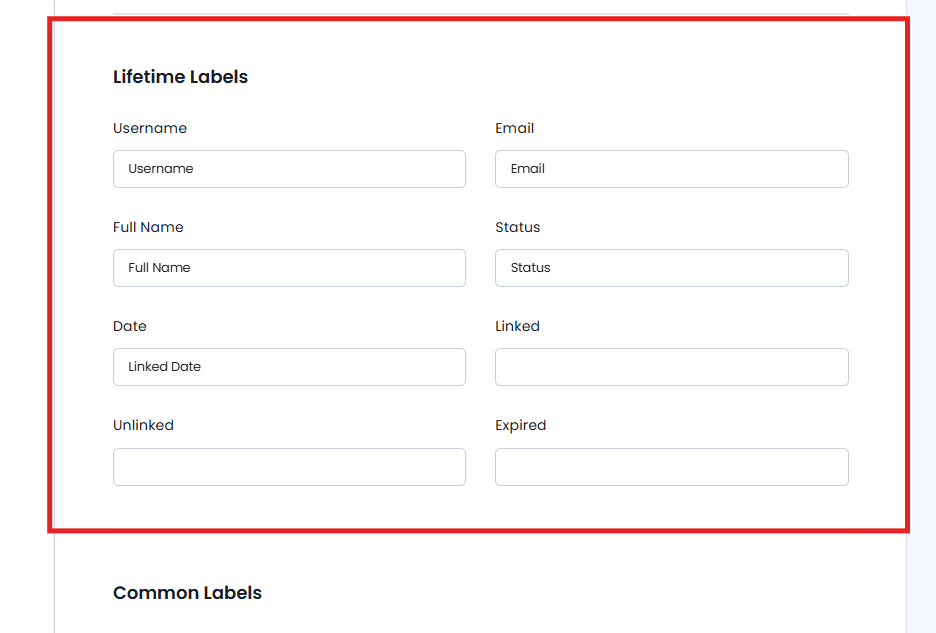
The Lifetime Labels section allows you to customize the labels shown for Lifetime Customers in the Affiliate Panel.
Remember, these customized labels are shown only in the Affiliate Panel. They do not change the corresponding labels or terminology in the AffiliatePress admin dashboard.
You can customize:
- Lifetime Customers: The menu label for Lifetime Customers.
- Username: The label for the customer’s username.
- Email: The label for the customer’s email address.
- Full Name: The label for the customer’s full name.
- Status: The label for the customer’s status.
- Date: The label for the linked date.
- Linked: The status label for a linked customer.
- Unlinked: The status label for an unlinked customer.
- Expired: The status label for an expired customer.
This gives you the flexibility to use terminology that fits your affiliate program and website.
How Lifetime Commission Works with Other Addons
Recurring Commission Addon
When both the Lifetime Commission and Recurring Commission add-ons are activated, the Lifetime Commission rate is applied to the customer’s first qualifying purchase only – never for the next sale.
Recurring renewal payments continue to use the commission rate configured in the Recurring Commission addon. Moreover, the Lifetime Commission rate is never applied to renewal commissions.
For more details regarding Recurring Commission Addon, click here.
Signup Bonus Addon
Whenever a new affiliate account is created, the Signup Bonus Addon awards the configured signup bonus. But, creating an affiliate account does not automatically create a lifetime customer relationship.
A lifetime customer is created only when a customer registers or makes a qualifying purchase via the affiliate’s referral link.
Thus in this case, the affiliate gets the signup bonus and the customer is linked as a Lifetime Customer.
For more details regarding Signup Bonus Addon, click here.
Tiered Affiliate Rates Addon
When both the Lifetime Commission and Tiered Affiliate Rates add-ons are activated, AffiliatePress automatically decides which commission rule to apply.
For standard referrals, the affiliate gets the commission rate based on their current tier. But yet, if the purchase is made by a linked lifetime customer, the Lifetime Commission rate takes priority and is applied instead.
For more details regarding Tiered Affiliate Rates Addon, click here.