Recurring Commissions Addon
AffiliatePress makes it easy to reward affiliates for long term customer relationships with the Recurring Commissions Addon. Thus you can continue rewarding affiliates whenever eligible subscription payments are renewed.
In this guide, we’ll show you how to install and configure Recurring Commission addon.
How Recurring Commission Tracking Works
Recurring commissions lets your affiliates earn commissions on all (or limited number of ) future subscription renewals.
You just have to make sure the Recurring Commissions Addon is set. Then, AffiliatePress automatically tracks every eligible recurring payment and generates commissions based on your recurring commission settings.
The first purchase always uses your default commission settings. Every successful renewal after that uses the recurring commission rate you’ve set until the recurrence limit is reached.
Let’s say:
- Initial Commission Rate: 20%
- Recurring Commission Rate: 10%
- Recurrence Limit: 3 Renewals
Here’s how it works:
- A visitor clicks an affiliate link and purchases a subscription.
- AffiliatePress generates a 20% commission for the first purchase.
- When the customer’s subscription renews for the first time, AffiliatePress generates a 10% recurring commission.
- The same 10% recurring commission is generated for the second and third successful renewals.
- After the third renewal, no additional recurring commissions are generated because the recurrence limit has been reached.
Note: If the Recurrence Limit is set to Unlimited, AffiliatePress continues generating recurring commissions for every successful renewal without any limit.
Important: If recurring commission settings are configured at the affiliate, group, or product level, AffiliatePress uses those settings instead of the default recurring commission settings when calculating recurring commissions.
Install & Activate the Recurring Commissions Addon
Before using the Recurring Commissions Addon, make sure AffiliatePress is installed and activated on your WordPress website.
After that, you can install and activate the Recurring Commissions Addon. Once set, you can configure recurring commission rules for your affiliate program and automatically reward affiliates for subscription renewals.
Configure Recurring Commission Settings
After activating the Recurring Commissions Addon, click Configure to open the recurring commission settings. Or else, you can juts:
- Go to AffiliatePress → Settings → Commissions tab.
- Scroll down to the Recurring Commission Settings section.
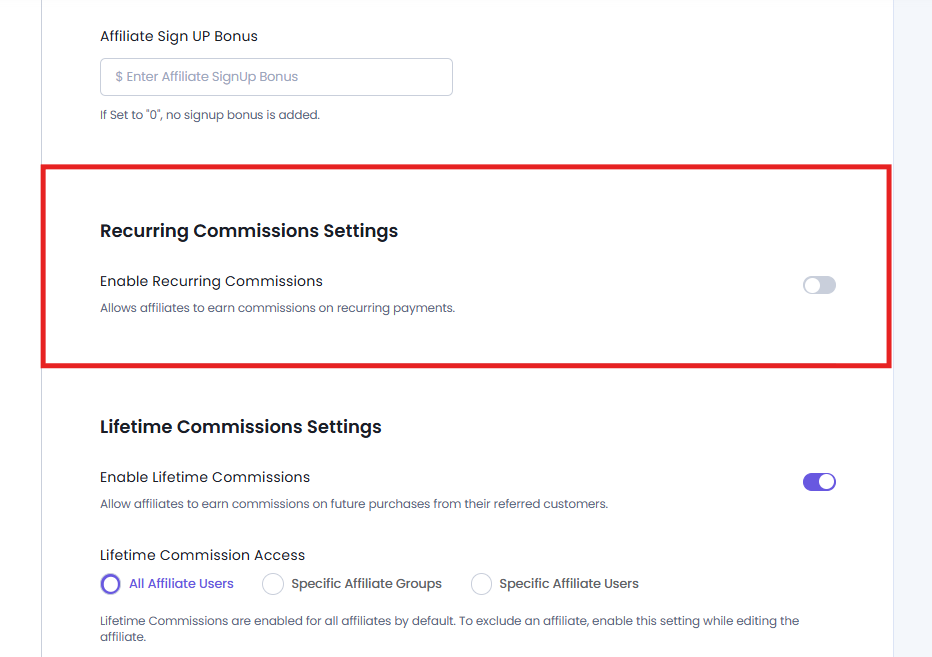
Now, simply toggle on the Enable Recurring Commissions option to allow affiliates to earn commissions on recurring subscription renewals in addition to the first purchase.
Once enabled, AffiliatePress will show you the following options:
Recurring Commission Rate
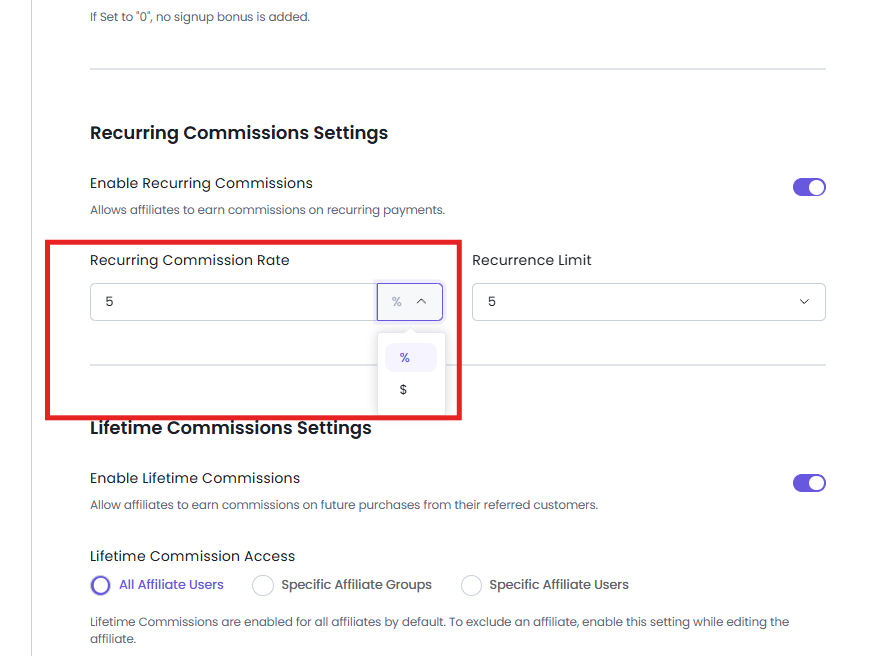
This setting decides how much commission affiliates earn on each successful subscription renewal.
You can enter the recurring commission as either:
- A percentage (e.g 20%)
- A fixed amount (e.g $15)
This recurring commission rate applies to every eligible renewal payment until the recurrence limit is reached.
For example, let’s say the Recurring Commission Rate is 20% and the Subscription plan is $100/month. In this scenario, the affiliate will earn $20 for each successful monthly renewal.
Recurrence Limit
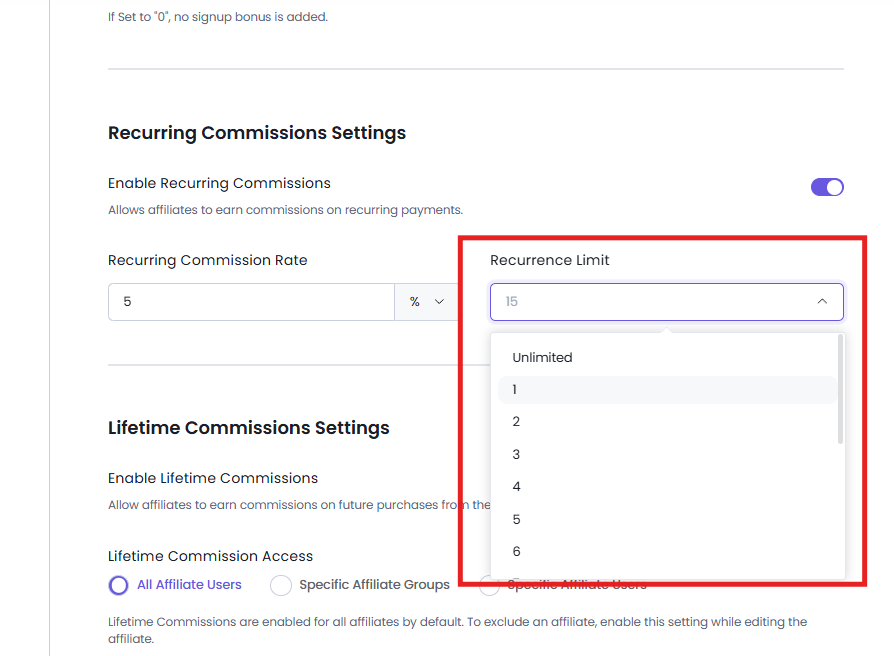
The Recurrence Limit allows you to set how many recurring payments will generate commissions for an affiliate.
You can select:
- A specific number (in-between 1 to 15)
- Unlimited (To generate commissions for every successful renewal)
Let’s understand these both recurrence different with a quick example:
Suppose your Recurring Commission Rate is 20% and the Recurrence Limit is set to 5. Now if a customer renews their subscription every month, the affiliate receives commissions for only the first five renewal payments.
However, if the Recurring Commission Rate is 20%, and the Recurrence Limit is Unlimited, then the affiliate continues earning recurring commissions for every successful subscription renewal until the subscription ends from the customer’s side.
Note: Recurring commissions generated from supported integrations are automatically recorded in AffiliatePress → Commissions. From there, you can view, verify, and manage every recurring commission just like any other commission in AffiliatePress. For more details, click here.
Group-level Recurring Commission Settings
AffiliatePress allows you to set recurring commission rules for specific affiliate groups as well. These settings override the default recurring commission settings for all affiliates assigned to that group.
For configuring group-level recurring commissions:
1. Go to AffiliatePress → Groups.
2. Add a new group or edit an existing one.
3. Toggle On Recurring Commission Rate settings.
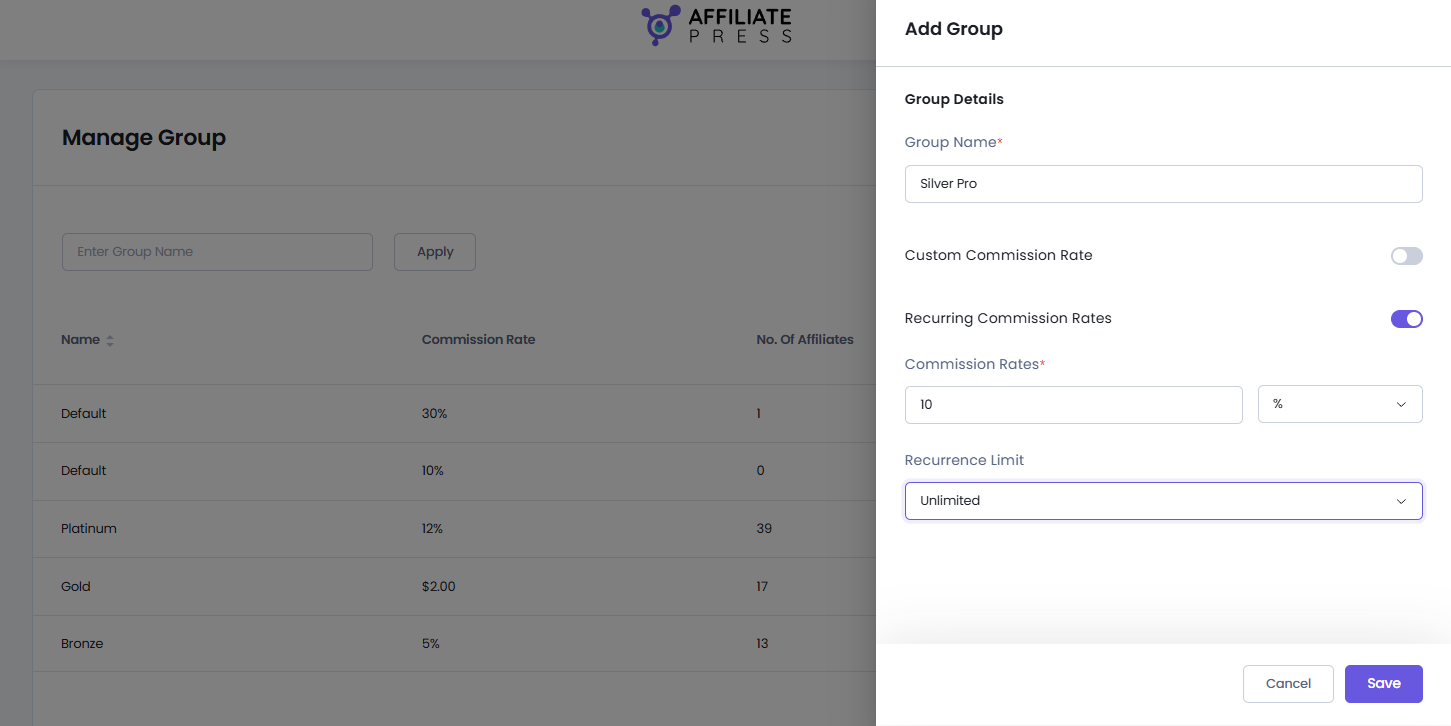
4. Now set the recurring settings:
- Commission Rate alongside % or $
- Recurrence Limit
5. Save your changes.
Once configured, every affiliate in that group will get recurring commissions based on the group’s settings unless an affiliate-specific recurring commission is set which will override this.
Let’s say, for example:
| Setting | Value |
| Default Recurring Commission Rate | 20% |
| Group Recurring Commission Rate | 30% |
| Recurrence Limit | Unlimited |
If an affiliate belongs to this group, they get a 30% recurring commission on every eligible renewal rather than the default 20%.
Affiliate-level Recurring Commission Settings
AffiliatePress also allows you to set recurring commission settings for each specific affiliate. These settings have the highest priority and override both the default and group-level recurring commission settings.
For configuring affiliate-level recurring commissions:
1. Go to AffiliatePress → Affiliates.
2. Add a new affiliate or edit an existing one.
3. Now Toggle on the Individual Recurring Commission Rate.
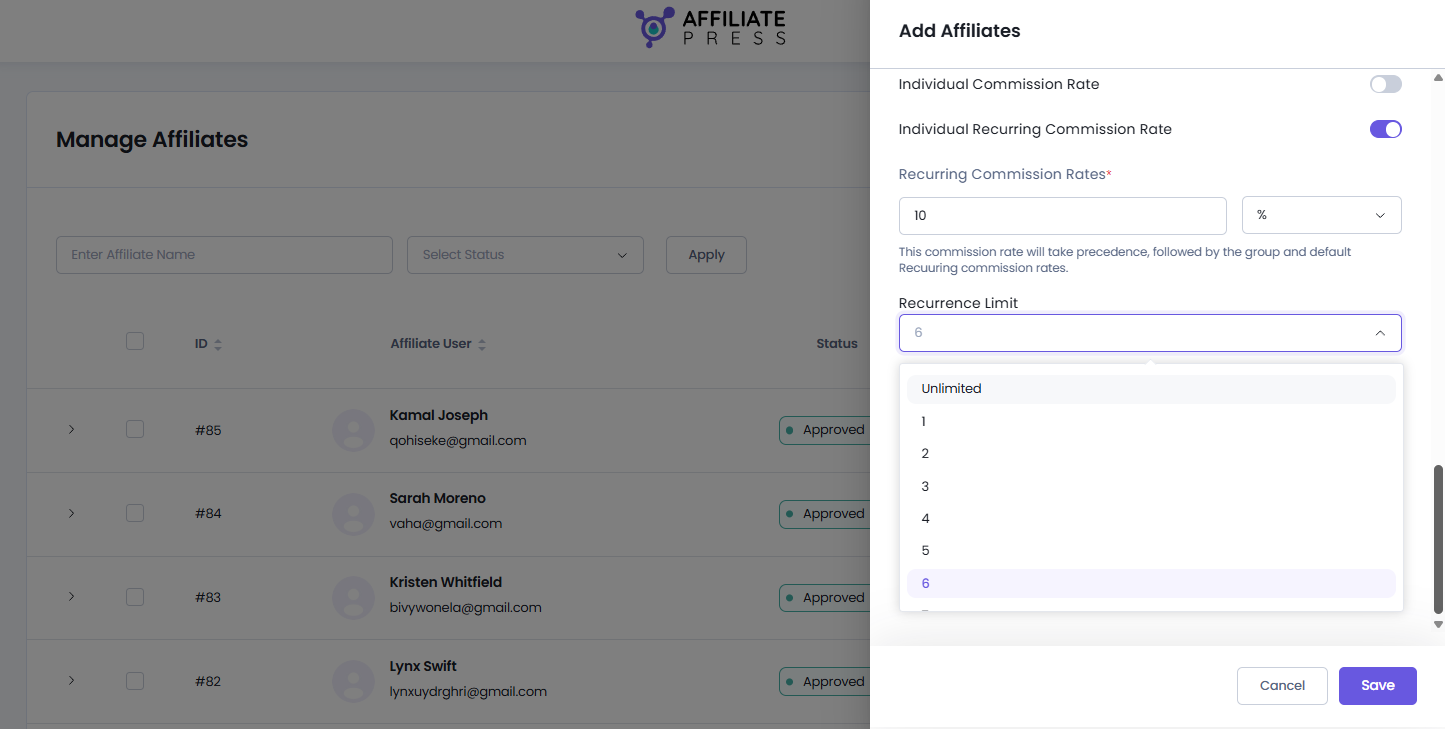
4. Now set the recurring settings:
- Commission Rate alongside % or $
- Recurrence Limit
5. Save your changes.
Once configured, AffiliatePress always uses the affiliate’s recurring commission settings whenever recurring commissions are generated.
Let’s say, for example
| Setting | Value |
| Default Recurring Commission Rate | 20% |
| Group Recurring Commission Rate | 30% |
| Affiliate Recurring Commission Rate | 40% |
| Recurrence Limit | Unlimited |
In this case, the affiliate receives a 40% recurring commission for every eligible renewal because affiliate-level settings take priority over both group and default settings.
Product-wise Commission Add-on Support
You can also set product-specific recurring commission rates in AffiliatePress.
To do that, just install and activate the Product-wise Commission Addon. After activation, you can set recurring commission rates for individual subscription products supported by compatible integrations.
When a recurring commission rate is configured for a product, AffiliatePress uses that rate for every eligible renewal of that product.
Note: Product-wise recurring commission settings will always override the default, Group, and Affiliate-specific commission.
For detailed setup instructions and more information, click here.
Recurring Commission Priority
When AffiliatePress generates a recurring commission, it checks all the available recurring commission settings in the proper order.
- Product-wise recurring commission.
- Affiliate-level recurring commission.
- Group-level recurring commission.
- Default recurring commission.
This makes sure the most specific recurring commission settings are always used.
Example
Let’s say you have set the following recurring commission rates:
| Level | Recurring Commission Rate |
| Default | 20% |
| Group | 30% |
| Affiliate | 40% |
| Product | 50% |
If the purchased subscription product has a 50% recurring commission configured, AffiliatePress applies 50%, even though affiliate, group, and default recurring commission rates are also available.
If no product specific recurring commission exists, AffiliatePress checks the affiliate settings next, followed by the group settings, and at last, finally uses the default recurring commission settings.
Supported Integrations
The Recurring Commissions Addon supports recurring commission tracking for the following integrations:
- ARMember
- MemberPress
- Paid Memberships Pro
- Paid Member Subscriptions
- Restrict Content Pro
- GetPaid
- Easy Digital Downloads (with the supported recurring payments extension)
- WooCommerce (with the supported subscriptions extension)
Note: For WooCommerce and Easy Digital Downloads, make sure their subscription/recurring payments extensions are installed and activated before using recurring commissions.