



Tiered Commission Rate Addon
Want to reward your top performing affiliates with higher commission rates? The AffiliatePress Tiered Commission Rate Addon allows you to dynamically increase affiliate commission rates based on their approved or paid commission status.
Configured once, and your affiliates can stay motivated always to generate more sales while allowing you to reward performance without manually updating commission rates.
In this guide, we’ll see how to install and set up the Tiered Commission Rate addon.

How Tiered Commission Rates Work
Tiered commission structures dynamically increase the affiliate’s commission percentage as they reach specific performance milestones. The number of sales or performance completely depends on your configuration.
Note: Tier calculations are based on commissions with an Approved or Paid status which you can set from the AffiliatePress Commission.
Affiliates can qualify for higher commission rates based on either the number of approved or paid sales they generate or the total approved or paid commission order amount.
For instance, you can create a tiered-based commission structure like this.
| Performance Threshold | Commission Rate |
| Up to 10 approved sales. | 5% |
| Up to 20 approved sales. | 10% |
| Up to 30 approved sales. | 15% |
Here, an affiliate starts by earning a 5% commission. They continue earning a 5% commission until they complete 10 approved or paid sales. Starting from the 11th approved or paid sale, AffiliatePress automatically applies the 10% commission rate to future referrals until the next threshold is reached.
Likewise, after the affiliate completes 20 qualifying sales, the 15% commission rate is automatically applied starting from the 21st qualifying sale. As affiliates continue to reach higher performance thresholds, AffiliatePress automatically applies the next commission rate based on your configured tier structure.
Note: Higher commission rates apply only to future referrals after a threshold is exceeded. Previously approved referrals keep their original commission rate.
Install and Activate the Tiered Commission Rate Addon
Before using the Tiered Commission Addon, make sure AffiliatePress is installed and your license is activated.
Next, install and activate the Tiered Commission Rate Addon to automatically reward affiliates with higher commission rates as they reach performance milestones.
Configure the Tiered Affiliate Rates
After activating Tiered Commission Rate Addon, you can click on “Configure”. Or else, you can:
- Go to the AffiliatePress → Settings → Commissions Tab
- Scroll down to till you find the Tiered Affiliate Rates section
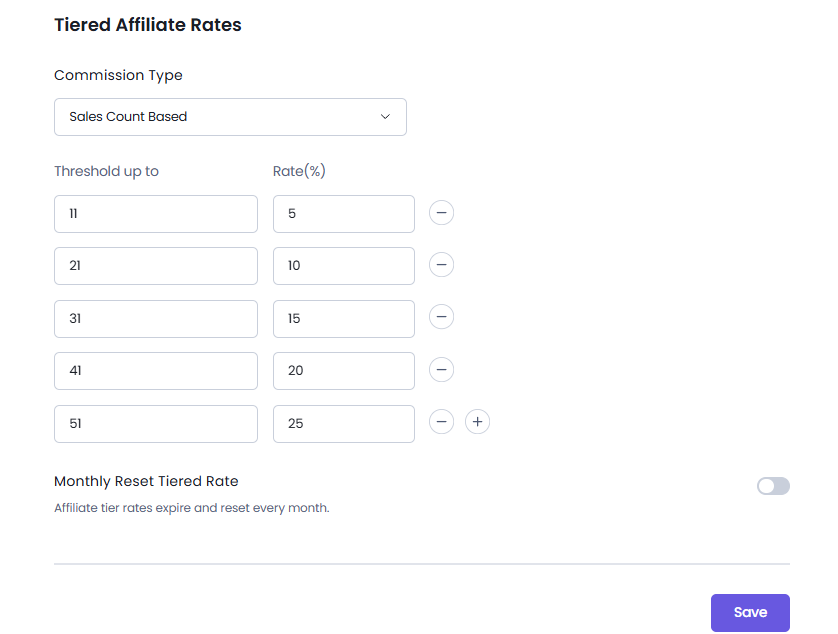
From here you can create your tiered-based commission structure.
Commission Type
You can choose between two methods available to calculate the tiered affiliate rate:
1. Sales Count Based
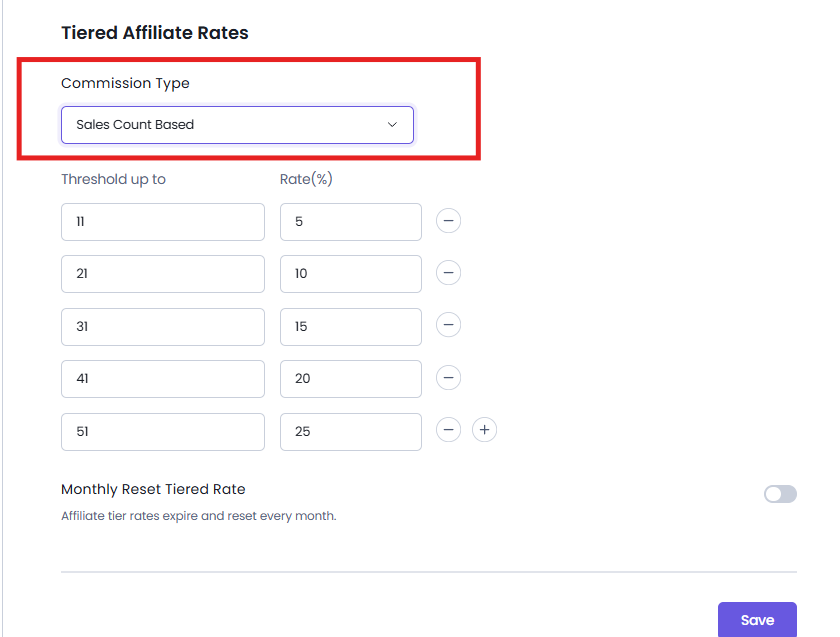
The affiliate’s commission rate increases based on the number of approved or paid sales. Each threshold determines how many approved or paid sales an affiliate must generate before qualifying for the next commission rate.
For example:
| Threshold up to (Approved Sales) | Commission Rate |
| Up to 2 sales | 10% |
| Up to 4 sales | 20% |
| Up to 6 sales | 30% |
Now here’s how it works:
- Sales 1 and 2 earn 10% commission.
- Starting from the 3rd approved sale, AffiliatePress applies the 20% commission rate.
- Starting from the 5th approved sale, AffiliatePress applies the 30% commission rate.
2. Sales Amount Based
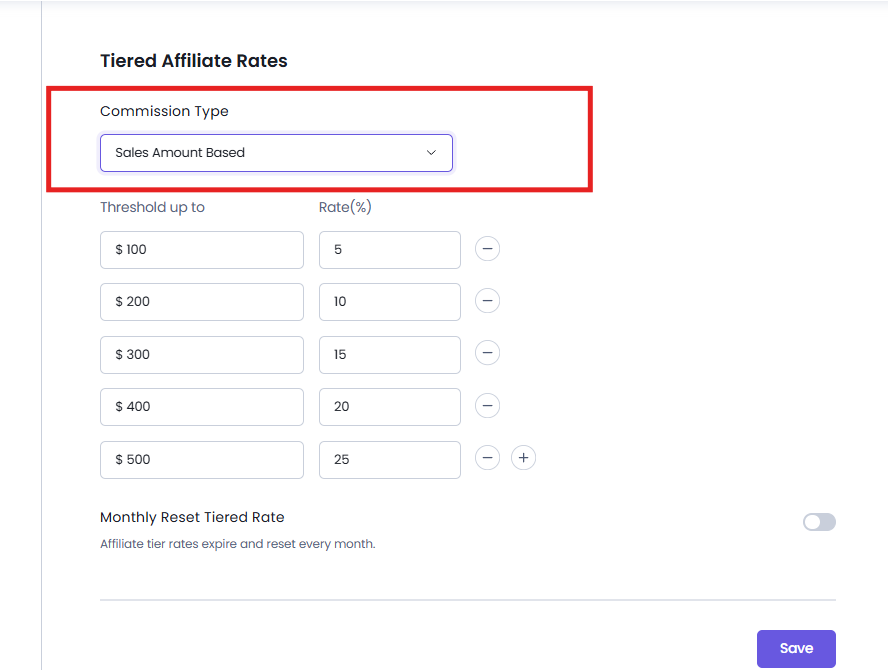
The affiliate’s commission rate increases based on the total approved or paid commission order amount. Each threshold determines how much commission order amount an affiliate must accumulate before qualifying for a higher commission rate.
For example:
| Threshold up to (Approved Sales Amount) | Commission Rate |
| Up to $100 | 15% |
| Up to $250 | 25% |
| Up to $500 | 35% |
Now here’s how it works.
Affiliates earn a 15% commission until their total approved and paid commission order amount reaches $100. Starting with the referral that pushes their total approved and paid commission order amount above $100, AffiliatePress automatically applies the 25% commission rate to future referrals until the next threshold is reached.
Tier Configuration
Click on the Add New right after selecting your Commission Type.
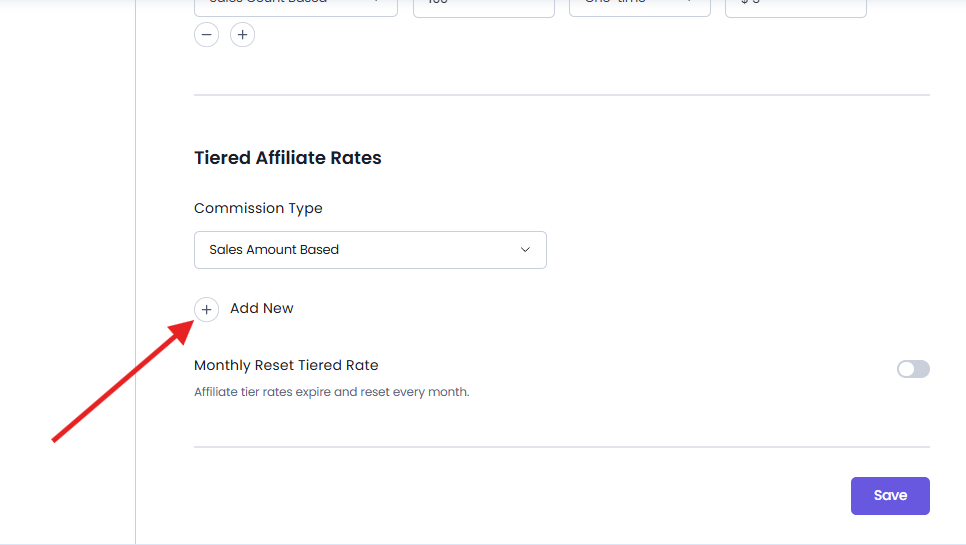
This will allow you to make a Tier Configuration table that lets you set the performance milestones needed for affiliates to unlock higher commission rates.
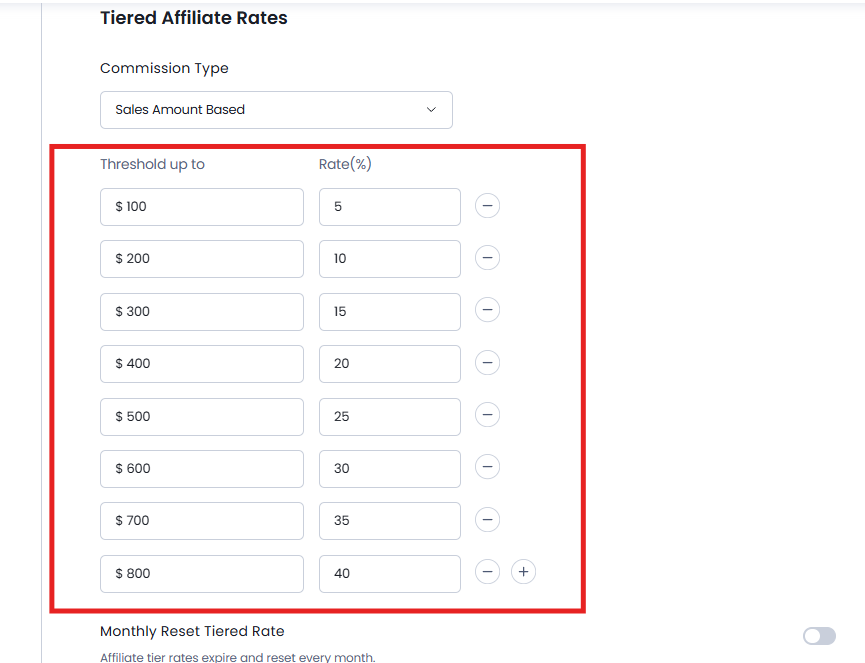
Each tier record has two values:
Threshold
The performance target an affiliate must reach. Based on the selected Commission Type, this represents either the number of approved sales or the total approved sales amount.
Commission Rate
No matter the Commission Type, this will be the same. This is the commission percentage that will be applied once the affiliate reaches that tier.
You can add as many tiers as needed to create a tiered commission structure that matches your affiliate program by simply clicking on the + icon next to each tier row. As for removing a record, simply click on – icon.
Monthly Reset Tiered Rate
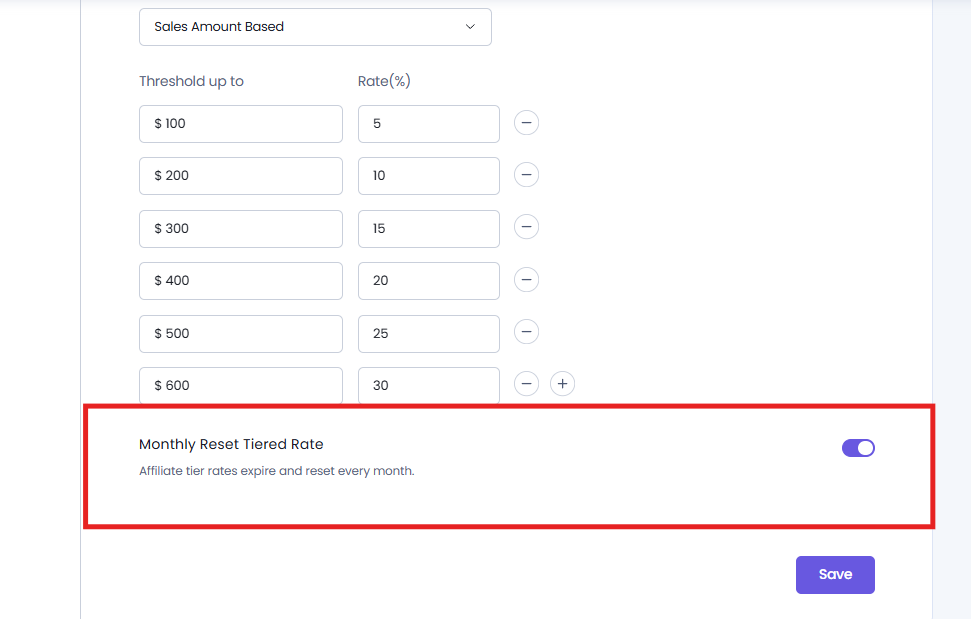
The Monthly Reset Tiered Rate option decides whether affiliate tier progress resets at the beginning of each calendar month.
When toggled on, affiliates must qualify for higher commission tiers again every month by meeting the preset sales count or sales amount thresholds. This is useful for running monthly affiliate contests, seasonal promotions or recurring performance-based incentive programs.
If disabled, affiliate progress will not be reset. So after affiliates reach a higher commission tier, they can simply continue progressing through the configured tiers without restarting their progress each month.
View Tiered Commission Rates in the Affiliate Panel
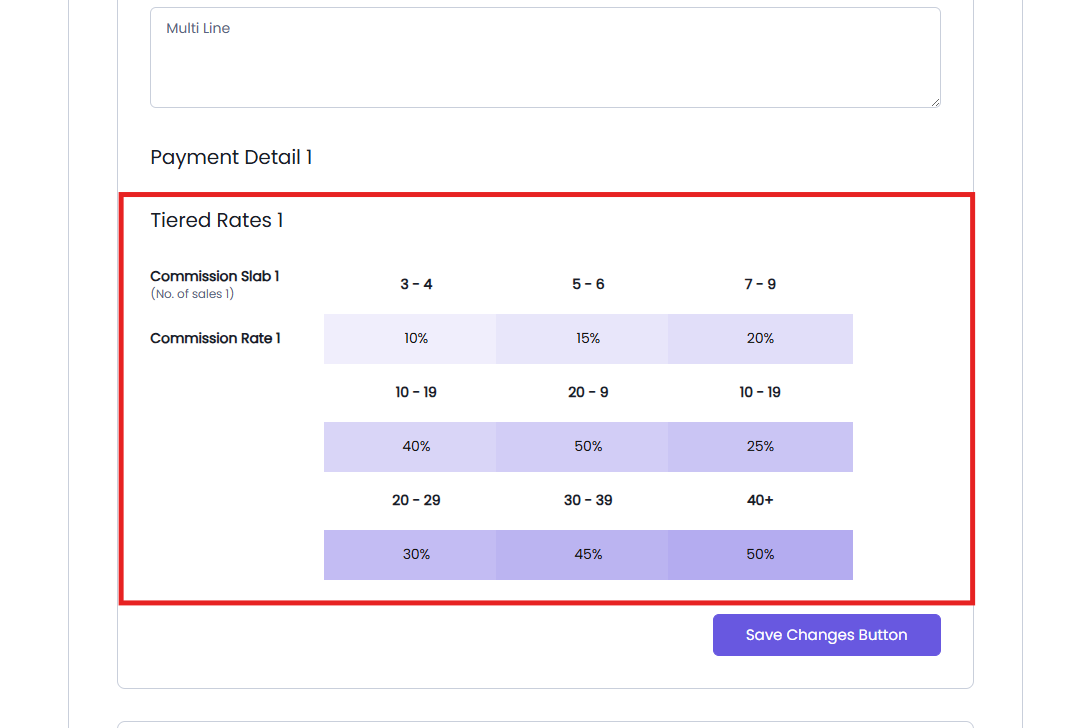
Affiliates can view their current tier structure right from their Affiliate Panel. Just head over to the Edit Profile page, scroll till you see the Tiered Rates section.
This section shows all the configured commissions in slabs so affiliates can quickly understand the structure at a glance.
Now based on whether you set Sales Amount Based or Sales Count Based, affiliates can see sales or earning milestones needed to unlock higher commission rates. This gives affiliates a clear view of their commission structure and encourages them to achieve the next performance milestone to earn higher commissions.
Modify Affiliate Panel Labels
You can customize the labels related to Tiered Commission Rates from AffiliatePress → Settings → Label → Tiered Affiliate Rates Labels.
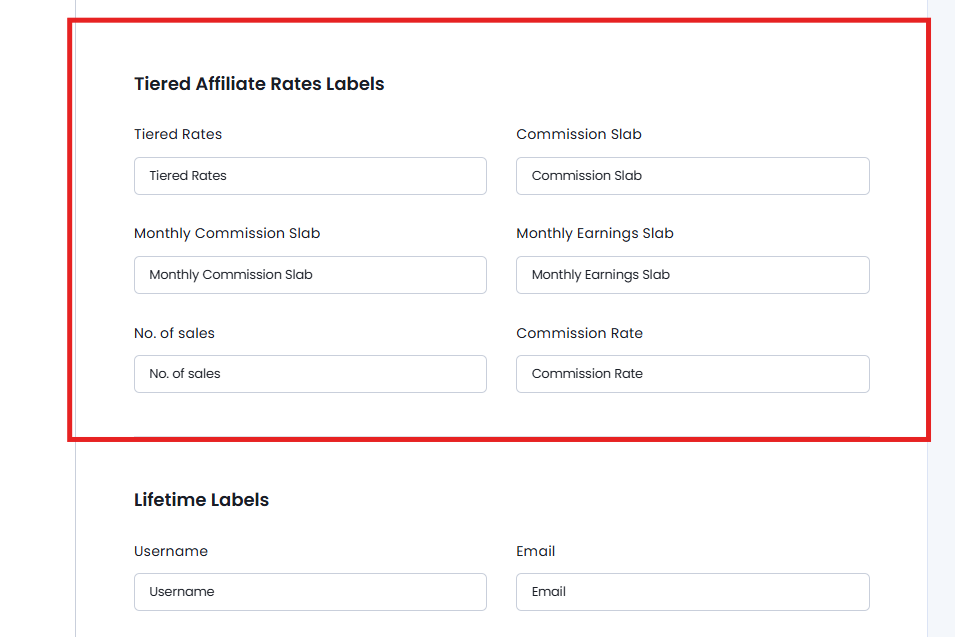
The Tiered Affiliate Rates Labels section allows you to customize the labels shown for tiered commission rates in the Affiliate Panel.
Remember, these customized labels are shown only in the Affiliate Panel. Thus they do not change the corresponding labels or terminology in the AffiliatePress admin dashboard.
From here, you can easily customize:
- Tiered Rates: The label for the tiered rates section.
- Commission Slab: The label used for commission slabs.
- Monthly Commission Slab: The label used for monthly commission slabs.
- Monthly Earnings Slab: The label used for monthly earnings slabs.
- No. of Sales: The label used to show the required number of sales.
- Commission Rate: The label used for the commission rate.
This gives you the flexibility to use terminology that fits your affiliate program and website.