



Download Manager Integration
AffiliatePress integrates with Download Manager to automatically track generate commissions whenever customers purchase downloadable products from your website.
Sell software, eBooks, PDFs, templates, digital assets, or other downloadable files, then attribute completed purchases to the affiliate who referred the customer using AffiliatePress.
Here we’ll show you how to integrate Download Manager with AffiliatePress.
Before You Begin
Before setting up the integration, make sure you have the following installed and activated:
- WordPress with administrator access
- Download Manager with the Premium Packages add-on
- AffiliatePress
Set Up Download Manager Integration
To turn on the Download Manager integration:
- Head over to AffiliatePress → Settings → Integrations.
- Scroll down until you find the Download Manager integration.
- Toggle on the integration and save your changes.
After turning on the integration, the following commission setting becomes available.
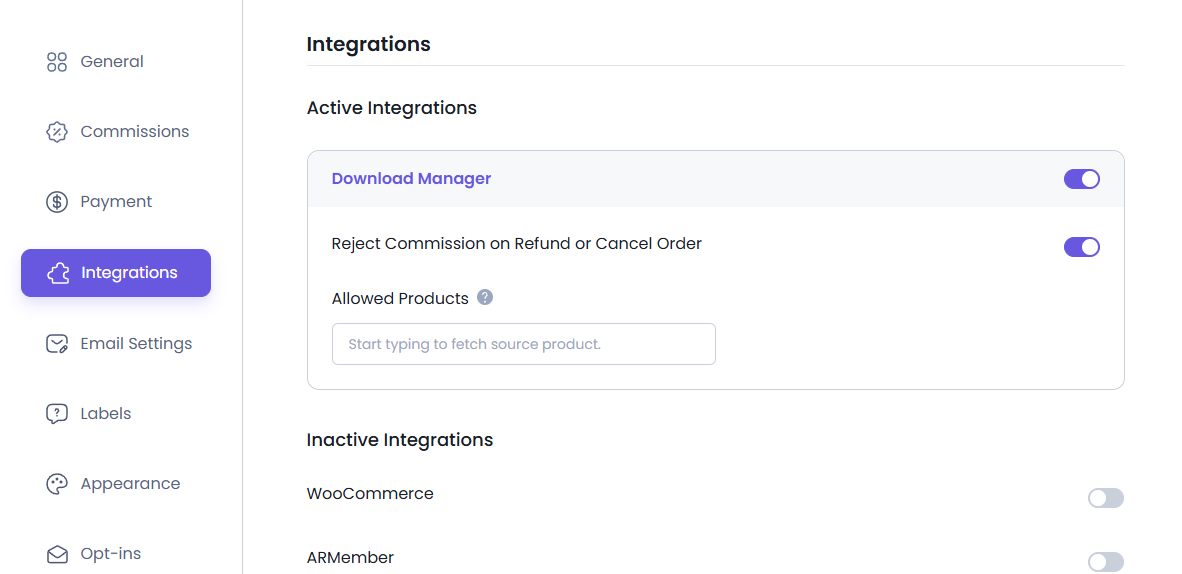
Reject Commission on Refunded or Cancelled Orders
Sometimes an order doesn’t end as expected. A customer may request a refund after purchasing a download or cancel the order before it is completed.
Turning on this setting automatically rejects any unpaid commission associated with those orders. This ensures commissions are generated only for completed purchases.
Note: This option only affects commissions that have not yet been paid.
Disable Commissions for Individual Downloads
If you don’t want a particular download to generate affiliate commissions, you can disable commissions for that download without affecting your other products. What’s more, AffiliatePress by default generates commissions for every downloadable product created in the Download Manager.
For example, you may want to exclude free downloads, promotional files, or internal resources from your affiliate program.
To do this:
- Head over to Downloads → All Files.
- Open the download you want to edit.
- Scroll down to the AffiliatePress section.
- Turn on the Disable Commissions option.
- Save your changes.
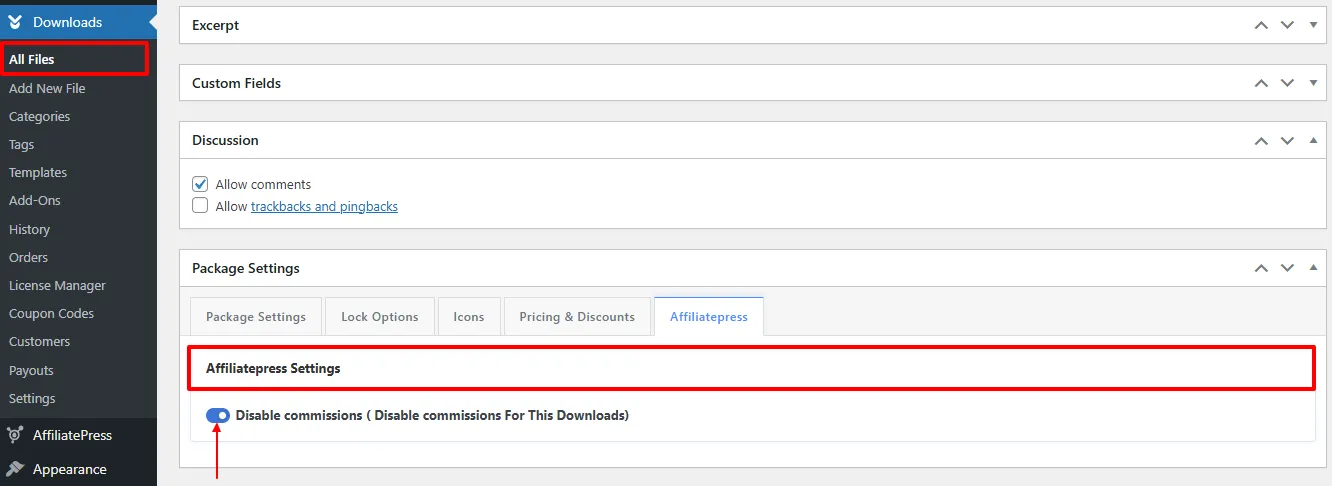
Note: AffiliatePress settings are available only when using the Premium Packages add-on for Download Manager.
Product-wise Commission Add-on Support
AffiliatePress allows you to set different commission rates for individual downloadable products.
To use this feature, you must install and activate the AffiliatePress Product-wise Commission Rate Add-on. Once activated, you can assign custom commission rates to specific downloadable products while keeping your default commission settings for other downloadable products.
For example:
| Download | Commission |
| WordPress Theme | 20% |
| Website Template | 15% |
| Premium Plugin | 30% |
| Free eBook | Default Rate |
Download-specific commission rates always override:
- Default commission
- Group commission
- Affiliate-specific commission
Downloads without a custom commission rate continue using the default commission settings.
For detailed setup instructions and more information, click here.
Product Selection Add-on
AffiliatePress allows you to control which downloadable products are eligible for affiliate commissions.
To use this feature, you must install and activate the AffiliatePress Product Selection Addon. Once activated,you can select specific downloadable products that should generate affiliate commissions. Products that are not selected will not generate commissions.
After installing the add-on:
- Go to the Download Manager integration settings.
- Choose the products under Allowed Products.
- Save your settings.
For detailed setup instructions and more information, click here.
How Download Manager Commission Tracking Works
After turning on the Download Manager integration:
- A visitor clicks an affiliate link.
- The visitor purchases a downloadable product.
- The Download Manager processes the order.
- AffiliatePress attributes the purchase to the referring affiliate.
- A commission is created based on your commission settings.
- If the order is refunded or cancelled, the commission may be automatically rejected depending on your settings.