



Performance Bonus Addon
Want to reward affiliates with bonus payouts when they achieve specific performance goals? The AffiliatePress Performance Bonus Addon allows you to reward affiliates with extra bonus whenever they hit the targeted performance.
In this guide, we’ll show you how to install, configure, and manage the Performance Bonus Addon.

Install and Activate the Performance Bonus Addon
Before using the Performance Bonus Addon, make sure AffiliatePress is installed and your license is activated.
After that, you must install and activate the Performance Bonus Addon to automatically reward affiliates with bonus payouts when they reach the performance milestones.
Configure the Performance Bonuses Settings
After activating the Performance Bonus Addon, click on the Configure. Or alternatively, you can simply:
1. Go to AffiliatePress → Settings → Commissions.
2. Scroll down to the Performance Bonus Settings section.
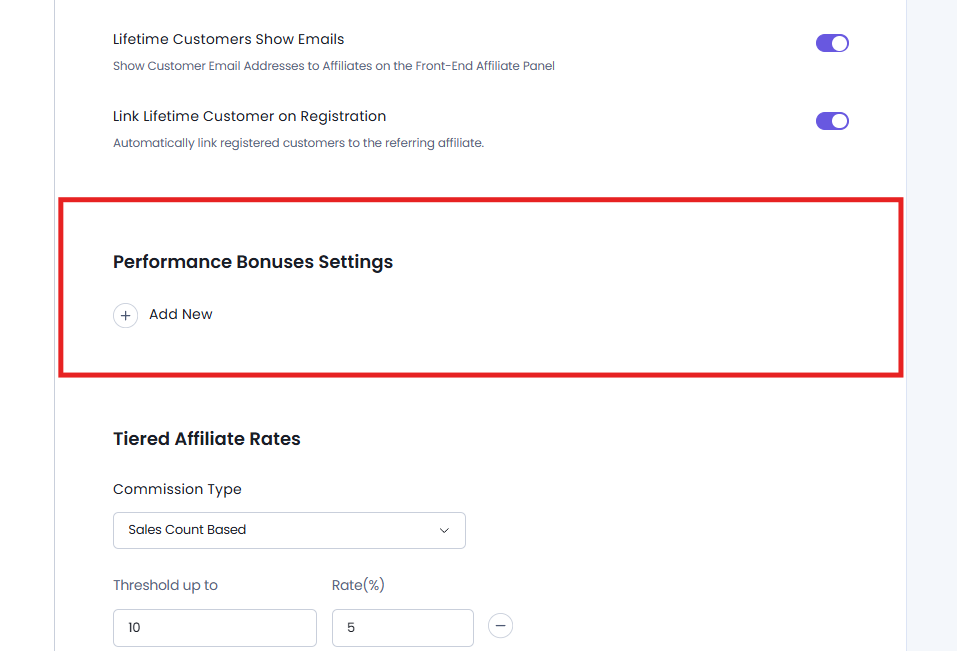
3. Click Add New to create a new performance bonus rule.
Next from here, you can set performance based bonus rewards using:
- Bonus Type
- Target
- Recurrence
- Bonus Amount
You can also add more than one
Bonus Type
There are two metrics to define what counts as “performance” here.
Sales Count Based
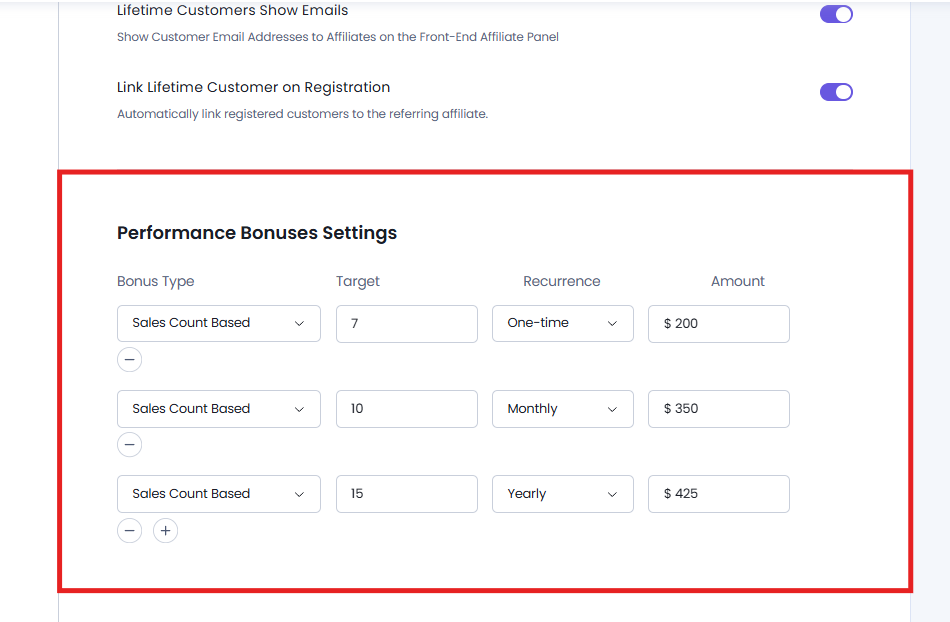
This lets you reward affiliates based on how many approved referred orders they bring in.
If you choose the Sale Count Based bonus type, you have to set the target number of approved referred orders. After which, the system will start tracking the affiliate’s progress. The bonus amount will only be awarded when the amount of referred orders is fully approved by the admin.
Note: The sales count will be counted on the product amount and not as per the number of sales made.
For example,
| Setting | Value |
| Bonus Type | Sales Count Based |
| Target | 100 |
| Recurrence | One-Time |
| Bonus Amount | $50 |
* Will discuss the Target, Recurrence and Bonus amount ahead in detail.
Here, in this case: If an affiliate reaches 100 approved referred products, the AffiliatePress system will automatically award the $50 performance bonus.
Sales Amount Based
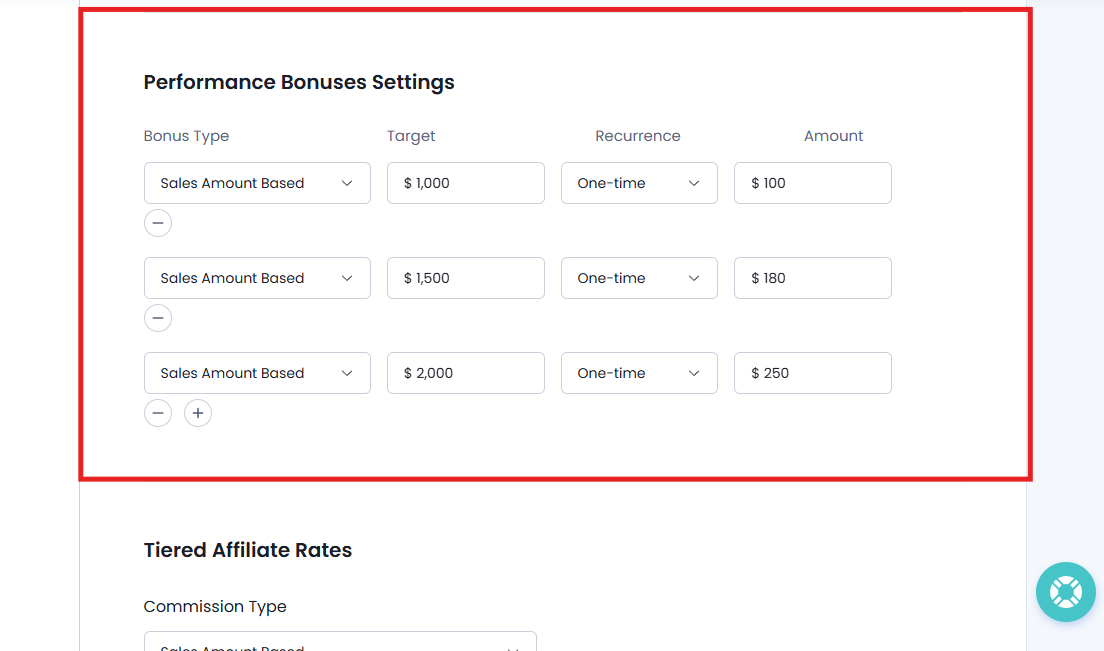
Choose this option to reward affiliates based on the total approved commission amount they earn.
After selecting Sales Amount Based, set the target amount of approved commissions an affiliate must earn. From here on, AffiliatePress will track the affiliate’s approved commission earnings and automatically awards the configured bonus once the target is reached.
For example,
| Setting | Value |
| Bonus Type | Sales Amount Based |
| Target | $1,000 |
| Recurrence | One-Time |
| Bonus Amount | $100 |
* Will discuss the Target, Recurrence and Bonus amount ahead in detail.
Here in this case: Once an affiliate earns $1,000 in approved commissions, AffiliatePress automatically awards the $100 performance bonus.
Target
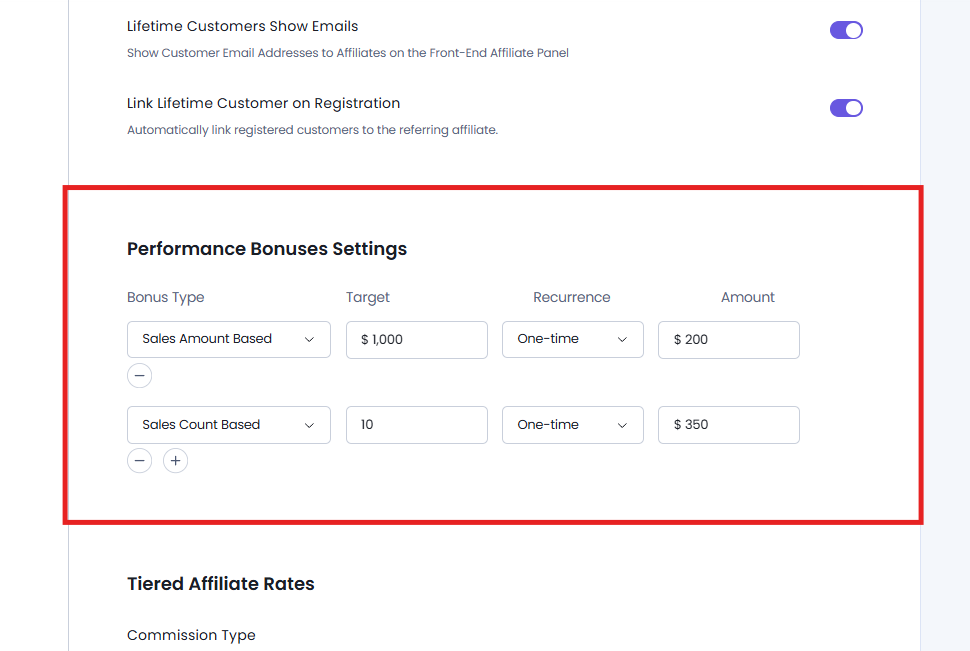
The Target is the performance goal an affiliate must achieve before receiving the bonus.
The target value depends on the selected Bonus Type:
- Sales Count Based: Enter the required number of approved referred products.
- Sales Amount Based: Enter the required approved commission amount.
For example,
| Bonus Type | Target | Bonus Awarded |
| Sales Count Based | 100 | $50 |
| Sales Amount Based | $1,000 | $100 |
Recurrence
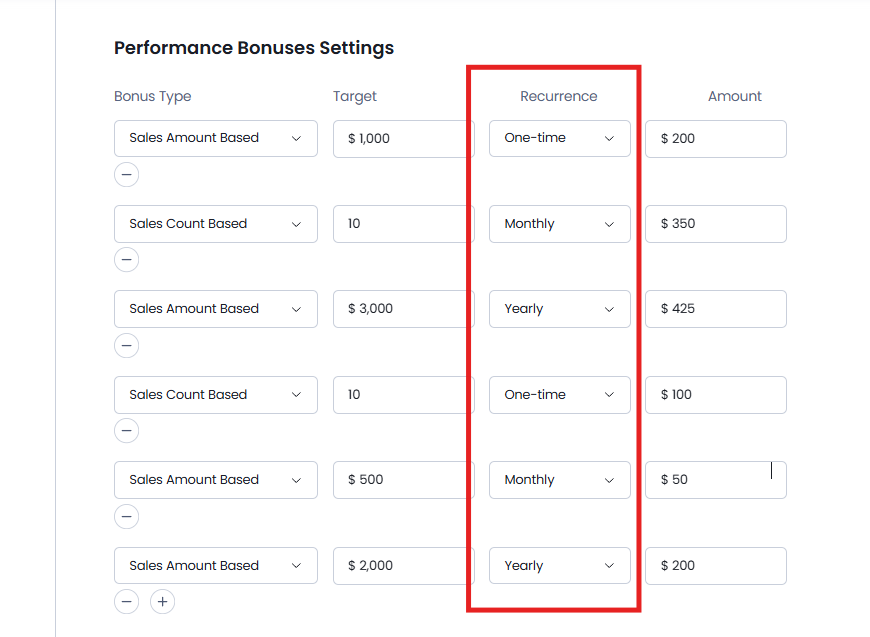
The Recurrence decides how often affiliates can qualify for the same performance bonus.
One-time
The bonus is awarded only once. After an affiliate reaches the target, they cannot earn the same bonus again.
Let’s say an affiliate reaches the target of 100 approved referred products and gets a $50 bonus. Now even if they reach the target again later, no extra bonus is awarded.
Monthly
The target automatically resets at the beginning of every month. Affiliates can earn the same bonus every month by reaching the required target.
Now if the monthly target is $1,000 in approved commissions with a $100 bonus, an affiliate can earn the $100 bonus every month they achieve the target.
Yearly
The target resets once every calendar year. Affiliates can earn the same bonus once per year after reaching the required target.
Suppose if the yearly target is 500 approved referred products with a $500 bonus, affiliates can receive the bonus once each year after reaching that target.
Important: Once a performance bonus rule is created, its recurrence type cannot be changed.
Bonus Amount
The Bonus Amount is the reward affiliates get after meeting the configured performance target.
When configuring the bonus amount:
- Enter numbers only.
- The currency automatically follows your AffiliatePress currency settings.
- The bonus is awarded automatically after the affiliate reaches the configured target.
Let’s say if the Bonus Amount is set to $75, affiliates automatically receive a $75 performance bonus after completing the required performance target.
AffiliatePress lets both administrators and affiliates view performance bonus details from their respective dashboards.
At last, simply Save your performance bonus settings.
Manage Performance Bonus From Admin Panel
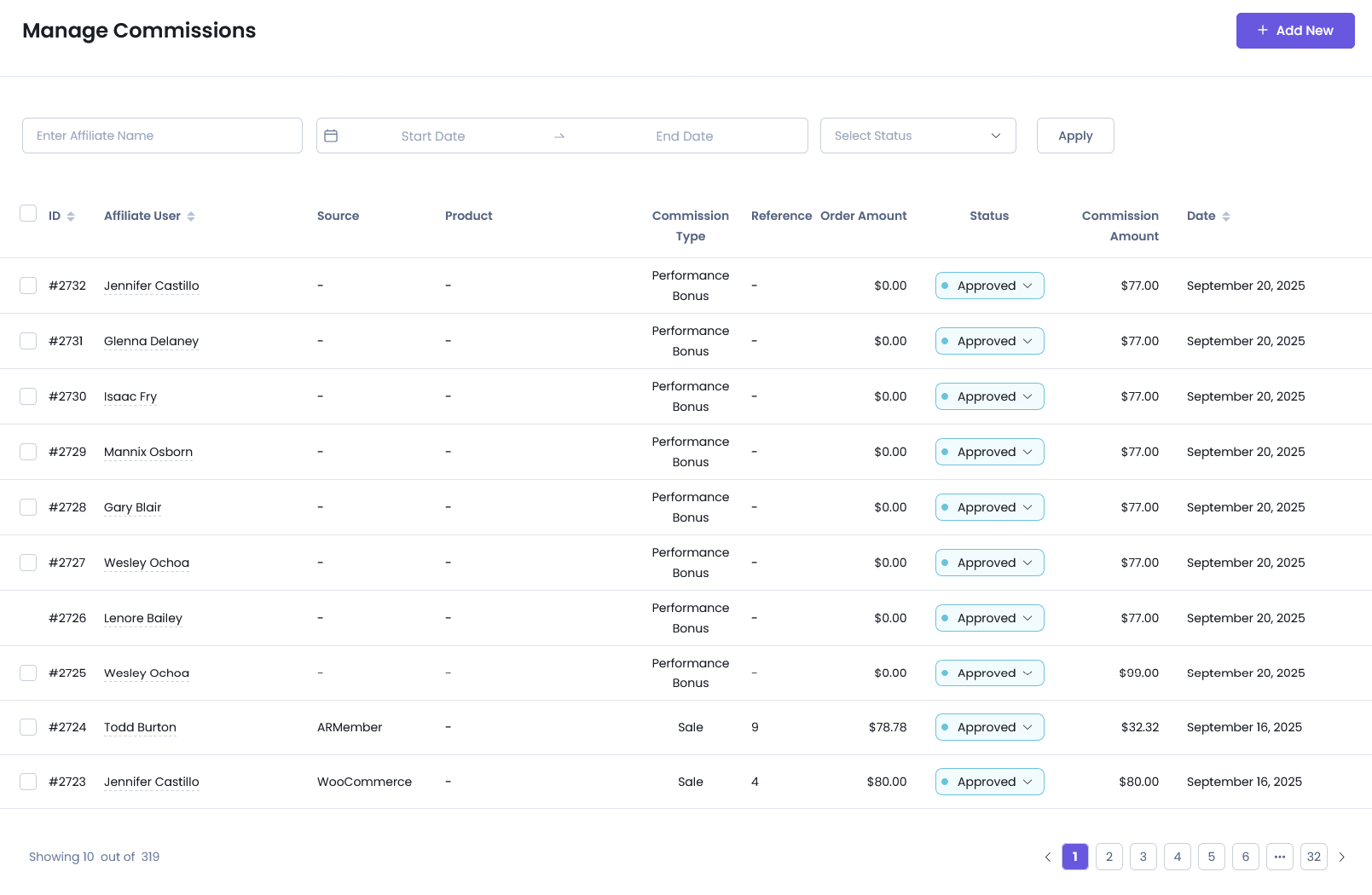
Site administrators can monitor all performance bonuses by going to AffiliatePress → Commissions.
From here, you can:
- View all performance bonus records.
- See which affiliates have earned bonuses.
- Monitor affiliates who are progressing toward their targets.
- Track when each performance bonus was awarded.
For more details, Here’s a quick guide on AffiliatePress Commissions.
Bonuses Affiliate Panel
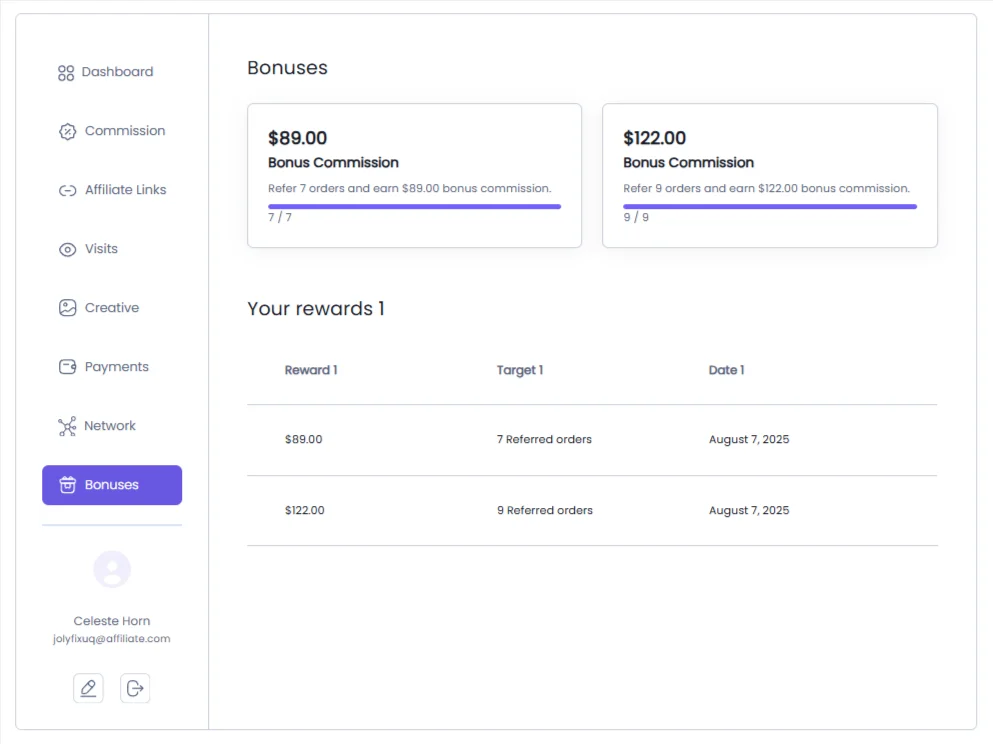
Affiliates can view their own performance bonus progress by going to the Affiliate Panel → Bonuses.
From here, affiliates can:
- View their current progress toward each bonus target.
- See the bonus amount they can earn.
- Check which bonuses have already been awarded.
- Monitor how close they are to unlocking their next performance bonus.
Modify Affiliate Panel Labels
You can customize the labels related to Performance Bonuses from AffiliatePress → Settings → Label → Bonuses.
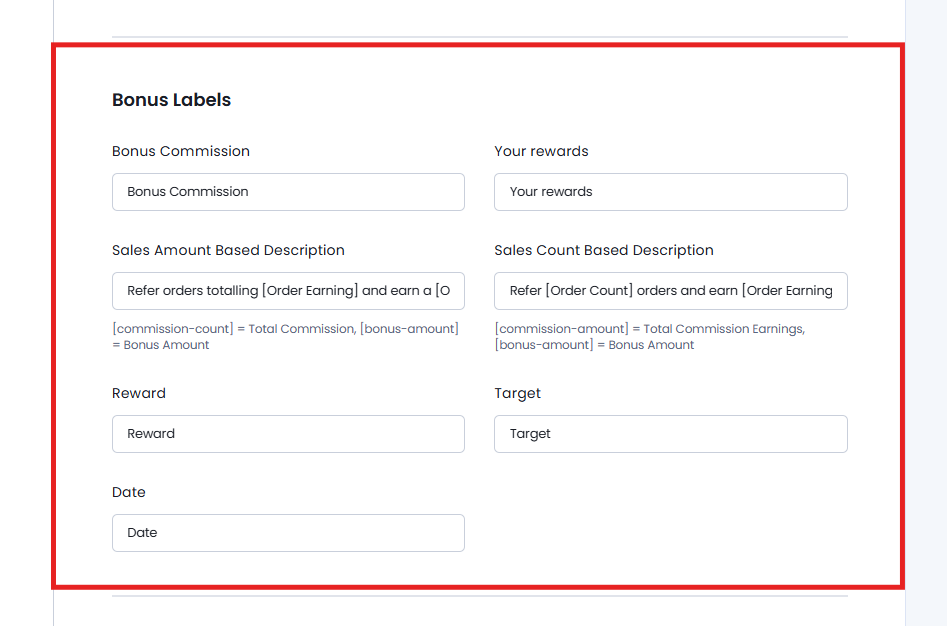
The Bonus Labels section allows you to customize the labels and descriptions shown for performance bonuses in the Affiliate Panel.
Remember, these customized labels are shown only in the Affiliate Panel. They do not change the corresponding labels or terminology in the AffiliatePress admin dashboard.
You can customize:
- Bonus Commission: The label used for the bonus commission.
- Your Rewards: The label used for the rewards section.
- Sales Amount Based Description: The description shown for sales amount-based bonuses.
- Sales Count Based Description: The description shown for sales count-based bonuses.
- Reward: The label used for the bonus reward.
- Target: The label used for the bonus target.
- Date: The label used for the bonus date.
This gives you full flexibility to use terminology that fits your affiliate program and website the best.