What Is Cookie Duration In Affiliate Marketing?


When trying to create an affiliate program for the products you sell, most likely you’ll stumble upon the word cookie quite often. It’s used by websites, browsers, and, of course, in affiliate software like AffiliatePress.
Affiliate tools in particular use cookies for remembering if a site visit was made through a particular affiliate link. But first of all, you may want to understand what cookies are, and what the role of a cookie duration is. For this, we’ve prepared this brief tutorial.
TL;DR: In the context of affiliate marketing, cookies are used to correctly attribute the commission that an affiliate deserves. A cookie duration is for how long this memory exists (in case allowed by a visitor).
What Are Website Cookies In General And When Are They Required?
From a visitor’s perspective, a cookie is simply a small piece of information that a website (like your ecommerce site) saves in their internet browser.
Let’s walk in the visitor’s shoes: imagine that you visit an online store and select English as your language. During the next visit, the site chooses English.
Cookies are helpful online ‘memories’ that help simplify and speed up many things:
- To keep logged-in users logged in.
- Saving items in an online shopping cart.
- Showing the right ads.
Google describes first-party cookies as cookies created by the website you are visiting, while third-party cookies are created by other websites whose content or services are embedded into the page.
Now, what are cookies from the perspective of a website owner (like you)?
Very often, customers don’t buy a product from the moment they land on your site, or even the next day. It might take weeks and even months before a prospect actually pays or makes an order. Website cookies are these exact ‘memories’ between the first landing and the final purchase that help attribute the sale to the right partner.
Almost every modern WordPress website uses some form of browser storage or cookies.
Suppose your website is example.com and you have an affiliate program. An affiliate sends a visitor to: example.com/?ref=marta.
Your affiliate plugin can save a cookie to notify you that “This visitor came through Marta’s affiliate link”.
The visitor can then browse your website, leave it, and potentially return later. For an affiliate system or affiliate plugin, attributing a sale to a specific affiliate ID is super critical.
Affiliate platforms commonly use this mechanism to connect a referral click with a later purchase so that the right person receives the commission.
Cookie Consent
A cookie required for a shopping cart is different from a cookie used to track a marketing referral.
Each has a purpose so we can’t classify them too simply as safe or unsafe.
It might be required for a feature to work – or, on the contrary, it may be legally required/allowed under particular conditions.
For example, your WordPress site may need a cookie to maintain a user’s login session. Without it, the feature may not work properly.
What’s the situation with an affiliate cookie? Your affiliate program may want the cookie because it makes attribution possible, but your cookie is not more legal or required because of that.
And there are rules and countries where cookie-consent requirements are of huge importance.
For example, you most likely need to place a cookie because otherwise your affiliate system simply won’t track commissions and sales. You don’t need that. But you should be aware that some privacy policies make a cookie consent simply required before such an action takes place.
To sum up, your cookie policy and how the consent function should be based on the laws that are applicable to your audience. The main takeaway here is that third-party cookies are not something every browser will accept by default. Google Chrome allows people to manage which cookies they allow, which means they can also block them.
For your affiliate program, it’s important to understand what cookies are used by your software. Those can be first-party cookies on your own domain, third-party cookies, URL parameters, server-side tracking, coupon codes and more. To make it even easier, if you place a cookie on your own WordPress website, it is considered a first-party affiliate cookie. It is technically different from a cookie you set using any external affiliate network.
The Role Of Website Cookies For Affiliate Marketing
When you use an affiliate program with software, there are two websites that matter for tracking:
- The affiliate’s website (for example, a blogger who uses a link to your site with their ID).
- Your store (everything that happens after the visitor clicks on the link and lands on your site).
Quite often the whole journey is like this:
- Affiliate’s website
- Affiliate link with an ID
- Your store
- Tracking cookie/identifier
- Purchase
- Commission attribution.
Overall, your affiliate plugin needs to record the affiliate ID and keep it available until the visitor makes a purchase. A cookie is usually that bridge.
When the order is completed, the work of the plugin is to connect the sale to the right affiliate.
Do you need to ask every blogger to install an affiliate cookie on their website? No! As a store owner, you should check your own site and an affiliate plugin first.
What should you check?
1. Does the affiliate link contain a way to identify the partner? The ref info at the end of the URL. The exact format depends on your affiliate plugin.
2. Does your website save that referral information? Check if your affiliate plugin creates a cookie (or remember the affiliate with another method). The cookie might contain an affiliate ID, click ID, timestamp, etc.
3. What is the cookie duration?
This is the referral window of your program. This is because a purchase can take place much later, and your plugin or your affiliate system should be able to still remember it, thanks to a cookie. For example, in AffiliatePress, you can set a cookie duration (more on this later).
4. Can the plugin connect the cookie/referral ID with the order?
Your affiliate system must be able to match an affiliate ID with visitor’s referral with a completed order. This is very important for an affiliate plugin to assign a commission.
What about the affiliate’s website?
You and your affiliate partners can have different cookies and privacy obligations, but those are separate from the tracking cookie used by your store to attribute the sale.
A blogger may have analytics cookies on their blog, yet these are not for tracking the purchase on your website.
Their affiliate link simply needs to send the visitor to your site with the information your affiliate system needs. But once the visitor is on your site, your affiliate tracking mechanism takes over!
But note that some affiliate networks require extra consent settings from publishers.
Also – don’t confuse tracking with compliance. Can you set or use the tracking cookie without the visitor’s consent?
To find out, check out your cookie laws, the purpose of the tracking, and how your affiliate system is implemented.
Cookie Duration In Affiliate Marketing: How To Succeed?
Strictly speaking, there is no universal number of days for a cookie duration that you can set and succeed. It all depends on your particular store, products, and customer behavior. So that a cookie duration should rely on the time it takes your customer to make a decision to buy.
There can be 7, 30, 60, or 90 days – some affiliate systems may allow you to set up more.
Short Or Long? Cookie Durations For Affiliate Marketing
A short window is typically 7-14 days and is often associated with quick decisions.
A longer window, like 30 days, is for a larger number of products, software, and other situations when it is okay to take time to think. There may be some middle steps like a trial, or a comparison, or something else that give prospects more time to test things out before they decide.
As for a longer cookie duration, up to 90 days, this might seem attractive to many stores that want to have peaceful relationships with their affiliate partners (as well as attract new ones). A longer cookie generally gives affiliates more opportunities to receive credit for their sales! However, in real life it makes more sense for products and software with longer consideration periods, research, testing, or comparisons. If there are a lot of such involved before customers normally buy your product, then it is really smart to have such a long cookie window.
With a 7-day cookie, the blogger may lose the commission. With a 30- or 60-day window, that original referral may still be eligible.
Is there any risk in having such a long cookie duration for a merchant?
Well, the affiliate can receive a credit for a sale even though the customer came back through another channel. Yes – the affiliate ID was at any moment a touchpoint, but it might not have been a real reason.
Your affiliate program’s attribution rules are important here. For example, if another affiliate refers to the customer later, your system may replace the first affiliate with the second one (depending on your software).
So, a very long cookie can increase the number of sales credited to affiliates, but it may not always mean that the affiliate was the last or only reason the customer decided to buy.
Here are a few starting point examples – the but the choice is yours:
| Simple products or low-cost software | 7-14 days |
| Self-service SAAS | 60 days |
| Expensive product, research-heavy software | 90 days |
Cookie duration is not a guarantee that every referral will be tracked properly.
Remember, a visitor may always clear their cookies, use a different browser or device, block tracking, or return through another affiliate link. So, it’s not just about how long the cookie duration for affiliate marketing is.
When you go to configure your affiliate plugin, think of cookie duration as one part of your attribution rules, because it’s not 100% that each sale is tracked.
Cookie Duration In AffiliatePress
If you use AffiliatePress to run your affiliate program, here is what you want to do:
1. You Can Decide On The Cookie Duration
Do that via WordPress → AffiliatePress → Settings → General. There, find ‘Tracking Cookie Days’.
As we explained, if you set it to, say, 30 days, an affiliate can still qualify for a commission during those 30 days.
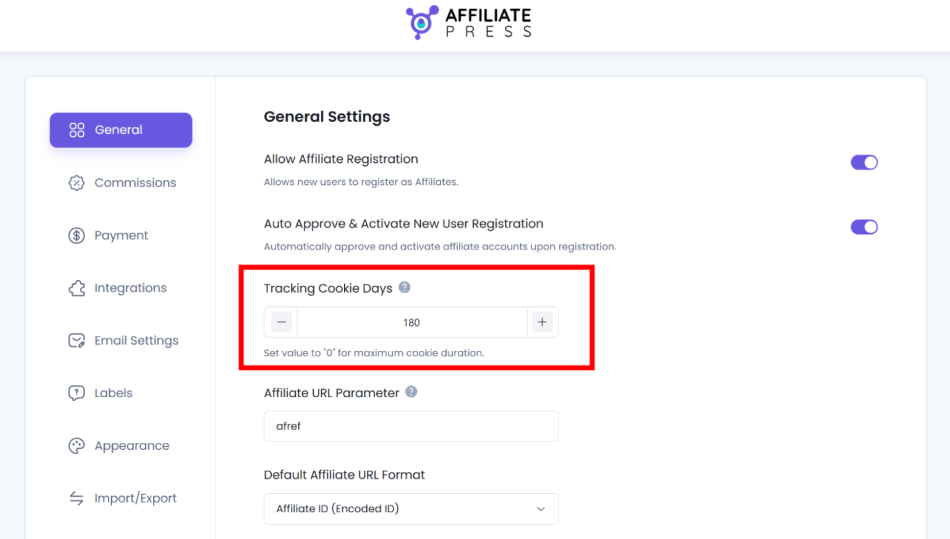
AffiliatePress currently allows a duration of up to 180 days..
2. Check The Tracking Via WordPress → AffiliatePress → Visits.
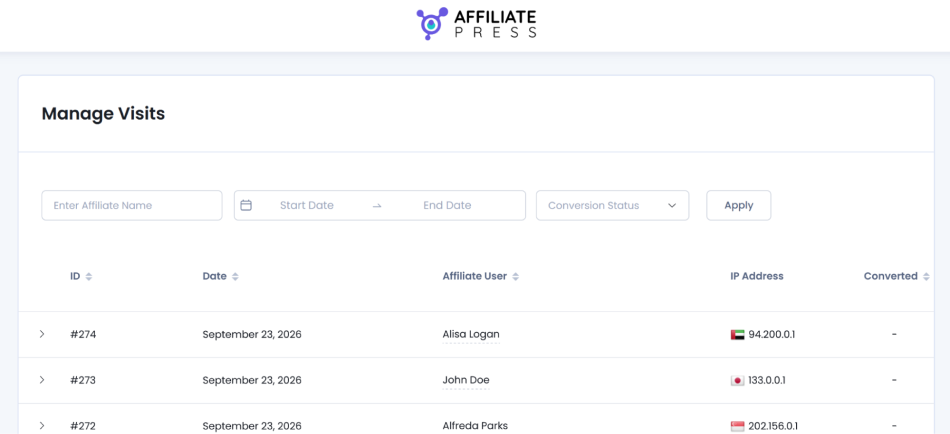
You’ll see details about an affiliate, visit date, landing URL, and conversion status.
Find out if an affiliate click reaches your records.
3. Check Commissions
Go to WordPress → AffiliatePress → Commission. There you can check the commission amount and its status (typical for AffiliatePress are Pending, Approved, Rejected, or Paid).
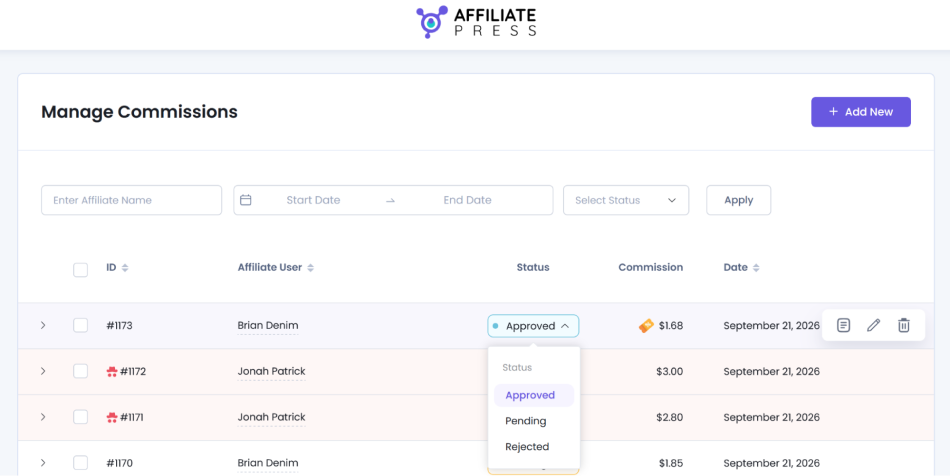
4. What Can Your Affiliates See?
AffiliatePress also shows the cookie duration to affiliates in their Affiliate Panel → Affiliate Links section. This is important for them to know.
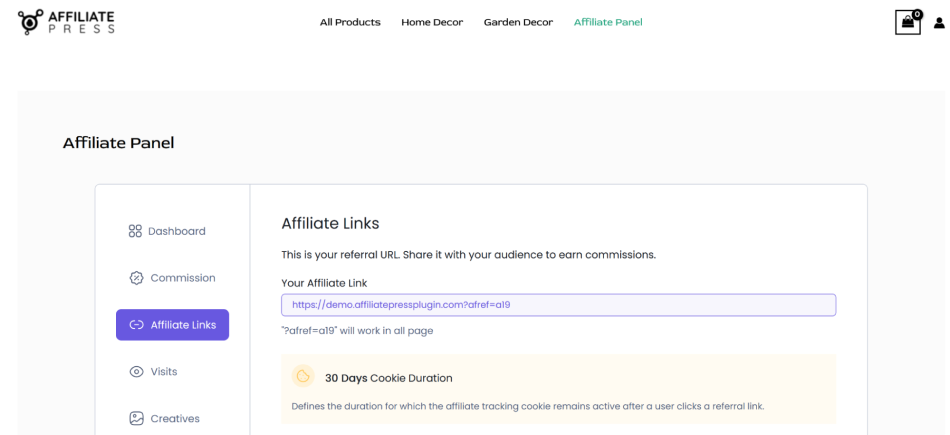
They’ll be able to see their tracked visits, including the visit date, campaign, landing URL, referrer URL, IP address, and whether the visit converted, as well as their individual commission records.
5. Run a Program On Multiple Domains
If your business sends visitors between several domains, you most likely use the Multi-Domain addon.
The parent site runs AffiliatePress and the other domains use the AffiliatePress Multi-Domain Connector.
The Tracking Cookie Days setting is configured on the child site’s connector as well (along with the Credit Last Referrer option).
The path might be different, like:
- Affiliate link
- Content/landing domain
- Main store
- Purchase.
AffiliatePress keeps the referral information as the visitor moves between domains to reward those who sent you a client.
Conclusion: What Is Cookie Duration In Affiliate Marketing?
Originally, cookies are much broader than a memory for your affiliate associated-purchases.
Cookies perform many functions, which are in the first place helpful for website owners, but also sometimes help website visitors (like keeping a shopping cart intact for many days until the purchase decision).
However, in the context of affiliate marketing, cookies are super helpful for affiliate partners in the first place because they help correctly attribute the commission that an affiliate deserves. A cookie duration is for how long this memory exists (in case allowed by a visitor). As a merchant or store owner, you can choose for how long these cookies last. How to do that?
Base your choice on your realities – if your customers normally need a few weeks to evaluate your product, a 30-day cookie is a reasonable place to start. Need much more? 60 or 90 days can work better for affiliate conversions. Moreover, for varied products on the same story, we recommend sticking to longer cookie duration windows.
Related articles: