



What Affiliate Tracking Methods Can You Use With AffiliatePress

There are some common and easy-to-implement tracking methods for affiliate programs (i.e., link tracking), which are regularly requested by affiliates. However, more unique needs of the modern day also exist – coupons, QR codes, etc.
Which of them can you easily access with AffiliatePress, the affiliate WordPress plugin built for today’s digital world?
Various tracking methods available in AffiliatePress let you easily see which click came from which affiliate and how much commission each affiliate should get. You can also see which methods work best and choose the most appropriate ones for particular affiliates or promo campaigns.
All these different affiliate tracking methods allow you to choose different ways to connect a visitor with an affiliate/conversion.
Now, let’s review the most important AffiliatePress affiliate tracking methods in this article!
Method #1: Classic links tracking (URL) + customizable cookies
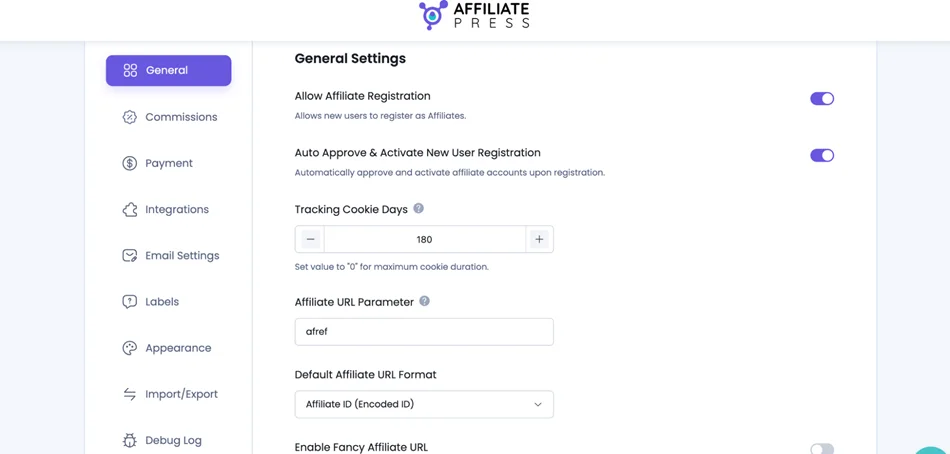
AffiliatePress offers, among other things, an extremely common link tracking method, which basically works like so: affiliate link click > record it > remember who sent the visitor > match that to a later purchase. The plugin does this automatically.
You only need to set the affiliate URL parameter and the cookie’s duration in the ‘General settings’ menu. There are also a few additional tools to better work with URLs:
- 4 options for a default URL format – this kind of ID helps you identify the affiliate.
- ‘Fancy URL’ option for more customized links.
The AffiliatePress plugin saves the information about a particular affiliate even if the visitor clicks around your site, checks other pages, or even makes a purchase many days later. This lets you easily attribute all sales correctly.
Based on your affiliate program rules, the plugin calculates the commission, e.g. flat (fixed cost per sale), percentage, or tiered, and attributes it to the right affiliate.
Using the General plugin settings menu, you can also configure how long the affiliate link should “count” for, which you can customize manually: 7 days, 30, or any custom period.
A longer cookie duration is usually more attractive for affiliates!
Method #2. Coupon/discount code tracking
Another very popular method (coupon-to-affiliate mapping), which is also built-in with AffiliatePress – you simply need to activate this option as an add-on.
It’s a perfect working method for influencers, social media, YouTube, podcasts, Instagram, etc., where people remember codes more than links.
To use this affiliate tracking method on WordPress, enable coupon-based tracking and rewards through the Coupons extension.
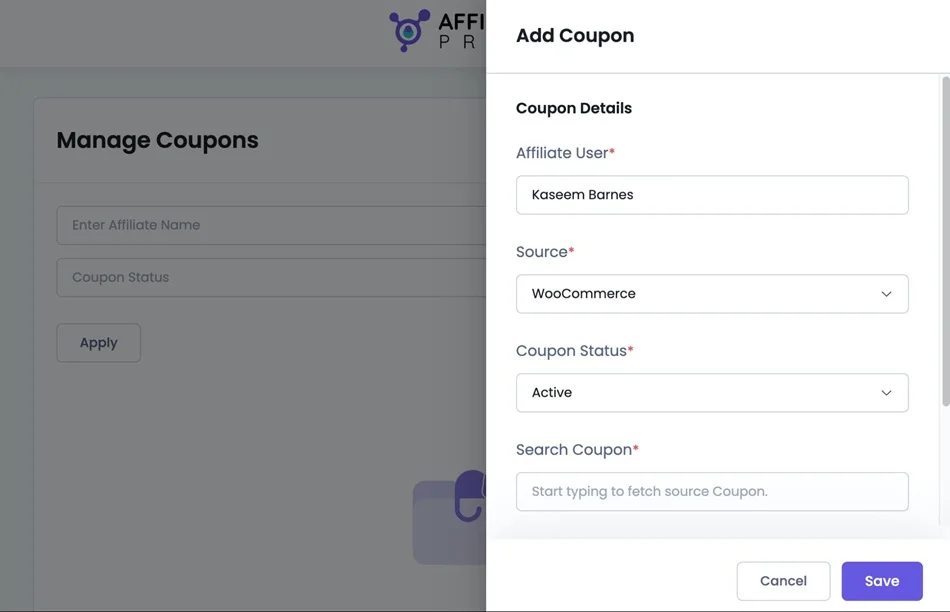
AffiliatePress lets you quickly create and link coupons to any affiliate right from the plugin. Once the add-on is activated, go to Admin Panel > AffiliatePress > Coupons and hit Add New.
How it works:
- You create and connect codes through the AffiliatePress plugin for sales.
- An affiliate gets a unique coupon code.
- The customer needs to enter it at checkout on your site.
- The plugin then checks which affiliate owns that coupon code and credits the sale.
In some cases, it can be better than links because coupons work even if cookies are blocked or removed. And it’s actually very user-friendly to use on creative assets like banners.
With AffiliatePress, you can link affiliates to WooCommerce and Easy Digital Downloads coupons. So, no matter which platform a customer checks out on, the coupon they use still credits the sale to the right affiliate.
Here’s what you need to fill in:
- Choose the affiliate you want this coupon assigned to.
- Pick the plugin where the coupon was originally created (like WooCommerce or EDD).
- Set it to Active or Inactive.
For example, if you use AffiliatePress with WooCommerce > Marketing > Coupons, this lets you link coupon codes to affiliates from the coupon screen. Then, when you create or edit a coupon, you’ll see a new Affiliate Settings section where you can assign the coupon to an affiliate for tracking and commission.
AffiliatePress adds a simple option there so you can connect that coupon to the right affiliate in just a click.
Method #3. QR code tracking for affiliate sales
QR codes can be used on printed materials – this is their power!
They are a great tracking way for scenarios where people aren’t clicking from a regular web link, including offline marketing campaigns (posters, flyers, billboards, booths, magazines, etc.).
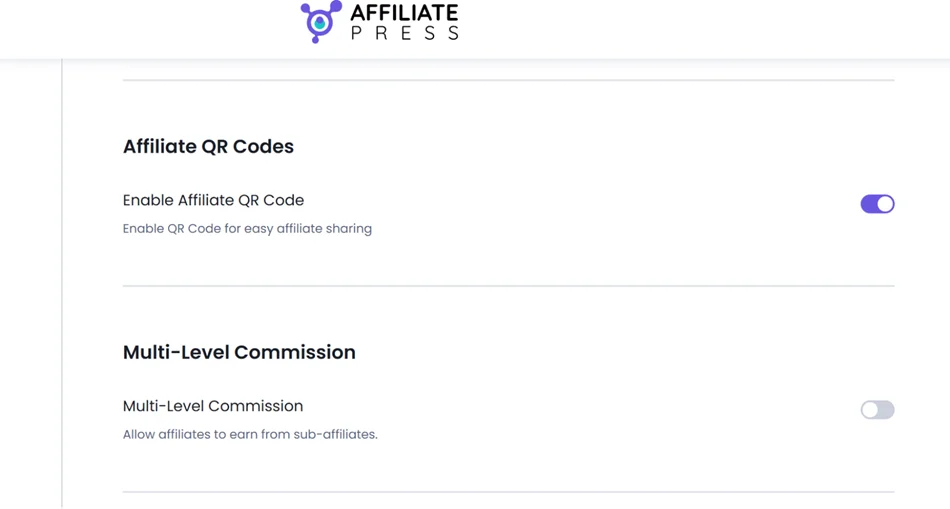
AffiliatePress allows you to create QR codes using the specialist Affiliate QR Code add-on. Once it’s installed and activated, you’ll find its settings in AffiliatePress General Settings > Enable Affiliate QR Code.
It enables each affiliate to generate a QR code for their unique referral link.
Your affiliates can then view and download their QR code from their accounts, making it easy to share it further. Each QR code is tied to the affiliate’s link, optimized for mobile scanning, and can be enabled or disabled from the plugin settings.
What are the options with AffiliatePress QR codes?
- You can turn on/off QR codes when needed.
- They are mobile-friendly and can be easily scanned on smartphones and tablets.
- Affiliates can download QR Codes as PNGs.
- Each QR code is tied to the affiliate’s referral link.
The Download QR Code button allows affiliates to save the QR code image and place it on any printed materials or their website.
Method #4. Landing page tracking
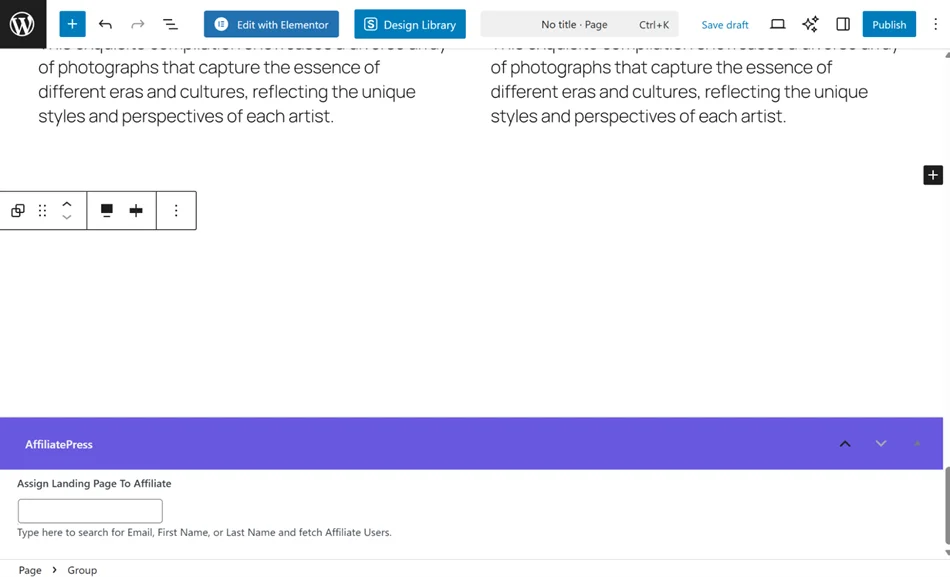
Assigning specific pages to individual affiliates is a way to give each affiliate a dedicated landing page that’s uniquely tied to them – and you can do this easily with AffiliatePress.
This method allows your affiliates to sell your products via dedicated website pages with multiple links. The landing page includes their affiliate URL. Each page is unique to an affiliate, so you know exactly which affiliate drove the visitor and converted.
Moreover, this is super helpful for specific products, promotions, or events, and assigning them to affiliates best suited to promote them.
This method is also available through the dedicated Landing page add-on for AffiliatePress. When enabling this add-on, you can assign specific pages or posts on your WordPress site to individual affiliates.
When a visitor lands on an assigned page, the affiliate automatically gets credit for any conversions, even if another affiliate’s link was clicked first. Affiliates can then access their exclusive landing page links in their dashboard and share them anywhere.
Conclusion: Why use different affiliate tracking methods?
Using the variety of tracking methods, you can see which affiliates send high-converting traffic, see channels that work best, and, of course, which offers, products, or landing pages perform best at what time.
AffiliatePress offers must-have ways to track affiliate sales as well as more unique ones for your specific needs:
- Reliable affiliate links + cookies for all the essential affiliate needs.
- Use affiliate landing pages if you want personalized, trackable, and high-converting affiliate campaigns.
- Simple QR codes for online and offline campaigns.
- Coupons codes for specific campaigns and the most accurate conversion tracking.
Related articles: