How To Automate Email Marketing For Your Affiliate Program


Running an affiliate program comes with plenty of repetitive (and honestly, boring) tasks.
Checking applications, monitoring commissions, handling payouts, answering affiliate questions, and somewhere in the middle of all that, keeping everyone updated by email.
It’s easy to put those emails off when you’re busy. But from an affiliate’s perspective, silence can create uncertainty. Did their application go through? Was their commission approved? Has their payment been processed?
Automating these updates gives you the best of both worlds. Your affiliates receive timely information, and you no longer have to manually manage every routine message.
Here, we’ll explore the most important emails to automate, how to make them feel less robotic and how to make affiliate email marketing work better for your program.
TL;DR: You can automate affiliate email marketing for your affiliate program using AffiliatePress, a reliable WordPress affiliate plugin that lets you send automatic, personalized email notifications.
Think Beyond “Sending Emails”: Map Your Affiliate Communication
Affiliate email marketing works best when you stop thinking about emails as separate messages and start looking at the affiliate journey.
An affiliate doesn’t need an email just because you have something to announce. They need one when something important happens in their relationship with your affiliate program.
Think about what happens after someone joins your affiliate program. They apply, wait for approval (if not set to automatic), start promoting your products, earn commissions and eventually receive payouts. Overall, each of these stages creates a natural communication point.
A simple affiliate communication journey might look like this:
Application → Approval → Promotion → Commission → Commission Approval → Payment
At each stage, ask one simple question:
“What does my affiliate need to know right now?”
That question helps you avoid filling inboxes with unnecessary messages while also making sure important updates don’t get missed.
For example:
- Application: Let affiliates know their application was received
- Approval: Tell them they’re approved and ready to get started
- Commission: Confirm when they’ve generated a commission
- Commission approval: Let them know their earnings have been approved
- Payment: Confirm when their payout has been processed
- Payment issue: Explain when something goes wrong and what they should do next
This is where affiliate marketing automation becomes useful. You aren’t expected to remember sending each message yourself. Just connect communication to the events already happening inside your affiliate program using a WordPress affiliate management system.
And there’s another benefit: consistency.
No matter whether you have 10 affiliates or 1,000, important updates can follow the same communication process. Your affiliates know what to expect, and you don’t have to keep checking your dashboard just to remember who needs an email.
But automation doesn’t mean every message should feel identical. The best affiliate email marketing combines automatic timing with relevant and useful information.
So, which emails are actually worth putting on autopilot?
Let’s look at the seven messages that can make the biggest difference.
The 7 Affiliate Emails Worth Putting On Autopilot
After you map your affiliate communication journey, the next step is deciding which messages genuinely need automation.
You don’t need to email your affiliates every time something happens in your affiliate program. But when an important account, commission or payment event occurs, a timely email can stop confusion and keep the affiliate tuned to any new update.
AffiliatePress, one of the most reliable WordPress affiliate plugins, includes automatic email notifications for these types of events, and you can enable or disable individual notifications, customize their content and add dynamic affiliate, commission or payment information.
Thus here are the seven emails worth putting on autopilot using AffiliatePress.
1. “We Received Your Application”
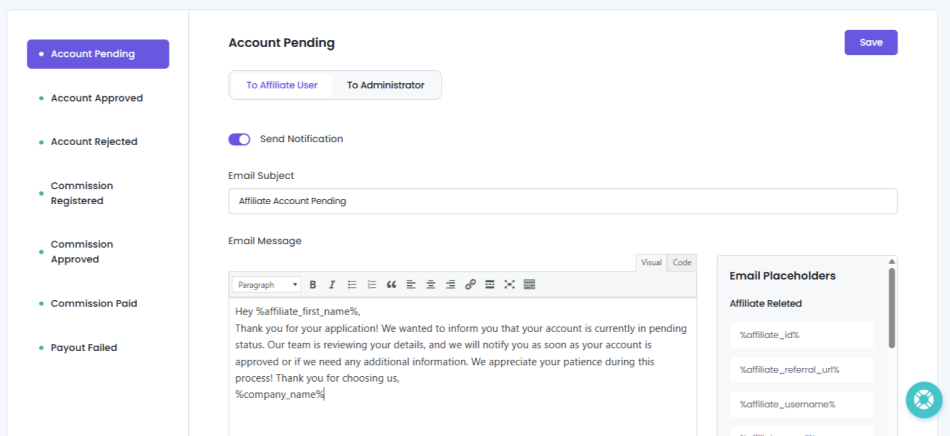
When someone applies to become an affiliate, don’t leave them wondering whether their application actually went through.
A simple confirmation email lets them know you’ve received their application and that it’s being reviewed. It’s a small message but it creates a much better first impression than leaving a new applicant waiting with no information.
This is even more useful when you manually review affiliate applications. Instead of sending a confirmation yourself every time someone registers, AffiliatePress can automatically send the Affiliate Account Pending notification when an affiliate account is placed in Pending status.
Keep this email simple. Confirm that the application was received and, if relevant, let the applicant know what happens next.
Worth mentioning that if your affiliate application process itself is on auto-pilot, you don’t have to worry about it.
2. “You’re Approved!”
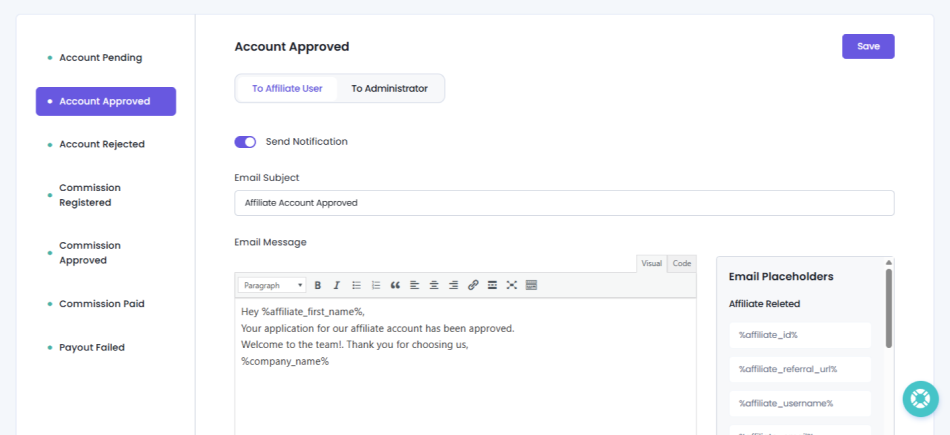
Getting approved is an important moment for a new affiliate. Don’t make them discover it by logging into their account and hoping something has changed.
An approval email gives them a clear green signal that they’re officially part of your affiliate program and can start promoting your products.
Use this email as more than a simple “You’re approved” message. Point affiliates toward the next step such as accessing their affiliate dashboard, finding their referral link or checking your promotional resources.
Thanks to the AffiliatePress system, the Affiliate Account Approved notification can be sent automatically when an affiliate account is approved.
That means one less manual follow up for you and a much clearer onboarding experience for your new affiliate.
3. “Your Affiliate Account Needs Attention”
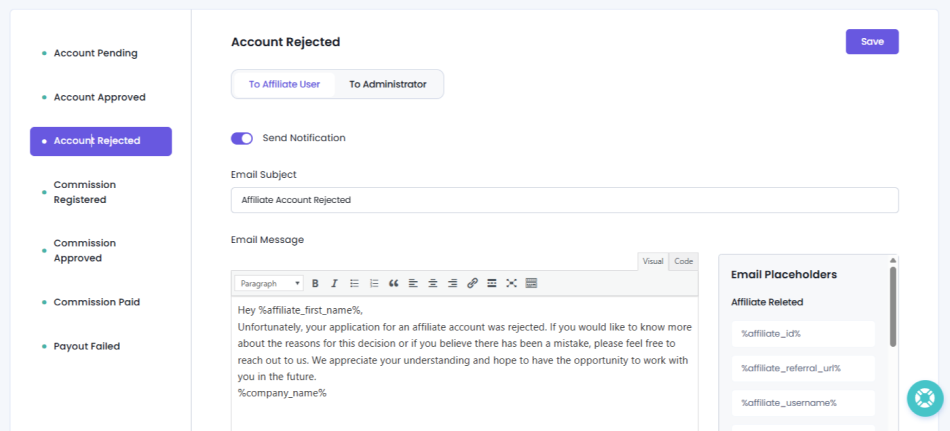
Not every affiliate account update is good news but that doesn’t mean the communication has to feel harsh.
An affiliate application may be rejected or an account may need attention before the affiliate can continue. In these situations, leaving the affiliate to figure things out on their own can create unnecessary frustration.
Thus your email should clearly explain what happened and what the affiliate should do next, if any action is needed.
AffiliatePress can automatically notify affiliates when their account is rejected via the Affiliate Account Rejected notification. You can customize the message so it fits your program and gives clear next steps.
Remember the goal is to make sure an important account update never happens without communication. So if possible, give affiliates clear next steps on how to fix this misunderstanding or the reason because of which they are rejected.
4. “You Just Earned a Commission”
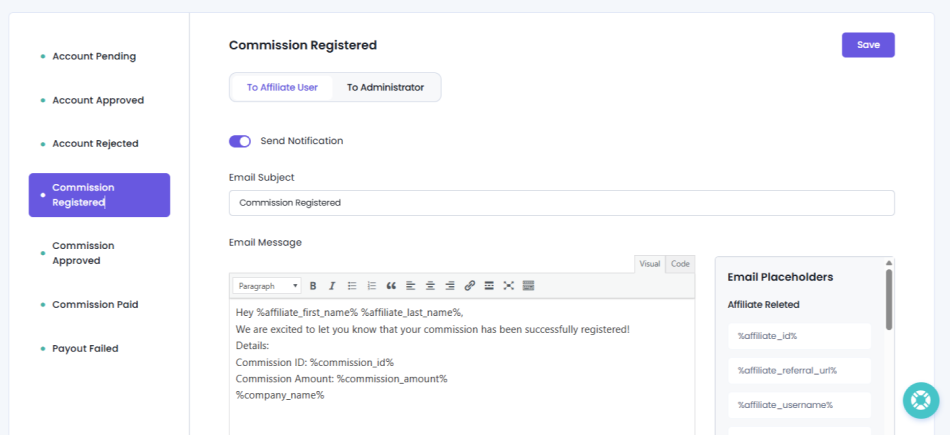
This is the kind of email affiliates actually enjoy receiving.
When an affiliate generates a successful referral, letting them know about the commission can reinforce the connection between their promotion and their earnings. Plus, it even gives them a quick confirmation that their referral was recorded.
Thus for that, you can set an automatic notification in AffiliatePress to get an update when a new commission is recorded.
AffiliatePress offers a Commission Registered notification for this purpose. Best of all, you can use dynamic placeholders to add relevant details such as the commission amount and commission reference.
That turns a basic notification into a useful performance update and potentially a little motivation to keep promoting.
5. “Your Commission Has Been Approved”
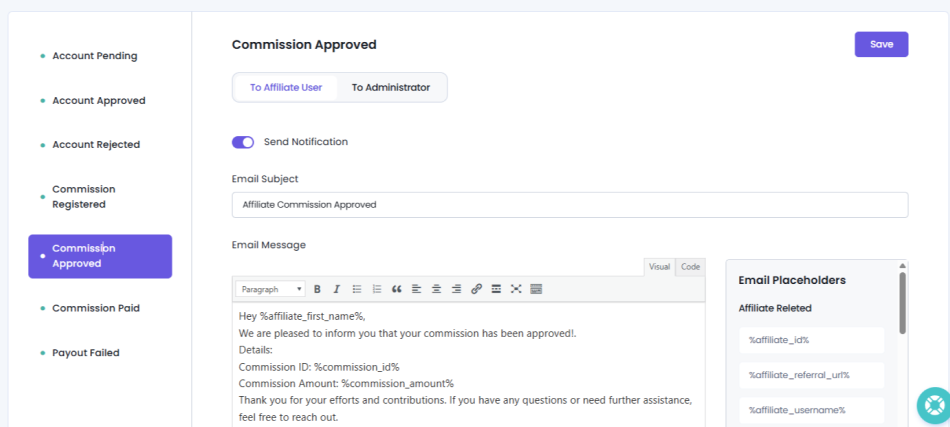
A registered commission isn’t always the same as an approved commission.
If your affiliate workflow got the step of reviewing commissions before they’re approved, affiliates must know when their earnings have moved to the next stage.
A commission approval email removes that uncertainty. It tells the affiliate that the commission has been reviewed and approved, so they know where it stands.
AffiliatePress can automatically send a Commission Approved notification when a commission is approved.
On top of that, you can personalize the message with relevant commission information such as the commission amount, so affiliates don’t have to dig through their account to understand the update.
6. “Your Payment Is on Its Way”
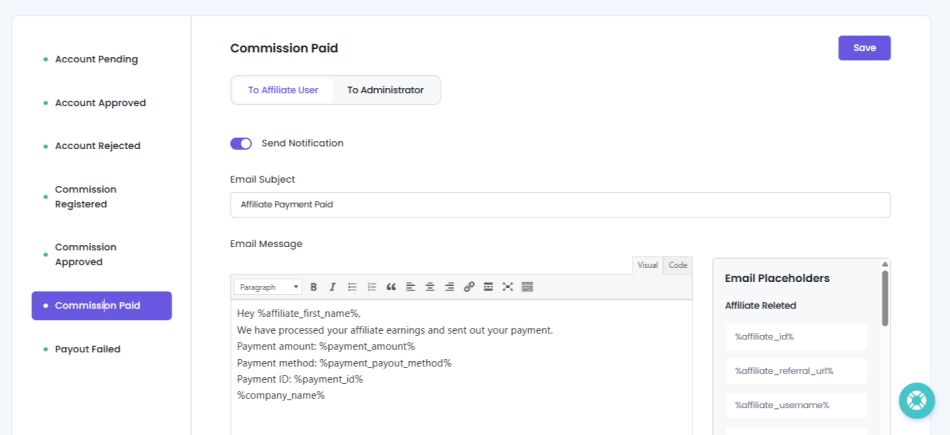
Payouts are one of the moments where communication matters most.
Affiliates naturally want to know when they’ve been paid, especially if they rely on your affiliate program as a regular source of income. Thus a clear payment notification gives them confirmation that their payout has been completed rather than leaving them wondering whether it was processed.
AffiliatePress has an Affiliate Payment Paid notification option that is automatically sent after an affiliate payout has been successfully completed.
You can even add real time payment details in the email using dynamic placeholders such as the payout amount, payment method and the date up to which the earnings are included.
That gives affiliates a useful record of their payment with no need to send you all the details manually.
7. “There Was a Problem With Your Payment”
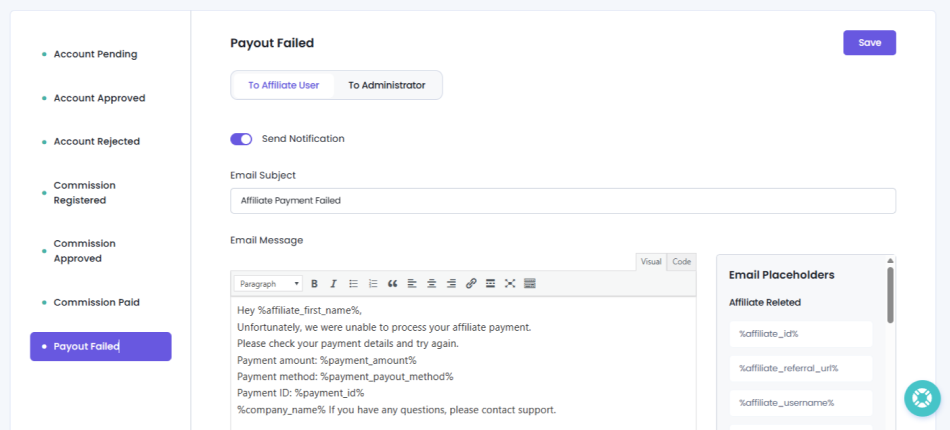
This might be the email you least want to send but it’s one of the most important to automate.
When a payout fails, silence can quickly turn a small payment issue into an affiliate support problem. The affiliate may assume their payment is simply delayed, while you’re left dealing with questions about what happened.
An automatic notification lets them know that something went wrong and gives you an opportunity to explain what they should do next, be it via Email or the last resort of calling.
AffiliatePress sends a Payout Failed notification automatically when an affiliate payout cannot be completed.
Keep this message clear and helpful. Explain that the payment wasn’t completed, offer any related details you can share and tell the affiliate how they can resolve the issue or contact you.
The Bigger Picture
Notice that these aren’t random marketing emails. They’re tied to specific events in the affiliate journey:
Application → Approval → Account Update → Commission → Commission Approval → Payment → Payment Issue
That’s what makes them good candidates for automation. You’re not sending emails simply to “stay in touch.” You’re sending them because something happened that the affiliate needs to know about.
And that’s the real value of affiliate email marketing automation: the message is triggered by the event, so you don’t have to remember to send it.
Next, there’s one more challenge to solve: automated doesn’t have to mean impersonal
Don’t Let Automated Emails Sound Automated
Automation saves you time, but there’s one thing you don’t want it to save on: personality.
Your affiliates know they’re receiving an automated email. That’s not the problem. The problem is when the message feels like it was written for a machine rather than a person.
A short “Your commission was approved” email can be useful, but it becomes much more valuable when the affiliate can immediately see what happened, what they earned and what they should do next.
A few simple changes can make your automated affiliate emails feel more personal:
- Use a friendly tone. Write the way you would speak to a valued affiliate; no need to use stiff or overly formal language.
- Keep the message focused. Don’t bury an important update under unnecessary information.
- Explain what happened. Tell the affiliate why they’re receiving the email.
- Give them a next step. If there’s something they need to do, make it obvious.
- Add relevant details. A name, commission amount, payment information, or referral detail can make a notification much more useful.
You have to make sure the email marketing automation feels clear, relevant and considerate always. And that’s exactly where personalizing your email messages, subject and email list for affiliate marketing becomes useful.
AffiliatePress lets you customize your automated email notifications so no same affiliate receives the exact same generic message. You can edit the email subject and message, choose which notifications are sent to affiliates or administrators, and use dynamic placeholders to automatically insert relevant information into the email.
That means you can build your templates once and still give each recipient info that’s relevant to their specific activity.
Final Words: Put Affiliate Communication On Autopilot With AffiliatePress
Affiliate email marketing should never be another daily task on your list.
The smartest way to affiliate marketing automation is through email affiliate marketing. You’ve to recognize the moments when affiliates genuinely need automated communications. Applications, approvals, commissions and payouts are all natural points where a timely email can keep affiliates updated and confident in your email marketing affiliate program.
But automation should never mean sending lifeless, generic messages.
Give every email a purpose. Include the information the affiliate actually needs. Make the next step clear. And add enough personalization to make the communication feel like it belongs to your program.
With AffiliatePress, you can put these routine affiliate notifications on autopilot while keeping control over the message your affiliates receive.
Automation handles repetition. You can focus on the relationships.
Related Articles: