How To Run One Affiliate Program Across Multiple Websites


“More websites, more opportunities” sounds great for an affiliate program. But managing affiliates across multiple websites? That can get complicated pretty quickly.
If you’re running several websites, you may wonder whether you need a separate affiliate program for each one. The good news is, you don’t.
Setting up a multi website affiliate program lets you connect multiple WordPress sites to one central affiliate program, and manage your affiliate activity from one place.
In this guide, we’ll explain how multi website affiliate programs work, how affiliate tracking works across different domains and how to set one up with AffiliatePress.
Let’s get going.
TL:DR: A multi website affiliate program lets you connect multiple WordPress sites to one central AffiliatePress program, so you can manage affiliates and track referrals from one place. With AffiliatePress’s Multi-Domain Addon, you can connect child websites to a parent site and run one centralized affiliate program across multiple domains.
Why Run One Affiliate Program Across Multiple Websites?
Running a separate affiliate program for every WordPress site sounds manageable when you have only one or two sites. But as your business grows, so does the amount of affiliate activity you gotta manage.
Having one centralized affiliate program helps you bring multiple websites together. Plus, gives affiliates more opportunities to promote your products.
Manage Affiliates From One Place
Managing affiliates becomes much way much easier when you don’t have to jump between different websites and affiliate dashboards.
Thus you can keep affiliate accounts, referral activities, and affiliate marketing management in one central place. This saves time and makes it really easy to keep your affiliate program organized as you add more websites.
Give Affiliates More Products To Promote
Why limit your affiliates to products from just one site when you can connect multiple websites to the same affiliate program?
This way affiliates can promote more of your product and services with ease. On top of that, they get to choose the offer that fits their audience best, and when a product recommendation fits best with the audience, sales skyrockets.
Keep Affiliate Tracking Connected
Your affiliates may send visitors to different websites but you still need to know who referred them.
That’s exactly why a multi website setup keeps affiliate tracking connected across your domains. When a visitor arrives via an affiliate referral link on a connected website, the tracking info gets sent back to your central affiliate program.
This gives you a more connected view of your affiliates activities.
Simplify Affiliate Program Management
Multiple websites don’t necessarily mean multiple affiliate programs.
So just connect your websites to one central program. This gives you a much simpler way to manage your affiliates and continue growing your business.
What Is a Multi Website Affiliate Program?
A multi website affiliate program lets you manage affiliate activity across multiple websites from one central affiliate program.
For instance you may have a main website along with separate websites for different products or services. Thus rather than creating an affiliate program for each website, you can connect them to one central AffiliatePress installation.
AffiliatePress is one of the most reliable WordPress affiliate plugins in the WordPress ecosystem.
The website where AffiliatePress is installed acts as the parent site. The other websites connected to it are treated as child sites.
Parent Site vs. Child Sites
| Site | Role |
| Parent Site | The main website where AffiliatePress is installed and the central affiliate program is managed |
| Child Site | An extra site connected to the parent site for affiliate tracking |
Thus the child sites are connected. They can now communicate with the parent site and send affiliate visits info through the Multi-Domain Connector.
But how does that tracking actually work?
How Does Affiliate Tracking Work Across Multiple Websites?
Let’s think for a while that you got :
- Parent Site →https://parent-site.com
- Child Site → https://child-site.com
- Affiliate URL Parameter →ref
- Affiliate ID →123.
So your affiliate can share a referral URL such as:
https://child-site.com/?ref=123
Whenever a visitor clicks this link, the Multi-Domain Connector on the child site recognizes the ref=123 affiliate info, and records the visit.
The connector then later sends the affiliate tracking info to the parent site’s AffiliatePress installation through an API connection. AffiliatePress can associate the visit with the affiliate who referred the visitor.
Now suppose the visitor continues browsing the child site, then the referral info still will be available as per the Tracking Cookie Days setting.
All in all, the basic flow looks like this:
Affiliate referral link → Child website → Multi-Domain Connector → Parent site → Affiliate tracking
This means your affiliates can send visitors to connected websites while you continue managing the affiliate program centrally.
Now that you know how multi website affiliate tracking works, let’s see how to set it up on your WordPress websites.
How To Set Up a Multi Website Affiliate Program In WordPress
1. Set Up AffiliatePress On Your Main Website
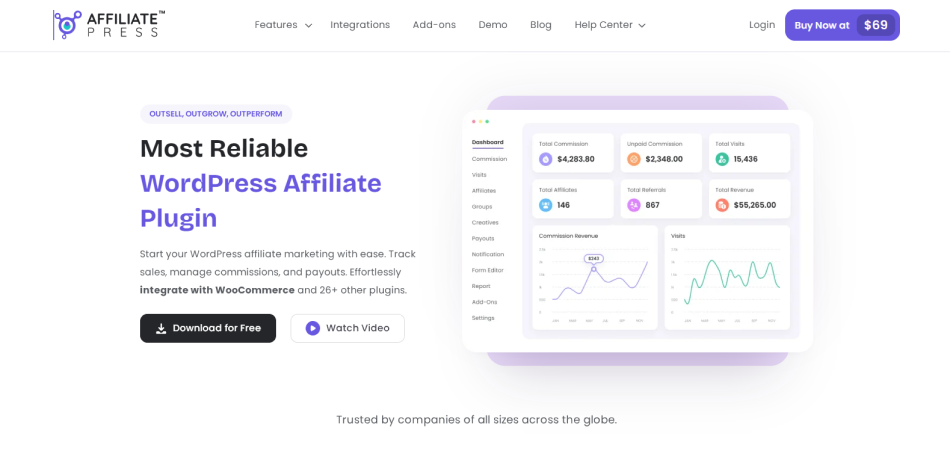
First of all, you must install and activate AffiliatePress on the website you want to use as your parent site.
This will be your main website. And from here you’ll be managing the central affiliate program and all your connected domains.
When AffiliatePress is ready, you can start adding your other websites to the setup.
2. Add Your Other Websites As Connected Domains
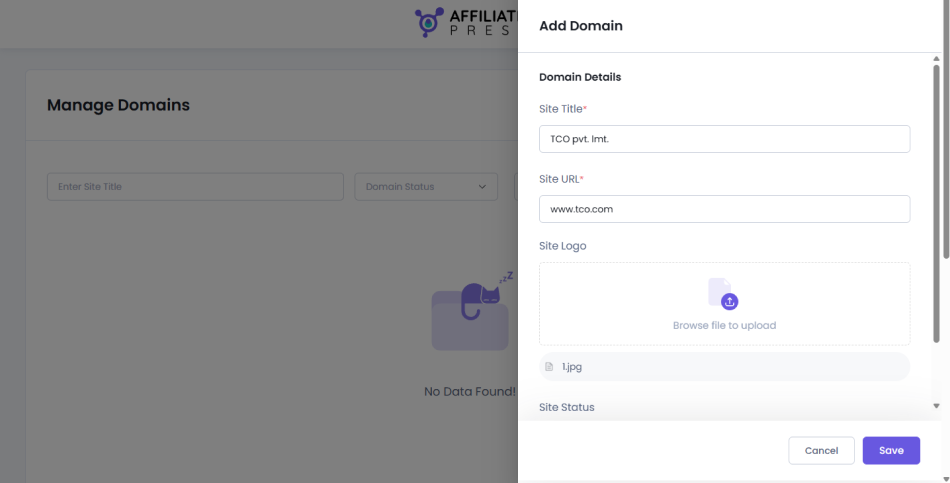
From your parent site’s WordPress dashboard, just head over to AffiliatePress → Manage Domains.
Here you can add all the websites you want to connect with your affiliate program.
Click Add New from the top right corner.
Now simply fill in all the basic details of your child website:
- Site Title: The name of your child site
- Site URL: The URL of the website you want to connect
- Site Logo: Upload your child site’s logo
- Site Status: Pick whether you want the site to be Active or Inactive
Lastly save the site.
After this AffiliatePress will generate a Public Key and Secret Key for the child site. Simply make sure to keep these keys handy as you’re gonna need them in the next steps.
3. Install The Multi-Domain Connector
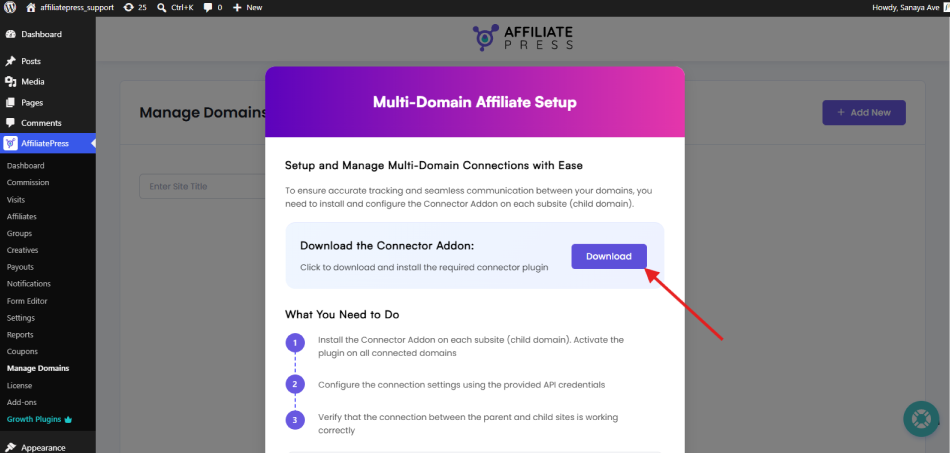
You have added your child site to the parent site. Next you need to install the Multi-Domain Connector on your child website.
Remember the connector goes on the child site, not the parent site where AffiliatePress is installed. Just download the Multi-Domain Connector plugin from the AffiliatePress GitHub repository.
Once you have the plugin ZIP file, log in to your child site’s WordPress dashboard.
- Then go to Plugins → Add New → Upload Plugin
- Pick Choose File, then select the Multi-Domain Connector ZIP file you downloaded
- Click Install Now and then Activate Plugin once the installation is complete
After activating the connector, you’ll see AffiliatePress Connector under your WordPress settings. That’s exactly where you’ll be connecting your child site to the parent site’s AffiliatePress site.
4. Connect Each Website To The Parent Site
Let’s now connect your child website with the parent site and for that, go to Settings → AffiliatePress Connector from your child site’s WordPress dashboard,
Here you’ll find the settings needed to connect your child site under the General Settings..
- Parent Site URL: Enter the exact URL of your parent site where AffiliatePress is installed. For example:
- https://parent-site.com
- Affiliate URL Parameter: Enter the same referral parameter you use in AffiliatePress on your parent site. For example if your affiliate URL looks like:
- https://parent-site.com/?ref=123
- then just add : ref
- Tracking Cookie Days: Enter the number of days you want to keep tracking the affiliate referral after the visitor’s first click. For example entering 30 means the referral can be tracked for 30 days according to your tracking settings.
- Credit Last Referrer: Enable this option if you want the most recent referrer to receive credit for the conversion
Next, under Connect with AffiliatePress, enter the keys you received when you added the child site:
- Public Key: Paste the public key generated on the parent site
- Secret Key: Paste the secret key generated on the parent site
At last after you’ve filled in these details, save the settings.
5. Verify The Connection
Time to check whether your child site is properly connected to the parent site from the AffiliatePress Connector settings on your child site. Now click Verify Site.
- If everything is set up correctly, AffiliatePress will verify the connection.
- If the site was already verified, you may see Re-Verify Site instead.
Moreover, you can also check the connection from your parent site’s AffiliatePress → Manage Domains page. The connected status will be shown for the child site.
That’s all! Your child website is now connected to your central AffiliatePress affiliate program.
You can repeat the same process whenever you want to connect to another website.
After your websites are connected, you can manage them from AffiliatePress → Manage Domains. You can even search for a site, change its status, edit its details or remove it whenever needed.
This way you can keep your affiliate activity connected and manage everything from one place.
What Are Some Real-World Use Cases For a Multi Website Affiliate Program?
A multi website affiliate program is useful in way more scenarios than you think.
Allow us to show you some of the common cases where a centralized affiliate program can make sense.
Multiple SaaS Products
If you run multiple SaaS products and each product has its own website, managing a separate affiliate program for every product can quickly become difficult.
Thus you can connect these product websites to one central affiliate program. Affiliates can then promote different SaaS products based on what fits their audience best, while you continue managing affiliate activity from one place.
This can be especially useful when the same affiliates are interested in promoting more than one of your products.
Multiple E-Commerce Stores
Running more than one online store? You must have separate websites for different product categories, markets or store types.
So with a multi website affiliate program, you can easily connect these stores and let affiliates promote products from different websites through the same affiliate program.
Multiple Brands Under One Company
Some companies manage several brands, and each brand has its own website. If that’s the case for you, creating a separate affiliate program for every brand can make affiliate management unnecessarily complicated.
A centralized affiliate program lets you connect the different brand sites and manage affiliate activity from one place. Also, affiliates can decide which brand or products they want to promote based on their audience.
Main Website + Product-Specific Websites
If you’re one of those who have one main company website along with separate websites for specific products or services, a multi website affiliate program can do the trick.
Your main website may introduce your company, and individual product websites focus on specific SaaS tools, services or product lines. Just simply connect these product specific sites to your main AffiliatePress installation.
This keeps your affiliate tracking connected while giving affiliates more opportunities to promote your products and services.
In Conclusion: Run Your Multi Website Affiliate Program From One Place
Running multiple websites doesn’t mean you need to run multiple affiliate programs.
Thanks to the concept of a multi website affiliate program, you can connect your WordPress website affiliate marketing to one central affiliate program. This way you can keep your affiliate tracking connected and manage your affiliate activity from one place.
The good news is, AffiliatePress, one of the most popular affiliate plugins, lets you run one centralized affiliate program across multiple websites. The site where AffiliatePress is installed is called parent affiliate website, and the others are its child affiliate website.
All it takes is just a few clicks for the parent site to connect with the child site using AffiliatePress the Multi-Domain Connector.
No matter whether you’re managing multiple SaaS products, eCommerce stores, brands or product specific websites, this setup can make affiliate management much simpler.
So, if you’re already running multiple websites or planning to add more, why manage every affiliate program separately when you can bring them together?
Related Articles: