



How To Handle Affiliate Commissions For Refunds, Cancellations, And Chargebacks


Affiliate commissions are easy to calculate when everything goes right. But what happens when a customer requests a refund, cancels an order, or files a chargeback after an affiliate has earned a commission?
Obviously, refunds are a normal part of running an online business. But when you run an affiliate marketing program, they can create another problem: commissions paid on sales that are later refunded or disputed.
And it’s not always as simple as rejecting a commission. What if the commission is already approved? What if the affiliate has already received the payout? Or what if the customer wins a chargeback dispute? The list of questions is endless.
Thus, if you run an affiliate marketing program, you need clear rules for these situations. Otherwise, you will end up paying commissions on sales that don’t generate revenue.
The good news? You can prevent most of these losses with the right commission approval rules, refund grace periods and reversal processes.
Let’s now look at how to handle affiliate commissions for refunds, cancellations, and chargebacks, and how you can manage these all situations (professionally) with AffiliatePress.
TL;DR: You can handle affiliate commissions for products which are refunded, cancelled or chargeback by setting clear affiliate terms and conditions. Plus, automatically reject the commission for refunded or cancelled orders using AffiliatePress affiliate management system.
Affiliate Commission Handling: All Scenarios At a Glance
| Affiliate Commission Scenario | Commission status | What should you do? |
| Full refund before payout. | Pending or approved | Reject or reverse the full affiliate commission if the sale is no longer eligible. |
| Full refund after payout | Already paid | Recover the commission through an allowed future payout deduction or another method permitted by your terms |
| Partial refund before payout | Pending or approved | Recalculate the commission based on the remaining eligible order value |
| Partial refund after payout | Already paid | Calculate the difference and adjust future payouts |
| Order canceled before payment | No eligible sale | Ensure no commission is payable for the uncompleted transaction |
| Order canceled after commission creation | Pending or approved | Reject or reverse the commission if the cancellation makes the sale ineligible |
| Product exchange | Depends on the transaction | Retain or adjust the commission according to the final eligible sale value and your policy |
| Store credit instead of a refund | Depends on your policy | Follow your published rules for store-credit transactions |
| Chargeback under investigation | Pending, approved, or paid | Review the transaction and handle unpaid commissions |
| Chargeback lost | Any status – Your Call | Reverse or recover the commission |
| Chargeback won | Any status – Your Call | Reassess the adjustment and restore the commission if the sale remains eligible |
| Commission already paid when a refund occurs | Already paid | Document the adjustment and recover the amount only through a permitted process |
What Happens To Affiliate Commissions When An Order Is Refunded, Canceled, or Charged Back?

When a customer reverses a purchase, the money path changes direction. When an order is refunded, canceled, or charged back, the affiliate commission is almost always clawed back, reversed or withheld by the business.
In simple words, no one pays commissions on revenue they don’t keep.
Affiliate Commissions For Refunds
When a customer returns a product and asks for their money back, the sale is undone. So, you have to claw back the commission from the affiliate’s balance.
The expert approach: Use a locking period (payout delay). If your store has a 30-day return policy, make sure to hold your affiliate payout for at least 35-40 days. This makes sure you only pay commissions on cleared, confirmed and final sales.
For instance, a customer buys your $100 product through an affiliate link, earning the affiliate a $20 commission. If the order is fully refunded, the commission is no longer eligible.
Afterall, chasing affiliates for money they’ve already cashed out is a hassle, so why not simply hold the payout till you are also sure.
How Do Partial Refunds Affect Affiliate Commissions?
Partial refunds don’t always mean you need to reject the complete affiliate commission.
If a customer gets a refund for only part of their order, you can adjust the commission amount, which will be based on the amount your business keeps.
Let us now explain it better with an example. Suppose a customer placed an order containing 4 items, each worth $50, making the total order worth of $200 through an affiliate link. Now if your commission structure pays affiliates per order value, not per-product, a straight 20% commission, then the original commission earned by that affiliate will be $40.
Now, the customer requests a $50 refund for one product but keeps the remaining three items. Thus, here’s how the commission could change:
| Order detail | Amount |
| Original order value. | $200 |
| Original affiliate commission (20%). | $40 |
| Partial refund. | $50 |
| Eligible order value after refund. | $150 |
| Adjusted affiliate commission (20%). | $30 |
| Commission to reverse. | $10 |
In this case, reducing the affiliate commission from $40 to $30 is the right thing to do.
The calculation is simple:
Adjusted commission = Eligible order value after refund × Commission rate.
However, remember this approach only works when your affiliate program calculates commissions based on the eligible order value. Taxes, shipping fees, discounts, product specific commission rates and other exclusions change the calculation.
Besides, you should also check the status of the original commission. If it’s still pending, you can easily adjust or reject it before payout. If you’ve already paid the affiliate, recovering the $10 will need a deduction from future earnings, if your affiliate terms and payout system allow it.
Luckily, if you want to have your commissions basis per order, rather than paying commission per product sold, WordPress affiliate plugins like AffiliatePress makes it too easy.
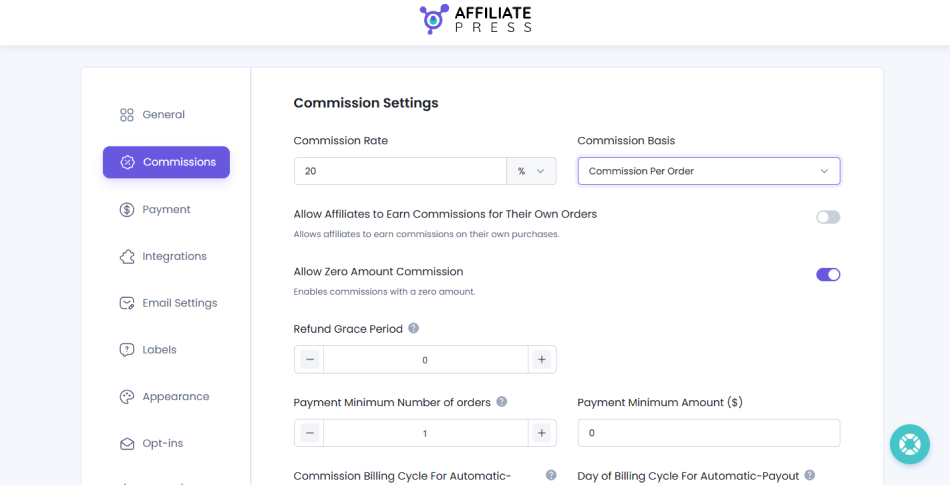
Just go to the AffiliatePress → Settings → Commissions inside your WordPress dashboard, and select the “Commission Per Order“. From here, you can also set your commission rate, and other commission related settings.
Affiliate Commissions For Cancellations
Cancellations happen before the product ships or before a service begins.
In that case, affiliate commission for cancelled products or membership is automatically voided. Because the transaction was never fully processed or fulfilled, no affiliate payout is generated.
Affiliate Commission Chargebacks
A chargeback commission situation happens when a customer disputes a charge directly with their bank, usually claiming fraud or that they didn’t receive the item.
In these scenarios, what happens is you lose the sale amount first, get hit with a hefty bank fee, and immediately revoke the affiliate’s commission.
In other words, a chargeback happens when a customer disputes a payment through their bank or card issuer. Unlike a regular refund, a chargeback involves an investigation and a decision from the payment provider.
If a chargeback is still under investigation, the call is yours. You can either choose to hold the commission while the dispute is resolved or pay it anyway (believing you think you’d win).
If the chargeback is decided against your business, the commission needs to be reversed under your affiliate terms. If you win the dispute and retain the payment, you can review whether the commission should remain eligible.
What happens to the affiliate’s commission after the chargeback? Well, mostly it’s your call. Whatever suits your affiliate terms and conditions. However, still here’s a scenario case to help you make the right call.
| Transaction scenarios | What happens to the sale? | How should you handle the affiliate commission? |
| Full refund | The customer receives the full purchase amount back | Reverse the full commission if the sale is no longer eligible under your affiliate terms |
| Partial refund | The customer receives only part of the purchase amount back | Recalculate the commission based on the eligible order value, if your commission structure supports it |
| Order cancellation | The order is canceled before or after commission creation | Reject or reverse the commission if the canceled transaction no longer qualifies |
| Product exchange | The customer exchanges a product for another | Retain or adjust the commission based on the final eligible sale value and your program rules |
| Store credit | The customer receives store credit instead of a cash refund | Follow your published policy on whether store credit affects commission eligibility |
| Chargeback under investigation | The customer disputes the payment through their bank | Review the commission and consider holding an unpaid commission until the dispute is resolved, where your rules and system allow it |
| Chargeback lost | The payment dispute is decided against your business | Reverse or recover the commission according to your affiliate terms and available payout options |
| Chargeback won | The payment dispute is resolved in your favor | Review whether the commission remains eligible and restore it if appropriate |
The smart thing to do? Put it in writing.
To avoid complaints from your affiliate partners, explicitly outline these all scenarios in your Affiliate Terms of Service (ToS). Affiliates are business owners and marketers too – they understand that if you don’t get paid, they don’t get paid. And, this transparency keeps everyone aligned.
How To Prevent Affiliate Commission Losses With a Refund Grace Period

Refunds are a normal part of running an online business. But paying affiliate commissions before you’re sure the sale is final? That’s where things can get tricky.
A refund grace period gives you some breathing room. You can keep commissions pending for a set period of time (Mostly recommended to set it slightly longer than your store’s refund policy). This way if a customer requests a refund during this time, you can handle the commission before it reaches the payout stage.
The expert approach: Match your commission approval delay to your actual refund policy. Don’t blindly choose 30 or 60 days just because other affiliate programs do so. Your product type, refund terms and payout schedule all matter.
How To Set Up a Refund Grace Period In AffiliatePress
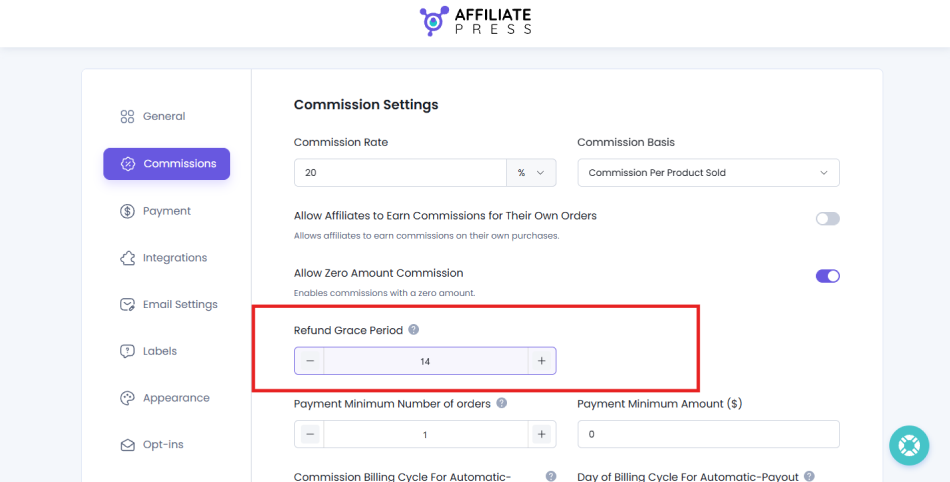
AffiliatePress is one of the most complete WordPress affiliate plugins here. It comes with a refund protection system – Refund Grace Period setting, to be more precise, to help you manage when affiliate commissions become eligible for payout.
Thus here’s how to configure it:
- Open your WordPress dashboard
- Go to the AffiliatePress → Settings → Commissions
- Find the “Refund Grace Period” option
- Set the period as per your refund policy
- Save your changes
How To Automatically Reject Affiliate Commissions For Refunds And Cancellations
Holding commissions is sure one way to prevent refund losses. But what about other things? What happens when a customer refunds or cancels an order after the affiliate commission has already been created?
That’s where commission status sync comes in. If your ecommerce or LMS order status changes, your affiliate plugin needs to handle the linked commission as per it. Otherwise, you will end up reviewing and correcting every affected commission manually.
Let’s now see how to manage this in AffiliatePress.
Configure Dynamic Commission Statuses In AffiliatePress
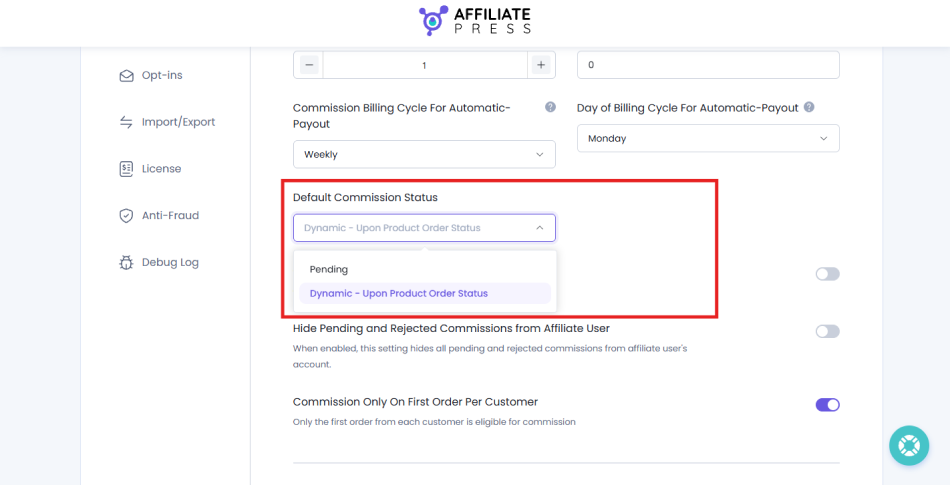
AffiliatePress lets you set commission statuses based on the associated product order status. And, here’s how to set it up:
- Go to AffiliatePress → Settings → Commissions in your WordPress dashboard
- Find Default Commission Status.
- Select “Dynamic – Upon Product Order Status”.
- Save your settings.
This connects commission status handling with the associated order status. Simply make sure whatever eCommerce or LMS integration you use supports the status changes you want to manage.
What Happens When a WooCommerce Or LMS Order Is Refunded?
If a customer buys a product via an affiliate link, AffiliatePress records its commission for that order. Later, the customer requests a refund and the store updates the order status.
With the right dynamic status and supported integration, AffiliatePress can update the associated commission.
The process look like this:
Order created → Commission recorded → Order refunded → Commission status updated
The important thing is to verify the resulting commission status in your setup. Don’t assume that every partial refund, cancellation or chargeback will trigger the same action automatically.
How To Manually Reject Affiliate Commissions
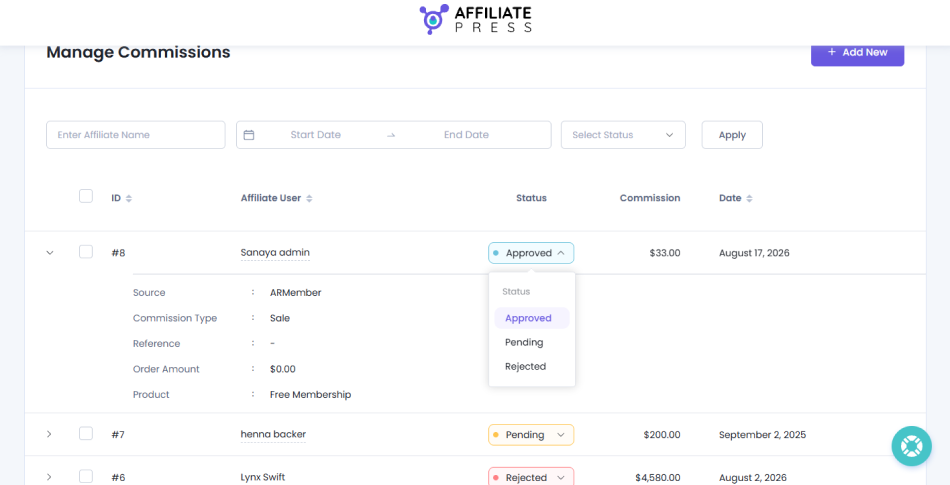
If you want to take matters in your hands, or simply want to review each commission or payout yourself, AffiliatePress makes it simple. No coding. No technical hassle. Here’s how:
- Open AffiliatePress → Manage Commissions
- Find and select the commission entries you want to reject
- Choose Reject from the bulk actions
- Click Go to apply the action
One last thing – always review your pending commissions before each payout. A quick check of refunded orders, canceled transactions and unusual commission entries can save you from unnecessary payout corrections later.
Reject Commission On Refunded, Trashed, or Failed Orders Automatically
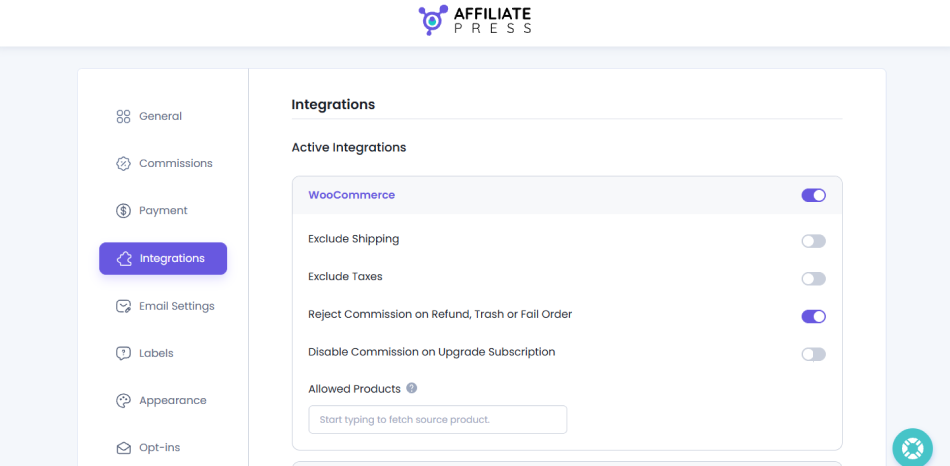
AffiliatePress gives you an option to automatically reject all unpaid affiliate commissions when an order is either refunded, trashed, Abandoned, Revoked Order or marked as failed.
To set this, you just simply have to go to AffiliatePress Settings → Integrations. From here, activate the plugin you want to connect your affiliate system with, and you’ll see options to reject commissions on the following basis. Toggle it on and save the settings. That’s all.
How To Handle Affiliate Commission Chargebacks Before And After Payout

A chargeback doesn’t always happen before you pay an affiliate. Sometimes, the customer disputes a transaction weeks after the affiliate has received their commission.
And that’s where things get complicated. Because now you can’t simply reject a commission that’s already been paid and expect the money to return to your account.
Thus, here’s how to manage this situations professionally:
What If The Commission Has Not Been Paid Yet?
This is an easier situation to manage.
For instance, an affiliate earns a $30 commission on a $150 order. Before you pay the affiliate, the customer files a chargeback with their bank.
In that case, you can keep the commission on hold. Meanwhile, you can review the dispute. If the chargeback is decided in the customer’s favor, you can reject the commission.
But don’t rush to reject every commission as soon as a dispute appears. The customer might lose the dispute or the transaction might be reinstated.
The smart move? Keep disputed commissions pending until you have enough data to decide what to do.
What If The Affiliate Has Already Been Paid?
Now this is where things get tricky.
Let’s say you paid an affiliate $30 for a sale but the customer later files a chargeback. So, here your business may lose the transaction amount and incur a chargeback fee, while the affiliate has already received their commission.
You have a few options now:
- Deduct it from future commissions
- Carry forward the adjustment
- Request repayment
However, don’t assume you can automatically withdraw money from an affiliate’s account. A commission reversal in your affiliate dashboard doesn’t necessarily reverse a payout already sent through PayPal, Stripe, or another payment method.
That’s exactly why it’s better to set your chargeback and repayment rules before launching your affiliate program. It saves you from awkward conversations later. And if you already run an affiliate program, update your terms and conditions now.
What Happens If The Chargeback Dispute Is Won?
Good news! The customer doesn’t always win a chargeback dispute.
If your business successfully challenges the dispute and the payment is restored, review the related affiliate commission before making any changes.
For instance, an affiliate earned $30 on a $150 order. You held the commission while the chargeback was under investigation. Later the bank resolves the dispute in your favor and restores the payment.
In that scenario, the commission will remain eligible for approval.
But what if you already rejected the commission?
Then, simply check whether your affiliate system lets you restore or reapprove it. If it doesn’t, you need to correct the commission manually or record an adjustment.
The best part is affiliate plugins like AffiliatePress do allow you to manually change and reapprove the commission.
One important thing: Winning a chargeback doesn’t automatically mean every commission should be paid. Check the order, the final transaction status, and your affiliate terms before approving it.
Best Practices For Managing Affiliate Commission Refunds And Reversals

When customers return a product or cancel a service, you shouldn’t be paying out pocket for an affiliate sale that didn’t stick.
Here’s how you can handle refunds and reversals without ruining your affiliate relationship:
- Locking Periods That Makes Sense for Both: If your refund window is of 7 days, setting the locking period for 30 days doesn’t make sense for affiliates. Thus, set the locking period in a way that gives both you enough time to react but also doesn’t stretch beyond the sensible time period needed for correction.
- Automate the Reversal Process: If a customer gets a refund during the pending window, your affiliate management software must automatically decline or adjust that commission – just the way AffiliatePress does.
- Handle Already-Paid Commissions safely: If a refund or chargeback happens after a payout has already gone through (for instance, a subscription cancellation or a special exception return), you have two main options….
- The Deduction Method (Recommended) – Simply roll the negative balance into the affiliate’s next billing cycle. Their next payout will simply be reduced by the reversed amount.
- The Invoice Method – For massive reversals (usually rare), you can invoice the affiliate. But, this strains relationships and is hard to enforce so stick to deductions whenever possible.
- Write an “Un-Unicorn” Terms of Service: Affiliates hate surprises. Be brutally honest and crystal clear in your affiliate program terms before they sign up. State clearly: “Commissions are only paid on kept, valid orders. If a customer refunds, the commission is voided.”
- Keep an Eye Out for “Serial Returners” (Fraud): Sometimes, shady affiliates will buy products through their own links to get the commissions, and then return the product later. Thus, always track your affiliate data.
The good news is AffiliatePress is one of the few affiliate systems that comes with in-built smart fraud detection for this exact thing. It automatically detects suspicious affiliates and flags them. You can also block them after a proper review.
Related articles:
- How to Protect Your Affiliate Program from Refund Losses
- Top 10 Free WooCommerce Affiliate Plugins (2026) To Grow Sales
- How To Increase WooCommerce Sales With Product-Wise Affiliate Commissions
In Conclusion: Manage Affiliate Commission Refunds, Cancellations, And Chargebacks
Refunds, cancellations, and chargebacks are all just part of running an online business. You can’t prevent every one of them but you can control how they affect your affiliate commissions.
First of all, start by setting clear commission approval rules using a right refund grace period, and automating commission status updates. Then, establish a process for handling commissions that have already been paid, disputed transactions and negative affiliate balances.
And don’t forget to put everything in your affiliate terms. Affiliates should know what happens when a sale is refunded or disputed before they start promoting your products.
Best of all, AffiliatePress is one complete affiliate management plugin that lets you manage commission statuses and review or reject commissions automatically. It comes with features like refund protection and fraud detection to save you from any hassle later.