How To Increase WooCommerce Sales With Product-Wise Affiliate Commissions


Not every product in your WooCommerce store is equally profitable. So why should every product offer the same affiliate commission?
You may have a high margin product you want affiliates to promote more. You may also have a new product that needs extra attention. Or, you may have low margin products where paying a high commission simply does not make sense.
Product wise affiliate commissions give you more control over these situations. You can decide how much affiliates earn based on the individual product instead of applying one commission rate everywhere.
And trust us, this can make your affiliate program much more strategic.
Let’s see how it works.
TL;DR: To increase WooCommerce sales, setting product-wise commission rates is the best way. It allows you to offer higher commissions on high margin products, encourage affiliates to promote new products, and use different commissions for different product categories.
What Are Product-Wise Affiliate Commissions?

Product-wise affiliate commissions allow you to set a different commission for specific products.
For example you can offer a 10% commission on one product, 20% on another, and a fixed $30 commission on a premium product. The affiliate commission is then calculated based on the product the customer buys.
In other words, product-specific commissions allow you to set different commissions for different products. It’s actually useful in situations like when your products have different prices, profit margins or sales priorities (which is way common in eCommerce).
This gives you more flexibility to decide which products should offer a higher earning opportunity to your affiliates.
What’s more is you can encourage affiliates to promote the products that are more valuable for your business without changing the commission for every product in your store.
With AffiliatePress, one of the most reliable WordPress affiliate plugins, you can set product wise commissions using three options: Site Default, Percentage and Fixed Amount.
So, instead of having one commission rule for everything, you can create a commission strategy that fits each product.
Why Use Product-Wise Commissions To Increase WooCommerce Sales?

A WooCommerce affiliate program can bring more customers to your store…but simply having affiliates is not enough. You also need to give them a good reason to promote your products.
This is exactly where product-wise affiliate commissions can make a difference.
You can use different commission rates to guide your affiliates toward products you want to sell more. At the same time, you can keep your commission under control for products where your profit margin is smaller.
Here are some ways product wise commissions can help:
Give Affiliates a Better Reason To Promote High-Value Products

Affiliates naturally look at the earning opportunity before deciding which products they want to promote.
If you have a high value product that can generate a good profit, you can offer a higher commission to make it more attractive to your affiliates.
For instance you sell a $200 product and offer a 10% commission. The affiliate earns $20 from a sale. If you increase the commission to 15%, the affiliate can earn $30 from the same product.
This extra earning opportunity can give affiliates a better reason to put more effort into promoting that product.
Protect Your Profit Margins

A higher affiliate commission can help you attract more promotional effort yet it also means giving away more revenue from every sale.
Thus product-specific commissions are what gotta use.
You don’t have to offer a high commission on products with small profit margins just because you want to offer a higher rate somewhere else. Instead, you can set a commission that makes sense for each product.
For example you offer 10% on a low margin product while offering 20% on a product with a better margin. This way you can encourage affiliate sales without ignoring your profitability.
Push Products You Want To Sell More

Sometimes the product you want to sell more is not necessarily your best selling product.
Maybe you have launched a new product. Maybe one product has a better profit margin. Or maybe you simply want to give more attention to a product that is not getting enough sales.
So for this, you can use product-wise commissions to give affiliates an extra reason to promote these products.
For example if your normal affiliate commission is 10%, you could offer 20% on a new product for a limited promotional period.
Affiliates can see the higher earning opportunity and may give that product more attention in their content, emails, social media posts or other promotional campaigns.
Make Your Affiliate Program More Competitive

Affiliates mostly compare different affiliate programs before deciding where to spend their promotional effort.
If competing programs offer better earning opportunities for the same products, your program will be less attractive to them.
Thus Product-wise commissions give you another way to make your program competitive. You can offer higher commissions on products where you have enough margin to do so.
This gives you more flexibility plus you get to keep your overall affiliate costs under control.
Build a More Strategic WooCommerce Affiliate Marketing Program

A good affiliate program is not only about deciding how much commission to pay (sure it does matters). It is also about deciding where that commission can create the most value.
With product wise affiliate commissions, you can connect your affiliate commission strategy with your WooCommerce sales goals. You can promote high margin products, support new product launches and give affiliates better incentives for products that need more attention.
This makes your WooCommerce affiliate marketing more strategic rather than just simply using the same commission rate for everything.
What Commission Rate Should You Offer For Different Products?

There is no single commission rate that works for every product. The right rate always depends on your:
- Product price
- Profit margin
- Marketing goals
- and, how much you want to encourage affiliates to promote that particular product.
With product wise commissions, you get more flexibility. You can follow your existing site-wide commission, offer a percentage based on the product price or give affiliates a fixed amount for every sale.
Using WordPress affiliate plugins like AffiliatePress, you can offer three rate types for this purpose.
Percentage Based Commission

A percentage-based commission gives the affiliate a specific percentage of the product’s sale price.
For instance if you set a 30% commission for a $100 product, the affiliate earns $30 from the sale.
This option can be useful when your products have different prices and you want the affiliate’s earning to increase as the product value increases. It can also work well when you want to adjust the commission according to the profit margin or marketing importance of a particular product.
For example you may offer a higher percentage for a high margin product that you want affiliates to promote more actively.
Fixed Commission

A fixed commission gives the affiliate the same monetary payout for every eligible sale, regardless of the product price.
For example you set a $30 fixed commission. Then the affiliate earns $30 for each sale of that product whether its price is $100 or $200.
This can make your affiliate payouts more predictable. It can be useful when you already know how much you are comfortable paying an affiliate for selling a particular product.
Moreover, it gives you more control when you don’t want the commission to increase along with the product price.
Site Default Commission

Sometimes, you do not need a separate commission for a product.
Thus if a product should follow the same commission rule as the rest of your site, you can use the Site Default option. It uses the global commission rate configured in AffiliatePress.
For example if your global affiliate commission is 20%, a $100 product will generate a $20 commission.
So, Which One Should You Choose?
If you want the commission to change as per your product price, Percentage can be a good way to go. If you want a predictable payout per sale, Fixed Amount gives you more control. And if you want the product to follow your existing affiliate commission, Site Default keeps things simple.
The important thing is to pick the rate based on your product economics and sales strategy.
One more thing worth mentioning is don’t fall into the “give highest commission possible” trap, nor try to compete with another affiliate program competitor in terms of commissions because that may result in loss of commission in the long run.
How To Set Product-Wise Affiliate Commissions In WooCommerce
Step 1: Activate AffiliatePress Pro
First of all, you have to install and activate AffiliatePress Pro in your WordPress dashboard.
Go to the AffiliatePress official website, and from here, you can either download the free version or get started with the pro version. For using Product-wise affiliate commissions, we’d suggest to go with AffiliatePress premium plans starting at just $79 with most of all premium addons included.
After downloading AffiliatePress Pro zip file, simply:
- Head back to your WordPress dashboard → Plugins → Add Plugin.
- Now upload the zip file of AffiliatePress Pro.
- Lastly click on Install Now, followed by Activate.
That’s it! Now simply click on the new AffiliatePress icon on the side menu bar to launch the plugin. As for setup, you can leave it its smart setup wizard which will walk you through everything in just 10 minutes.
Step 2: Activate The Product Commission Rate Add-On
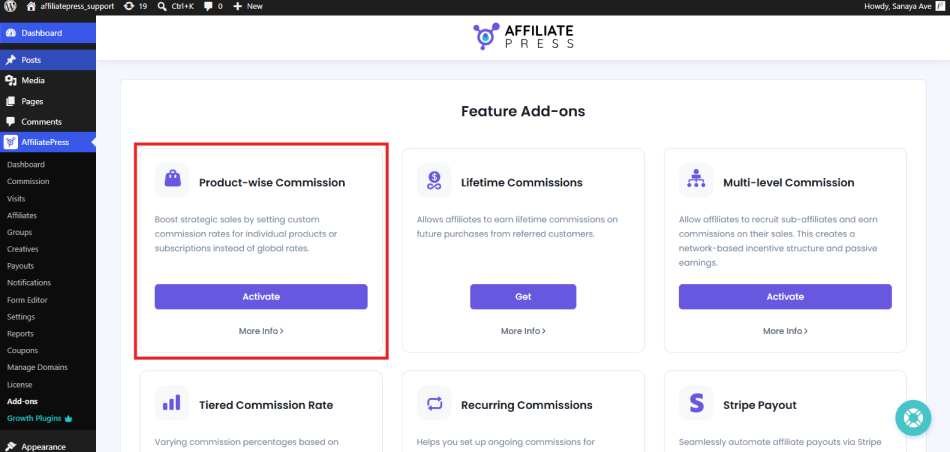
After setting you and exploring the AffiliatePress system, now’s the time to install Product-wise Commission Addon.
Just go to the Add-ons page, and you’ll see the Product-wise Commission add-on under all the Feature Add-ons section.
Simply click on Activate to get started.
Step 3: Set The Correct Commission Basis
After activating the Product-wise Commission addon, you have to make sure your commissions preferences are configured to use this feature.
- Go to Settings → Commissions.
- Under the Commissions Settings, you can see the Commissions Basis field.
- Simply make sure to select the Commission Per Product Sold option from the dropdown menu.
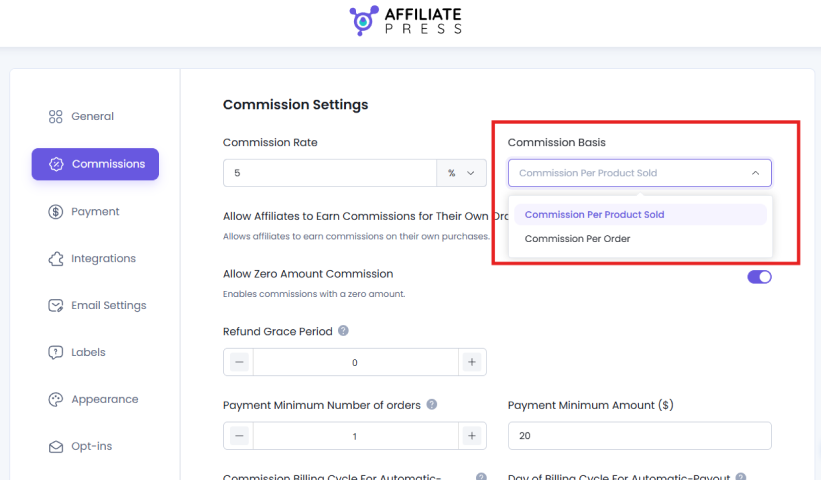
- At last, scroll till the end and don’t forget to Save your settings.
Step 4: Configure Commission Rate Type In Supported Integration
AffiliatePress integrates smoothly with WooCommerce and 26+ other WordPress plugins including eCommerce, Membership and LMS. Out of which, most of all popular integrations are supported for product-wise commissions.
For this tutorial we’re only going to focus on WooCommerce.
- Firstly open your WooCommerce Product or create a new product
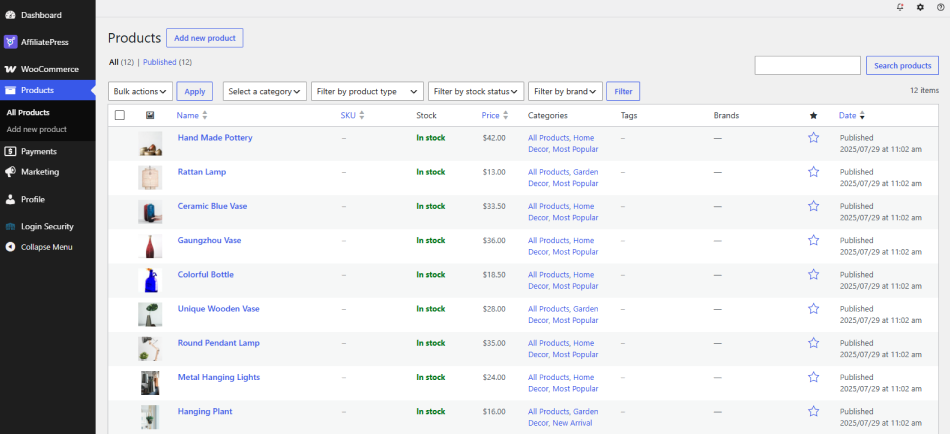
- Now inside the Edit/Add new product page, scroll down to the Product Data section.
- Inside, click on the AffiliatePress Settings.
- Now you can see two options basically:
- Disable Commissions
- Affiliate Rate Type
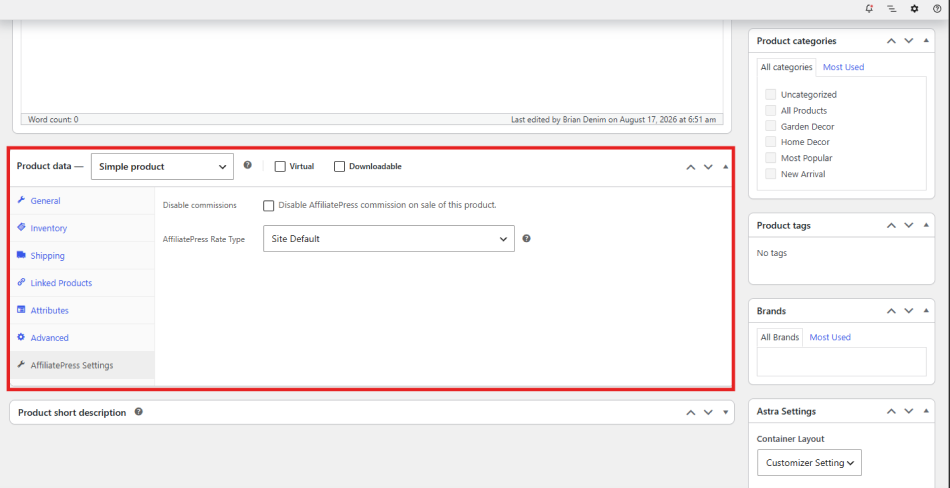
- Since we’re here to set the product-specific affiliate commissions, click on the Affiliate Rate Type. Here as we discussed, you have to choose rate type as percentage-based or fixed for that specific product.
- After selecting your rate type, enter your commission amount or commission percentage inside AffiliatePress Rate field.
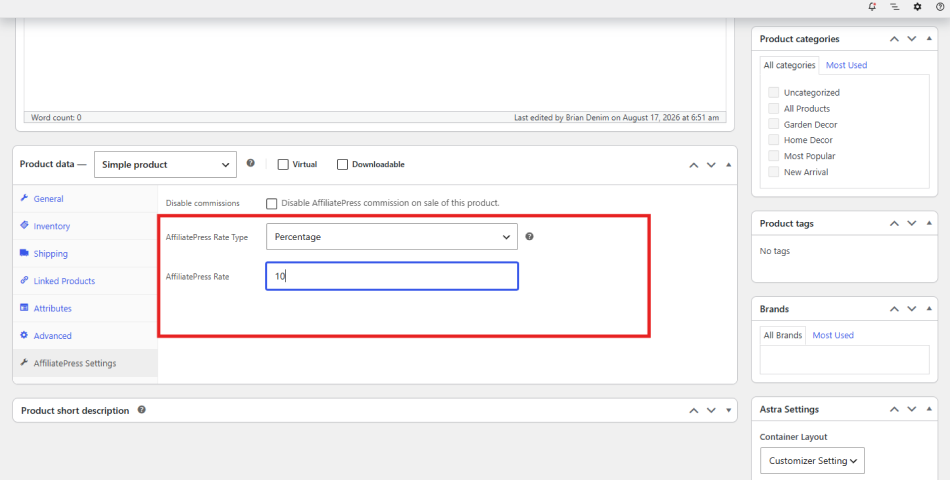
- Lastly, simply Publish or Save the product.
Step 5: Test Your Product Commission
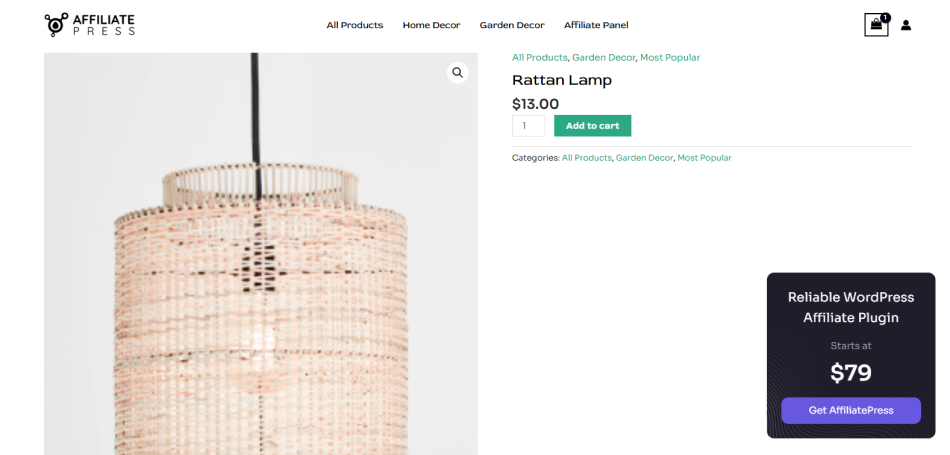
Congrats! You’ve finally set up a product-wise affiliate commission in AffiliatePress to increase your WooCommerce sales.
To increase WooCommerce sales, product-wise commission is the smartest strategy. Now the only thing left to do is ensure the whole setup is complete.
For that, you can test it first yourself to ensure each product has its own commission, and is getting attributed as expected.
Product-Wise Commission Examples For a WooCommerce Store
Knowing the different commission types is one thing. But how do you actually use them for different products?
As we said before, the best approach depends on your product price, profit margin and what you want your affiliates to focus on.
Thus you don’t necessarily have to offer the highest commission on every product, when you can create different product commission rates based on what makes sense for your store.
Here are a few practical examples to understand it better.
Example 1: Low-Margin Product

Let’s say you sell a product for $50, but the profit margin on this product is low.
Offering a 25% or 30% affiliate commission may leave you with very little profit after the sale. Thus in such a situation, you can set a lower product wise commission like 10%.
With a 10% commission, the affiliate earns $5 on every $50 sale.
This still gives the affiliate an earning opportunity, and gives you more control over your profit margin.
So if you have products where your margins are already tight, you don’t always need to compete by offering a very high affiliate commission. A reasonable rate that works for both you and your affiliate is good to go!
Example 2: High Margin Product

Let’s say now you have another product that sells for $100, and has a much better profit margin.
This is exactly where you can be more aggressive with your affiliate commission.
You could offer a 20% commission which means the affiliate earns $20 for every sale.
Why would you do that? Because the higher earning opportunity can make the product more attractive to affiliates. They may be more willing to create content around it, recommend it to their audience or add it in their personal promotional campaigns. You never know but its worth the shot.
At the same time, you are not increasing the commission across your complete WooCommerce store. You are simply giving a better incentive for a product where you have enough margin to support it.
Example 3: Premium Product With Fixed Commission

Now for example you sell a premium product for $500.
Here if you use a percentage based commission of 20%, your affiliate would earn $100 from one sale. Depending on your margins, that may be more than you actually want to pay.
Instead, you can use a Fixed Amount commission.
For example you could set a fixed commission of $50 per sale.
Thus the affiliate gets a predictable $50 payout and you get a better idea of how much you are giving away from each sale.
This approach can be useful for premium or high priced products where a percentage based commission can quickly become a large payout.
Example 4: New Product Promotion

What if you have launched a new product but your affiliates are not promoting it yet?
You can use product wise commissions as an extra incentive.
For instance your standard affiliate commission is 10%, but you want affiliates to give more attention to a new product. So what you can do is temporarily increase the commission for that product to 20%.
Now affiliates have a stronger reason to promote the new product.
They may include it in their blog posts, YouTube videos, newsletters, social media content or product recommendations. After the product starts getting sales on its own, you can analyze the results, and then decide whether you want to continue with the higher commission or bring it back to the standard rate.
This is one of the biggest advantages of product wise commissions. You don’t have to change your complete affiliate commission structure just to promote one product.
You can simply give that specific product a better commission opportunity and see how your affiliates respond.
How Product-Wise Commissions Compare With a Global Affiliate Commission
A global affiliate commission is simple to manage because every product follows the same commission rule. However as your WooCommerce store grows, more control over how much affiliates earn from each product becomes important to analyze.
| Feature | Global Affiliate Commission | Product-Wise Affiliate Commission |
| Commission rate | Same rate across eligible products | Different rate for individual products |
| Flexibility | Limited | More flexible |
| Profit margin control | Less control at product level | Better product-level control |
| Promoting specific products | Difficult to incentivize separately | Easy to offer a higher commission |
| New product promotion | Requires changing the overall strategy | Can increase commission only for the new product |
| High margin products | Same commission as other products | Can offer a higher commission |
| Low margin products | Same commission as other products | Can keep the commission lower |
| Affiliate incentives | One earning opportunity across products | Different earning opportunities based on products |
| Management | Easier to manage | Requires more product-level management |
| Best suited for | Stores with a simple product range | Stores with different products, margins, and sales goals |
Conclusion: Turn Your Affiliate Commission Into a Sales Strategy
To increase WooCommerce sales, you have set your WooCommerce affiliate commission smartly, not highly. Product-wise affiliate commission is one of the most smart commission structures that allows you to set different commission rates, percentage-wise or fixed, for specific products.
The best part? If you’re using AffiliatePress + WooCommerce integration, setting up product commission only takes a few clicks.
So what are you waiting for? Turn your WooCommerce affiliate commission into a sale strategy using product-wise commission structure.
Related articles: