How To Automate Affiliate Payments With Stripe In WordPress With AffiliatePress

Paying your affiliates is one of those tasks that looks easy when you have only a few affiliate partners. But as your affiliate program starts growing, manually checking each and every commission alongside handling payments starts taking more time than you expected.
And let’s be honest, your time is better spent growing the affiliate program than managing individual payments again and again.manage
So, what can you do about it?
You can connect Stripe with AffiliatePress. Then, your affiliates will also be able to connect their own Stripe accounts, and you can manage their commissions plus the payout records from your WordPress dashboard.
This way, you never have to treat each affiliate payment as a completely different task.
Let’s now dig deeper into how this affiliate payment with Stripe works and how to set it up.
TL;DR: Stripe Payout with AffiliatePress helps you automate affiliate payments in WordPress by connecting affiliate accounts to Stripe and giving you a central place to manage affiliate payouts.
Why Should You Automate Affiliate Payments?

Automating affiliate payouts saves hours of hassle later. Wondering how? Allow us to show you.
At the beginning, you simply check the commissions, collect the payment details and send the money manually. All sorted, right? Sure, till your affiliate program hits more than 500 affiliates, and doing the same thing for every affiliate can take a lot of time, literally days sometimes.
Moreover, you also need to keep track of which commissions are ready to pay, which affiliates have provided their payment details and which payments are already completed.
That’s exactly why it makes sense to automate affiliate payments as much as possible. Rather than treating every payout as a new different task, you can create a more organized process where your affiliate commissions and payout information stay connected.
Save Time On Repetitive Affiliate Payouts

Manual affiliate payments means…
- More checking.
- More payment entries.
- More administrative work every time your affiliates generate commissions.
So, stop logging into banks or PayPal to send money one by one. When you automate payments with Stripe, you save time after time, and spend more time on things that actually help your affiliate program grow such as finding better partners, improving your offers and supporting your existing affiliates.
Make Affiliate Payments Easier To Manage

As your affiliate program grows, you start having dozens or even hundreds of commissions waiting to be paid.
Having a proper payout system helps you keep track of:
- Which affiliate commissions are ready for payment.
- Which commissions have already been paid.
- Which affiliates still need to connect their payment account.
- How much you need to pay each affiliate.
- Your previous payout records.
This makes affiliate payouts much easier to manage than keeping everything in different spreadsheets with different access to different people.
Give Affiliates a Better Payout Experience

Affiliates don’t only care about how much commission they can earn. Also, they want to know that getting paid will be straightforward and simple.
When your payment process is clear and consistent, your partners don’t have to ask you about their payout status or send their payment information every time they earn a commission.
And trust us, a smooth payout experience can make a big difference when you want affiliates to stay active in your program.
Make Your Affiliate Program Easier To Grow

The more affiliates you recruit, the more commissions you gotta manage.
Due to this, a manual payout process that works for 5 affiliates will never be practical when you have 50 or 500 affiliates.
Thus automating affiliate payments gives you a more scalable way to handle payouts as your program grows.
This is where connecting Stripe with AffiliatePress becomes useful. You can keep your affiliate commissions and payout management inside AffiliatePress, while affiliates can connect their Stripe accounts for receiving payments.
So, you can build a payout process that grows with it.
Pay Affiliates Without Human Mistakes

When you automate payouts, you stop your staff or yourself from by mistake typing the wrong amount or sending cash to the wrong person.
Because humans make mistakes that systems rarely do (at least with AffiliatePress, we’d guarantee you never have to face any commission error thanks to its real time commission tracking).
How Do Automated Affiliate Payments Work With Stripe?

So how does the whole thing actually work when you connect Stripe with AffiliatePress?
The idea is pretty simple. AffiliatePress handles the affiliate side of your program. Meanwhile Stripe takes care of the payment side. Once an affiliate generates a commission, you can manage that payout via AffiliatePress and send the payment to the affiliate’s connected Stripe account.
Here’s how the process works in practice:
Affiliate generates a referral → AffiliatePress tracks the commission → Commission becomes eligible for payout → Affiliate connects their Stripe account → You manage the payout → Stripe processes the payment.
First thing first, the AffiliatePress system tracks the affiliate referral and records the commission as per your commission settings. You can later anytime see the commission and payout data right from your AffiliatePress dashboard with ease.
Next, the affiliate needs to connect their own Stripe account from the Affiliate Panel. This creates the connection needed for getting their affiliate payments via Stripe.
At last, after the affiliate has a connected Stripe account and the commission is ready to be paid, you can manage the payout from the AffiliatePress Payouts page.
This means you don’t need to collect every affiliate’s Stripe payment details manually and keep them in a separate spreadsheet. The affiliate connects their account themselves. You just need to keep the affiliate payout process connected to your WordPress affiliate program.
One more thing: AffiliatePress lets you use Sandbox mode while setting up and testing your Stripe connection. Thus when everything is ready, you can switch to Live mode and process real affiliate payouts.
Thus, you can keep your commissions, affiliate payment connections and payout records much more organized. And now, let’s see how you can actually set up Stripe affiliate payments in AffiliatePress.
How To Set Stripe Affiliate Payments In AffiliatePress
Now that you know how Stripe affiliate payments work, let’s move on to the actual setup.
The good thing is that you don’t need to create a separate payment workflow from scratch. AffiliatePress gives you the Stripe Payout Addon which connects your affiliate program with Stripe and allows your affiliates to connect their own Stripe accounts.
Still before jumping straight on, you need to seek out how to install and activate AffiliatePress on your WordPress site, and then you gotta have access to the Stripe account you want to connect to.
Let’s now go through the setup step by step without any further delay.
Step 1. Install The Stripe Payout Addon
First things first, you need to install and activate the Stripe Payout Addon in AffiliatePress.
- Go to AffiliatePress → Add-ons
- Look at the Stripe Payout addon and activate it.
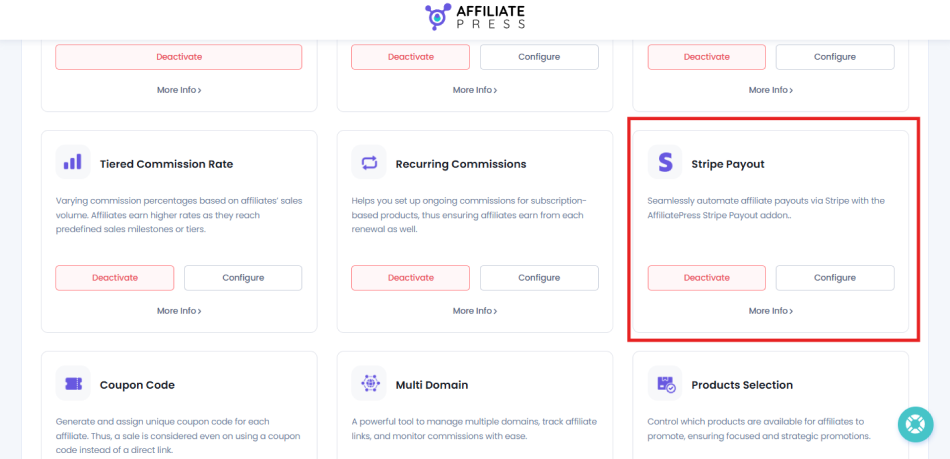
If the addon is not available in your WordPress dashboard, you need to download it first from your AffiliatePress account and then install it on your WordPress site.
After the addon is activated, you will see the option to configure Stripe payouts.
Step 2. Enable Stripe Payouts
After activating the Stripe Payout Addon, click Configure. This will take you to AffiliatePress → Settings → Payments.
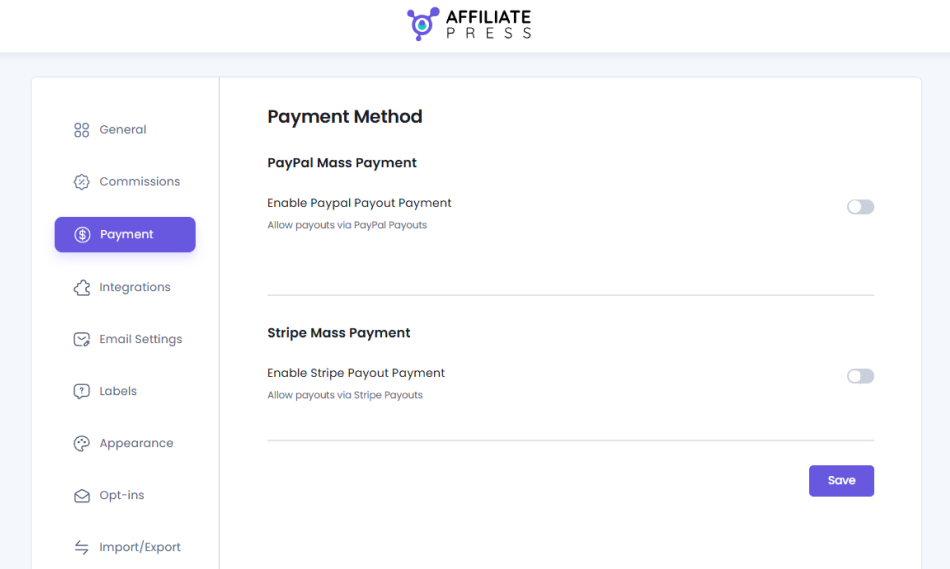
Under the Stripe Mass Payment section, find Enable Stripe Payout Payment option, and simply turn it on.
This setting allows you to use Stripe for paying all affiliate commissions which can be paid.
Next, AffiliatePress will show you the Stripe connection fields you need to complete. Here you will find options such as…
- Stripe Publishable Key
- Stripe Secret Key
- Stripe Client ID
- Stripe Redirect URL
- Stripe Account ID
Just add these details to connect your Stripe account with AffiliatePress.
Step 3. Connect Your Stripe Account
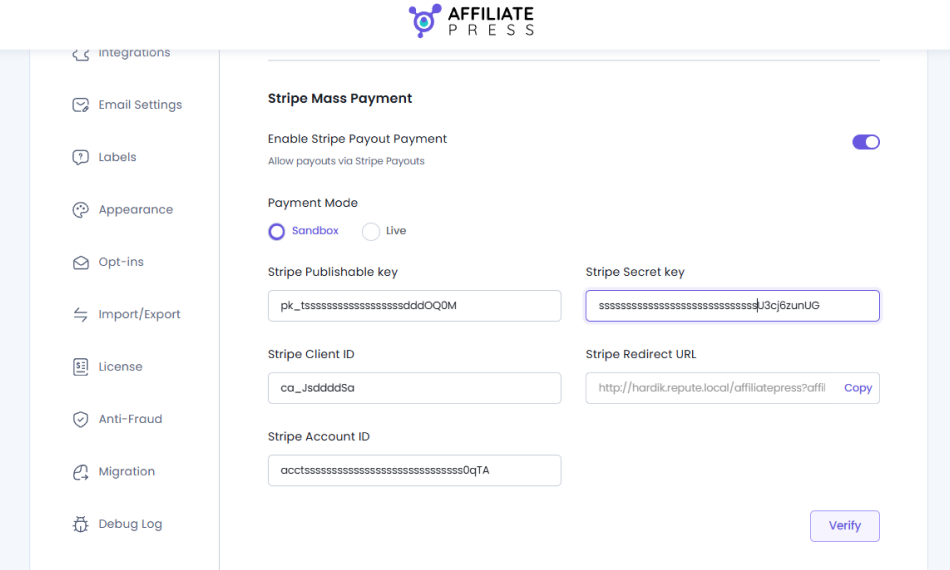
Now comes the important part; connecting your Stripe account from the admin side.
As we said before, AffiliatePress needs a few Stripe details for the Stripe connection. Thus you can get these details from your Stripe dashboard and then fill them in the fields inside AffiliatePress.
When you have added all the needed Stripe details, hit the Verify.
If everything is correct, AffiliatePress will show a confirmation message in the Payments panel. And if not, don’t worry. First, check each Stripe key, Client ID, Redirect URL and Account ID again. A single incorrect detail can stop the connection from being verified.
Step 4. Choose Sandbox Or Live Mode
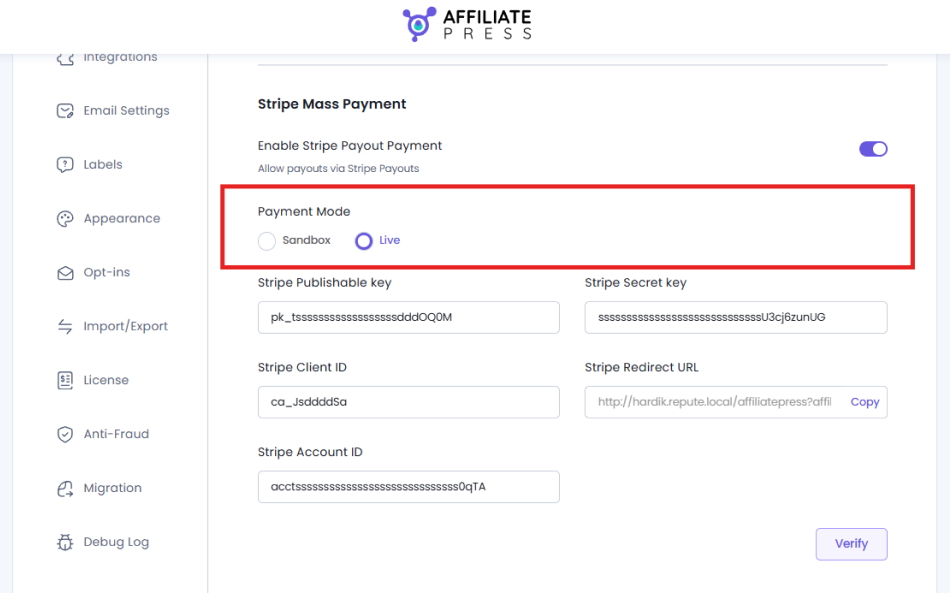
Before you start sending real affiliate payouts, you need to pick which Stripe payment mode you want to go with.
AffiliatePress gives you two options:
- Sandbox
- Live
When testing your Stripe connection, we suggest you go with Sandbox. It works with Stripe test credentials. Thus you can test the setup without any real payments involved. Or else, you can go with Live mode when you are ready to automate real affiliate payouts.
Worth mentioning that if you’re setting it all up for the first time, starting with Sandbox is a good idea. It allows you to check the connection before any real money gets involved.
Step 5. Ask Affiliates To Connect Their Stripe Accounts
Connecting your Stripe account as the site owner is only one side of the setup.
Your affiliates also have to connect their own Stripe accounts before they can receive payouts via Stripe.
From the Affiliate Panel, an affiliate can simply have to:
- Log in to their Affiliate Account.
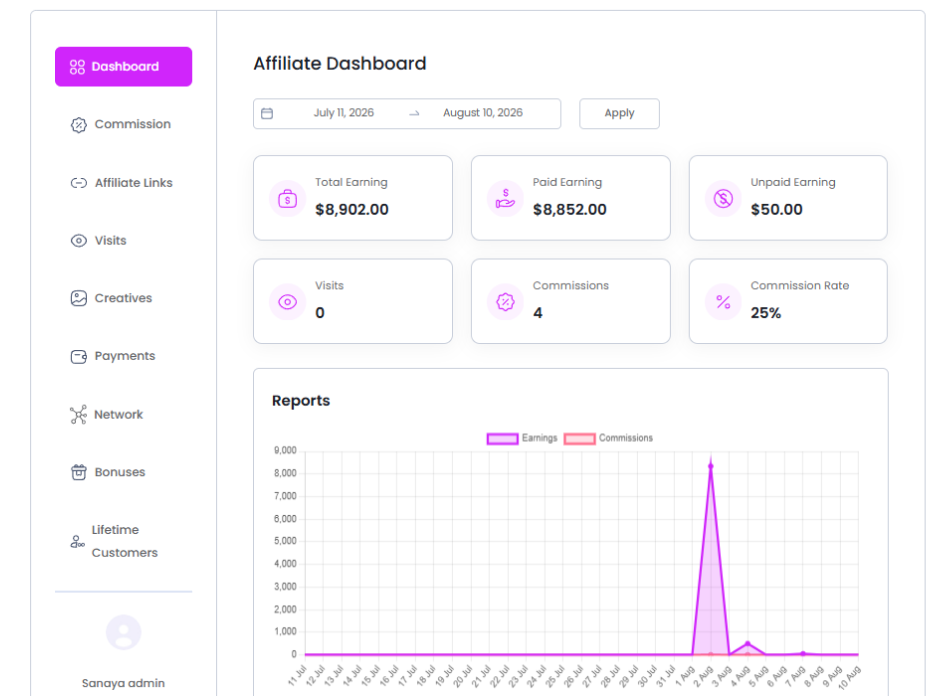
- Click the Edit Profile icon.
- Scroll down to Payment Details.
- Select Stripe (Optional)
- Click Connect with Stripe.
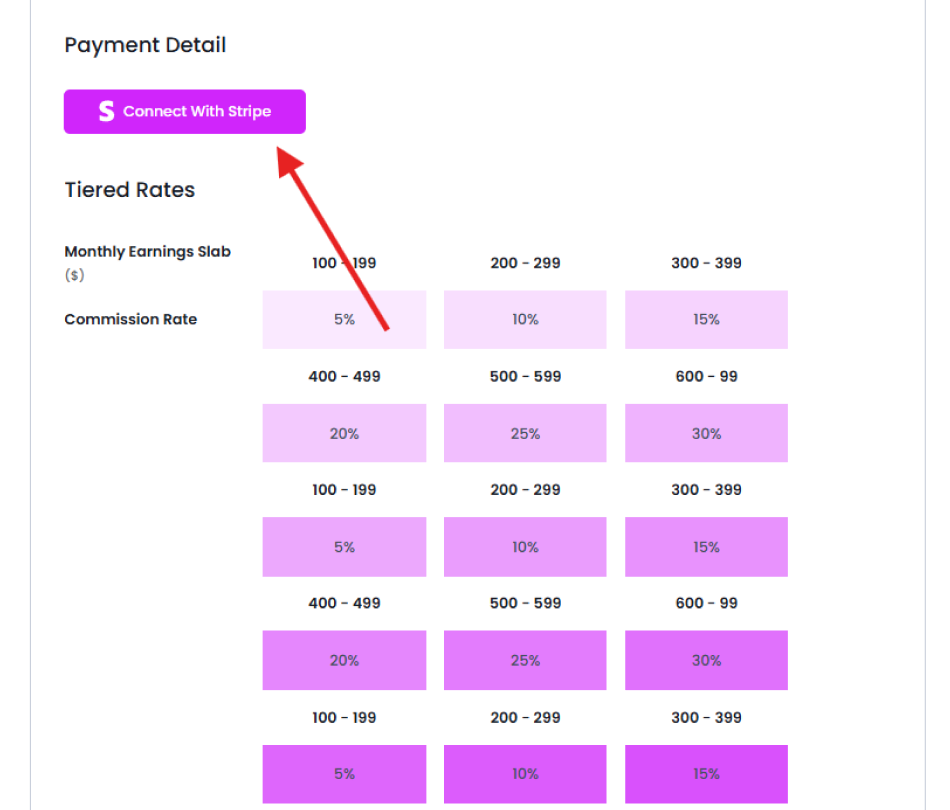
- Complete the authorization process on Stripe.
After the connection is successful, the affiliate’s Stripe account will be linked to AffiliatePress. Again, worth mentioning that Affiliates must connect their Stripe accounts before they can receive payouts through Stripe.
Thus, the setup is now complete from both sides. You have connected Stripe to AffiliatePress, and your affiliates have connected their own Stripe accounts. You can now move on to managing the actual real affiliate payouts from your WordPress dashboard.
How To Manage Affiliate Payouts With AffiliatePress
You don’t need to jump between different dashboards just to check which affiliates need to be paid. AffiliatePress keeps your payout records in one place. So you can simply see what has already been paid and what is still waiting for payment.
To manage your payouts, just go to AffiliatePress → Payouts.
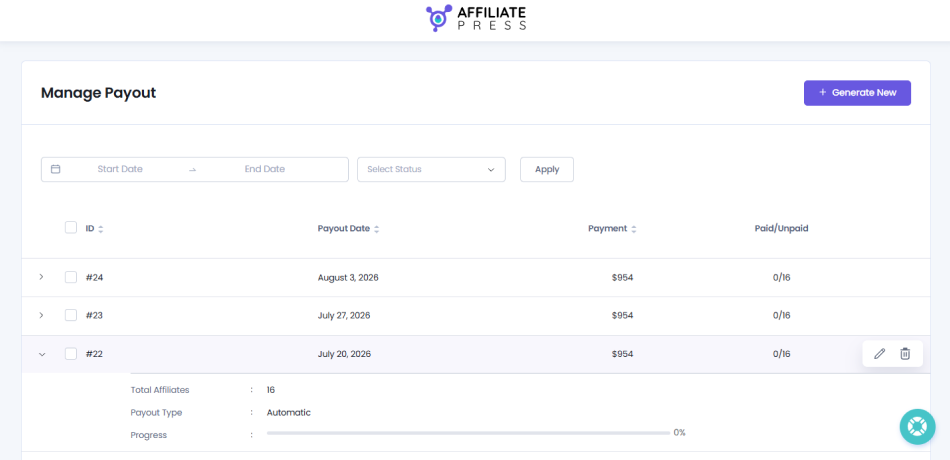
From here on, you can:
- See all affiliate payout records
- Check pending and completed payouts
- Review payout details for each and every affiliate
- Track paid and unpaid commissions
This is especially useful when your affiliate program starts growing. You don’t have to juggle different spreadsheets to remember who has been paid. Just use the AffiliatePress Payouts section as your central place for managing affiliate payouts.
Another useful part is that affiliates can even manage their own Stripe connection from their Affiliate Panel. They can connect their Stripe account when they are ready to get payments and they can also disconnect the account when needed.
This means you don’t have to collect and manually maintain every affiliate’s Stripe account details yourself. The affiliate handles their own Stripe connection, while you manage the affiliate payout process from AffiliatePress.
Thus after everything is connected, AffiliatePress gives you a much more organized way to manage affiliate payouts, payment records and your overall Stripe payout workflow.
Conclusion: Make Affiliate Payments Easier To Manage
AffiliatePress allows you to automate affiliate payouts with Stripe in just a few simple steps in WordPress.
To set this up, you only need to activate Stripe Payout addon, configure all details and establish the connection. That’s all. Affiliates now can connect their own Stripe account to start accepting payouts with Stripe payment gateway.
Once an affiliate generates a commission, you can manage that payout via AffiliatePress, and let the system send the payment to the affiliate’s connected Stripe account automatically.
This Stripe Payout extension allows you to instantly send affiliate commissions directly to your affiliates’ Stripe accounts.
You can run a borderless, automated affiliate program with the total payout flexibility of Stripe.
Related Articles: