How To Set Up Tiered Commission Rates in AffiliatePress

This is what you can tell your affiliates: the more successful you are, the more you earn. Consider it one of the most natural ways to motivate them to make their work better. Psychologically, you are winning your best affiliates with such an offer. Technically, it’s very easy to set up with AffiliatePress using just one add-on. Let’s see how to do it.
TL;DR: AffiliatePress makes it easy to set up tiered commission rates that automatically reward affiliates as they reach sales or revenue milestones. Simply enable the Tiered Commission Rate add-on, set your commission tiers, and optionally reset progress every month to keep your affiliate motivated.
What Are Tiered Commission Rates?
Tiered commission rates in an affiliate program allow you to offer affiliates different commission rates depending on their performance level. So, it’s when you offer more than just one commission type by creating “tiers” or levels.
Those tiers can be based on sales, revenue, referrals, or conversions. Better commission rates are awaiting only those who perform better and send you more clients. For instance, those bringing you up to 10 sales, can have a max 20% commission, while 11+ sales can enjoy 25% or higher, etc.
Why Should You Use Tiered Rates For Affiliates?
We’ve just explained that with tiered commissions, you motivate affiliates to do more – with more rewards and engagement. What else?
- You also keep your commission structure flexible without creating and running multiple programs.
- You build fair and performance-based partnerships, letting everyone know what they need to do to have better opportunities.
- Forget about manual work because tiered commission rates mean automation. Rates are automatically applied when an affiliate reaches a new level.
How To Set Up Tiered Commission Rates In AffiliatePress
Can you do this on your WordPress site with the AffiliatePress plugin? Of course, in a few easy steps.
In AffiliatePress, all your commission rules can be customized through the Settings > Commissions tab. However, the exact settings you see depend on what add-ons are activated.
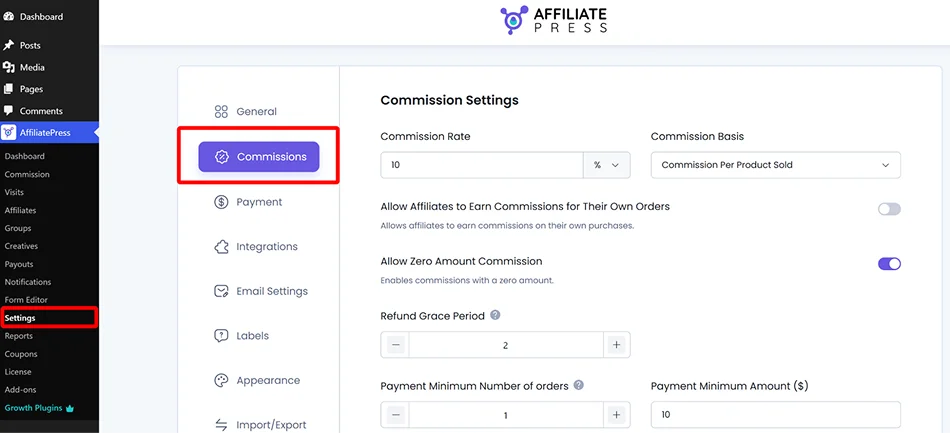
For tiered commission rates in AffiliatePress, install and activate the add-on of the same name: Tiered Commission Rate. You might need to download it first from your AffiliatePress account and then install it as a normal plugin. This add-on is available only in Professional and Enterprise plans.
Then in the AffiliatePress Commissions settings, once everything is installed and activated, follow these steps.
Step 1: Choose How Affiliates Should Progress
The first step is deciding what should unlock higher commission rates.
The plugin allows you to reward affiliates based on two crucial options:
The number of sales they drive.
The total value of those sales.
Option 1. Sales Count Based (e.g. 2 sales – 10%, 10 sales – 25%)
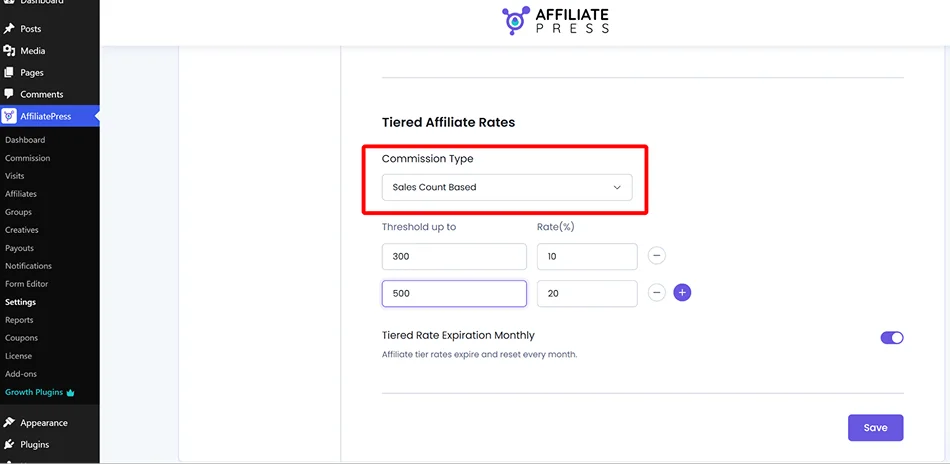
Choose this if your focus is on conversions. The higher commission rates are applied automatically when the threshold is finally crossed with approved sales.
Our tip is to use this when your products or services are similarly priced. In this case, the number of sales is a good measure of performance.
Option 2. Sales Amount Based (e.g. $100 earned – 15%, $200 – 20%)
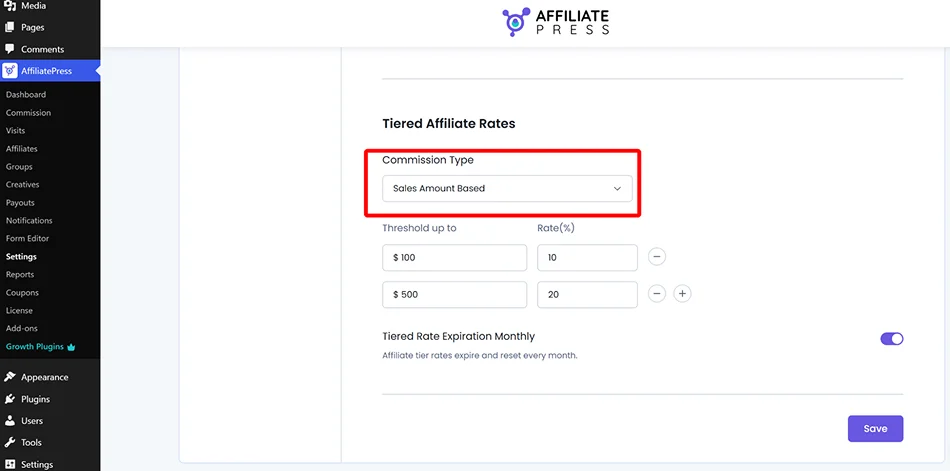
You can also set a revenue milestone from approved commissions to motivate affiliates to earn more. For many of you with different product types and prices (e.g. traditional retail on WooCommerce), this might work better thanks to higher business impact.
You can’t have two at the same time, though.
Step 2: Configure Your Tiered Rates
Setting up your tiers is straightforward:
- Choose the commission type (as we’ve explained, the number of approved sales or the total value of approved sales).
- Add your thresholds (designate the milestone an affiliate needs to reach), which is either a sales count or a revenue amount.
- Assign the commission rate (the percentage affiliates will earn after reaching each threshold).
Step 3: Set Up Monthly Tier Reset (Optional)
Now you’re all set! And when affiliates qualify for higher levels, the plugin applies the appropriate commission rate without any manual updates.
You may also use the option of resetting tiers every month, but it’s optional. Want to keep affiliates motivated month after month? Enable them to earn their way back through the tiers each month.
For this, you may enable the ‘Tiered Rate Expiration Monthly’ toggle to reset every affiliate’s progress at the beginning of each calendar month.
You may want to use it just sometimes for affiliate contests or as performance incentives.
How To Communicate This To Your Affiliates?
Now you know how to set up tiered commission rates in AffiliatePress. Make sure your affiliates know what they’re working toward and try to make tiered rates a visible part of your affiliate program, including on the affiliate registration page.
More simple ways:
- Show rates inside the affiliate dashboard. In AffiliatePress, affiliates can see their current commission tier and upcoming milestones, so ensure they visit their dashboards.
- Mention tiers in your email campaigns. Affiliates are busy people and might not know the details of just one of their clients’ affiliate programs. A short email reminding them that they’re only a few sales away from a higher commission is a good idea.
- Highlight milestones during promotions, when you are running a seasonal sale or launching a new product.
- Add a brief explanation on the affiliate registration page.
What Are Some Other Methods To Differentiate Affiliate Commissions?
In AffiliatePress, you will find even more automation for dynamic affiliate rates. Below, you’ll find just a few of such possible conditions:
- Product-specific commissions (higher commissions for selected products).
- Individual affiliate rates, which are assigned specifically to top-performing partners, influencers, or strategic affiliates. Or just anyone you are interested in boosting your relationship with.
- Recurring commissions (make rewards as constant as subscription renewals).
- Performance bonuses are one-time bonuses when affiliates hit milestones.
- Multi-level commissions allow your affiliates to recruit others, so that they build a bigger referral network.
Find out which AffiliatePress add-on is required for any of these incentives.
Finally, How To Set Up Tiered Commission Rates In AffiliatePress?
Tiered commission rates are easy with AffiliatePress. Whether it’s about the number of sales or the total sales amount, you can set it up.
In AffiliatePress, as with all more advanced features, you need to enable tiered commissions through the dedicated add-on. Then, it only takes a few settings, where you basically set up your method and the threshold for the affiliate earnings (which reward follows when a threshold is crossed).
Then it all happens automatically when your affiliates reach the milestones. You don’t need to manually track affiliate progress. Your task is to simply set it up, communicate your message really well so that affiliates are aware of the opportunities, and finally get better results for your affiliate program!
Related articles: