


AffiliatePress vs SliceWP : Everything You Need To Know Before Choosing

AffiliatePress vs SliceWP. Two WordPress affiliate program plugins. Similar goals, but some pretty important differences.
At first glance, both seem to offer everything you need to launch a complete affiliate marketing program. You get affiliate registration, referral tracking, commission management and tools to reward your partners.
But look a little closer, and you’ll notice that the differences go beyond their feature lists.
What if you want to run an affiliate program for an online course? What if your business relies on memberships or appointment bookings? And, what if you require more control in future over commissions, tracking and affiliate payouts?
These are the questions worth asking before choosing an affiliate plugin.
This guide will put together AffiliatePress and SliceWP side by side, explore what makes each one different and help you decide which is the better fit for your business.
TL;DR: AffiliatePress offers more integrations, flexible commission management, dedicated fraud protection, and better long-term pricing. SliceWP stands out with first-click/last-click attribution, more payout options, and a longer money-back guarantee. Overall, AffiliatePress is the better investment for businesses looking for flexibility, affordability, and room to grow.
AffiliatePress vs SliceWP: Quick Comparison
Short on time? No problem! Below are the both best WordPress affiliate program plugins compared at a glance, side by side.
| Feature | AffiliatePress | SliceWP |
| Free version | Yes | Yes |
| Integrations | 26+ | 13+ |
| WooCommerce support | Yes | Yes |
| Membership integrations | 7+ | 3 |
| LMS integrations | Yes | Not prominently documented |
| Form integrations | Yes | Not prominently documented |
| Appointment booking integration | Yes (BookingPress) | Not prominently documented |
| Commission management | Fixed, percentage, product-wise, tiered, multi-level, recurring, lifetime, and bonuses | Fixed, percentage, product-wise, recurring, lifetime, multi-level, and bonuses |
| Referral tracking | Links, coupons, QR codes, multi-domain, Bitly | Links, coupons, first-click/last-click, cross-site |
| Payout methods | PayPal, Stripe, manual | PayPal, Stripe Connect, bank transfer, store credit |
| Fraud prevention | Dedicated fraud protection features | No directly comparable dedicated fraud detection add-on listed |
| Reporting | Real-time reports and analytics | Advanced reports |
| Best suited for | Businesses needing broader integrations and flexible affiliate management | WooCommerce and membership-based businesses |
Now let’s get into the actual comparison. Both WordPress affiliate plugins cover the basics of affiliate management, but you’ll notice some important differences when you look at their setup process, integrations, commission options, tracking methods and payout features.
Thus, we’ll compare and show you what each of these plugins bring to the table and declare a winner based on the features that matter most to your affiliate program.
1. Ease Of Use And Setup
Nobody wants to spend an entire afternoon figuring out how to launch an affiliate program. You want to install the plugin, set a few settings, connect your existing WordPress tools and get things moving. That’s all!
Both AffiliatePress and SliceWP are designed to work directly from your WordPress dashboard but their installation and setup processes are a little different.
AffiliatePress
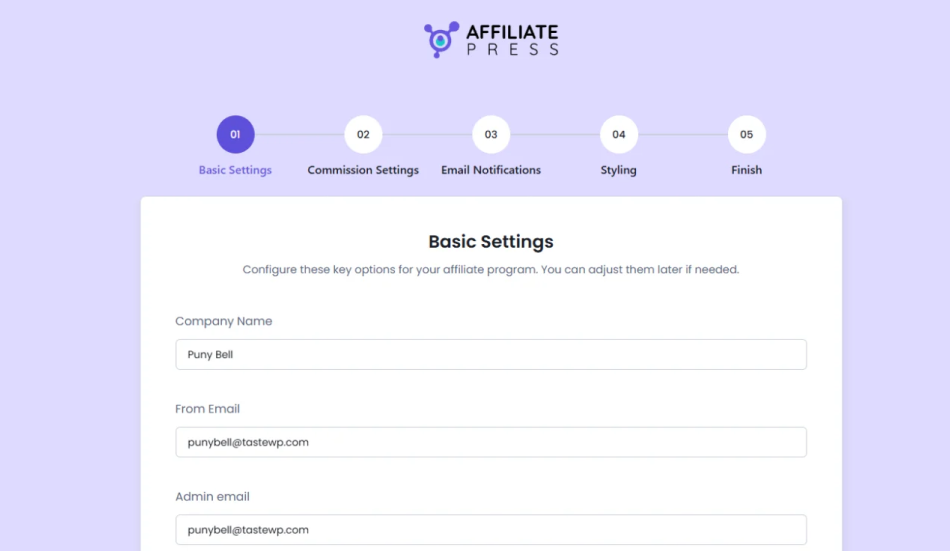
AffiliatePress comes with a Lite version and three Pro plans. You can download the free version or buy a Pro license, install the plugin and simply activate it from your WordPress dashboard. The steps are almost the same as activating any ordinary WordPress plugin. No hassle.
To kick things off, its Smart Setup Wizard walks you through everything. You can:
- Add your basic affiliate program information.
- Set commission rates and payment settings.
- Set up email notifications.
- Customize your affiliate panel.
- Select the WordPress integration you want to use.
The best part? The setup wizard takes care of the essential settings and you can always change them later. And changing them is also easy thanks to its modern, SaaS-like user interface and settings.
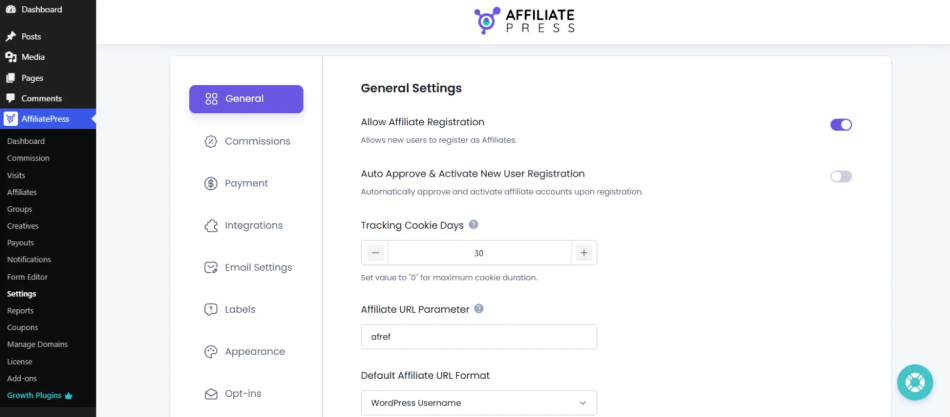
If you ever feel stuck, beginner-friendly documentations, video tutorials and instant, fast tech-customer support is always available to help.
SliceWP
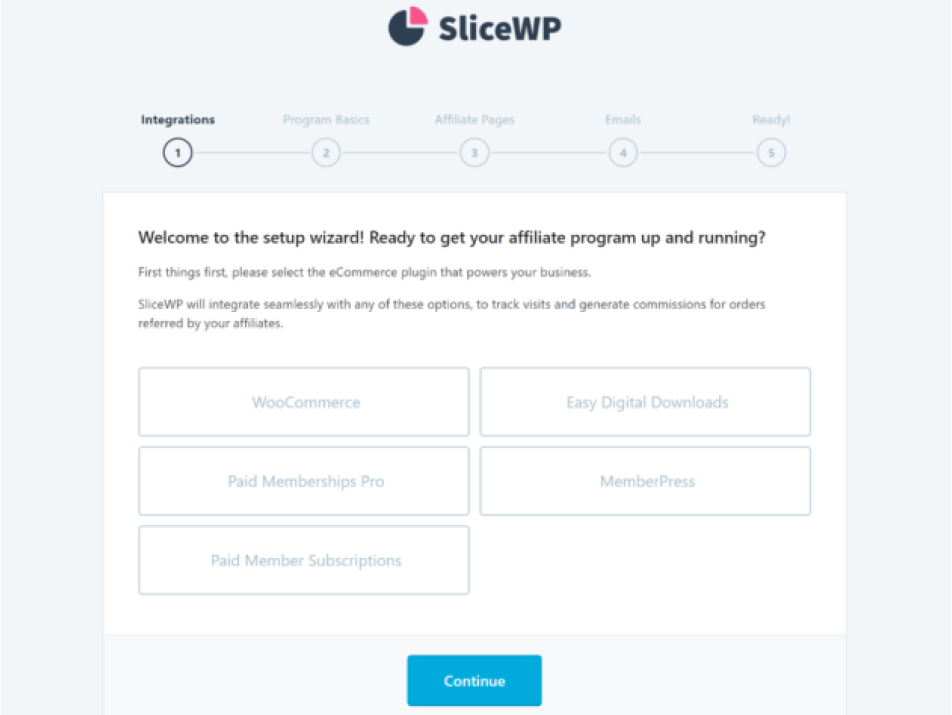
SliceWP, is also one of the popular names in the WordPress affiliate tools ecosystem for offering a core free plugin. Just like AffiliatePress, you can install it directly from your WordPress dashboard.
However, if you want to use SliceWP Pro, you’ll need to install the Pro extension separately. First, install and activate the free core plugin, download the Pro extension from your SliceWP account, upload it to WordPress and activate it.
After that, you can register your website and activate the Pro add-ons you need.
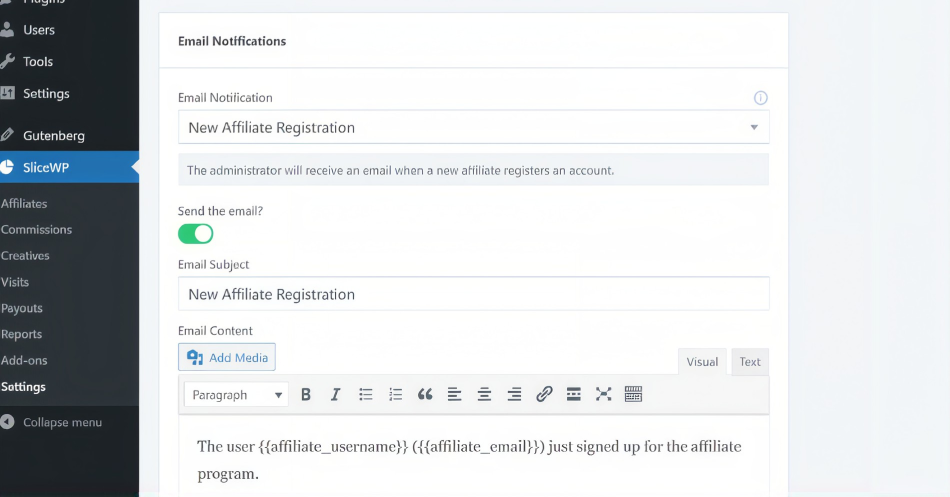
SliceWP keeps its setup wizard steps simple with dedicated settings for
integration, commissions, affiliate registration, emails and payouts. On top of that, you get a detailed documentation library covering installation, testing, troubleshooting and other setup tasks.
The Bottom Line?
🏅Winner: AffiliatePress
AffiliatePress takes the lead here because its Smart Setup Wizard brings the most of all basic configuration steps together in one guided process. SliceWP also has a simple setup, but installing its Pro extension separately adds another step.
If you’re new to WordPress affiliate management and want a guided onboarding experience and modern, SaaS-like user interface for general settings, AffiliatePress gets the point.
2. WordPress Integrations And Supported Business Models
This is where things get interesting.
Not every business runs on WooCommerce. Some sell online courses, others manage paid memberships and plenty of businesses rely on appointment bookings, lead generation or digital downloads.
Thus, if you’re an agency working on multiple client projects, you’ll never know which site or store will come, so it’s better to be prepared early then later spend more just to get that “Specific” integration. And if you’re a store owner, you never know how your business will grow. Maybe today you’re using WooCommerce to sell your products, but what if tomorrow you decide to switch from WooCommerce to SureCart, EDD, or any other platform.
Thus, your affiliate plugin should work with the tools that already power your business (or will power your business in future).
Let’s see how both plugins handle integrations.
AffiliatePress
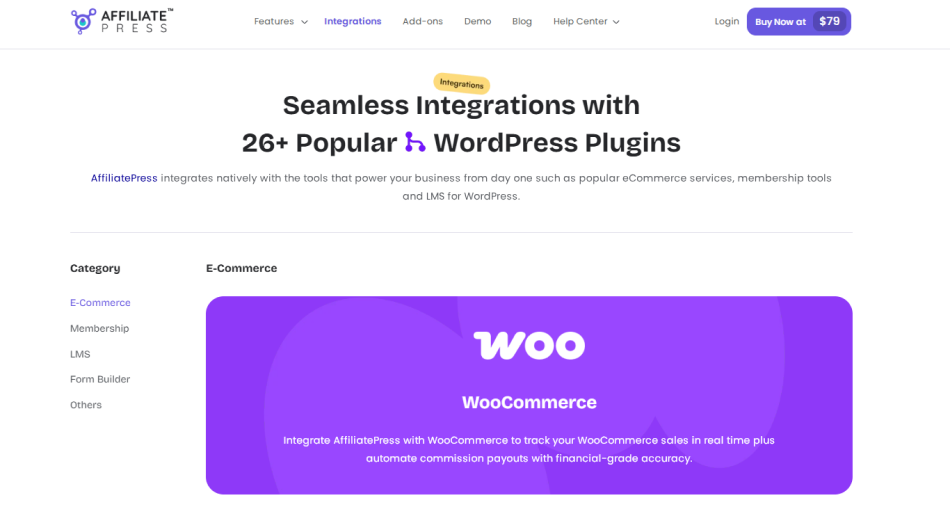
AffiliatePress integrates smoothly with 26+ WordPress plugin integrations across multiple categories.
Now, what does this actually mean for your business?
Let’s say you run an online course website powered by LearnDash. AffiliatePress can track course enrollments and reward affiliates for bringing new students to your platform.
Running a membership website with ARMember? You can connect AffiliatePress to track membership signups and reward affiliates for successful referrals.
And what if you’re running an appointment-based business?
With BookingPress, you can track referrals generated through appointment bookings and their associated payments.
Best of all, you even get integrations for form-based, lead generation, digital products, donations and other business models.
SliceWP
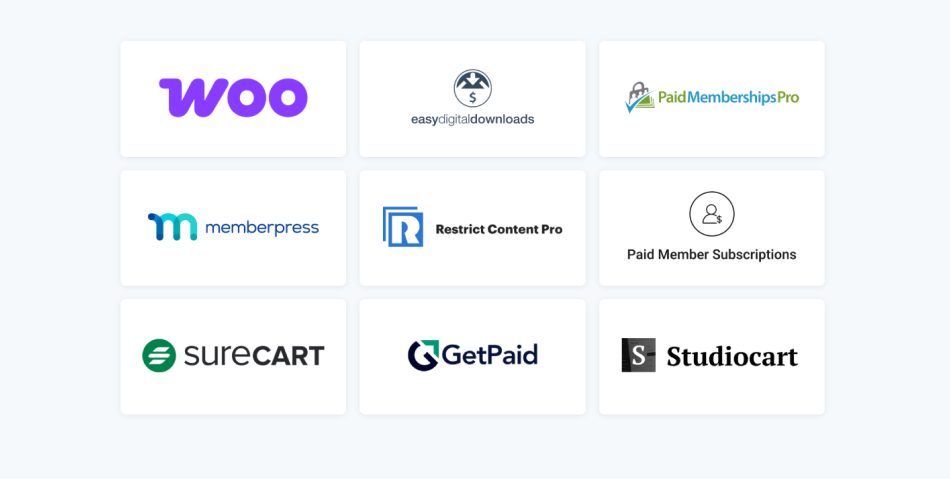
SliceWP has a solid yet limited collection of 13+ WordPress integrations for e-commerce and membership-based businesses.
You can use these integrations to track referred purchases, membership signups and other eligible transactions.
For instance, if you run a WooCommerce store, SliceWP can automatically track referred orders and generate affiliate commissions. Also, it works with many membership plugins like MemberPress and Paid Memberships Pro, allowing you to reward affiliates for bringing new members to your website.
However, its officially listed integration ecosystem is more focused than AffiliatePress. Thus, you won’t find the same documented range of LMS, form-builder, and appointment-booking integrations.
The Bottom Line?
🏅Winner: AffiliatePress
AffiliatePress wins this round by a clear margin. SliceWP is a good choice for WooCommerce stores and some membership websites. But AffiliatePress covers more business models like online courses, form-based lead generation, appointment bookings and donations.
| Category / Business Model | AffiliatePress (26+ integrations) | SliceWP (13+ integrations) | Advantage |
| E-commerce / Physical Products | WooCommerce, SureCart, Easy Digital Downloads, WP EasyCart | WooCommerce, Easy Digital Downloads, GetPaid | AffiliatePress |
| Digital Products / Downloads | Easy Digital Downloads, SureCart, Download Manager, WP Simple Pay, Accept Stripe Payments | Easy Digital Downloads, GetPaid | AffiliatePress |
| Memberships | ARMember, MemberPress, Paid Memberships Pro, Ultimate Membership Pro, Restrict Content Pro, Simple Membership, Paid Member Subscriptions | MemberPress, Paid Memberships Pro, Paid Member Subscriptions | AffiliatePress |
| Online Courses / LMS | LearnDash, LifterLMS, Tutor LMS, LearnPress, Masteriyo LMS, MasterStudy LMS | — | AffiliatePress |
| Forms / Lead Generation | WPForms, Gravity Forms, Ninja Forms, ARForms | — | AffiliatePress |
| Appointments / Bookings | BookingPress | — | AffiliatePress |
| Donations / Nonprofits | GiveWP | — | AffiliatePress |
| Invoicing / Payments | GetPaid, WP Simple Pay, Accept Stripe Payments | GetPaid | AffiliatePress |
| Best Fit | Stores, membership sites, online courses, agencies, lead-generation websites, booking businesses, and nonprofits | Primarily WooCommerce stores and membership websites | AffiliatePress |
Overall, AffiliatePress gives you more room to build and expand your affiliate program.
3. Affiliate Commission Management
Commissions are the heart of any affiliate program.
You have to decide how much affiliates earn, which product qualifies for commissions, whether recurring payments are rewarded and how you want to motivate your top performers.
Both AffiliatePress and SliceWP offer flexible commission management but there are differences in their available commission structures and add-ons. Let’s check them out.
AffiliatePress
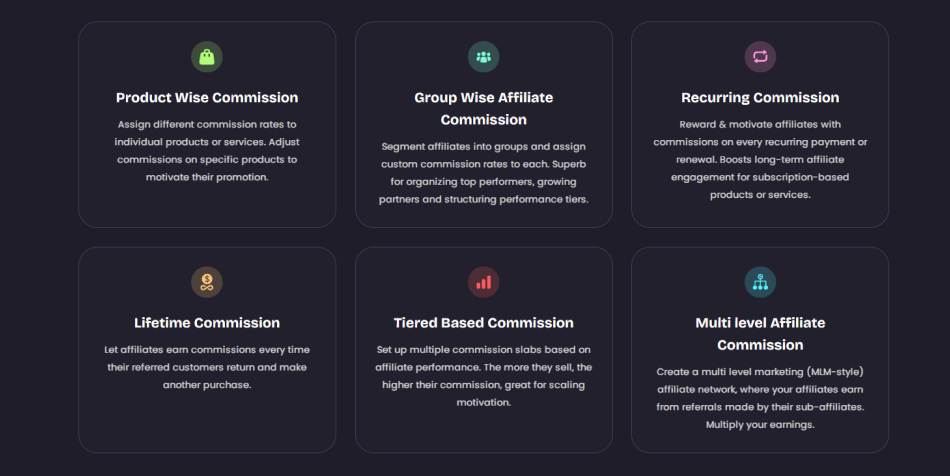
AffiliatePress comes with multiple commission types to let you reward your affiliates the way your business wants: You get:
- Fixed and percentage commissions
- Product-wise commissions
- Recurring commissions
- Lifetime commissions
- Tiered commissions
- Multi-level commissions
- Performance bonuses
- Sign up bonuses
On top of that, you get individual affiliate commission settings, giving you more control over how different partners earn.
For instance, you can offer your regular affiliates a 20% commission while giving your top-performing partners a higher rate. Best of all, you can also set different commission rates for products with different profit margins.
SliceWP
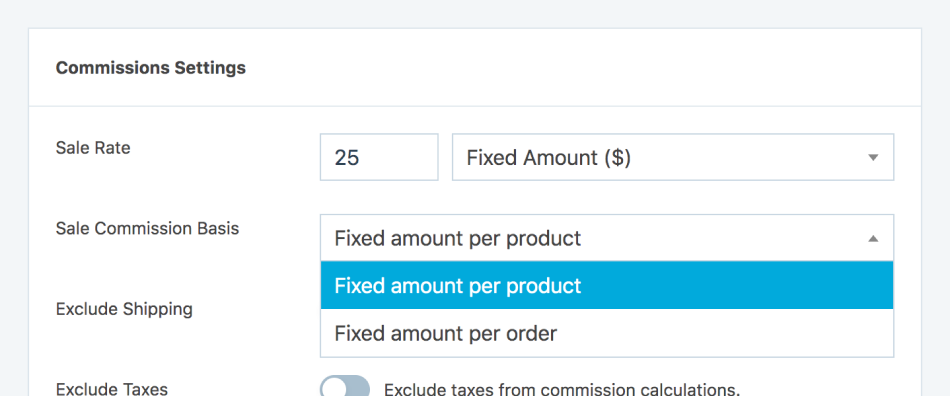
SliceWP also offers a good range of commission management features. Its core commission settings allow you to set:
- Percentage-based commissions
- Fixed commissions per order
- Fixed commissions per product
- General commission rates
- Individual affiliate commission rates
- Commission rates for affiliate groups
With the Product Commission Rates add-on, you can also assign different commission rates to individual products or membership levels.
And… that’s not all.
SliceWP offers more commission-related add-ons such as:
- Recurring Commissions
- Lifetime Commissions
- Multi-level Affiliates
- Performance Bonuses
- Product Revenue Share – Reward affiliates with commissions from selected products
Thus, if you’re looking for recurring commissions, lifetime rewards or multi-level affiliate marketing, SliceWP has those options too.
The Bottom Line?
🏅Winner: AffiliatePress
AffiliatePress takes this round because of its wider commission management toolkit, particularly tiered commission rates, product-wise commissions, multi-level structures, recurring rewards, lifetime commissions, and sign-up bonuses.
No doubt, SliceWP also covers plenty of advanced commission requirements through its add-ons. But, AffiliatePress gives you more ways to create performance based commission strategies across different products and business models.
4. Accurate Affiliate Tracking
Getting affiliates to promote your products is one thing. Knowing exactly where your referrals come from and which partners are generating conversions is another.
Let’s now see how AffiliatePress vs SliceWP handle this.
AffiliatePress
AffiliatePress offers a lot of ways to track affiliate referrals and promotional activity such as:
- Referral links
- Coupon tracking
- QR code tracking
- Affiliate landing page
- Multi-domain tracking – Tracks affiliate activity across multiple domains
- Bitly integration – Instantly shorten your affiliate referral links
When tested personally, it tracked and attributed each and every sale correctly. We first set AffiliatePress up for a staged WooCommerce store, made 8 sales, and each one was tracked and attributed with full accuracy.
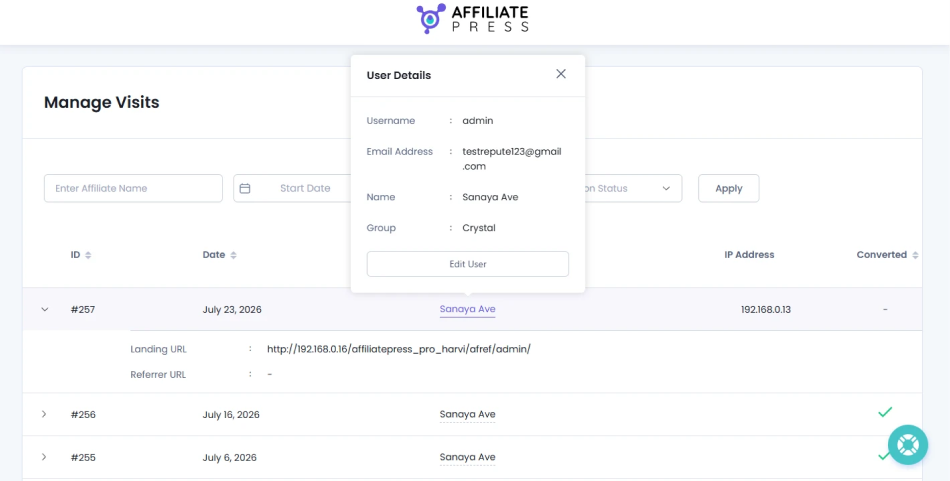
Best of all, you even get a dedicated Visits section in your AffiliatePress WordPress dashboard. Here, you can monitor individual visits, including the referring affiliate, visit date, IP address, conversion status and landing URL.
SliceWP
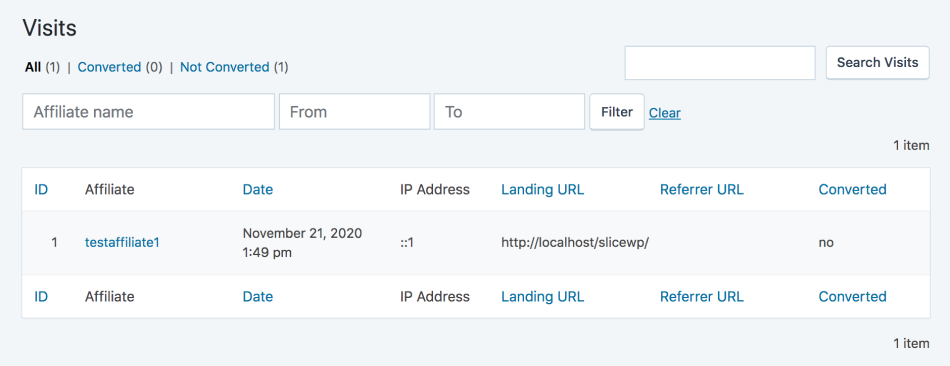
SliceWP offers reliable referral tracking as well through unique affiliate links and coupon codes.
When someone clicks an affiliate’s referral link, SliceWP stores the referral information in a first party browser cookie and records the visit in your WordPress dashboard.
The default tracking cookie duration is 30 days but you can change it from the plugin settings.
Another useful feature is affiliate attribution.
Let’s say a customer clicks Alex’s referral link and later clicks John’s referral link before making a purchase.
Who gets the commission?
With SliceWP, you can choose between:
- Last-click attribution.
- First-click attribution.
On top of that, you can also use coupon codes to track referrals. The Affiliate Coupons add-on lets you connect specific coupon codes with individual affiliates.
SliceWP also offers cross-site tracking through an add-on which is useful when your main e-commerce website and other promotional websites operate on different WordPress installations.
The Bottom Line?
Winner: SliceWP
Both of the WordPress affiliate plugins, SliceWP and AffiliatePress track sales 100% accurately. The only reason we declared SliceWP winner is due to its first-click and last-click attribution controls along with configurable cookie duration and referral tracking.
AffiliatePress has more promotional tracking formats, particularly QR codes, Bitly, and multi-domain tracking. But, when it comes to choosing how affiliate referrals receive credit, SliceWP offers a great useful level of control.
5. Affiliate Payouts
Your affiliates bring customers to your business, generate sales and earn commissions. Now comes the important part: paying them on time.
So let’s compare the available payout options.
AffiliatePress
AffiliatePress supports three main payout methods:
- PayPal
- Stripe
- Manual payments
The payout process is pretty simple.
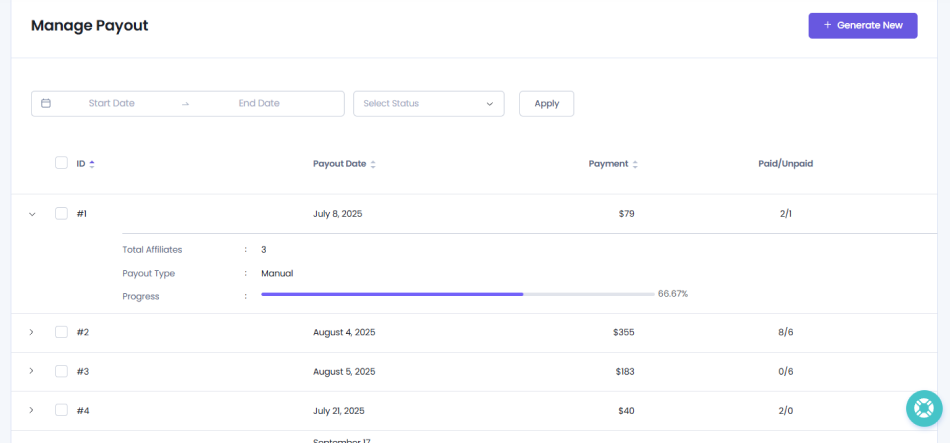
You can generate payouts based on approved commissions, check which affiliates qualify for payment, review the payout amounts and process the payments.
On top of that, AffiliatePress also lets you set payout requirements such as minimum payout amounts and minimum completed orders.
SliceWP
SliceWP offers multiple ways to pay your affiliates, too. Its available payout methods include
- PayPal Payouts
- Stripe Connect
- Bank transfers
- WooCommerce store credit
One thing worth mentioning is that SliceWP’s Stripe integration uses Stripe Connect. Thus, your affiliates can connect their own Stripe accounts to your website and SliceWP instructs Stripe to transfer their earnings from your Stripe balance to their connected accounts (It works the same with AffiliatePress, too).
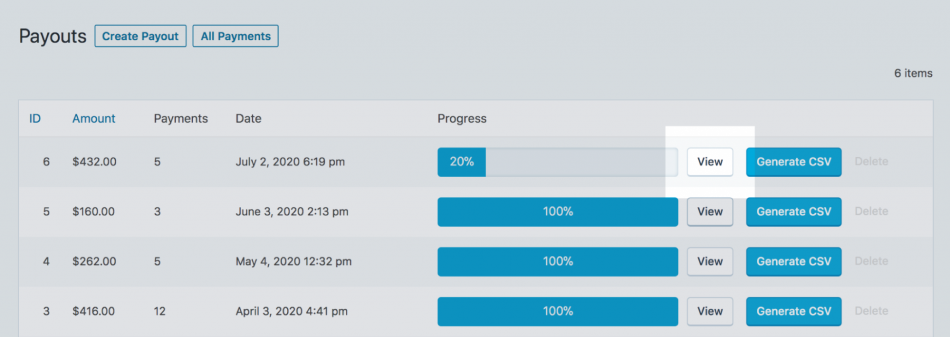
Also, just like AffiliatePress, here you can also set a minimum payout amount, set payment methods for individual affiliates, and allow them to request payments through the Payout Requests add-on.
The Bottom Line?
🏅Winner: SliceWP
SliceWP wins this round because it offers a slightly wider selection of payout methods. AffiliatePress also integrates with Stripe, PayPal and manual payments so both plugins cover the important payment gateway options.
6. Affiliate Dashboard, Registration And Onboarding
Your affiliate program isn’t just about the website owner. Your affiliates also need a comfortable place to register, find promotional materials, generate referral links and check their earnings.
A confusing affiliate dashboard simply makes things worse, looks unprofessional and increases unnecessary support requests. All of these indirectly make it harder for affiliate partners to promote your business.
So, how do both affiliate plugins handle the affiliate experience?
AffiliatePress
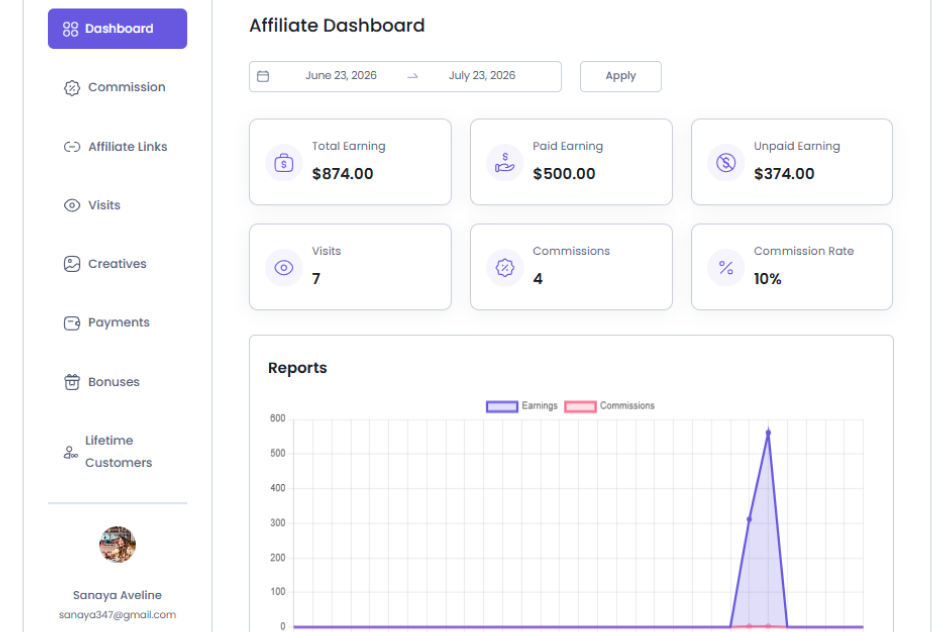
AffiliatePress comes with a dedicated Affiliate Panel where your partners can manage their affiliate activities.
From their panel, affiliates can access their referral links, view visits, check commissions, and monitor their performance. Plus, you can also give them all their promotional materials through the Creatives section.
For example, you can upload:
- Promotional banners
- Text advertisements
- Coupon codes
- QR codes.
- Affiliate landing URL
- Other marketing materials.
AffiliatePress also supports customizable affiliate registration forms, manual or automatic approval and automated email notifications.
All in all, it makes it easier to onboard new affiliate partners and give them the resources they need to start promoting your products.
SliceWP
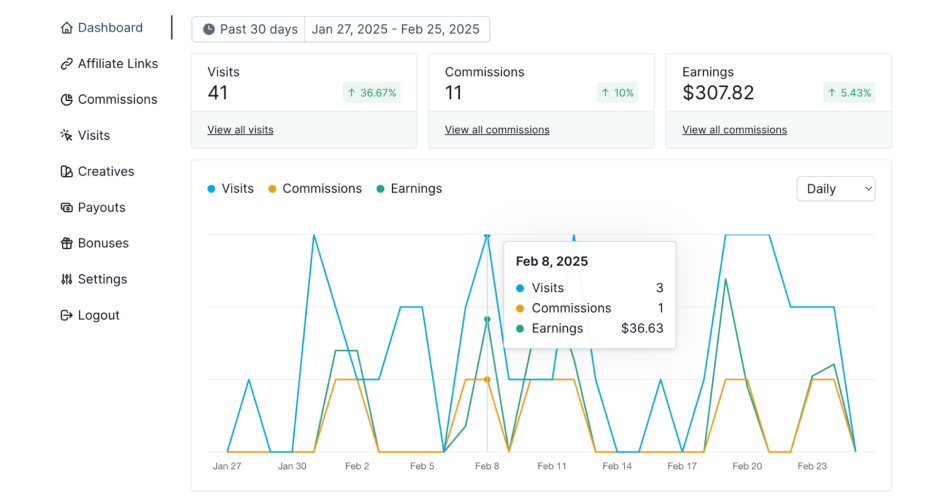
SliceWP offers a dedicated Affiliate Area with separate pages for registration, login, affiliate accounts and program terms and conditions.
Its affiliate dashboard allows partners to:
- Register for your affiliate program.
- Generate and manage referral links.
- View visits, commissions and performance statistics.
- Access promotional creatives.
- Edit their account information.
- Share products through social media.
Basically, everything that AffiliatePress lets your affiliate, SliceWP does the same.
Also, you get plenty of control over the registration process.
SliceWP allows you to add custom fields to your affiliate registration forms, including text fields, dropdowns, checkboxes, radio buttons, file uploads, and country or state fields.
You can also enable automatic affiliate approvals or manually review new applications before accepting them.
The Bottom Line?
🏅Winner: It’s a Clear Tie
No matter how we look, both offer the almost same affiliate onboarding experience, a dedicated affiliate dashboards, promotional creatives, registration forms, and email notifications.
7. Reporting, Analytics And Fraud Prevention
Last but not the least, running an affiliate program without proper reporting is like running an online store without checking your sales.
You must know which affiliates are performing well, how many visits they’re generating, how many referrals are converting and how much commission you’re paying.
And there’s another thing you shouldn’t ignore: fraudulent affiliate activity.
So let’s see what both plugins offer.
AffiliatePress
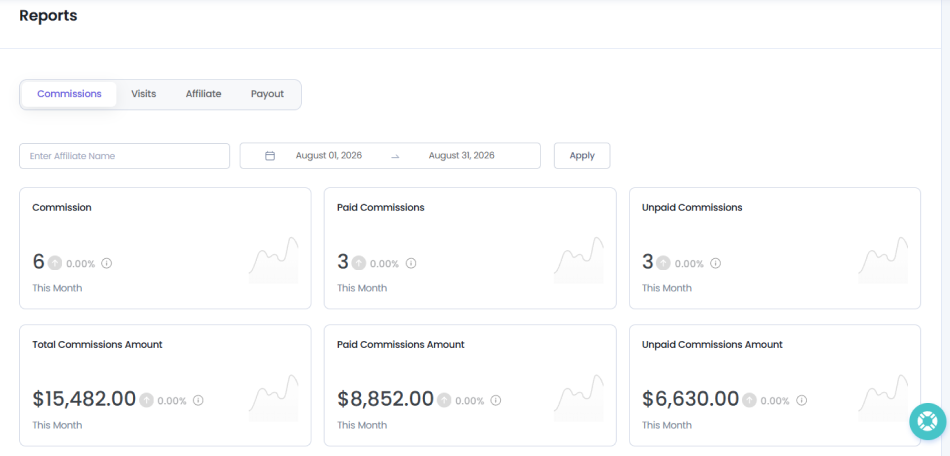
AffiliatePress offers a dedicated real-time Reports section that gives you an overview of your affiliate program’s performance.
- Commissions Report – Track generated commissions, paid and unpaid amounts, and commission trends
- Visits Report – Monitor affiliate visits and conversions
- Affiliate Report – Analyze affiliate registrations and recognize your top performing partners
- Payout Report – Review payout amounts, payment status and payout trends
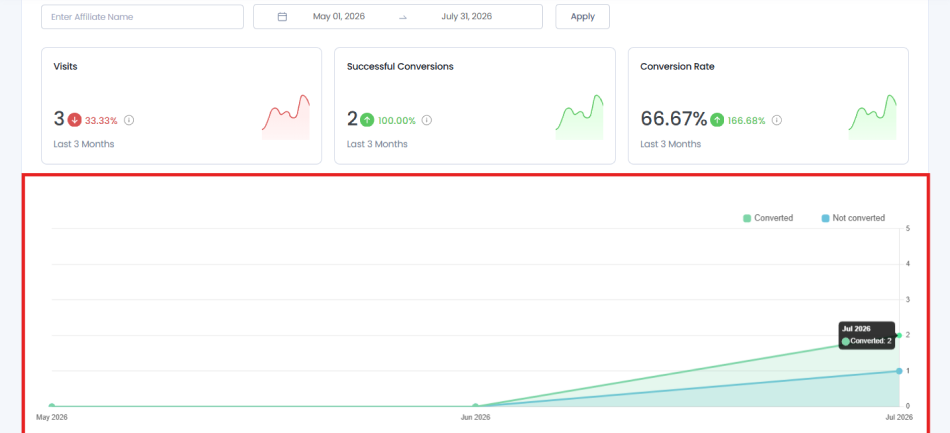
On top of that, you can also apply filters, choose date ranges, view key metrics, and analyze performance through visual charts. But, the real advantage comes with AffiliatePress’s Fraud Protection add-on. It features:
- Conversion rate monitoring
- IP restrictions
- Commission monitoring
Besides, you can also set your own conversion rate limits and grace refund protection period.
For instance, if an affiliate generates an unusually high number of conversions compared to their recorded visits, AffiliatePress can flag their commissions for review.
Later, this lets you investigate suspicious activity before releasing affiliate payments.
SliceWP
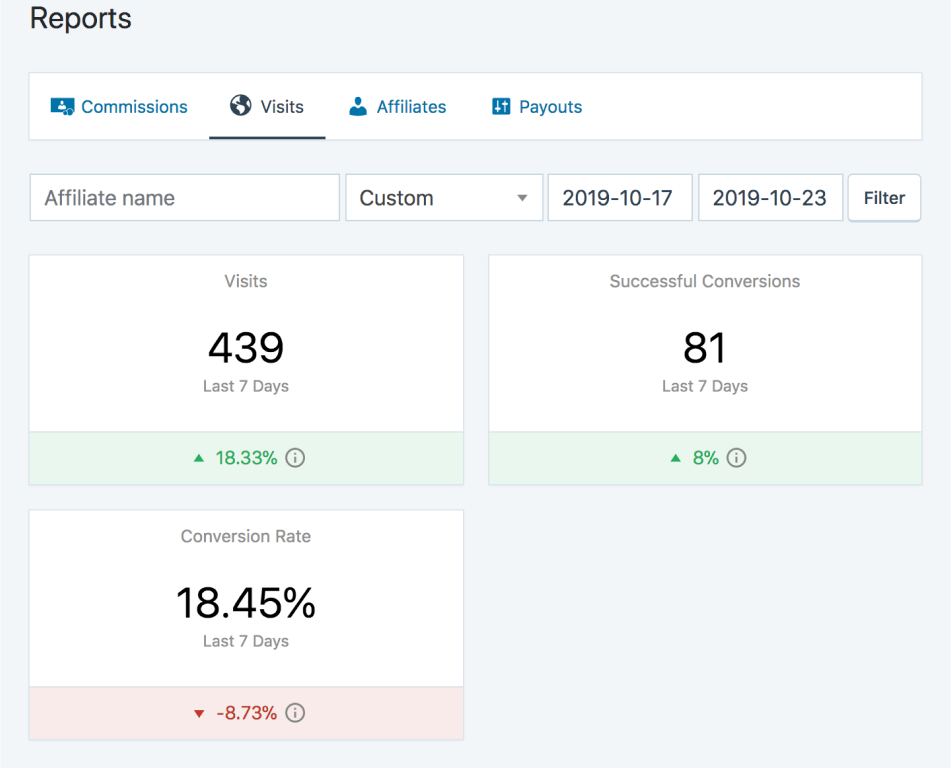
SliceWP also gives you some good reporting tools to understand how your affiliate program is performing. Its Advanced Reports feature lets you monitor:
- Referred visits
- Affiliate commission
- Generated revenue
- Affiliate registrations
- Individual affiliate performance
However, its official add-on list does not currently present a dedicated fraud detection tool comparable to AffiliatePress’s Fraud Protection add-on.
The Bottom Line?
Winner: AffiliatePress
AffiliatePress wins this round because it combines reporting and analytics with dedicated fraud detection and refund protection features.
SliceWP also comes with useful reporting, filtering and CSV export options. But AffiliatePress goes further by allowing you to track suspicious conversion patterns, restrict IP addresses and flag potentially fraudulent commissions for manual review.
For real growing businesses managing a successful affiliate network, those controls can make a real difference.
AffiliatePress vs SliceWP: Pricing And Value For Money
Now let’s talk about money.
Because choosing an affiliate plugin isn’t just about finding the lowest price. It’s about picking a tool that gives you enough features today, doesn’t become too much expensive as your business grows, and doesn’t force you to upgrade just when your affiliate program starts getting serious.
And here’s something worth paying attention to: the first-year price and the actual long-term cost can be very different.
Both AffiliatePress and SliceWP offer free versions, yearly plans, and lifetime options. But, their pricing structures, website limits, renewal policies and feature availability are way too much different.
So, let’s break them down.
AffiliatePress Pricing
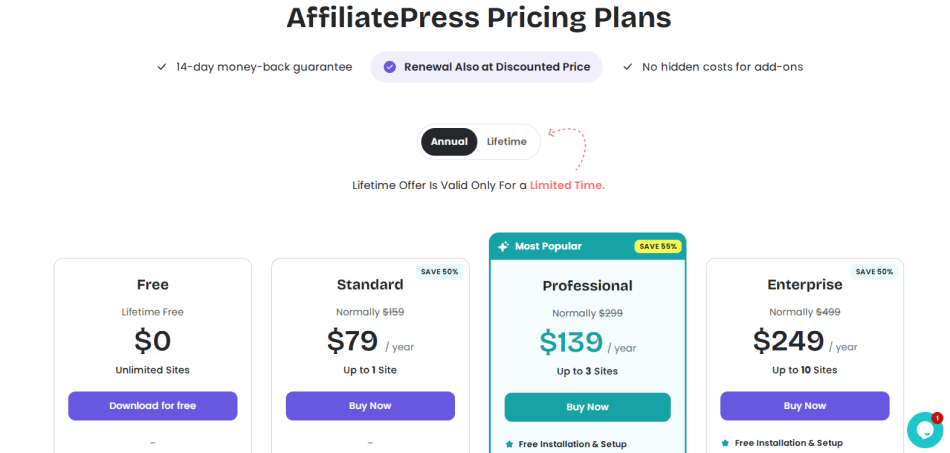
AffiliatePress offers a free version, three annual plans, and three lifetime plans.
Its current pricing page lists the following options:
| Plan | Current Price | Website Limit | License Type |
| Free | $0 | Unlimited sites | Free |
| Standard | $79/year | 1 site | Annual |
| Professional | $139/year | 3 sites | Annual |
| Enterprise | $249/year | 10 sites | Annual |
| Standard Lifetime | $179 | 1 site | Lifetime |
| Professional Lifetime | $299 | 3 sites | Lifetime |
| Enterprise Lifetime | $599 | 10 sites | Lifetime |
One thing I like here is that AffiliatePress doesn’t limit you to a single paid plan with all the advanced features locked behind separate purchases.
You can start with the Standard plan and upgrade to Professional or Enterprise when your program grows.
For instance, the AffiliatePress Standard plan already offers advanced reporting, fraud detection, product-wise commissions, performance bonuses and PayPal payout options. But if you want multi-level commissions, tiered commission rates, recurring commissions and multi-currency support, opt for the Professional plan. The Enterprise plan adds features such as multi-domain tracking and lifetime commissions.
The best part? AffiliatePress offers discounted renewals, a 14 day money back guarantee and no hidden add-on costs on its pricing page.
SliceWP Pricing
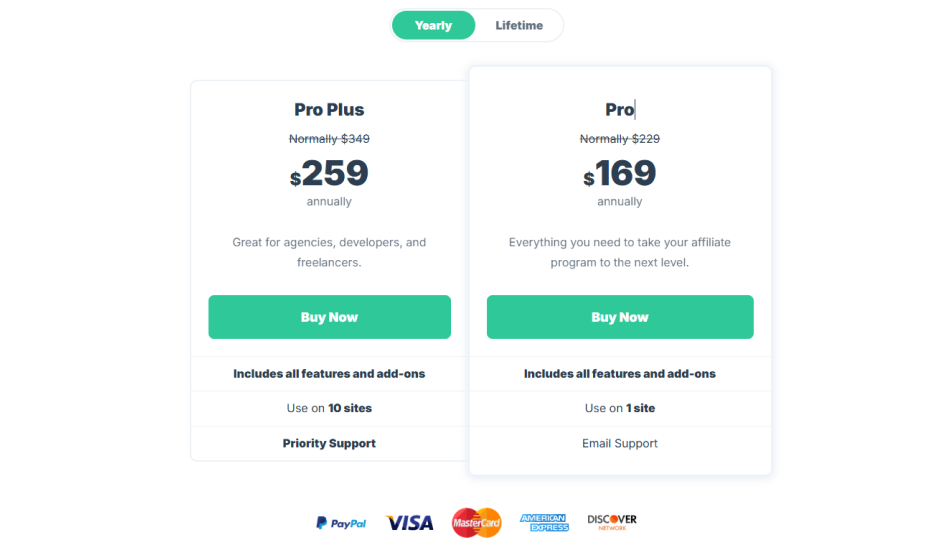
SliceWP follows a slightly different pricing model.
It offers two paid plans, Pro and Pro Plus with annual and lifetime payment options.
| Plan | First-Year Price | Regular Annual Price | Website Limit | License Type |
| Pro | $169/year | $229/year | 1 site | Annual |
| Pro Plus | $259/year | $349/year | 10 sites | Annual |
| Pro Lifetime | $429 | — | 1 site | Lifetime |
| Pro Plus Lifetime | $649 | — | 10 sites | Lifetime |
SliceWP’s Pro and Pro Plus plans come with all its features and addons. The main difference is the number of websites you can use the plugin on.
But, there’s one important detail no one should ever overlook:
SliceWP’s advertised yearly discount applies to the first year only. Renewals return to the regular annual price. So, the Pro plan costs $169 for the first year but $229 for all upcoming next years. The same applies to Pro Plus, which renews at $349.
The best part? SliceWP offers a 30-day money-back guarantee, and plugin updates and support are given.
The real cost: What will you pay over 1, 2, and 3 years?
This is where the comparison gets more interesting.
Let’s assume you want to run your affiliate program for at least three years. You don’t want to keep changing plugins, migrating affiliate data or rebuilding your setup every time your business grows.
Thus here’s how the costs compare using the currently displayed prices.
| Plan | Year 1 | 2-Year Cost | 3-Year Cost |
| AffiliatePress Standard | $79 | $158 | $237 |
| AffiliatePress Professional | $139 | $278 | $417 |
| AffiliatePress Enterprise | $249 | $498 | $747 |
| SliceWP Pro | $169 | $398 | $627 |
| SliceWP Pro Plus | $259 | $608 | $957 |
Look at the difference.
For a single website, AffiliatePress Standard costs $79 per year, while SliceWP Pro starts at $169. That’s a $90 difference in the first year. And, even if you go with AffiliatePress Enterprise plan that costs $747 for three years that has all the features for up to 10 sites, it is still a better investment than SliceWP Pro Plus that costs $957 for three years.
Annual vs Lifetime: Which is the smarter investment?
If you’re planning to run your affiliate program for several years, then lifetime pricing deserves a closer look.
| Plugin | Annual Plan | Lifetime Plan | Approx. Break-Even Point |
| AffiliatePress Standard | $79/year | $179 | 3 years |
| AffiliatePress Professional | $139/year | $299 | 3 years |
| AffiliatePress Enterprise | $249/year | $599 | 3 years |
| SliceWP Pro | $169 first year, then $229/year | $429 | 3 years |
| SliceWP Pro Plus | $259 first year, then $349/year | $649 | 3 years |
For AffiliatePress, the lifetime plans become financially attractive if you expect to use the plugin for around three years or longer
For SliceWP, the lifetime option also starts making more financial sense around the third year because its annual renewal price is higher than its introductory price
Of course, lifetime licenses are a bigger upfront investment. If you’re still testing your affiliate program or aren’t sure whether you’ll use the plugin long term, an annual plan may be the safer starting point.
Big Buyer’s Guide: Which Plugin Gives You More Value For Your Money?
Time to look at these both WordPress affiliate plugins from a business owner’s perspective.
Imagine you’re investing your own money. You aren’t buying a plugin just to collect features. You’re buying it because you expect it to help generate revenue, manage affiliates, lower manual work and protect your business from unnecessary expenses.
Thus let’s look at what you’re actually getting for your investment.
| What You Should Evaluate | AffiliatePress | SliceWP | Investor’s Perspective |
| Free version | Free version available with unlimited sites and core affiliate management features | Free core plugin available | Both let you start without an upfront purchase. Test the free version before committing to a paid plan. |
| Lowest paid annual price | $79/year | $169/year | AffiliatePress has the lowest entry price for a single website. |
| Lowest paid lifetime price | $179 | $429 | AffiliatePress requires a smaller upfront investment. |
| Second-year renewal pricing | Advertises discounted renewals – $79/year | $229/year | SliceWP’s introductory price can make the first year look cheaper than its long-term cost. |
| One-site license | Standard: $79/year | Pro: $169 first year | AffiliatePress is less expensive at the entry level. |
| Three-site requirement | Professional: $139/year for 3 sites | Pro Plus: $259 first year for up to 10 sites | AffiliatePress has a lower price if you need three websites and don’t need every Pro feature. |
| Ten-site requirement | Enterprise: $249/year | Pro Plus: $259 first year, then $349/year | AffiliatePress has a lower listed annual price for ten sites. |
| Feature availability across paid plans | Advanced features are distributed across Standard, Professional, and Enterprise | Pro and Pro Plus include all features and add-ons | SliceWP offers a simpler paid-plan structure. AffiliatePress lets you choose a lower-cost tier if you don’t need every advanced feature. |
| Integration coverage | 26+ integrations across e-commerce, memberships, LMS, forms, bookings, and donations.. | 13+ listed integrations, primarily e-commerce and memberships. | AffiliatePress may save you from needing a different affiliate solution when your business uses multiple WordPress platforms.. |
| Advanced commission structure | Product-wise, tiered, multi-level, recurring, lifetime, performance, and signup bonuses and mor. | Product, recurring, lifetime, multi-level, and performance-related options via its features and add-on. | The better options looks AffiliatePre.sss for flexible commission models |
| Affiliate tracking. | Referral links, coupon tracking, QR codes, multi-domain tracking, and Bitly integration, depending on plan | Referral links, coupon tracking, first-click/last-click attribution, and cross-site tracking add-on. | The better option depends on your promotional channels and attribution requirements. |
| Fraud prevention | Dedicated Advanced Fraud Detection feature and refund protection, with plan restrictions | No directly comparable dedicated fraud detection add-on listed on its pricing page | If you expect a large affiliate network, AffiliatePress fraud monitoring can help protect your commission budget. |
| Payout options | Manual, PayPal, and Stripe options, with availability depending on plan | PayPal, Stripe Connect, bank transfers, and store credit options through its feature set | Check which payout methods are available in your country and on your chosen plan. |
| Support and updates | 1 year and 3 years | Updates and support are provided while the annual subscription is active | Consider support continuity as part of your ongoing operating cost. |
| Money-back guarantee. | 14 days. | 30 days. | SliceWP gives you a longer refund window to evaluate your purchase. |
| Best long-term fit | Businesses using multiple WordPress plugins, agencies, and businesses planning to expand into different business models… | Businesses that prefer SliceWP’s workflow and need its bundled features across one or multiple sites | AffiliatePress seems like the best long-term fit. |
Related articles:
- Top 6 FluentAffiliate Alternatives In 2026 (Compared)
- Top 6 Easy Affiliate Alternatives In 2026 (Compared)
- AffiliatePress: The Best Affiliate Plugin for WordPress
Final Word
Winner: AffiliatePress for overall pricing value and feature-set
AffiliatePress offers a lower entry price, lower listed annual costs across comparable site-count tiers and a wider range of integrations across different WordPress business models.
SliceWP still has a good pricing proposition if you want all its features and add-ons bundled into one paid plan, prefer its workflow or value its longer 30-day money-back guarantee.
But if I were investing my own money, I’d look at the three-year cost, the integrations I’d actually use and the features I’d need as my business grows.
My choice would be AffiliatePress for a business that needs flexibility and room to expand. SliceWP would still be a reasonable choice for someone whose requirements fit its existing integrations and feature bundle.


