



How To Automate Affiliate Approval And Management

Affiliate onboarding, application review, affiliate approval… Have you been doing these tasks manually? And not just them, of course. You know what we mean if you are an affiliate manager or business owner doing everything solo.
However, today’s world offers so many ways to automate the process of affiliate approval and management online. Affiliate program software, like WordPress plugins for affiliate management, allows you to do a few configurations to automate an entire cycle: from an application review to managing pending approvals, reviewing eligibility, verifying and validating an affiliate, etc.
In this article, we’re focusing on how to bring affiliate management automation to your routine!
To show you real examples, we’ll use our bestseller – the AffiliatePress plugin for creating a powerful affiliate program for websites selling with WordPress.
TL;DR: Affiliate management automation can save you from manually reviewing applications, managing affiliate accounts, tracking commissions, and processing payouts. With AffiliatePress, you can automate most of these recurring tasks while keeping manual control over important decisions, such as affiliate and commission approvals.
What Is Affiliatepress And Which Ecommerce Plugins Does It Support?
AffiliatePress is a popular WordPress affiliate management plugin. It adapts to the real-world business requirements, allowing you to have the needed control of your program. This means you can automate things that don’t need strict review from you, as well as manually control those parts of your program that you want to be absolutely safe about. It has it all to help you stay productive and proactive.
We are more than sure that you can easily connect it to your e-commerce plugin. AffiliatePress already supports such big names as WooCommerce, Easy Digital Downloads, WP Easy Cart, SureCart, and many more multipurpose plugins, including for membership websites or LMS.
Now, let’s take a look at how exactly it helps you automate affiliate approval and management, freeing up a lot of time for you.
Which Affiliate Management Routines Can Be Automated? Overview
In AffiliatePress, it’s very easy to automate a substantial part of the recurring administrative work (e.g. commission recording, routine calculations, notifications, payout eligibility checks, and payment processing).
One of the best things, however, is flexibility: some tasks still require a decision from you and some workflows retain a review or confirmation step. Because every successful automation has a decent portion of human decision behind it!
Let’s summarize the key automations AffiliatePress is ready to provide you with in this table:
| Affiliate program management task | Automation level | How this helps |
| Affiliate registration | Automatic | You build a form in which applicants submit their own details on your site. |
| Affiliate approval | Configurable | You can automatically approve new registrations or manually review each potential partner. |
| Affiliate onboarding emails | Automatic | The plugin will automatically send emails for pending accounts, approvals, and rejected notifications. |
| Commission recording | Automatic | Create commission records when qualifying referrals generate sales. |
| Commission calculation | Automatic | Automatic calculations based on your commission rules. |
| Commission approval | Configurable | You may want to automatically approve commissions based on order status, or keep them pending for manual review. |
| Refund protection | Automatic | Delay payout in accordance with the refund grace period expiration terms. |
| Payout eligibility | Automatic | Affiliate needs meet certain conditions before they become eligible for automatic payout. |
| Affiliate notifications | Automatic | The right affiliate always gets the right email about commission events, payments, and failed payouts. |
| Affiliate reporting | Automatic | The plugin collects and displays visits, commissions, and performance statistics. |
| Affiliate payouts | Configurable | Generate payouts and automate payment processing. |
Impressed? Now, let’s get into it with a bit more detail!
Affiliate Applications And Approval: Configure To Suit Your Requirements
As we’ve mentioned, AffiliatePress supports both automatic and manual affiliate approval methods.
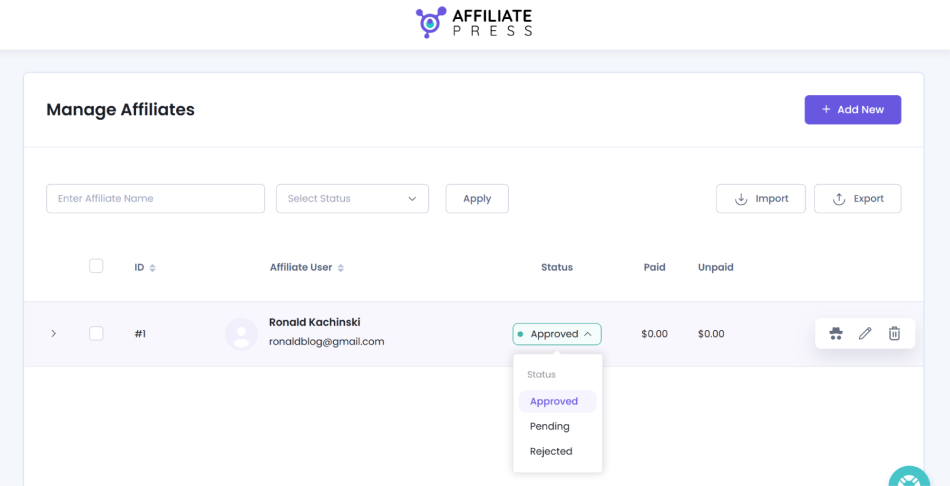
You can set the AffiliatePress plugin to automatically approve someone simply because they completed the registration form with all the requested fields. You can also leave their application pending until an administrator/you reviews it.
There are two ways you can follow:
#1 First, manual approval. When you set the plugin for this method, you need to review the applicant and manually change their status to approved or rejected.
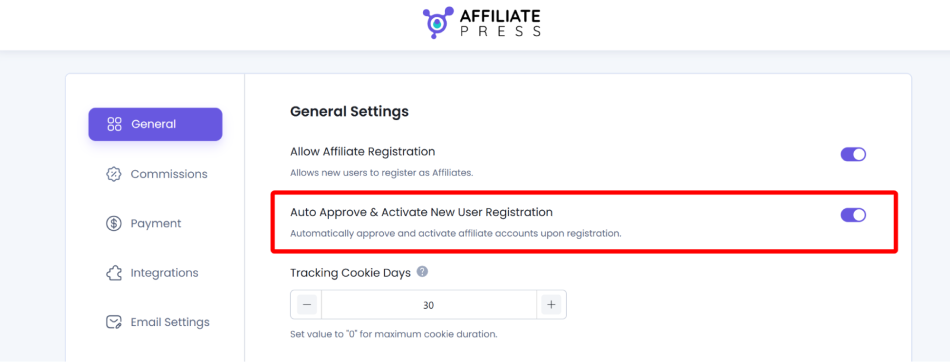
#2 When you set the plugin to auto approval, AffiliatePress approves and activates the accounts immediately. You don’t need to review applications.
Where can you set this? Go this way: WordPress → AffiliatePress → Settings → General and find the setting named Auto Approve & Activate New User Registration.
Haven’t added an affiliate registration form on your site yet? Here is a quick guide with AffiliatePress.
Of course, you still can add an affiliate by hand if needed. Automation doesn’t mean you don’t have any flexibility. You might want to do so when you want to give special requirements for this affiliate:
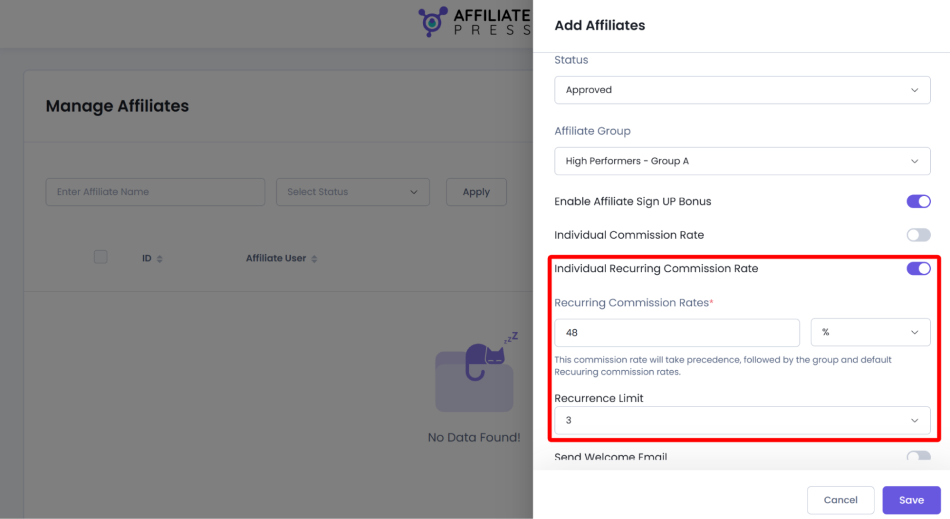
If you are used to reviewing profile information, including the applicant’s website and how they plan to promote your products, you would want to disable automatic approvals.
Automating Affiliate Account And Partner Management
There is no fully featured customer relationship management platform in AffiliatePress, but it has a lot of tools closely tied to your entire affiliate program, where a whole bunch of processes are automated.
With AffiliatePress, you get a central place where you can easily manage affiliate lists, create custom groups, review profiles, update account information, change statuses, and overall forget about any spreadsheets or email threads.
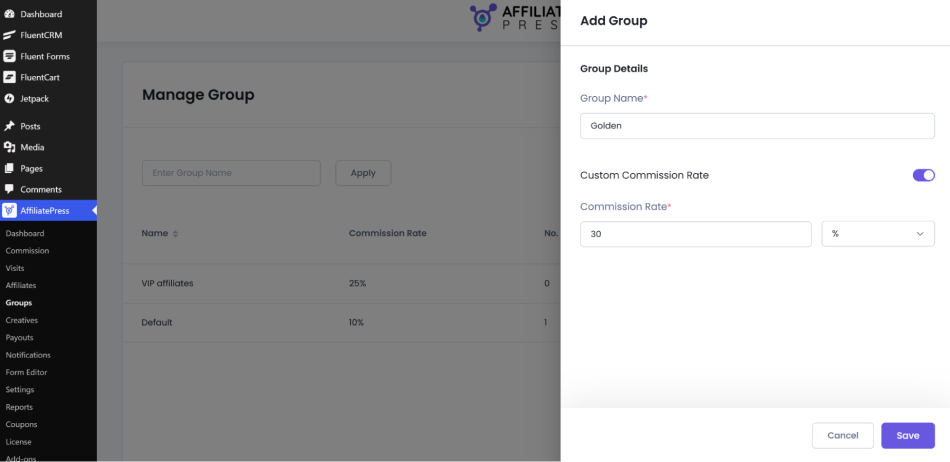
Also, all the email communications, like affiliate approvals or pending submissions, can be automated through email templates. Overall, you have full automation from the affiliate registration to the notification stage.
AffiliatePress provides you with a single place to see how your affiliate program performs in terms of recent registrations, affiliate approval statuses, visits, revenue, etc.
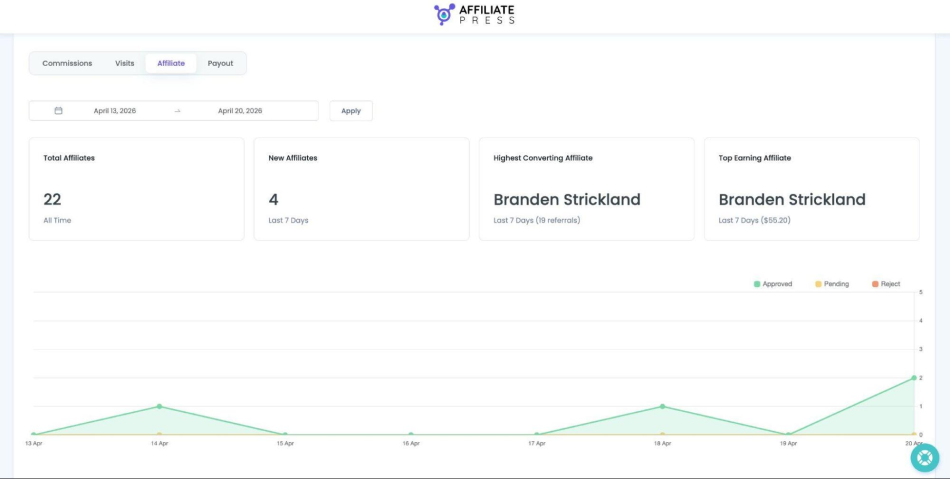
Moreover, thanks to affiliate accounts that you provide your partners with, affiliates can manage their own profiles, payment details, and get promo materials inside their accounts. You don’t need to have another email sequence for that.
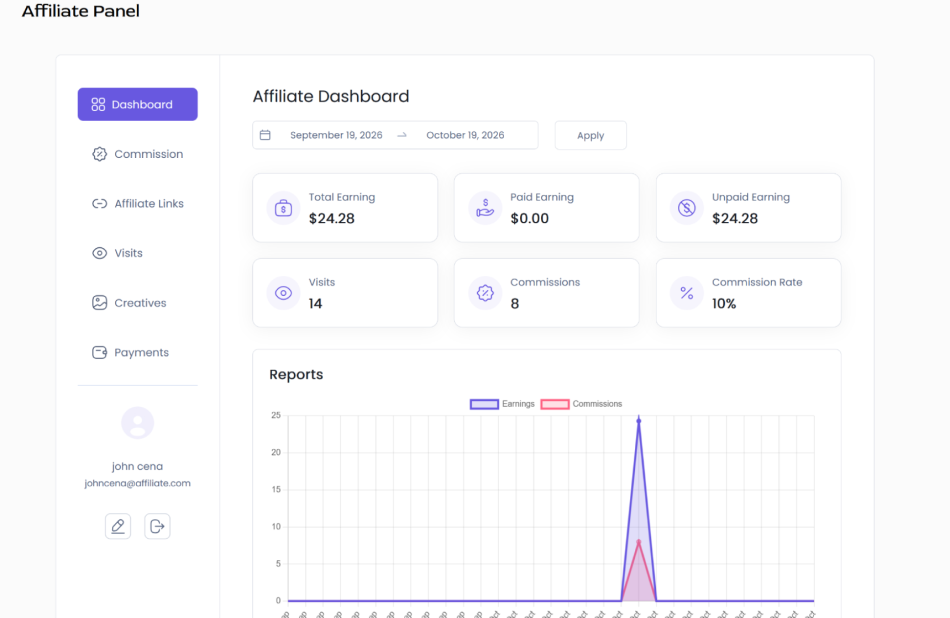
You won’t have any burden with maintaining affiliate trackers, processing registrations, or monitoring accounts.
How To Automate Commissions And Payouts
Of course, you have full control over commission rules, with configurable rates, first order rules, and other commission settings that you don’t need to review manually; just need to set them up once.
Basically, you decide on the right business policy, configure your commissions, whether performance-based or per product. Then just see how it all applies and automatically. As for performance-oriented commissions, these performance incentives require a few add-ons for tiered rates. But once again, when you have such targets, you can set them once and then review whether they work. Still no need to glance at this data every day.
You can configure new commissions to be approved based on the order status, or leave them pending for review. Overall, routine transactions are automated and control over the chosen ones is preserved.
Another aspect – payout – might seem to require special manual control. However, in practice, it’s one of the greatest opportunities to reduce administrative work.
Let’s review both automatic and manual payout control in AffiliatePress. What does the process look like with either?
Manual Payout Workflow
Here is how your routine looks:
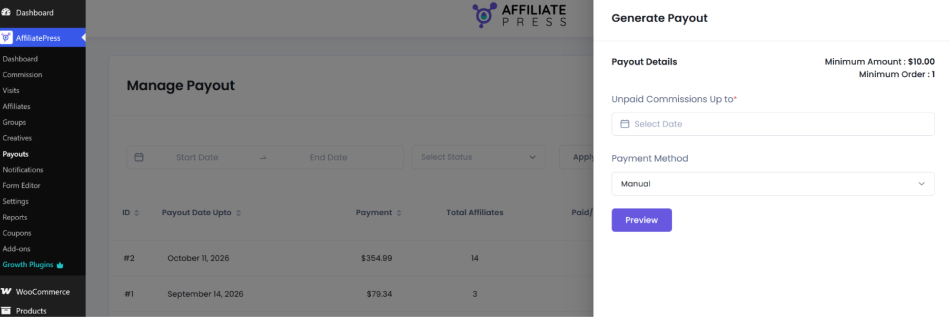
- Open the Payouts page.
- Generate a payout and select the relevant date and payment method.
- Review the eligible affiliates and amounts in the payout preview.
- Click to proceed with the payout.
Automatic Payouts
You still have control but set this control on autopilot:
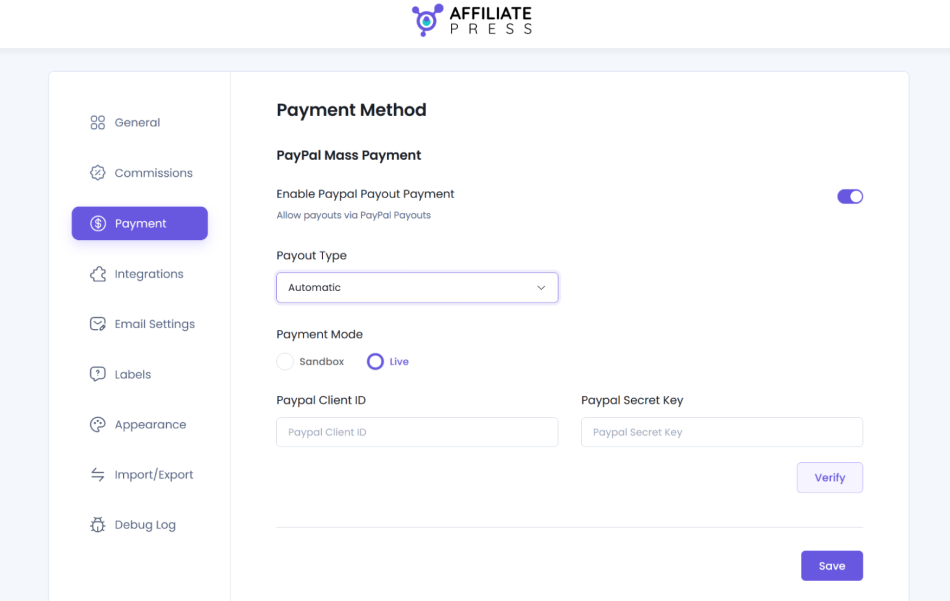
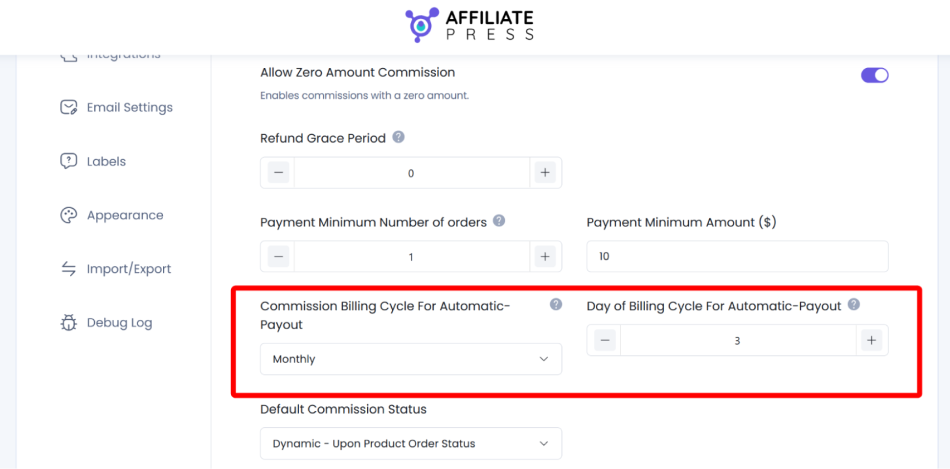
- Configure the automatic payout schedule and payment gateway.
- Set commission rules and payout thresholds.
- AffiliatePress generates payouts based on the schedule you set.
- Review payout records to never miss failures or exceptions.
As you see, with AffiliatePress, the standard payout generation workflow includes a preview and a confirmation step. To eliminate that routine step, use automatic payouts with peace of mind.
AffiliatePress can also automatically send various emails to affiliates and administrators, which you can customize with templates. Those can be approval emails, commission records, or payout status ones. So, the routine of writing emails is also automated with significant and timely notifications.
A Quick Way To Monitor Your Affiliate Program
There are many more tasks you can automate with AffiliatePress.
For example, for affiliate performance monitoring, you can use built-in dashboard metrics that show you visits and commissions and even help you analyze top-performing partners. You don’t need to gather and duplicate numbers manually – the plugin’s system already tracks them.
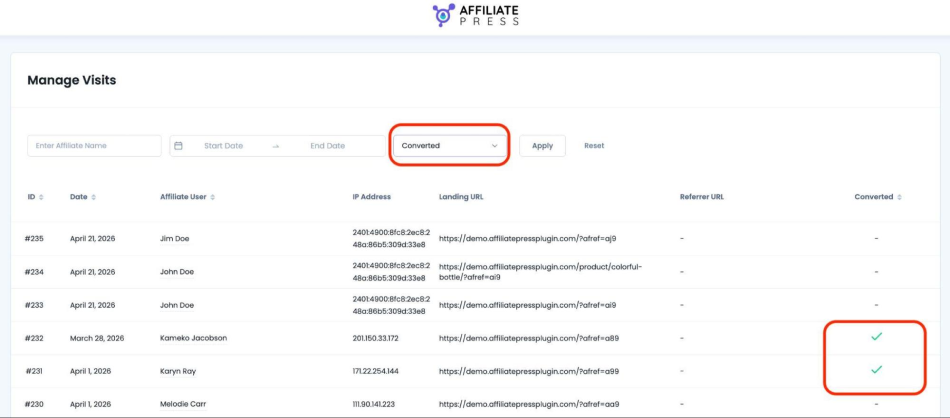
AffiliatePress also provides troubleshooting tools for affiliate program management.
You can use debug logs for email delivery, commission tracking, and payouts to find any possible holes in automation.
Concluding: How To Automate Affiliate Approval And Management?
Automating affiliate approval and management is becoming super crucial when your partners’ base is growing. On WordPress, the AffiliatePress plugin is your real saver in this situation.
You can use the plugin as a largely automated affiliate administration system, not just a referral tracking link tool. It’s made to perfectly handle the repetitive tasks you are involved in with affiliate approvals, commissions, eligibility checks, notifications, and potentially scheduled payments. AffiliatePress is really strong at organizing affiliate administration and automating routine communications.
You will see the real results when your number of affiliates increases, almost all happening automatically.
Related articles: