How To Set Up Tiered Affiliate Commissions In WordPress And Grow Your Affiliate Program


“The more customers you refer, the more you earn,” – this is what every affiliate wants to hear.
Tiered commission rates can easily deliver that. If you’re looking to run your affiliate program on WordPress, we’ll explain how to set up tiered affiliate commissions with AffiliatePress.
You’ll discover what types of tiered commissions exist, how you can reset periods for conversion thresholds, and a few successful cases of affiliate programs that practice tiered affiliate commissions.
TL;DR: Tiered commissions reward affiliates with higher rates when they reach specific sales or revenue targets. With AffiliatePress, you can create tiered rates, set performance thresholds and optionally reset progress monthly to motivate affiliates and grow your program.
How Tiered Commissions Can Help Grow Your Affiliate Program
Tiered commission rates give your affiliates a very good reason to perform better!
They may work toward a specific goal, move into a higher tier, and find more creative ways to get better commissions. So, does it really have a direct effect on your sales and revenue? We bet it does:
The best booster for affiliate motivation
Without performance targets, motivation is weak. With tiers, you give affiliates a reason to work toward higher tiers and better commissions. The better affiliates perform, the better for your business.
Make affiliate management easier
When you have enough affiliates, tiers aren’t only a motivational tool, they become an affiliate management tool. With tiers, you can much quicker spot high-volume partners and top-performing affiliates who may need even stronger incentives (they deserve it!).
Reward the affiliates who create real value
Let’s be honest, top tiers are not for everyone, they require reaching difficult goals. Tiered rates let you reserve your best commissions for the smaller group of partners who have shown the strongest results.
One of the real-life examples that proves the effectiveness of the tiered commissions is Flowerstore.ph. WOMO, the team that relaunched and managed Flowerstore.ph’s affiliate program.
In their research, they describe that they introduced a 3-tier revenue-share structure, with top affiliates earning up to 15%. However, affiliates had to meet daily sales targets! According to the case study, this encouraged partners to prioritize Flowerstore.ph: media publishers gave the brand better placements and creators posted during peak hours.
AffiliatePress is a nice live product-owner practical example. It is a real WordPress plugin company openly showing exactly how it currently structures its own tiered affiliate program.
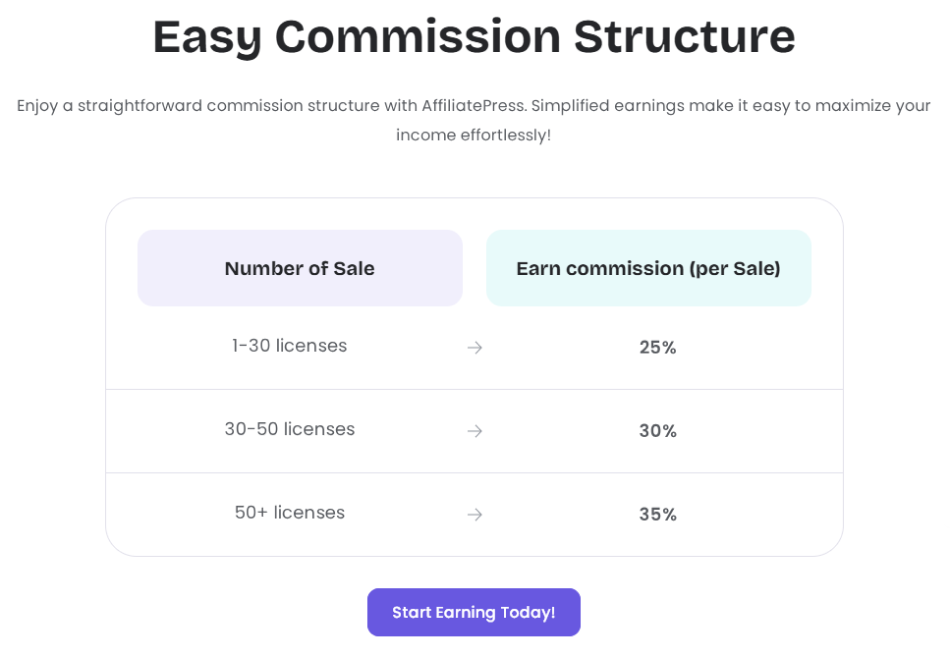
AffiliatePress uses volume-based qualification:
- 1-30 licenses – Start tier
- 30-50 – Grow tier
- 50+ – Lead tier
The recurring commission rises from up to 25% > 30% > 35%.
As you see, with default rates or boosted by extra bonuses, you can build an affiliate revenue generation machine. Ready to do that? Then follow our guide below.
Creating Tiered Commission Rates In WordPress With AffiliatePress
To build a tiered affiliate commission structure on your WordPress site, we’ll explain the steps with AffiliatePress. It’s pretty easy to do.
First of all, AffiliatePress will most likely work well with your e-commerce plugin, including WooCommerce, SureCart, EDD, WP EasyCart, and more. The list of membership and LMS plugins that integrate with AffiliatePress is also impressive.
For any of the products or services you sell, you can create performance-based commission tiers. For this, install and activate the Tiered Commission Rate add-on. Then, you’ll see settings for it via Settings > Commissions. This is actually where you can configure any commission settings available for your AffiliatePress plan.
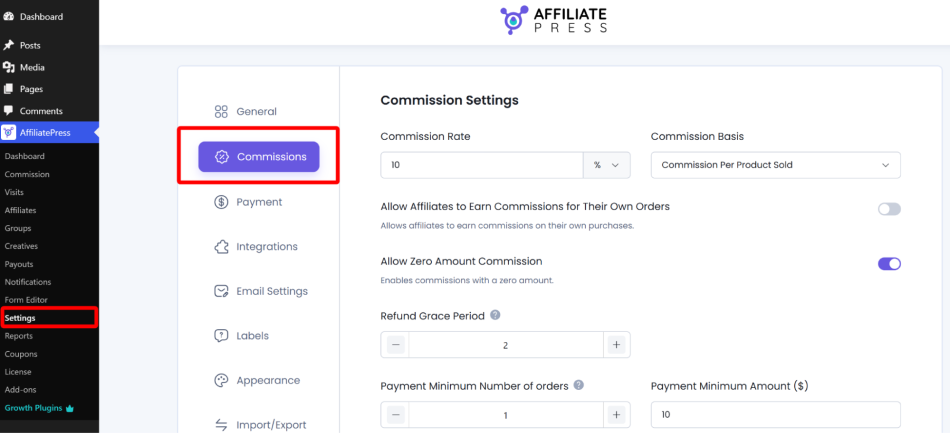
Note: only owners of the Professional and Enterprise plans from AffiliatePress can download this add-on from their accounts.
Now, it’s time to customize how affiliates qualify for higher commission rates on WordPress through the Commissions settings menu.
1. Choose Your Tier Model
AffiliatePress supports two main ways to structure tiers: volume-based tiers and revenue-based tiers.
Volume – Based Tiers
It’s for your store if you want affiliates to progress based on the number of approved sales they generate.
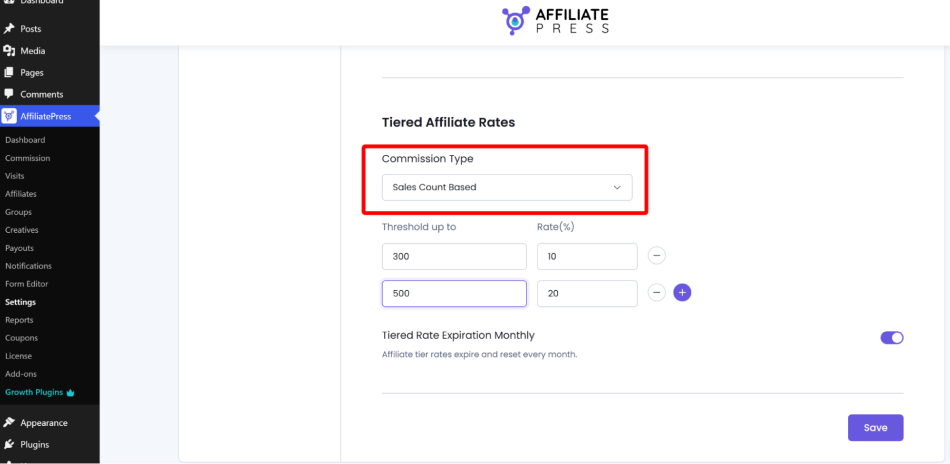
For example, for 5 approved sales, they earn 15% commission and for 15 approved sales, they are qualified for 25% commission.
The sales count is the tier threshold, and the performance milestone unlocks the next commission rate.
Does it suit your case? Let’s review a few models where it’s a nice way to go:
- Subscription products with the same plan price (affiliates are focused on bringing in more new subscribers).
- Lead generation if affiliates are rewarded for a fixed-value conversion such as a signup or qualified lead.
- SaaS products or simply the same entry-level plans.
Revenue – Based Tiers
In addition to that, AffiliatePress allows you to base tier progression on the total value of approved sales.
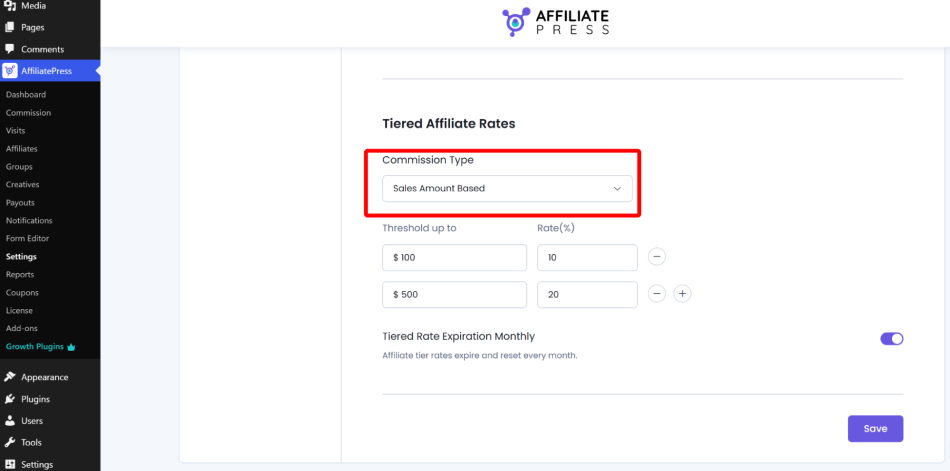
A simple example: $500 in approved sales means 15% commission, while $1000 grants 20% commission.
In this affiliate tier structure, affiliates move into higher tiers when they reach revenue thresholds set by you.
For you, it can be more effective to use the reward tied more closely to the actual value of the sales. For your affiliates, revenue – based tiers are attractive when they promote premium items. Why? The math is simple – they can reach the next commission threshold with fewer conversions.
AffiliatePress works with both models: sales-count or sales-amount, but not both at the same time.
2. Define Tier Thresholds And Commission Rates
After the qualification model decision, you need to create your individual commission tiers.
In AffiliatePress, settings for each tier are as follows:
- Commission type (sales count or sales amount).
- Tier threshold – the performance milestone that should be reached, such as 10 approved sales or $500 in approved sales.
- Commission rate (the percentage the affiliate earns).
Such commission levels can be considered performance clusters within your program.
For example, newer or lower-volume affiliates may remain in the base tier, more active affiliates can progress to a mid tier, and your strongest performers can reach the top tier:
- Base tier: 1–9 approved sales → 10%
- Mid tier: 10–29 approved sales → 15%
- Top tier: 30+ approved sales → 20%
When an affiliate changes their position among these performance clusters, the commission rate applied to their qualified sales switches automatically. Reaching the mid or top tier can therefore increase their affiliate payout, while the resulting commission payout reflects the higher rate they have earned.
This gives you a progression like 5 sales → 10%, 20 sales → 15%, 50 sales → 20% or $500 in sales → 10% $5,000 in sales → 20%.
AffiliatePress automatically applies the appropriate tiered commission rate when the threshold is crossed by the affiliate (everything is on autopilot).
3. Decide Whether Tier Progress Should Reset
There is another level of control – should affiliates permanently retain the tier they reach or qualify each month again? It’s up to you.
In case of the latter, enable Tiered Rate Expiration Monthly in the same settings (if you want affiliate progress to reset at the beginning of every month). Other reset periods are not available at the moment.
It might sound like a challenging task for an affiliate (starting from zero every month), though, and can be demotivating, so pick wisely. Just remember that monthly resets may work better for short-term campaigns or realistic monthly thresholds.
Concluding: How To Set Up Tiered Commissions for Affiliates In WordPress?
With AffiliatePress, you can use sales count to reward high-volume partners who consistently bring in more conversions, or sales amount for top-performing affiliates who have shown they can generate more revenue overall.
Your tier model for affiliates determines a so-called tier qualification. In other words, what affiliates need to achieve before they unlock a higher commission rate from purchases on your WordPress website.
With every model, you have pretty clear performance targets for affiliates. Once they reach them, the higher rate affects their future affiliate payout.
Install the Tiered Commission Rate add-on along with AffiliatePress and start adding your commission rates and thresholds to start working with better motivated customers!
Related articles: