


How Multi-Vendor Stores Can Manage Affiliate Promotions With Multi-Domain Addon

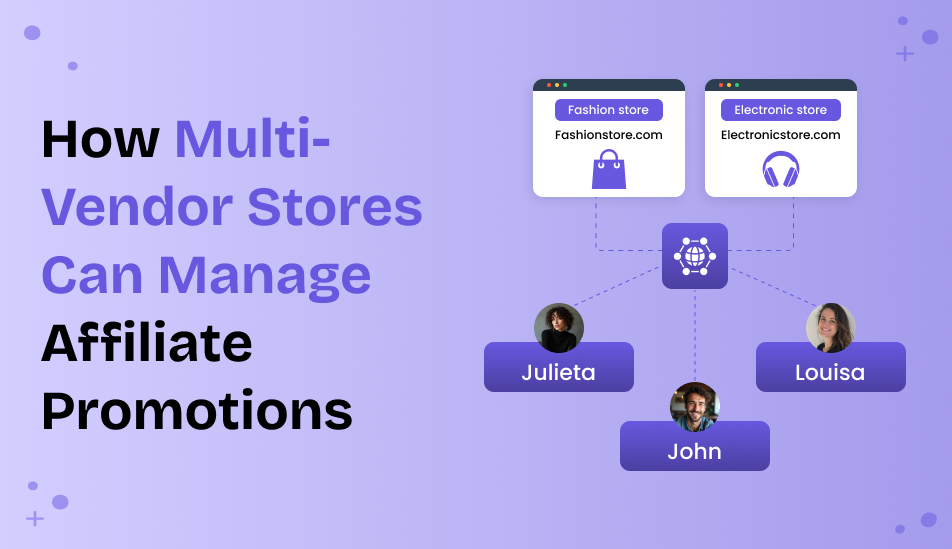
Are you selling from many WordPress sites? How do you create an affiliate program on WordPress that works for all your domains? We have a solution – AffiliatePress + its specialist add-on for multi-domain brands. With this, you can easily have one program for all sites, managed in one place! Let’s see what you need to make it happen.
TL;DR: AffiliatePress lets you run a single affiliate program across multiple WordPress domains using its Multi-Domain Add-on. Connect child websites to one parent site, track referrals and sales centrally, and allow affiliates to promote any connected domain while managing everything from a single user-friendly dashboard.
What Are The Key Benefits?
With our tutorial, you will be able to build a multi-domain affiliate tracking system on WordPress.
So, is this something you really need? What are the actual benefits of this solution? Let’s see:
- Manage your entire affiliate program from one place, even if your websites are spread across multiple domains. You won’t need to configure affiliate tracking separately on each site, everything stays connected through a secure API.
- When you connect child sites to the main site – visits, clicks, conversions, and affiliate activity are automatically tracked and reported back to your main website.
- Your affiliates can promote each brand site.
Real Cases
Let’s explain with more examples of when you might need this solution.
Scenario 1: Vendors Have Their Own Marketing Websites
In cases where vendors have their own websites where they promote their products, publish reviews, or create marketing content, while all purchases are completed on a central marketplace, this is a working solution.
An affiliate sends traffic to a vendor site via a referral link. The visitor explores the product, then clicks “Buy Now” to complete the purchase on the main marketplace. Even though the sale happens on the marketplace, the Multi-Domain add-on preserves the affiliate attribution, so that you create one unified affiliate program across multiple vendor sites.
Scenario 2: Regional Or Country-Specific Websites
The addon is also useful for those operating a few regional websites. If you have separate domains for different countries or languages and want to have the affiliate program in one central location. Affiliates can promote whichever regional site is most relevant to their audience, and all referral activity is tracked back to the same AffiliatePress installation.
Scenario 3: Vendor-Specific Landing Pages Or Microsites
It also works for marketing websites. Some marketplaces create dedicated landing pages or microsites for individual vendors, product categories, or marketing campaigns. These sites are designed to attract visitors and provide focused content before directing them to the main store to make a purchase.
With the Multi-Domain add-on, affiliates can promote any of these landing sites using their referral links.
Working With The Multi-Domain Add-On From AffilitePress
If you are ready to proceed, we’re here to explain all the details.
Parent And Child Sites For Your Program:
For a multi-domain program, you will be working with child and parent sites. The parent site is the main website where AffiliatePress is installed and managed.
Responsibilities of the parent WordPress site:
- Stores all affiliate data
- Generates API keys
- Receives tracking data from child sites
- Tracks clicks, visits, referrals, and commissions
- Manages all connected domains from one dashboard.
A child site is any website connected to the Parent Site using the Multi-Domain Connector plugin.
This is what it does:
- Detect affiliate referral links
- Track visitor activity
- Send tracking data to the parent site
- Does not manage affiliates itself.
As you see, the affiliate can promote links to any connected child site, but they should register on the parent site (child sites work as traffic collectors). Purchases also happen on the parent site.
So, child sites might be product reviews, blog content, landing pages, etc. A parent site contains product pages, shopping cart, checkout, order processing, and affiliate commission calculation.
Requirements For A Multi-Domain Affiliate Program For WordPress:
What do you need to integrate to run a multi-domain affiliate program?
- Have a child site and parent site ready
- Install AffiliatePress on your site
- Activate the Multi-domain add-on (plus the Connector for child sites).
Let’s walk you through step by step.
Detailed Steps:
Let’s help you build your own multi-store system based on a single affiliate program from AffiliatePress.
Step 1: Install Affiliatepress On The Parent Site
- On your main website, install and activate AffiliatePress Pro.
- Go to AffiliatePress → Addons.
- Activate the Multi-Domain addon.
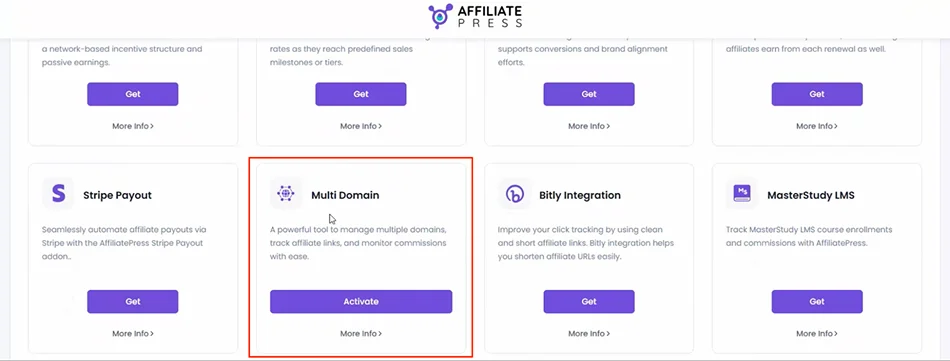
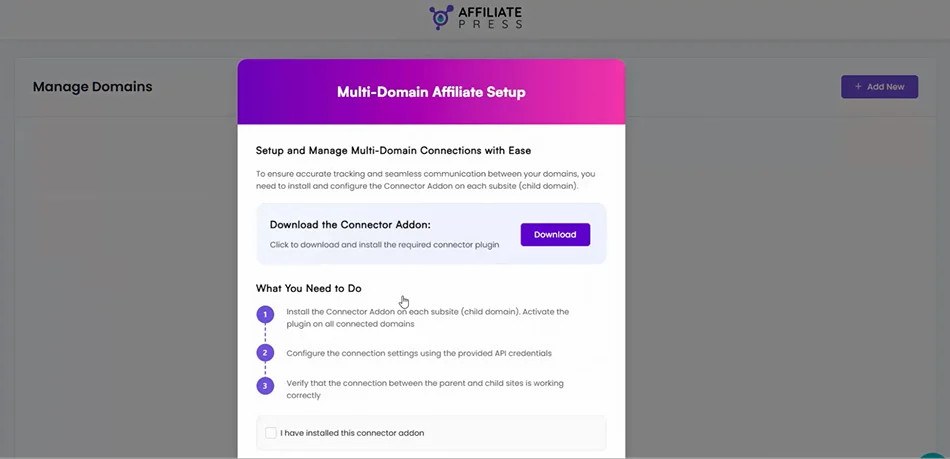
When you activate the Multi-domain add-on, you are prompted with the screen offering to install the Connector add-on. You need this add-on on each child site. You will simply download it from the public directory by clicking Download.
Step 2: Install The Connector On The Child Site
On the child website:
- Login to WordPress Admin.
- Go to: Plugins → Add New → Upload Plugin.
- Upload the AffiliatePress Multi-Domain Connector plugin.
- Activate the plugin.
Step 3: Add A Child Site
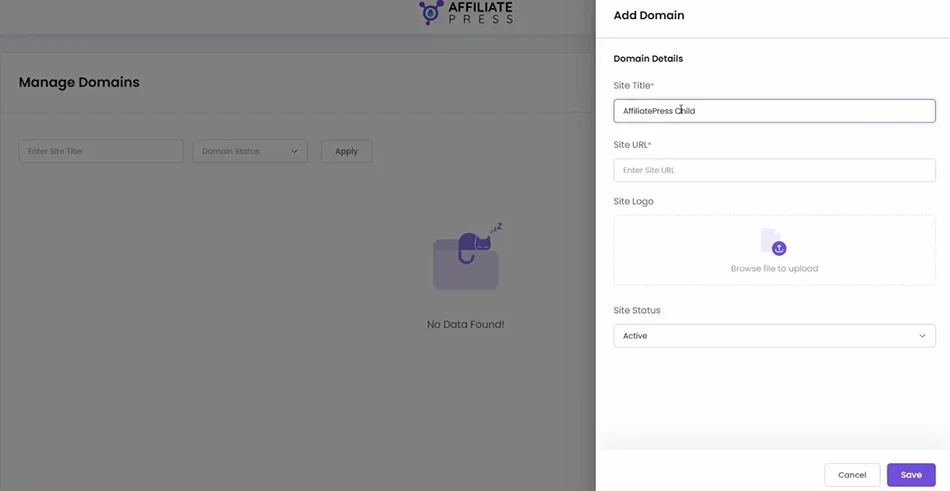
- On the Parent Site, go to AffiliatePress → Manage Domains.
- Click: Add New.
- Fill in the site title, site URL, site logo, and site status (active or inactive).
- Save the domain.
Step 4: Copy The API Keys
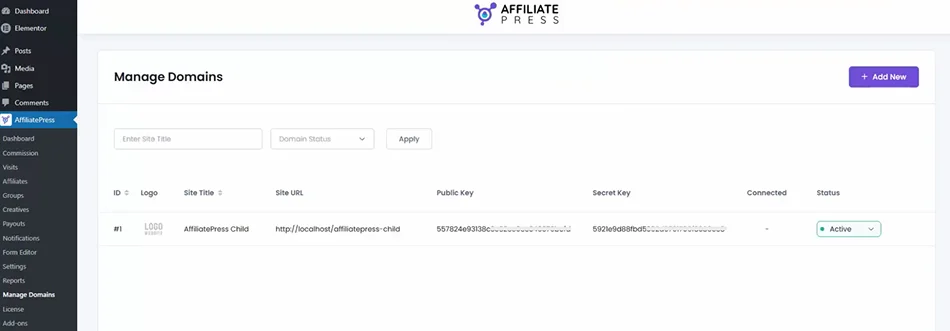
After saving the child site, AffiliatePress generates Public Key and Secret Key. Keep these keys handy because you’ll need them on the child site.
Step 5: Configure The Child Site
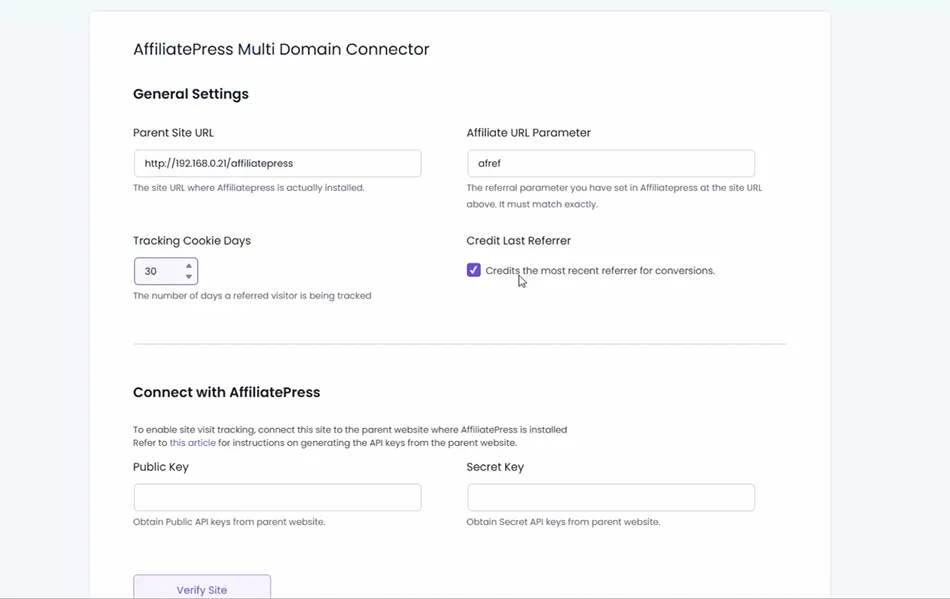
- Go to Settings → AffiliatePress Connector.
- In General Settings, insert your Parent Site URL.
- Add an affiliate URL parameter: ref
- Set up Tracking Cookie Days.
- Turn on or off the Credit Last Referrer tool.
Step 6: Connect to AffiliatePress
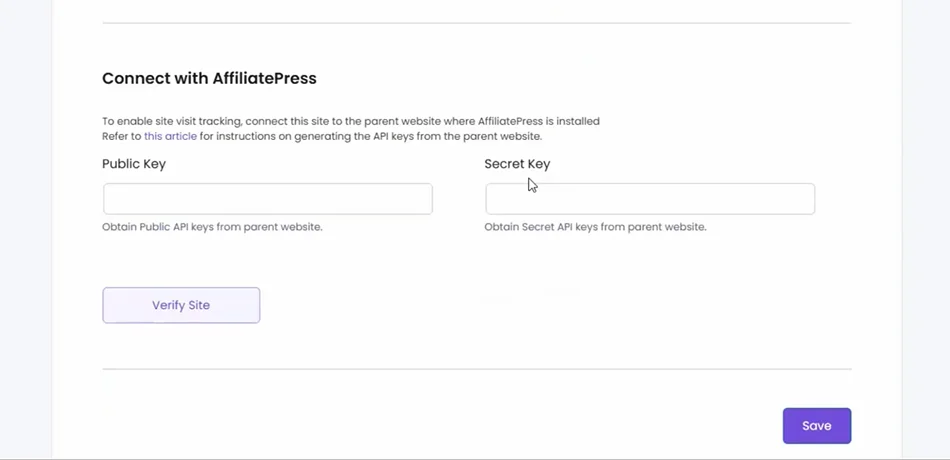
- In the same settings page, paste the API credentials from the Parent Site (Public Key and Secret Key).
- Save settings.
Step 7: Verify The Connection
- Click: Verify Site
- If successful, the child site becomes connected – then simply click ‘Save’.
The Parent Site’s Manage Domains page will show the child site as connected.
How Tracking Works For Multi-Domain Sites
How does affiliate tracking work when the add-on is enabled? You need to place the default affiliate URL from the General Settings of AffiliatePress to the child site, thus enabling user redirection to the main site.
Here is a simple explanation of the step-by-step process:
- Affiliate shares link.
- The visitor lands on the child site.
- The Connector add-on detects a referral parameter (ref).
- The visit data is sent to the main parent site where AffiliatePress is installed.
- The visitor clicks to the main store.
- Purchase happens on the parent site and the affiliate receives credit.
Concluding: Creating A Multi-Domain Affiliate Network In WordPress
With AffiliatePress, you can manage brand-specific domains under a single affiliate system.
The multi-domain extension saves you time since you don’t need to manage numerous settings, and it gives you a synchronized view of your affiliate performance across all your WordPress domains.
WordPress Multisite is not required to run a multi-domain affiliate program on WordPress with AffiliatePress. The Multi-Domain addon works by connecting separate WordPress websites through an API connection:
- The parent (main) site has AffiliatePress + Multi-Domain Addon installed.
- Each child site has the AffiliatePress Multi-Domain Connector plugin installed.
- The connection is established using the Parent Site URL, Public Key and Secret Key.
- Data is sent between sites via API.
The parent site is where AffiliatePress is installed and manages affiliates. The child sites only run the Connector plugin and send tracking data to the parent site. All affiliate tracking, visits, clicks, referrals, and commissions are centrally managed on the parent site.
So, your sites can be completely separate WordPress installations, hosted on different servers, and even using different themes and plugins. Still, you can have a complete multi-shop affiliate system on WordPress run by just one ecosystem.
Related articles: