


How to Stop Affiliate Spam with Multi-CAPTCHA Protection

Tired of seeing fake affiliate signups and spam bot traffic ruin your affiliate program’s stats? Well, at least you’re not alone!
Affiliate marketing spam is sneaky, automated, and can actually cost you real commissions, not to mention clutter your analytics too. If only there were a way to stop spam bots in their tracks without frustrating your real affiliates, huh?
To your surprise, there is a way: Multi-CAPTCHA Protection in AffiliatePress, your new shield against spam and fraud.
With this feature, you can say goodbye to:
- Fake signups.
- Automated login attempts.
- and fraudulent traffic that makes tracking performance a nightmare.
With AffiliatePress Multi-CAPTCHA protection, you can secure your affiliate program, have clean analytics, and seriously focus on building authentic relationships with your affiliates.
Now, let’s dive into how it actually stops affiliate spam.
Why Affiliate Spam Is a Real Threat?
In 2026, Affiliate spam is a serious problem that can hurt your business metrics, waste resources, and even trigger fraud payouts. Means loss of both your affiliate business and affiliate commissions.
Here’s what makes affiliate marketing spam a real threat today:
- Fake Affiliate Registrations: Automated bots create accounts just to abuse coupons or earn commissions.
- Bot Logins: Credential stuffing attacks or repeated login attempts can make your affiliate system turn upside down.
- Skewed Analytics: Spam generates fake clicks, visits, and sales inflate your numbers, making it hard to track real performance and real affiliate sales.
- Fraudulent Commissions: Fake accounts or referrals can trigger automatic payouts, eating into your and your affiliate’s profits.
- Coupon Misuse: Bots or malicious hackers exploit discount codes over and over again, hurting revenue and margins.
Just assume, what happens if your WooCommerce store receives over 200 fake affiliate signups in just 24 hours? How much effort does your team have to manually verify all payouts?
A simple Multi-CAPTCHA and spam bot protection setup could have stopped it before it even got started.
That’s why we are proud to introduce you to your new Multi-CAPTCHA protection from AffiliatePress that adds a strong line of defense. So your affiliate program stays secure, and your data stays accurate.
Meet the Multi-CAPTCHA Protection in AffiliatePress
AffiliatePress comes with two enterprise level CAPTCHA layers designed to stop spam bots and affiliate spam before they ever touch your affiliate program.
Whether you want privacy, first protection, or a completely invisible experience, you’ve got both options built right in:
- hCaptcha: Privacy friendly and extremely bot resistant.
- Google reCAPTCHA v3: Invisible, score based protection that won’t annoy real affiliates.
Together, they form a powerful shield that keeps your signups, logins, and affiliate analytics clean and secure.
Here’s what Multi-CAPTCHA Protection protects you from:
- Login + Registration Attacks: Block bots trying to brute force their way into affiliate accounts.
- Script Based Attacks: Automated scripts are getting smarter, and AffiliatePress Multi-CAPTCHA protection stops them cold.
- Mass Bot Signup Attempts: No more waking up with fake affiliates created overnight.
- Fake Affiliate Accounts: Prevent fraudulent users from exploiting coupons, commissions, or referral systems.
- Spam Visits in Analytics: No more inflated data and fake click reports.
Finally! Your real affiliates get a smooth, frustration free experience….and the bots? They get kicked out right away to protect your site at all costs!
Enable hCaptcha or Google reCAPTCHA v3 (Setup in Minutes)
The multi-CAPTCHA protection setup takes just a few minutes, and once enabled, protection runs silently in the background to stop spam before it even starts.
How hCaptcha Works?
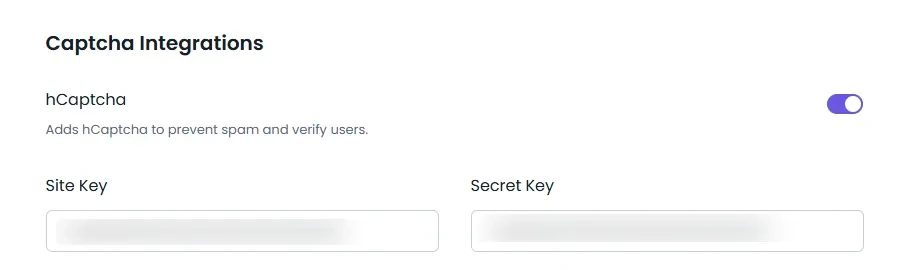
hCaptcha is a popular security measure to protect your affiliate site from affiliate spam. It adds a strong and more privacy focused security layer to your custom affiliate signup or login forms.
Here’s all it takes:
- First, go to the hCaptcha website and sign up or log in.
- On the Sites page, click Add a new site.
- Now simply enter your domain (like yourwebsite.com) and save it.
- Next, you have to copy the Site Key shown for your site.
- Now, add that to AffiliatePress > Settings > General > Captcha Integrations.
- And toggle on the hCaptcha and paste the Site Key.
- In your hCaptcha dashboard, open Settings to find your Secret Key.
- Copy it and paste it into the Secret Key field in AffiliatePress.
- And that’s it!
The second you enable hCaptcha in AffiliatePress, your registration and login forms are affiliate spam protected.
Moreover, hCaptcha identifies unusual behavior and stops bots from creating accounts or attacking login pages, and keeps your real affiliates unbothered.
Most affiliates or users pass without answering challenges, but bots get blocked right away, making your affiliate program safe and sound.
How reCAPTCHA v3 Works?
When we think of Google reCAPTCHA, most of us think of a checkbox that says “I’m not a robot” or ticking random objects like traffic lights, crosswalks, or bicycles in a grid image.
Not gonna lie, that was pretty annoying for all. Like, come on, nobody wants to play Spot the Bus just to sign up for an affiliate program.

And that’s exactly why Google reCAPTCHA v3 feels like a breath of fresh air. There are no puzzles, no boxes to tick, no interruptions at all.
Google reCAPTCHA v3 runs in the background, analyzing visitor behavior to decide whether someone is a real person or a bot. It offers an invisible, user friendly approach to spam bot protection.
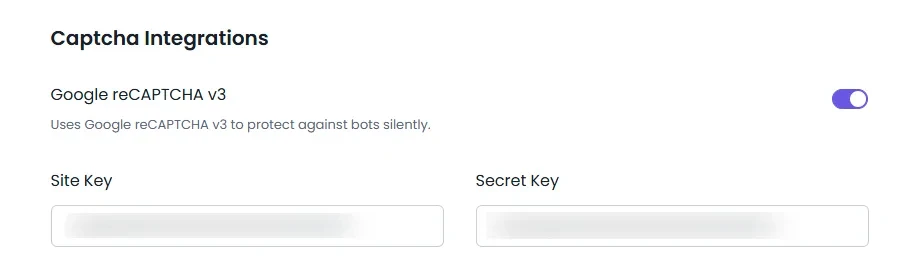
Here’s what it does behind the scenes:
- Analyzes user behavior in real time.
- Silently blocks suspicious traffic.
- Protects both login and registration forms.
- No puzzles or clicks needed.
Protected by reCAPTCHA v3, you can keep things smooth while still filtering out bad actors.
Here’s all it takes to set this up:
- Go to the Google reCAPTCHA website and sign in.
- Click Admin Console.
- Click the + button if you need to add a new site.
- Google will give you two keys: Site Key & Secret Key
- Copy both keys.
- Now open your AffiliatePress dashboard > Settings > General> Captcha Integrations and simply toggle on Google reCAPTCHA v3.
- Paste the Site Key and Secret Key into their fields, and that’s it!
Now your Google reCAPTCHA v3 will work silently in the background, checking visitors and blocking suspicious ones automatically.
Which One Should You Choose?
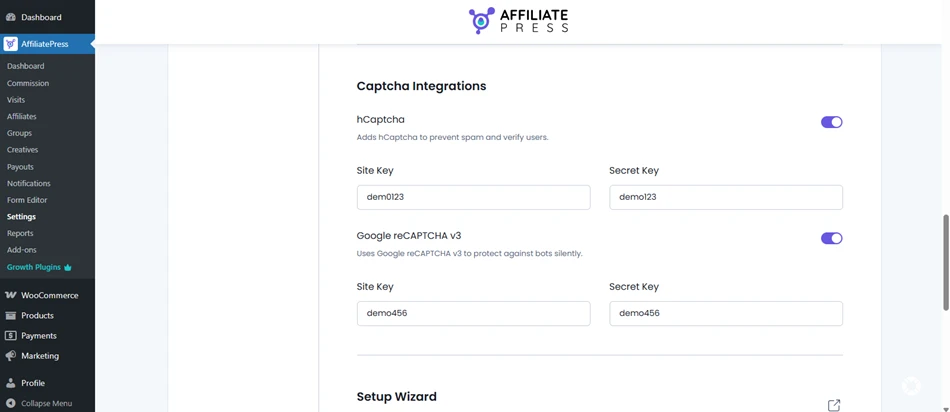
Both CAPTCHA systems work smoothly with AffiliatePress. So the choice to choose simply depends on what matters most for your affiliate program.
Choose hCaptcha if:
- You want stronger and more effective spam bot protection.
- Privacy and non Google tools are important to you.
- Your site faces a high volume of automated signups or script-based attacks and wants extra secure bot protection.
Choose reCAPTCHA v3 if:
- You want a completely seamless and invisible experience for affiliates.
- You prefer Google’s behavior based scoring system (simply trust Google more than anyone)
- Your priority is security (Not privacy).
In simple words,
- hCaptcha = Maximum security.
- reCAPTCHA v3 = Maximum user experience.
Either choice gives your affiliate program a solid, modern defense against bots, fake signups and spam traffic, all managed effortlessly via AffiliatePress.
Keep Bots out with Smarter, Hassle-Free Registration Control
Other than Multi-CAPTCHA protection, AffiliatePress also offers built-in registration control tools that help you block fake signups and filter suspicious users, too.
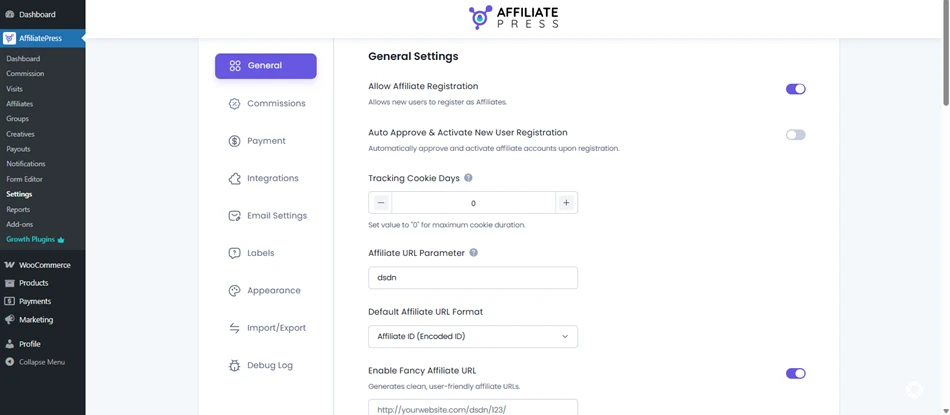
Let us give you a detour of AffiliatePress advanced affiliate tools and their settings. These settings work alongside Multi-CAPTCHA to eliminate spam bot registrations and low quality referrals. Of course, if you have extra time. Otherwise, AffiliatePress can take care of it all automatically.
- Manual approval mode: Review each new affiliate before activating yourself.
- Disable Auto Approve: Stop instant activation for unknown users.
- Custom Affiliate URL parameters: Use unique parameters instead of the common “ref”.
- Enable Fancy Affiliate URLs: Hide referral patterns that spam bots target easily and protect your site.
- Disable Automatic Affiliate Creation: only trusted users can apply.
One of the membership businesses using AffiliatePress saw spam drop by 90% in affiliate spam after combining Multi CAPTCHA protection with manual approval and fancy URLs.
The result? Cleaner analytics, fewer fake accounts, and a smooth experience for real affiliates.
Smart Fraud Detection + CAPTCHA
Why settle for just one line of defense when you can have two?
With AffiliatePress, you can get double layer security by using both at once Fraud Detection Addon and Multi CAPTCHA protection to create a double layer of security for your affiliate marketing program.
- Fraud Detection keeps an eye on user behavior to spot suspicious activity before it becomes a problem.
- Multi-CAPTCHA Protection (hCaptcha or reCAPTCHA v3) stops automated spam bots at registration and login.
Working hand in hand, this can stop fake signups, prevent commission fraud, and ensure your affiliate analytics reports stay accurate.
In Conclusion: Upgrade Affiliate Security & Performance with AffiliatePress
There are plenty of reasons to choose AffiliatePress to power your WordPress affiliate, and security is just one of its strongest points.
With Multi-CAPTCHA protection, you get an extra layer of security that keeps spam bots, fake signups, and fraud activities out while keeping real affiliates happy.
The best idea for extra security? Combine all, hCaptcha or Google reCAPTCHA v3 with smarter registration control & automatic fraud detection! By applying all this, you’ve got yourself a secure, high performing affiliate marketing program that’s ready for growth.
You May Also Like:
- What Is Affiliate Fraud And How To Prevent It (Guide)
- How to Set Up Affiliate Terms and Conditions
- 10 Step Checklist to Start an Affiliate Program Confidently
FAQs
Affiliate abuse is sometimes also known as affiliate fraud. It happens when fake accounts, bots or malicious hackers exploit an affiliate program to earn commissions using fake results, clicks or sales.
You can use AffiliatePress Multi-CAPTCHA protection to add hCaptcha and Google reCaptcha v3, manually approve affiliates, fancy your affiliate URLs, and automatic fraud detection to stop affiliate spam on WordPress sites.
Yes, CAPTCHA blocks automated login attempts, stopping bots from accessing affiliate accounts to make your affiliate program safe and sound.
You can use hCaptcha if your top priority is privacy and GDPR compliance. Or go with Google reCAPTCHA v3 to give your users a smooth user experience.