



How to Use AffiliatePress Analytics for Smarter Decisions?

It doesn’t matter what you sell – physical products, digital downloads, memberships, or online courses, AffiliatePress provides you with the Reports dashboard for an intelligent data-driven view of your affiliate program.
Actually, data collection and data analysis are among the most in-demand skills in modern business. And companies even pay significant budgets for analytics specialists, dashboards, and reporting software just to understand where they are standing and what they can do better.
But when it comes to affiliate marketing, AffiliatePress reduces that complexity to a significant level. You get a powerful analytics and reporting system directly inside your WordPress dashboard, fully connected to the data from AffiliatePress, with no need for external tools or professional data analysts.
Want to better understand how it works and how to read the charts? In this guide, we’ll break down:
- What each Reports tab tells you.
- How to interpret the data.
- Practical, everyday decisions you can make using these insights.
- How to use the main dashboard for quick, at-a-glance control.
Start With the Big Picture: The AffiliatePress Main Dashboard
Before diving into detailed numbers, you can browse through the Reports menu. AffiliatePress gives you a bird’s-eye view of your affiliate program through the main dashboard (Dashboard menu).
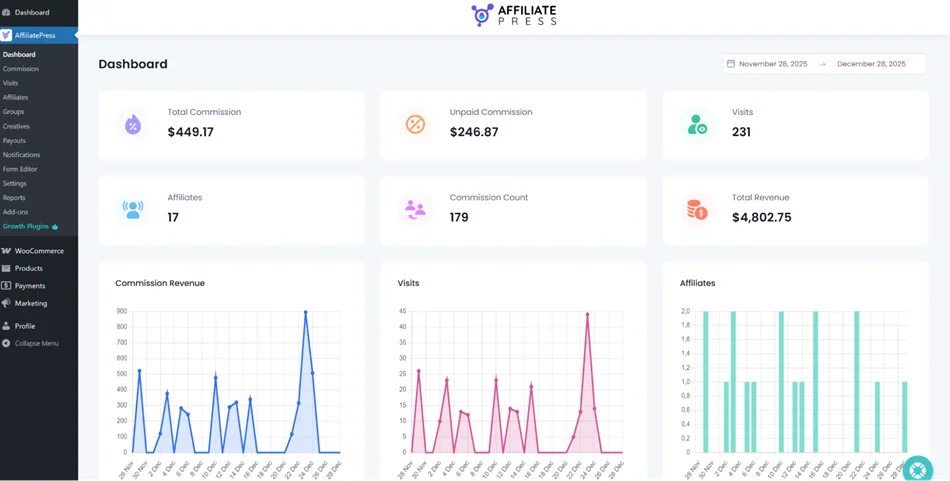
You’ll see some data here only after your program has run for some time, so that you can get the numbers.
At a glance, you can see:
- Total commissions
- Paid vs unpaid commissions
- Total visits
- Total affiliates
- Total commission count
- Total revenue generated through affiliates
Scrolling further, you’ll also find the latest affiliate registrations (great for spotting growth trends), the names of the most valuable affiliates (your top performers), and recent commissions, with the ability to manually change commission status (Approved, Pending, or Rejected).
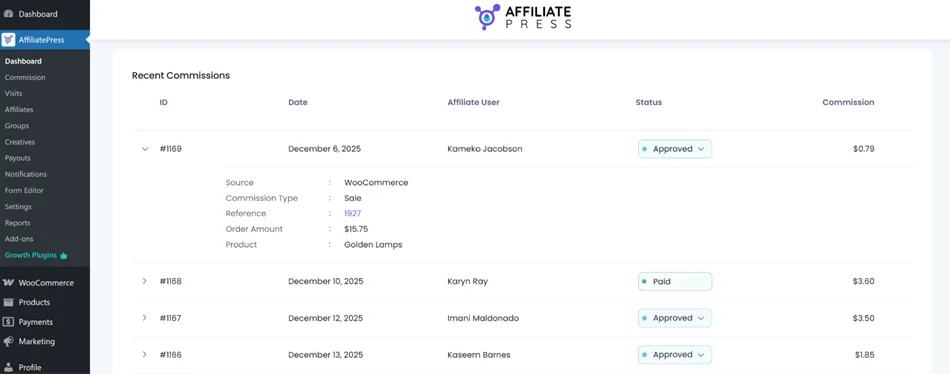
Use this dashboard as a daily or weekly health check. If something looks off, like unpaid commissions growing too fast or visits rising without conversions, you know exactly which report to open next.
Diving into AffiliatePress Reports for Your Affiliate Program
Go to the dedicated Reports menu on your AffiliatePress plugin to get the structured data on the performance of your program.
Commissions report: Measure financial performance
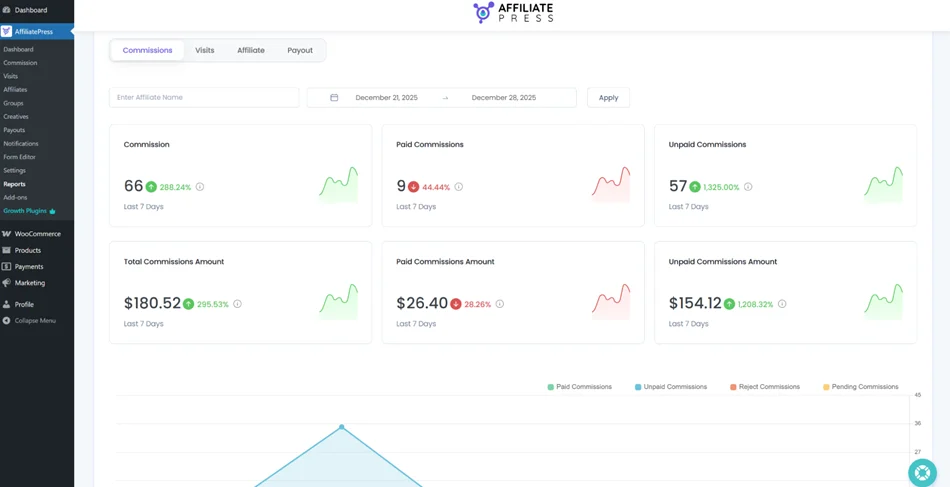
The Commissions tab is where you analyze the financial side of your affiliate program. For any selected date range, you’ll get:
- Total commissions count.
- Total commissions amount.
- Paid commissions (count & amount).
- Unpaid commissions (count & amount).
You can also filter by affiliate name or view a visual graph showing commission trends over time.
How to use this data in practice?
1. Spot growth or decline quickly, analyze campaigns
A rising commission graph usually means that affiliates are actively promoting or offers are converting well. We recommend measuring periods where you made any significant changes or ran holiday/any other special promo.
A sudden drop may signal broken affiliate links, promotion fatigue, pricing or checkout issues, or highlight underperforming campaigns.
2. Control cash flow with unpaid commissions
This is an easy way to monitor your unpaid commissions. A growing unpaid amount means your program is scaling but if it stays unpaid for too long, it can hurt affiliate trust.
3. Identify affiliates worth personal attention
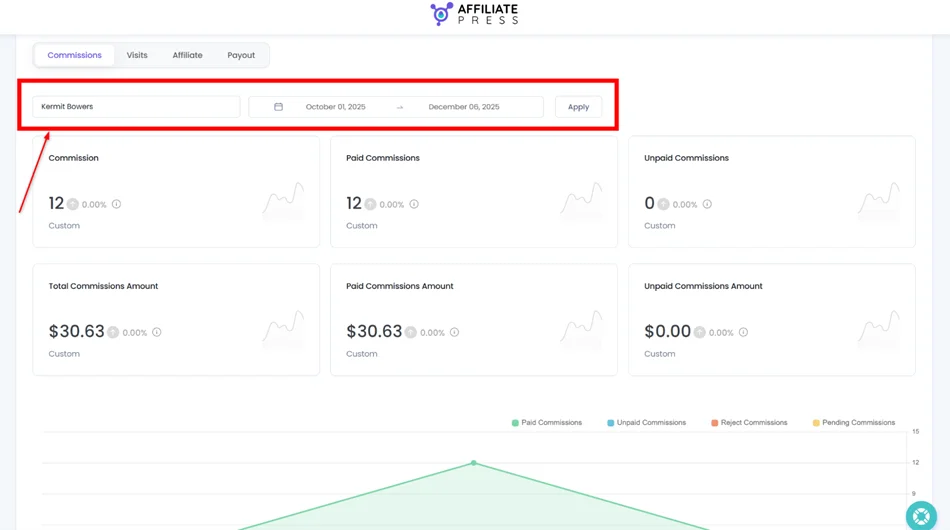
Here, you can see who consistently generates commissions (just filter affiliates by names and period) and reach out to them with personalized promo ideas or special discounts. Others might need help, new creatives, better incentives, or even a review of their partnership.
4. Spot anomalies
Moreover, in the Commission report, you can spot anomalies, like sudden commission spikes without matching visit growth.
What you can see in this AffiliatePress report in this case: commissions jump sharply in a short period, but visits and conversion rates stay flat or grow only slightly. This is suspicious because healthy affiliate growth usually follows this pattern:
More visits > more conversions > more commissions
If commissions grow without a proportional increase in visits, it may indicate:
- Cookie stuffing.
- Forced redirects or hidden iframes.
- Auto-triggered conversions without genuine user intent.
What to do:
- Cross-check the Visits report for the same date range.
- Look for affiliates generating conversions with unusually low visit counts.
Visits report: Do clicks bring conversions?
The Visits tab in Reports is where you understand how affiliate traffic behaves on your site and whether your affiliates send quality leads.
In simple terms, whether the traffic sent by your partners brings real sales.
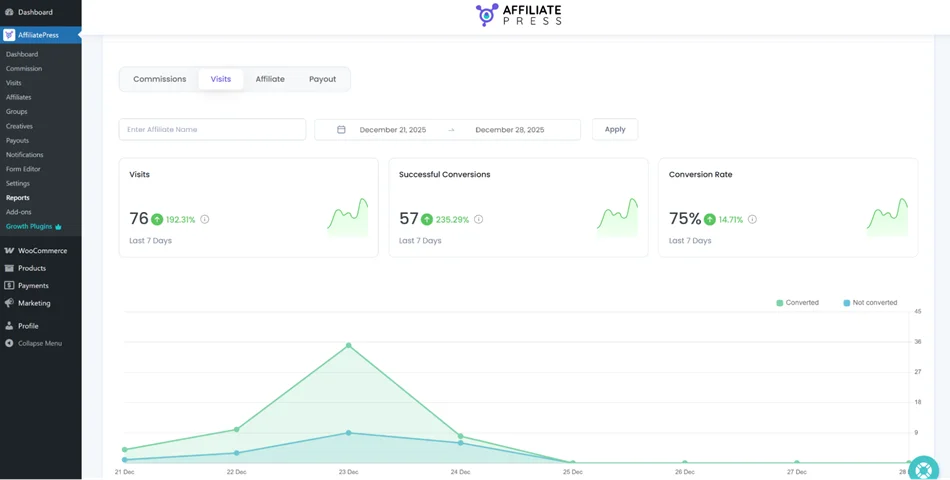
Metrics available in AffiliatePress:
- Total visits in a selected period.
- Successful conversions.
- Conversion rate (%).
You’ll also see:
- Converted vs not converted visits (visualized).
- Top landing URLs.
- Top referring URLs.
- Pages that converted and pages that didn’t.
How can you use this data to improve results?
1. Focus on conversion rate in the first place
More visits don’t always mean more revenue. A smaller number of visits with a high conversion rate is more valuable. This helps you identify quality affiliates and have a realistic assessment of high-traffic ones.
2. Optimize top landing pages
Your top landing URLs are the pages affiliates send traffic to most and most likely the biggest opportunity for CRO improvements. Simple optimizations can include:
- Clearer CTAs.
- Better product descriptions.
- Faster load times.
- Stronger trust signals.
If certain URLs receive traffic but don’t convert, they may need better messaging or they may not be suitable for affiliate traffic at all.
3. Learn from top pages
Top referrer URLs help you see the actual site pages that get the most visits. They reveal which product pages affiliates link to most and which blog posts or landing pages attract the most affiliate traffic.
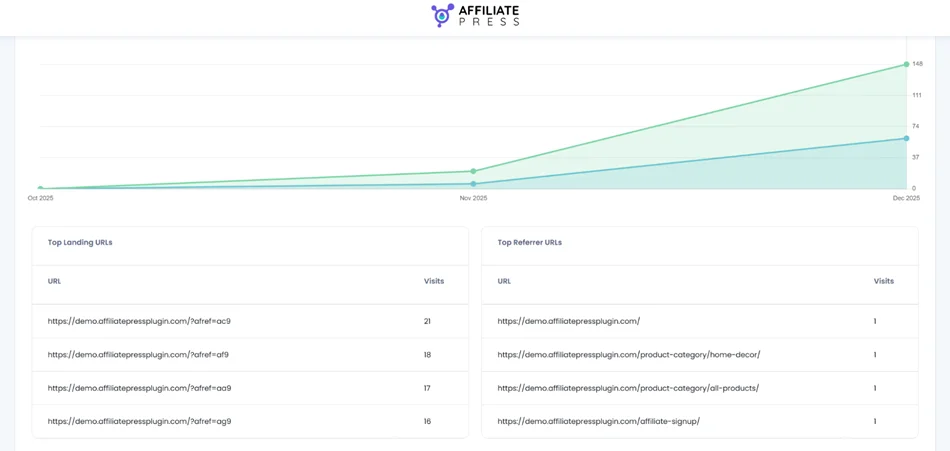
Thus, you’d better understand affiliate messaging. If affiliates are pushing:
- Discount pages > your program may attract coupon-based traffic.
- Blog content > educational or review-based traffic.
- Product pages > high purchase intent.
Based on that, you can adjust commission rates by page or offer type and align your affiliate guidelines with what’s actually being promoted. These insights also help you guide affiliates toward better-performing pages.
Affiliates report: Managing people to improve partnership
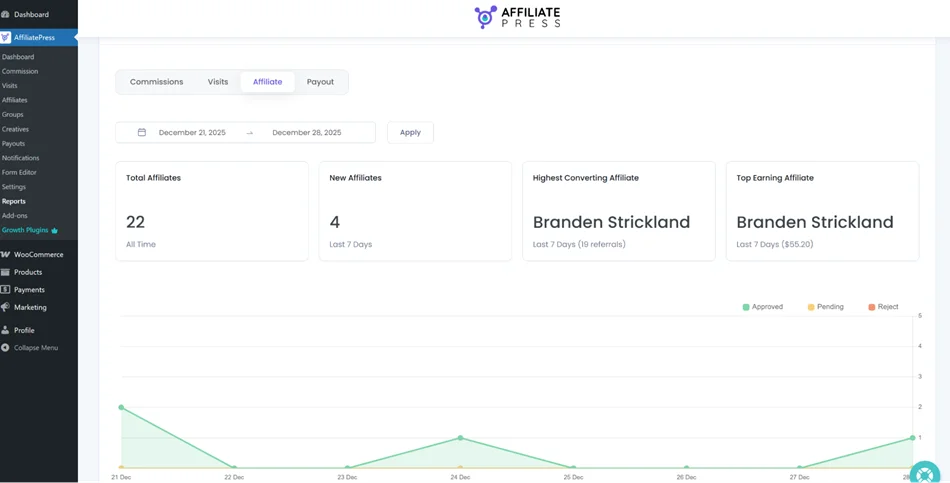
The Affiliates tab focuses on the human side of your affiliate program letting you find the best promoters based on data. So, in this report, you get numbers on:
- Total affiliates (all time).
- New affiliates in the selected period.
- Highest converting affiliate (with number of referrals).
- Top earning affiliate (with earnings amount).
You’ll also see a graph showing approved affiliates, ending affiliates, and rejected affiliates. It’s probably the easiest chart to read and turn into action.
1. Identify and reward top performers
Your highest converting and top earning affiliates are:
- Ideal candidates for bonuses.
- Perfect for early access to new products.
- Great partners for testimonials or case studies.
2. Monitor affiliate quality
A growing number of rejected affiliates might indicate spam sign-ups or misaligned promotional methods. Take this as a basis to refine affiliate application questions, approval rules, and affiliate guidelines.
3. Track program growth momentum
If new affiliates keep signing up, it’s a good sign your program is attractive and your outreach is working.
Payout report: Staying in control of payments
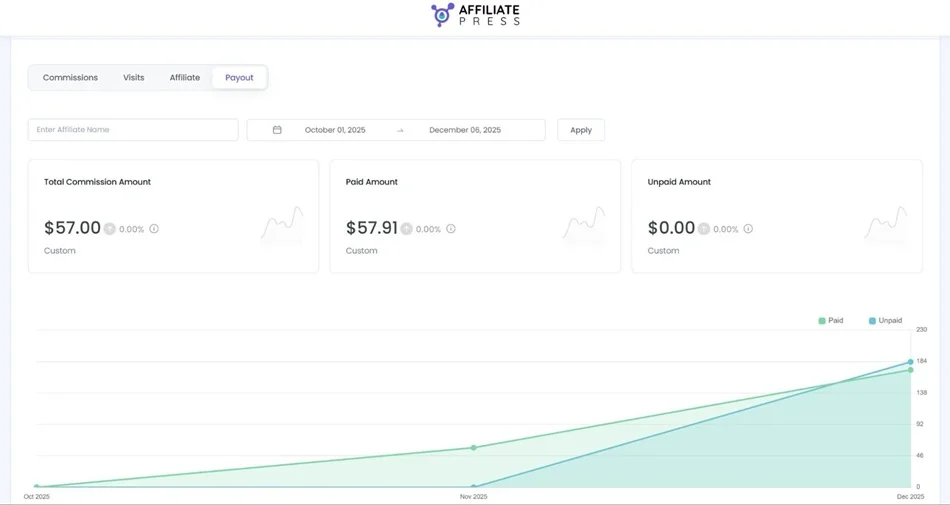
The Payout tab helps you manage what matters most to affiliates – getting paid. You can get such key insights:
- Total commissions amount.
- Paid amount.
- Unpaid amount.
- Visual breakdown through charts.
This matters for your everyday operations to always have predictable payments, which are important for trust. Seeing unpaid totals helps you schedule payout cycles, which is easy in AffiliatePress. This helps you easily forecast expenses and avoid missed or duplicated payments.
Final takeaways – Use AffiliatePress reports to turn data into decisions
AffiliatePress provides you with many areas to monitor the health of your affiliate program with:
- Dashboard (overview)
- Commissions (money)
- Visits (traffic quality)
- Affiliates (people)
- Payouts (trust and operations)
However, the real power of AffiliatePress’s reports and affiliate analytics is how all the data gets connected. For example:
- High visits + low conversions > landing page optimization needed.
- High conversions + low commissions > commission rates may need adjustment.
- High unpaid commissions > payout workflow needs review.
- One affiliate driving most revenue > diversify recruitment.
This way, your affiliate program gets clear insights, actionable data and visual trends for smarter everyday decisions. And you don’t need to be a data analyst, just use it effectively to spot opportunities, fix problems, and strengthen relationships with top affiliates to increase your revenue.
Related articles: