



How To Optimize High-Traffic Affiliate Websites (Tips & Tricks)

Websites that rely heavily on affiliate traffic – most likely like yours – often run into a predictable set of technical problems. These are mostly related to performance, caching, SEO, and database load.
Those problems are even more pronounced when sites scale, grow, and recruit more affiliates – all sending more and more traffic to the site. In this case, we’re dealing with high-traffic websites.
In today’s guide for non-experts, we want to take a look at the most common issues websites with high affiliate traffic get, and, of course, the ways to solve them.
If you are on AffiliatePress powering your WordPress affiliate site, these simple tips and tricks are for you!
Fixing slow pages that affiliate traffic creates

Google perfectly works with clean URLs and query parameters (like links to your site with affiliate identification parameters) alike.
However, affiliate sites often load too many scripts, tracking pixels, and things like coupons, cookies, or tracking tools can make a site slower. This means: performance issues (you know, lower conversions, rankings, and earnings).
As for how to fix this for WordPress, multiple things are often suggested:
1. Script management, defer, delay JS
Most affiliate tools load on every page, even when they’re not used. You may force them to load only on product pages or affiliate posts with script manager plugins like Tracking Script Manager, Asset CleanUp, or Perfmatters. These tools let you “turn off” scripts page-by-page.
2. Caching
Caching makes WordPress act like a static site, which is much faster. However, the problem lies with affiliate links that typically append URL parameters like ?ref=123.
That can cause:
- Cache fragmentation: Each unique URL parameter may create a separate cached page, but with different URL parameters, which might each generate a new cache (many unnecessary cache files).
- Cache bypass: Some caching setups may bypass caching for any URL with query parameters, meaning high affiliate traffic hits the database directly.
- Poor cache hit rate: Even if caching works, the variety of affiliate parameters reduces the chance that visitors hit an already cached page.
It’s hard to implement proper site caching without a plugin for non-experts since it includes specific configurations of browser caching, server caching, and object caching. This is of middle and high difficulty.
For a start, you can simply go with popular plugin names such as WP Rocket, LiteSpeed Cache, or FlyingPress. They will help you safely ignore specific query parameters with human-friendly settings to avoid cache fragmentation and massive disk usage.
3. Lightweight themes, image optimization, CDN
Resize, compress, and convert site images to modern formats (WebP or AVIF), use lightweight WordPress themes with minimal code, and request a CDN from your hosting server to deliver content to a site visitor faster based on their location.
Affiliate sites often generate massive crawl waste
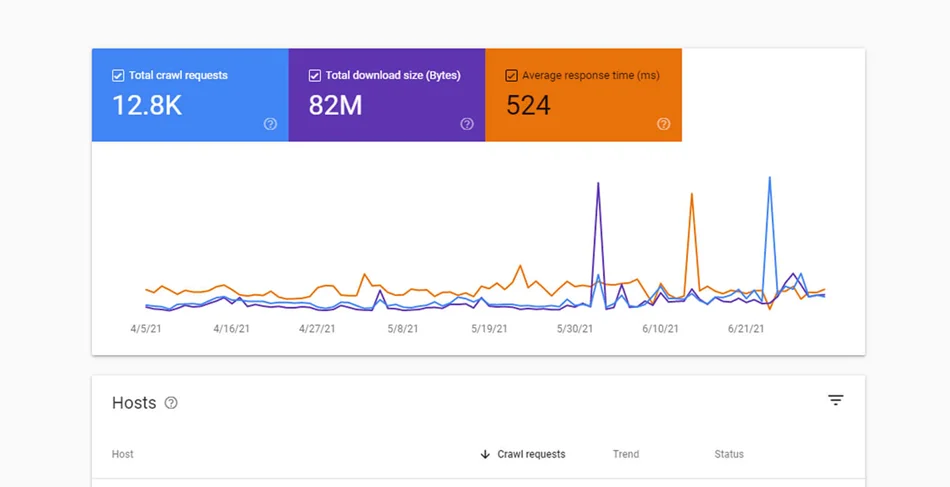
The faster your pages load and render, the more Google is able to crawl, the more of your money-making pages get indexed and ranked, so you can capture more affiliate clicks and revenue.
However, because large affiliate sites often generate so-called infinite faceted combinations, tag archives, category archives, pagination, and duplicate content merges, Googlebot wastes crawl budget on useless URLs, and key pages get crawled less often.
This is a sad counter-intuitive truth in this scenario – traffic grows, rankings stagnate. Some of the typical fixes include:
- Make your site faster for your users, and you’ll also help Google crawl more pages.
- If you do use versioned URLs to indicate new content, Google recommends that you only change the URL when the page content has changed meaningfully.
- Tell Google which pages it should ignore so it doesn’t waste time crawling junk pages (set up Robots.txt + parameter handling).
- Set up canonical URLs for pages (Google may see multiple pages with the same content and get confused about which one to rank).
- Make taxonomy archives non-index (hide category and tag pages from Google so it only indexes pages that matter).
Monitoring website links
Broken affiliate links? That happens more often than you think. The worst impact of broken affiliate links on a high-traffic affiliate site is lost revenue, but it can cause multiple serious problems.
These issues are common when affiliate programs change link format, program owners, and tracking parameters. Lost revenue and bad UX because of redirect loops are the impact.
It’s fixable with monitoring and link cloaking. Using AffiliatePress reports, you can monitor a lot of data to always be able to spot anomalies, for example:
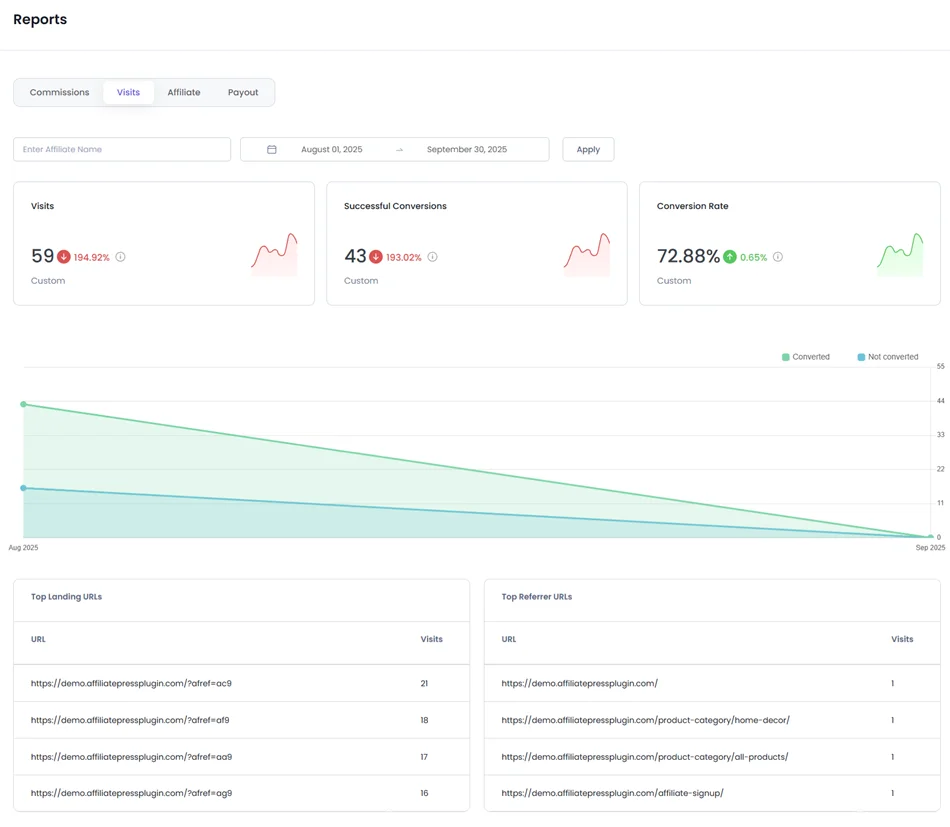
Visits Report > Total Visits
It shows traffic driven by affiliate links and helps you identify unusual drops or spikes that may indicate site speed or technical issues affecting user access.
Visits Report > Conversion Rate
Low conversion rates despite traffic can signal slow pages, broken links, or tracking/script issues affecting user experience.
Affiliates Report > Highest Converting / Top Earning Affiliate
If top affiliates’ traffic suddenly underperforms, it may hint at broken links, slow-loading pages, or SEO problems affecting that segment.
Overall, AffiliatePress helps with data trends on your affiliate site – sudden drops or spikes in traffic, conversions, or payouts can highlight technical problems, such as downtime, broken affiliate links, or slow-loading pages.
To Conclude: How traffic heavy sites should deal with affiliate related issues
Whether you consider your website a high-traffic one or just want to get prepared for such, get started with the mindset that helps you understand issues and fix them on time:
- High-traffic issues are systemic (how you cache, how you query, how you deploy, how you monitor), so you need to think in terms of the system and not single pages.
- Making a site faster is key for users’ experience and also for Google’s crawl rate. For Googlebot, a speedy site is a sign of healthy servers, so it can deliver more content per connection.
- Many sites over-engineer for rare scenarios and ignore core template speed or common user paths. Understand what gets the most traffic from your affiliates and optimize that.
- High-traffic sites cannot rely on manual fixes or server scaling. You need many ‘autos’ such as auto-scaling, auto-rollback, automatic cache purging, etc.
To sum up with other quick tips, here are some keys for non-experts we can highlight:
- CDN caches pages, ignoring tracking parameters.
- WordPress caching plugin set to ignore UTMs & ref params.
- Affiliate tracking uses cookies or server-side.
- Canonical URLs enforced for SEO.
This helps your site solve such crucial things as:
- Cache fragmentation.
- Database overload.
- Slow pages.
- SEO duplicate URLs.
Related blogs: