


How To Track Affiliate Commissions Across Monthly And Annual Subscriptions


With the AffiliatePress plugin, you’re sitting pretty: it has everything you need to make a good income through affiliates from your subscription-based projects.
If you are looking to understand commission calculations behind the subscription lifecycles (monthly or early) and commission monitoring, we’ve created this detailed tutorial for you.
In particular, we’ll focus on how AffiliatePress’s affiliate program settings will help you track affiliate commissions across both monthly and annual subscriptions.
TL;DR: AffiliatePress helps you track commissions across monthly and annual subscriptions by setting initial and recurring commission rates, managing renewal limits, and monitoring affiliate earnings. You can review individual commission records, compare subscription performance, and analyze affiliate revenue through reports.
Behind Commission Calculation – How It Works In AffiliatePress
Which subscription periods can you use with AffiliatePress? It’s not in AffiliatePress where you set this.
Subscription billing periods are customized by your subscription/membership/LMS plugin that you connect to AffiliatePress. For example, if you connect to ARMember, your billing cycles are defined within the ARMember plans and billing settings. AffiliatePress only responds to eligible recurring payments generated by the integration like ARMember.
Another notable aspect is the recurrence itself. Using our previous example once again, ARMember supports it by default as a built-in feature. However, other important e-commerce plugins, such as WooCommerce or EDD, require their own extensions for recurring payments/subscriptions.
Basically, to move on with automated recurring commissions for your affiliates, your key selling plugin should already have everything configured and set up.
Configuring Your Initial And Recurring Commission Rates
Now, let’s move to the actual AffiliatePress affiliate commission settings.
If you sell subscriptions and want to reward affiliates for every charge, you still have two commission values to configure as the foundation:
1. Initial commission rate
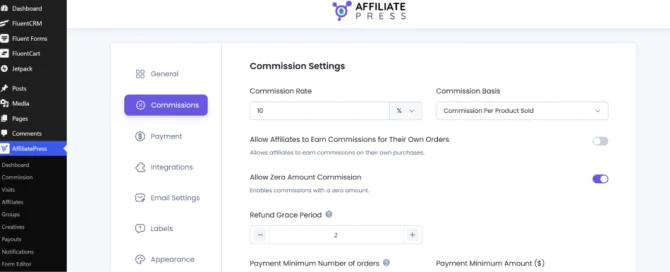
Set what your partners get for the first purchase through their referrals: AffiliatePress > Settings > Commissions.
The commission can be:
- Percentage-based (e.g. 20%).
- Fixed (e.g. $10 per qualifying sale).
2. Recurring commission rate
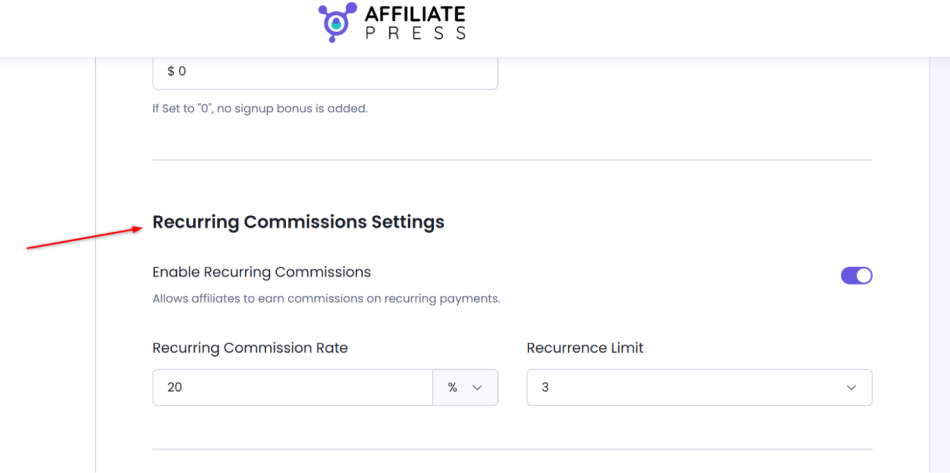
Once again, the annual or monthly charging process is defined by the plugin that processes sales. To give your affiliates extra renewal commission with AffiliatePress, install and activate the Recurring Commissions add-on.
After that, use the AffiliatePress > Settings > Commissions > Recurring Commission Settings. The two key things you need to define:
- Recurring rate (percentage or fixed).
- Recurrence limit: optionally limit the number of subscription renewals you want to pay for.
As for the latter, AffiliatePress allows you to select a specific limit from 1 to 15 renewals or choose Unlimited.
The first purchase always uses the default commission settings, and every successful renewal after that is based on the recurring commission rate.
AffiliatePress receives the appropriate renewal information from the integrated plugin you use to recognize the payment as a renewal. If you want to then see whether AffiliatePress recognizes renewals correctly, it’s better to give a test go with the first purchase and renewal.
More than that, recurring commissions work only when you set the “Flat Rate Commission Basis” to Commission Per Product Sold. Confirm it via AffiliatePress > Settings > Commissions.
3. Apply Additional Commission Rules
AffiliatePress also makes it possible to apply different rates for selected affiliates or subscription products.
A global commission rate might not be sufficient if you want to reward certain affiliate partners differently or offer different commissions for specific subscription plans.
AffiliatePress supports several levels of recurring commission customization:
- AffiliatePress > Groups (create different recurring rates and renewal limits to selected affiliate groups).
- AffiliatePress > Affiliates (create an individual recurring rate for chosen partners).
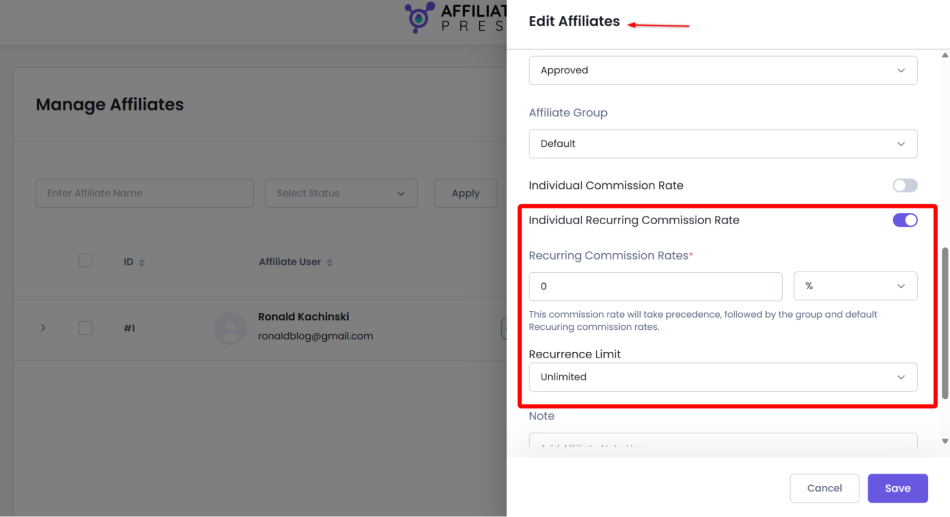
- Product-based rates > Edit your product in the integrated plugin (different rates for subscription products).
As for which of this rates will be prior to the inner AffiliatePress calculations, it’s like this:
- Per product.
- Affiliate-specific.
- Group-based recurring commission.
- Default recurring rates.
For instance, your standard partners can get 10% recurring commissions, a premium affiliate group – 15%, and an influencer partner 20%.
Or, you may offer 10% recurring commission on a basic plan and 20% on a premium plan if you need product-based groups as well.
What do you need for flexible rules? AffiliatePress + a few add-ons:
- AffiliatePress is fundamental for referral tracking and commission management.
- Recurring Commissions add-on for commissions from subscription renewals.
- Product-wise Commission add-on – if you want to set different recurring rates for products.
- Product Selection add-on is for simpler restrictions to identify which subscription products are eligible for affiliate commissions.
It’s best to check the requirements with your particular plugin integration to see if all add-ons would work properly with it.
Track Affiliate Commissions Across Subscription Periods
Where to monitor monthly and annual subscription commissions?
Whether you are testing things out or have even got real commissions to check, you can easily find the earnings generated by those rules.
When you go to AffiliatePress > Commissions, you will find individual commission records with essential details:
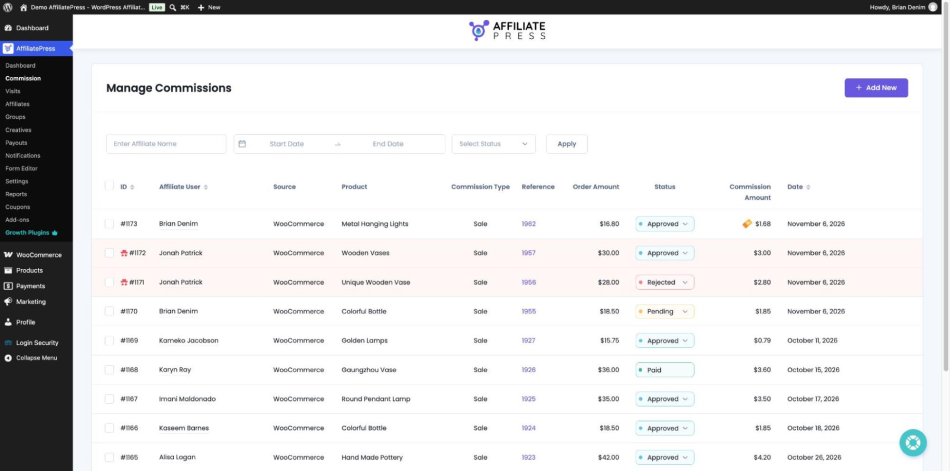
- Commission ID.
- Affiliate partner.
- Commission status.
- Commission amount.
- Subscription type sold (product).
- Date of the commission.
Want to find a particular person? Search by affiliate name and filter commission records by date range and status.
Opening an individual record provides additional information.
To get more details about the commission source, commission type, reference, order amount, and the actual product, simply check out individual records in that same menu.
This is the touchstone for verifying whether a recurring payment has yielded a commission and which affiliate has earned credit for it.
Let’s also take a look at the commissions monitoring through the eyes of your partners. They use the AffiliatePress affiliate panel for it, where they can see:
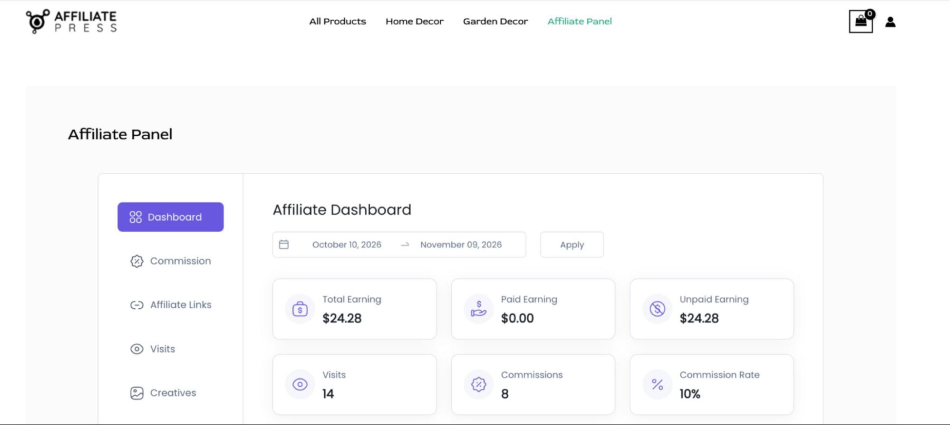
- Total earnings.
- Paid earnings.
- Unpaid earnings.
- Number of visits.
- Number of commissions.
- Current commission rate.
Inside the Commission menu, they will see individual commission records, including the product, date, amount, and status. Using filters, it’s easy to find earnings over a particular period.
Can you distinguish monthly and annual subscription commissions?
Tracking commissions by date is entirely different from tracking them by subscription billing frequency.
You can find commissions by the affiliate name, date range, and commission status but not for monthly, annual, or quarterly subscription commissions. But you’ll need to interpret and group the records to compare subscription types.
So, how can you compare them? Here is what you can do:
- With the date ranges, you can compare commission activity across months, quarters, and years.
- For the quick search, review the earnings generated by individual partners.
- See which subscription product generated a commission.
- Review the dates and amounts associated with the same product or subscription and simply compare commission records.
For example, if your website offers separate Basic Monthly and Basic Annual plans, identifying the associated product in commission records can help you distinguish their earnings.
Understand Your Subscriptions Progress
Interpreting and managing affiliate earnings as subscriptions progress is another important aspect in your routine. The good news is that AffiliatePress also helps you with this within the AffiliatePress > Reports menus.
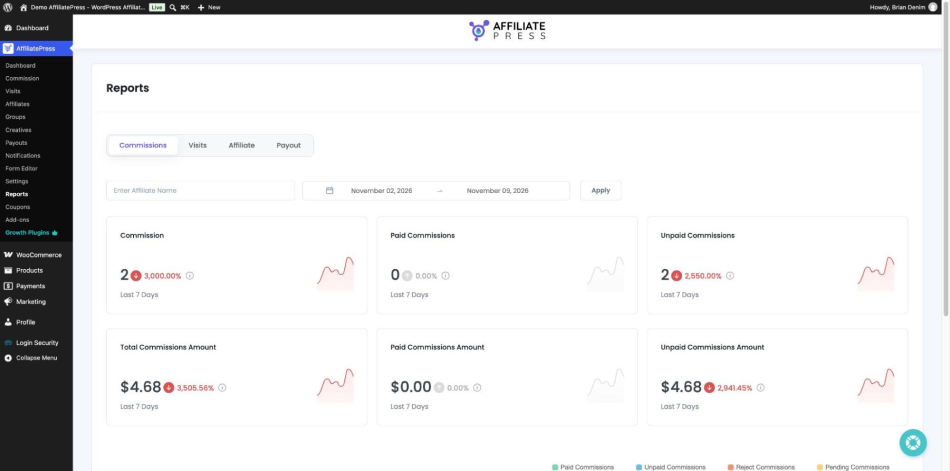
Via different sections, you can analyze generated commissions, paid and unpaid earnings, and commission trends. Inside the Visits menu, you can find affiliate traffic, successful conversions, and conversion rates. Payouts are also essential to understand the payout trends across the program.
However, there is not a dedicated subscription-level breakdown (let us know if you need it!).
But how to use these insights for subscription businesses?
- Compare affiliate-generated visits and conversions to understand which subscription period is better.
- Understand which partners bring which types of subscription sales.
- Compare commission and payout trends.
- Export data to analyze with AI or other tools, especially the affiliate-level performance (all in all, you can export payment, affiliate and other data as a CSV file).
Concluding: How To Track Affiliate Commissions Across Monthly And Annual Subscriptions
To fully analyze subscription-level performance for monthly and annual sales, you’ll need to combine AffiliatePress commission data with records from your e-commerce/membership or another plugin that helps you sell online. Finally, to get started, follow these steps:
- Make sure that your plugin that sells subscriptions is supported by the Recurring Commissions add-on.
- Make sure to use the ‘Per Product Sold’ commission type.
- Eligible renewals should be within your affiliate reward policy – and you can set the limits with AffiliatePress.
- Review how your integration handles failed, refunded, or deleted subscription payments.
- Monitor commission statuses. Regularly review pending, approved, rejected, and paid commissions.
- Compare reporting periods to understand earnings and conversion rates from monthly and annual subscriptions.
- Check your ecommerce plugin to see the actual subscription status and billing history.
- Customer retention, churn, subscription lifetime, and failed renewal analysis should be analyzed in your ecommerce plugin.
Related articles:


